You know that arcade game where plastic moles pop up from holes and you slam them with a foam mallet? You smash one, feel great for half a second, and then two more pop up somewhere else. The game speeds up the longer you play. You swing faster, hit harder, and still fall behind. Eventually you are just flailing.
That is exactly what happens when you ask AI to fix a bug and the fix creates a new bug. You fix that one and something else breaks. Each cycle is faster, messier, and further from the working code you started with. This is the whack-a-mole bug loop, and 92% of developers now use AI coding tools daily, which means nearly all of us have been trapped in one.
The numbers confirm what the frustration already told you. Research shows that 41% of AI-generated code ends up being reverted. Not because the AI is stupid, but because it fixes symptoms instead of causes, and each symptom-level fix introduces side effects that become tomorrow's bugs.
What Causes the Loop
The whack-a-mole bug loop has three root causes, and they compound each other in ways that make the game speed up the longer you play.
Symptom-level fixes. When you paste an error message into your AI tool and say "fix this," the AI does exactly what you asked. It makes the error go away. But making an error disappear is not the same as solving the underlying problem. The AI might add a null check that silences a TypeError, but the real issue is that your data fetching logic returns undefined when the network request fails. The null check masks the problem. The next time something depends on that data actually existing, a new bug pops up in a completely different part of your app.
Think of it like the arcade game. Each mole you whack does not actually go away. It just moves to a different hole. The AI is not removing moles from the game. It is relocating them.
Cascading changes. AI tools do not make surgical edits. When you ask for a fix, the AI often rewrites surrounding code to "improve" things while it is in there. Those changes ripple outward. A function signature changes, so every caller needs updating. A state variable gets renamed, so three components need adjusting. Each adjustment is a chance for the AI to introduce another subtle difference from what you had before. You started with one bug and now you have a modified codebase with unknown changes scattered across multiple files.
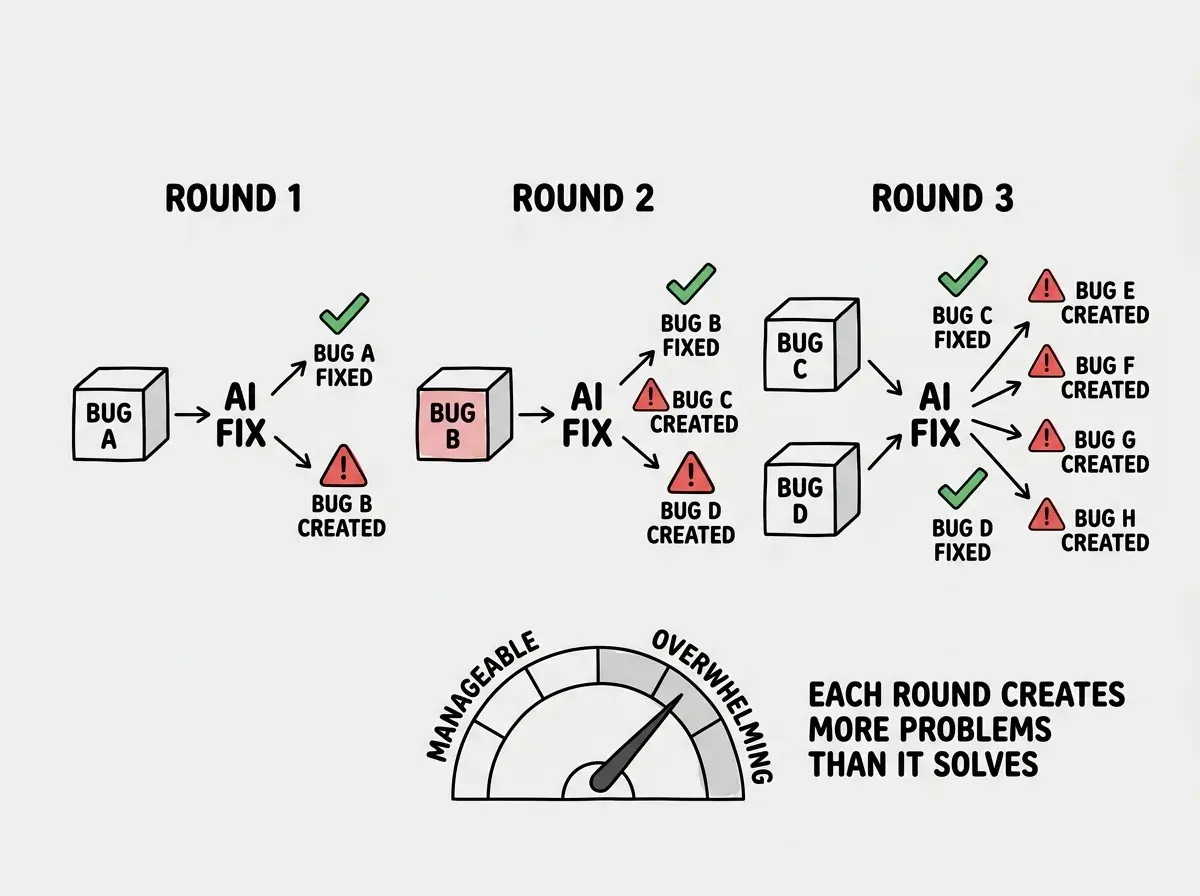
Context degradation. This is the hidden accelerator. The longer your conversation with an AI tool runs, the worse its understanding of your codebase becomes. Early in the conversation, the AI can see your whole file and reason about relationships between functions. Twenty messages later, the context window is full of previous attempts, error messages, and abandoned approaches. The AI starts losing track of what worked and what did not. It might undo a fix it applied ten messages ago, or reintroduce a pattern you already rejected.
In the arcade game, this is like the lights dimming as you play. You can barely see the moles anymore. You are swinging blind, and every miss makes the next round harder.
How to Recognize You Are in One
The whack-a-mole bug loop does not feel like a loop when you are inside it. It feels like progress. You are actively working, the AI is generating code, things are changing. But change is not the same as progress, and the loop has distinct signatures you can learn to spot.
The fix count exceeds three. If you have asked the AI to fix the same area of code more than three times in a single conversation, you are in a loop. Working code does not need three rounds of fixes. Something fundamental is wrong, and the AI is rearranging deck chairs.
New errors appear in files you did not touch. When your fix for a button component breaks the navigation bar, that is a cascading failure. The AI changed something it should not have, and the blast radius is growing.
You cannot explain what changed. If someone asked you right now, "what exactly did the AI change in the last five messages?" and you could not answer clearly, you have lost track of the codebase. The AI has too, which is why its fixes keep missing the mark.
The whack-a-mole bug loop accelerates because AI tools fix symptoms rather than causes. Each symptom-level fix relocates the problem instead of removing it, and context degradation means the AI understands your code less with every round. The game literally speeds up the longer you play.
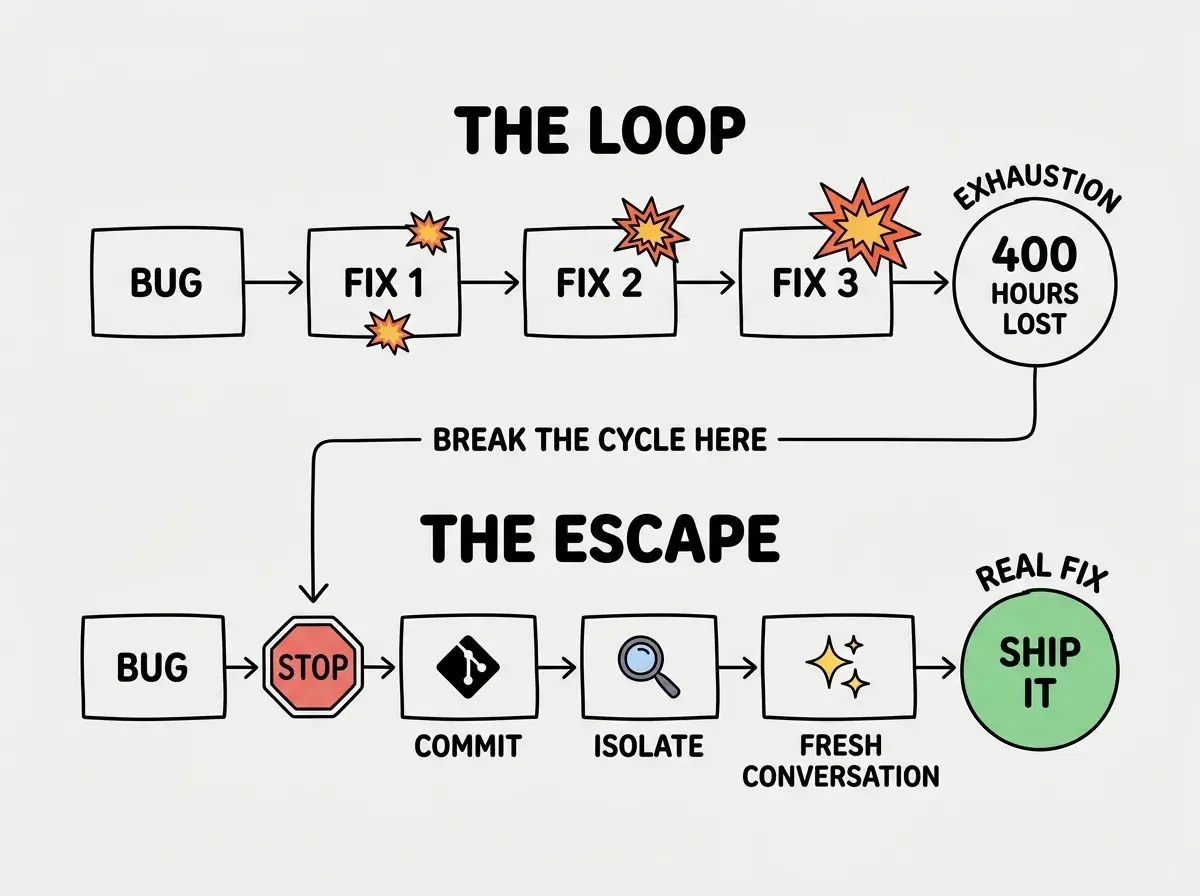
You feel exhausted but have nothing to show. One developer described investing 400 hours into an AI-assisted project and ending up as "QA testing work of a bad engineer." The emotional signature of the loop is unmistakable. You are working harder than ever and your app is getting worse.
The Escape Strategy
Escaping the whack-a-mole bug loop requires the one thing your instincts fight against. You have to stop swinging the mallet. Step away from the machine. The game cannot speed up if you refuse to play.
Here is the systematic approach that actually works.
Step one, stop. Close the AI conversation. Do not send one more fix request. The hardest part of escaping the loop is accepting that your current approach is not working. Every fiber in your brain says "just one more fix and it will be fine." It will not be fine. That is the loop talking.
Step two, commit what works. Before you touch anything else, save the current state of your code. Run git add and git commit with a message like "saving state before debugging." This gives you a known checkpoint to return to. If your next attempt makes things worse, you can get back here instantly. This single habit prevents more lost work than any other practice in AI-assisted development.
Step three, isolate the problem. Do not ask the AI "why is my app broken?" Instead, figure out exactly where the original bug lives. Comment out the code that is not working. Add a console log or a simple test. Narrow down from "something is wrong" to "this specific function returns the wrong value when given this specific input." The more precisely you can describe the actual problem, the better the AI (or you) can fix it.
Step four, start a fresh conversation. This is critical. Your old conversation is polluted with failed attempts, conflicting approaches, and a degraded context window. Open a new conversation. Paste in only the relevant code and your precise description of the isolated problem. The AI now has a clean context, a focused problem, and a much better chance of producing a real fix instead of another mole relocation.
Good debugging habits are the difference between shipping and spiraling.
Learn the fundamentalsThis four-step process works because it attacks all three root causes simultaneously. Stopping breaks the cascade. Committing preserves your progress. Isolating forces you (and the AI) to address causes rather than symptoms. Starting fresh eliminates context degradation. You are not just stepping away from the arcade machine. You are resetting the game entirely.
Prevention Habits That Keep You Out
Escaping the loop is good. Never entering it is better. These habits create natural breakpoints that prevent the whack-a-mole pattern from forming.
Commit before every AI interaction. Not after. Before. This means you always have a clean rollback point. When the AI produces something that breaks more than it fixes, you can revert in seconds instead of spending an hour untangling the mess. Think of it as putting a coin in the arcade machine but keeping one hand on the power cord. If the game starts going sideways, you pull the plug and nothing is lost.
One problem per conversation. Do not ask the AI to fix a bug, then add a feature, then refactor a component, all in the same thread. Each request pollutes the context for the next one. Keep conversations short, focused, and disposable. Cheap conversations that do one thing well are infinitely more valuable than long conversations that do everything badly.
Continuing to prompt the AI in the same conversation after three failed fix attempts. The context window is already degraded and the AI is working with a muddled understanding of your code. Starting fresh feels like giving up, but it is actually the fastest path to a real solution.
Read the diff, not the result. After the AI generates a fix, do not just check whether the original error is gone. Read the actual changes line by line. What did the AI modify beyond the fix? Did it rename variables, restructure functions, or change imports? Unsolicited changes are where new bugs hide. If the AI changed things you did not ask it to change, revert those changes before accepting the fix.
Test after every change, not after every session. Run your app (or your tests) after each individual AI-generated change. Not after five changes. Not at the end of the day. After each one. This tells you immediately whether a fix introduced a new problem. Catching a new bug after one change is easy. Catching it after ten changes is a nightmare.
Dig deeper
A few hand-picked sources if you want to go further.
What This Means For You
The whack-a-mole bug loop is not a sign that you are a bad developer or that AI tools are broken. It is a predictable pattern that emerges when reactive fixing meets context degradation. Once you recognize the pattern, you can interrupt it before it costs you hours, days, or entire projects.
- If you are a founder, the loop is your biggest time thief. You entered vibe coding to move fast, and the loop makes you move backward. Build the commit-before-every-prompt habit into your workflow from day one. The five seconds it costs you per interaction will save you five hours per week.
- If you are a senior developer, you probably recognize this pattern from pre-AI debugging. The difference is that AI makes the cycle spin faster because it generates changes so quickly. Apply the same discipline you would use with a junior developer who keeps patching symptoms. Slow down, find the root cause, fix it once.
- If you are an indie hacker, you are shipping alone, which means nobody is going to tell you that you are in a loop. Set a personal rule. Three failed fixes in the same conversation means you stop, commit, isolate, and start fresh. No exceptions. The rule saves you from your own momentum.
The arcade game ends when you run out of quarters or the timer hits zero. The whack-a-mole bug loop ends when you run out of patience, context, or working code. But unlike the arcade game, you can walk away from this one whenever you choose. The moles only pop up if you keep playing.
Learn the habits that turn AI-generated prototypes into real products.
Start here