You asked AI to add a dark mode toggle. It broke the navigation. You asked it to fix the navigation. Now the sidebar is gone. You ask it to fix the sidebar and suddenly your login page throws an error. Thirty minutes have passed and you are further from a working app than when you started.
This is the most common trap in AI-assisted development. 92% of developers now use AI tools daily, but 41% of AI-generated code ends up getting reverted. That gap tells you something important. The problem is not that AI writes bad code. The problem is that most people do not know when to stop asking AI to fix a mess and instead hit undo.
The decision between "ask AI to fix it" and "undo and try again" is the most valuable judgment call you can develop as a vibe coder. Get it right and you save hours every week. Get it wrong and you spend your afternoons watching AI dig deeper into a hole it created.
The GPS Analogy That Changes Everything
Think of your AI coding tool like a GPS navigation system. When you make a small wrong turn, a left instead of a right, the GPS recalculates and gets you back on track within a block or two. You do not need to drive all the way back to your starting point. You just let the GPS reroute and keep moving forward.
But sometimes you take a fundamentally wrong turn. You get on the highway going the wrong direction, three exits deep into a route that takes you further from your destination with every mile. The GPS keeps recalculating, but every new route is longer and more convoluted than the last. At some point the fastest path is not another recalculation. It is a U-turn back to where you went wrong.
AI code fixes work the same way. A small, isolated bug is a wrong turn on a side street. The AI recalculates, adjusts a few lines, and you are back on track. But a fundamental approach problem, where the AI chose the wrong architecture or misunderstood what you were building, is a highway going the wrong direction. Every "fix" takes you further from working code because the foundation is wrong.
The skill is knowing which situation you are in. Most people default to "let the GPS keep recalculating" long past the point where a U-turn would have been faster.
The Three-Attempt Rule
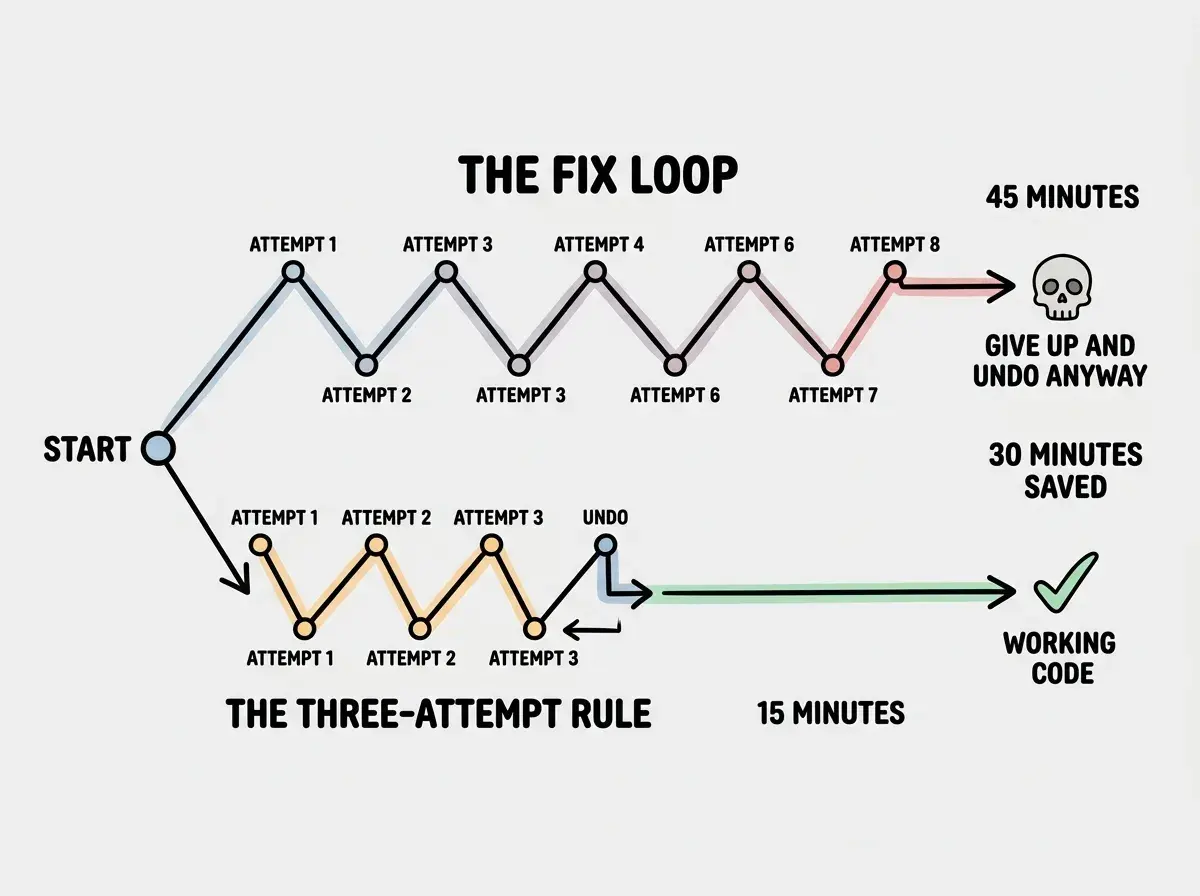
Here is a simple framework that will save you more time than any other debugging strategy. When AI introduces a problem, give it exactly three attempts to fix it. If the problem is not resolved after three tries, undo everything and start over with a different approach.
Why three? Because the first attempt is a genuine fix. The AI understood the error, addressed the root cause, and the solution either works or gets you closer. The second attempt is a refinement. Maybe the first fix was almost right but missed an edge case. The AI adjusts and you are still making forward progress. The third attempt is the tipping point. If the AI has not solved the problem in three tries, the fourth, fifth, and sixth attempts are almost never going to solve it either. They are the GPS recalculating on the wrong highway, generating increasingly convoluted routes that never reach the destination.
The three-attempt rule is not about the number three being magic. It is about establishing a hard boundary that prevents the most expensive mistake in AI coding, which is the slow slide from "one more try" into an hour-long debugging spiral. Three attempts is generous enough to catch real fixes and strict enough to prevent sunk-cost spirals.
This confuses everyone at first because it feels wasteful to throw away three attempts of work. But consider the alternative. Without a hard rule, the typical pattern is seven, eight, sometimes twelve attempts before you finally give up and undo everything anyway. The three-attempt rule does not cost you anything. It saves you the five to nine extra attempts that were never going to work.
When to Ask AI to Fix It
Not every problem calls for a U-turn. Some genuinely are small wrong turns where the GPS just needs a moment to recalculate. Here is how to recognize them.
The error is isolated to one file or function. If the AI broke a single component and everything else still works, this is a good candidate for a fix. The blast radius is small, the AI can see the full context of what went wrong, and the solution is likely straightforward.
The error message is specific. A clear error like "Cannot read property 'name' of undefined on line 47" gives the AI something concrete to work with. The problem is well-defined and the solution space is narrow. This is the side-street wrong turn. One recalculation and you are back on track.
The approach is correct but the implementation has a bug. If the AI chose the right strategy but made a mistake in execution, fixing is faster than redoing. A typo in a variable name, a missing null check, an off-by-one error in a loop. These are mechanical problems, not directional ones.
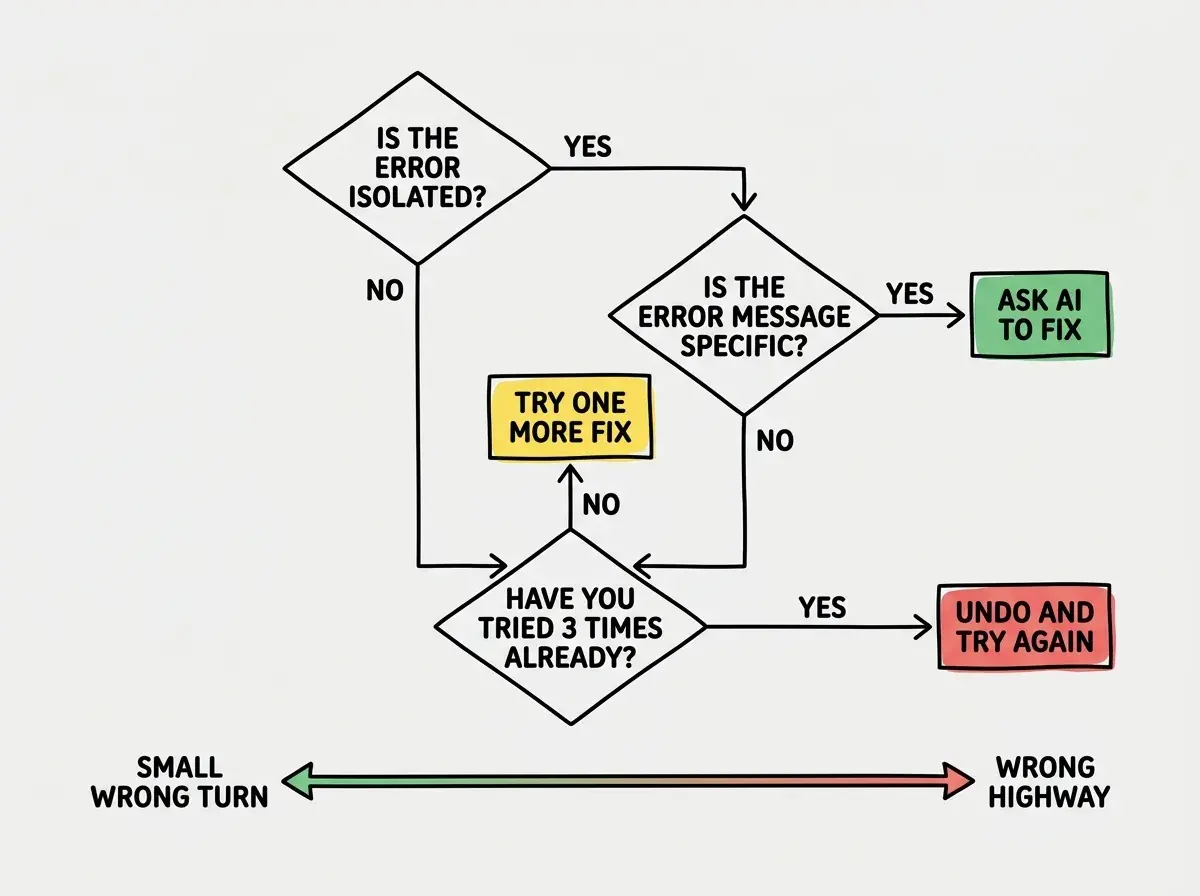
You understand what went wrong. This is the most important signal. If you can look at the AI's code and see why it broke, you can describe the problem clearly to the AI and get a targeted fix. Understanding the problem means the GPS has accurate coordinates to work with.
When to Undo and Start Over
Now for the harder call. Here are the signs that you are on the wrong highway and need a U-turn.
Fixing one thing breaks another. This is the strongest signal that the underlying approach is wrong. When each fix introduces a new bug, the AI is not converging on a solution. It is shuffling the problem around. The GPS is sending you in circles because there is no good route from where you are.
The AI keeps changing its approach. In one attempt it uses a state variable. In the next attempt it switches to a context provider. In the third attempt it tries a completely different pattern. When the AI cannot commit to a single strategy, it means none of the strategies work with the current code structure. The problem is not the fix. The problem is what came before.
You do not understand what the code is doing. If you look at the AI's attempted fix and cannot follow the logic, you have lost the thread. Asking for more fixes at this point means you are trusting the GPS in a city you have never been to, with no idea whether it is actually taking you closer or further from your destination.
The changes span multiple files. When a "simple fix" requires changes to three, four, five files, that is a sign that the original change was not simple at all. It touched something structural, and now the ripple effects are spreading through your codebase. This is the highway problem. You are not one turn away from your destination. You are miles off course.
How to Undo Safely
Knowing when to undo is only useful if you can actually do it without making things worse. The key is defensive commits, saving your progress frequently so you always have a clean state to return to.
Commit before every AI interaction. This is the single most important habit in AI-assisted development. Before you ask AI to make any change, commit your current working code. It takes ten seconds and it gives you an instant escape hatch. In your terminal, that is just git add . followed by git commit -m "working state before AI change". If the AI makes a mess, git checkout . takes you right back.
Use descriptive commit messages. When you need to undo, you are often looking through several commits to find the right one. Messages like "working login flow" and "before adding dark mode" are infinitely more useful than "update" and "fix" when you are trying to find your way back.
Many vibe coders skip defensive commits because they feel like unnecessary overhead. Then when AI creates a cascading problem, they have no clean state to return to. They end up manually trying to undo changes across multiple files, which introduces even more bugs. The ten seconds you spend committing saves the thirty minutes you would spend untangling a mess.
Do not try to partially undo. When you decide to undo, undo all of it. Go back to the last known working state, not some halfway point where you keep the "good parts" of the AI's changes. Partial undos are like making a U-turn but stopping halfway. You end up facing sideways in the middle of the highway, which is worse than either direction.
The Emotional Trap of Sunk Cost
The hardest part of the AI fix vs undo decision is not technical. It is emotional. After three attempts at fixing something, you have invested time and mental energy. The AI has written dozens of lines of code. Some of those lines might actually be good. Walking away from all of it feels like waste.
This is the sunk cost fallacy, and it is the reason most people keep asking AI to fix things long after they should have hit undo. The time you already spent is gone regardless of what you do next. The only question that matters is which path forward is faster. And after three failed fix attempts, the answer is almost always undo.
Here is a reframe that helps. You are not losing the work from those three attempts. You are gaining information. You now know what does not work, which means your next attempt starts with better context. You can write a more specific prompt and describe the pitfall the AI should avoid. The three failed attempts were not wasted time. They were reconnaissance.
Think about it in GPS terms one more time. When you make a U-turn, you are not admitting defeat. You are making the fastest possible move toward your destination. The GPS does not judge you for the U-turn. It just recalculates from your new position. Your AI tool works the same way. It does not care that you undid its last three suggestions. It just takes your new prompt and generates fresh code from a clean starting point.
Learn the fundamentals before your first debugging spiral.
Start herePutting It All Together
The next time AI breaks something in your project, pause before typing "fix this." Ask yourself three questions. Is the error isolated? Do I understand what went wrong? Am I still on the right road, or did I get on the wrong highway?
If the error is small and specific, let the GPS recalculate. Ask for a fix with a clear description of the problem. Give it up to three attempts.
If the error is cascading, if you have lost track of what the code is doing, or if this is your fourth attempt at the same problem, make the U-turn. Check out your last clean state and start the feature fresh with a better prompt.
The 41% revert rate tells us that nearly half of AI code eventually gets undone. The question is whether you undo it after five minutes with the three-attempt rule, or after forty-five minutes of watching AI make things progressively worse. Both paths end at the same place. Only one of them respects your afternoon.
Practical workflows that save you hours every week.
Explore guides