There is a famous debugging technique that has been around since the 1990s. It goes like this. You put a rubber duck on your desk. When your code breaks, you explain the problem to the duck. Line by line. Out loud. And somewhere in the middle of that explanation, you realize what the bug is. Not because the duck gave you advice. The duck is made of rubber. It sits there silently. The magic is in the explaining.
Now imagine the duck can talk back. That is rubber duck debugging with AI, and it is one of the most powerful workflows available to builders in 2026, especially if you are not a traditional programmer.
The key insight is the same one developers have relied on for decades. Clearly explaining a problem forces you to organize your thinking, fill in gaps you glossed over, and confront assumptions you did not know you were making. But with AI, the duck does not just sit there. It asks follow-up questions. It spots patterns. It suggests things you had not considered.
According to recent surveys, 92% of developers now use AI tools daily. But the ones getting the best results are not the ones pasting raw error messages and hoping for a fix. They are the ones who have learned to explain their bugs properly first.
What Rubber Duck Debugging Actually Is
The original technique comes from the book "The Pragmatic Programmer." A developer kept a rubber duck on their desk and would explain their code to it whenever they got stuck. The process of translating messy, half-formed thoughts into clear spoken language is what made it work.
When code lives only in your head, it exists as a blur. You think you understand it, but you are holding onto a vague impression of what it does. The moment you try to explain it step by step to someone (or something) else, the blur has to become specific. And specific is where bugs live.
Think about the last time you asked someone for help with a problem. How many times did you figure out the answer halfway through explaining it? That is the rubber duck method in action, whether you knew it or not.
Why Explaining the Problem Often IS the Solution
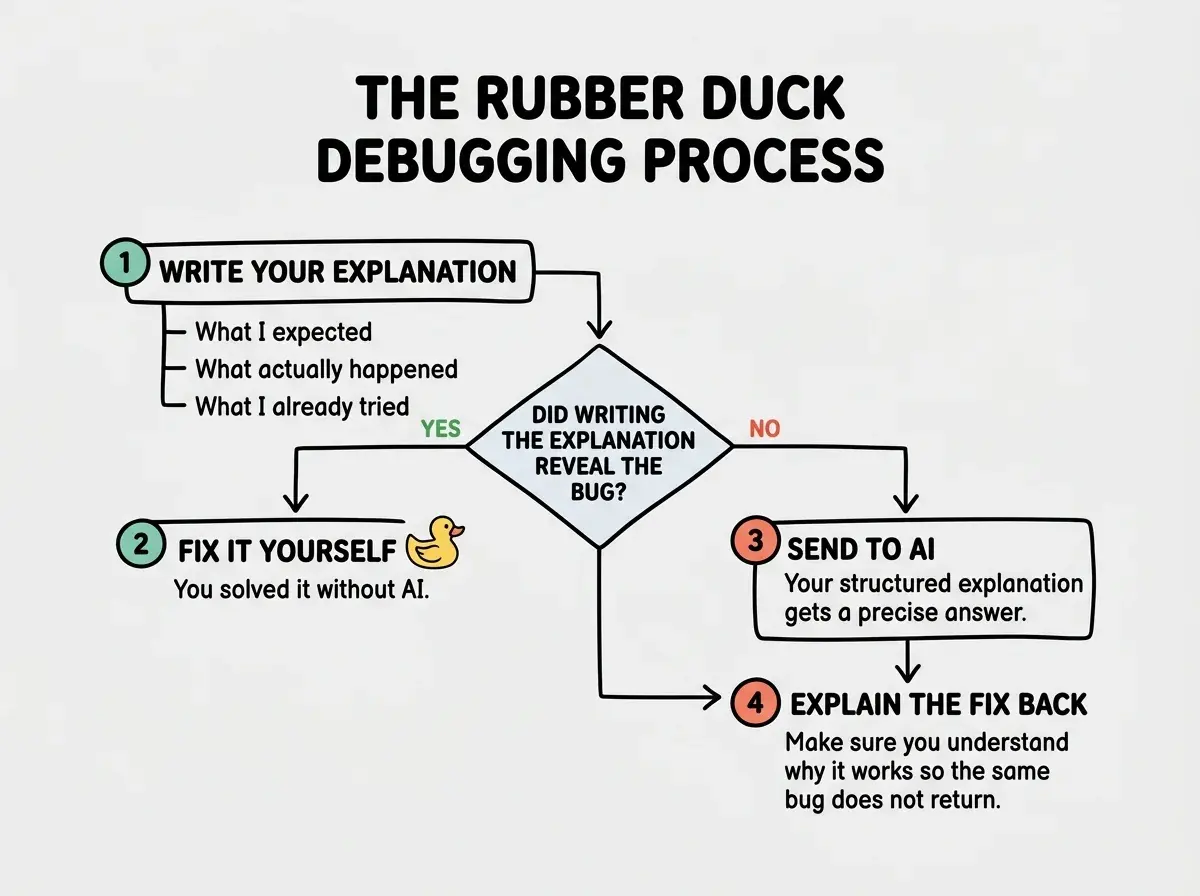
Here is something that sounds too simple to be true. For a surprising number of bugs, the act of writing a clear explanation is the fix. You never even need to hit send.
This happens because bugs usually hide in one of three places. In your assumptions about what the code should do. In the gap between what you told the AI to build and what it actually built. Or in a misunderstanding about how a particular tool or library works.
When you force yourself to write out exactly what you expected and exactly what happened instead, you are comparing those two things side by side for the first time. Often the difference jumps out immediately.
One founder building their first SaaS started keeping a "bug journal" where they wrote explanations before asking AI for help. About 40% of the time, they solved the problem while writing the entry. The AI never saw those bugs at all.
How to Structure Bug Explanations for AI
When the rubber duck method does not solve the problem on its own and you need the AI to respond, the quality of your explanation determines the quality of the answer you get back. Here is a simple three-part structure that works every time.
What you expected to happen. Start here. Not with the error, not with the code. Start with the behavior you wanted. "When a user clicks Subscribe, they should see a confirmation message and their email should be saved to the database." This gives the AI the destination before you describe the detour.
What actually happened. Now describe reality. "When a user clicks Subscribe, nothing visible happens. No error in the browser, but the terminal shows a 500 error from the API route." Be specific. "It does not work" is not a description. It is a frustration.
What you already tried. This is the part most people skip, and it saves the most time. "I checked that the API route exists and the URL matches. I added a console.log at the top of the handler and it fires. The error seems to happen on the database insert line." This prevents the AI from suggesting things you already ruled out.
Structure every bug explanation in three parts. What you expected, what actually happened, and what you already tried. This framework forces clarity and gives AI the context it needs to help you efficiently instead of guessing.
That three-part structure transforms the conversation from "here is an error, please fix it" into a genuine collaboration. The AI can reason about the gap between expected and actual behavior, see which hypotheses you already tested, and jump straight to the most likely causes.
The Explain-It-to-a-Five-Year-Old Technique
Sometimes the three-part structure is not enough because the bug lives in code you do not fully understand. Maybe AI generated a complex authentication flow and something in it is breaking, but you cannot even explain what the code is supposed to do.
This is where the "explain it to a five-year-old" technique comes in. Instead of debugging the code directly, ask the AI to explain it to you first. Then try to explain it back in your own words. Write it out.
"Okay, so when the user logs in, the server creates a token. That token gets stored in a cookie. Every time the user visits a page, the browser sends the cookie, and the server checks if the token is still valid. If it is, the user stays logged in. If not, they get redirected to the login page."
Now you have a mental model. And with that mental model, you can usually spot where things go sideways. "Wait, the redirect is happening even though I just logged in. So either the token is not being created, the cookie is not being set, or the validation check is failing."
You just went from "login is broken" to three specific theories in about sixty seconds. That is the power of forcing yourself to explain things simply.
When Explaining Reveals You Do Not Understand the Code
Here is the uncomfortable truth that makes rubber duck debugging with AI so valuable. Sometimes you start explaining the bug and realize you cannot. Not because the bug is complex, but because you do not actually understand what the code is doing.
This happens constantly with AI-generated code. The AI wrote 200 lines of database logic. It worked. You moved on. Now it is broken and you realize you never understood those 200 lines in the first place.
Do not skip past the discomfort of not understanding your own code. When you cannot explain what a piece of code does, that is not a failure. That is the bug revealing itself. The fix starts with understanding, not with more code changes.
This is actually a gift. The rubber duck method just revealed a deeper problem than the surface bug. You have code you cannot reason about, and code you cannot reason about will keep producing bugs you cannot fix.
The solution is to use this moment to learn. Ask the AI to walk you through the code. Explain it back. Then look at the bug again with fresh eyes. Nine times out of ten, the bug becomes obvious once you actually understand the code it lives in.
A Practical Walkthrough
Let me show you what this looks like in practice. Say you are building a simple task manager app and the delete function is not working.
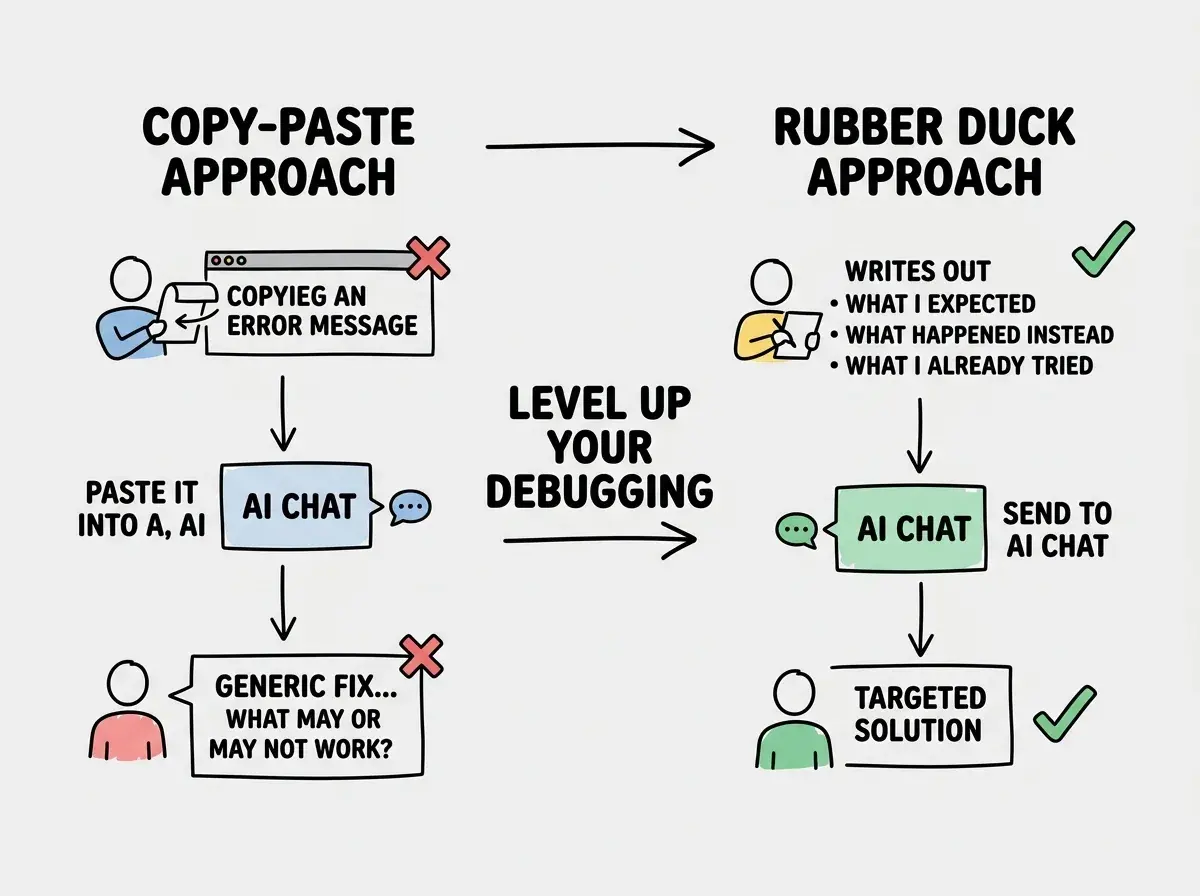
The copy-paste approach (what most people do): You grab the error "TypeError: Cannot read properties of undefined (reading 'id')" and paste it into the AI. The AI gives you a generic answer about null checks. You add them everywhere. It still does not work.
The rubber duck approach: You type something like this. "I have a task manager where users can delete tasks. When I click delete, I expect the task to be removed from the list and the database. Instead I get a TypeError about 'id' of undefined. I checked the onClick handler and it receives the task object correctly. The error seems to happen inside the API route, not on the frontend."
The second version gives the AI everything it needs to zero in on the actual problem. You already ruled out the frontend as the cause. The AI can focus on the API route and probably identify the issue in one response.
Building the Habit
The hardest part of rubber duck debugging with AI is not the technique. It is the discipline. When something breaks, your instinct is to copy the error, paste it, get a solution, move on. That instinct is strong, and fighting it feels slow.
But "slow" is an illusion. The copy-paste approach feels fast because each action takes seconds. What you do not notice is the cycle. Paste, get a bad fix, paste again, get another bad fix, break something else, paste that. An hour later you have made no progress and your codebase is messier than when you started.
The rubber duck approach takes two extra minutes up front to write an explanation. But those two minutes often eliminate the need for the fix entirely. And when they do not, the AI's response is so much more accurate that you fix the bug on the first try instead of the fifth.
Start small. The next time something breaks, before you paste anything into your AI tool, write three sentences. What you expected. What happened. What you tried. That is it. That is the whole practice. Do it ten times and it will become automatic.
The rubber duck has been helping developers for thirty years. The only thing that changed is that now the duck talks back. Learn to explain your bugs clearly, and you will be amazed how often the explanation itself is the solution. And when it is not, you will have an AI partner working with the best possible context to help you fix it fast.