Imagine you hired a contractor to renovate your kitchen. They show up on day one, work incredibly fast, and hand you a finished counter by lunchtime. Do you sign off on it without looking? Do you skip checking whether the plumbing actually connects to the water line? Of course not. You walk through the work, ask questions, and verify the important stuff before you pay the invoice.
That is exactly how you should think about AI-generated code. The AI is a fast, capable contractor. But you are the homeowner. You are the one who has to live with the result.
Right now, 92% of developers use AI coding tools daily. That adoption rate is incredible. But here is the problem: trust in AI-generated code has dropped from 77% to 33% over the past year. Developers tried the tools, accepted everything the AI produced, watched things break, and lost confidence. The issue was never the tools themselves. It was the missing step between generation and acceptance.
This article gives you that missing step. A practical framework for deciding when to accept AI code changes and when to say no.
The Contractor Analogy in Practice
Your AI coding tool is the fastest contractor you have ever worked with. It can frame walls, run wiring, and tile a floor in minutes. But like any contractor, it does not know your vision the way you do. It does not know that you need the outlet on the left side because your desk goes there. It does not know that the bathroom door needs to swing outward because you use a wheelchair. It fills in gaps with reasonable defaults that might be completely wrong for your situation.
When you accept AI code changes without reviewing them, you are signing off on work you have not inspected. And the data shows what happens next: 41% of AI-generated code gets reverted within two weeks. That is not a minor inconvenience. That is nearly half the work being torn out and redone, like discovering your contractor installed the kitchen sink backwards after the countertops are already sealed.
The solution is not to fire the contractor. It is to develop a review habit that catches the problems before they become expensive.
Five Questions That Tell You Whether to Accept or Reject
You do not need to become a code expert to review AI changes effectively. You need a checklist. When your AI tool generates code, run through these five questions before you accept anything.
Does it do what I actually asked for? This sounds obvious, but it is the most common failure point. You ask the AI to add a login button and it rebuilds your entire navigation bar. You ask for a simple form and it installs three new dependencies. Read the diff and make sure the scope matches your request. If the contractor remodeled your bathroom when you asked for a new faucet, you would notice. Notice the same thing in your code.
Did it change files I did not mention? AI tools sometimes edit files beyond what you requested. Check the list of changed files. If you asked for a change to your homepage and the AI also modified your database schema, that is a red flag. A good contractor does not rewire your living room when you asked them to fix a leaky pipe.
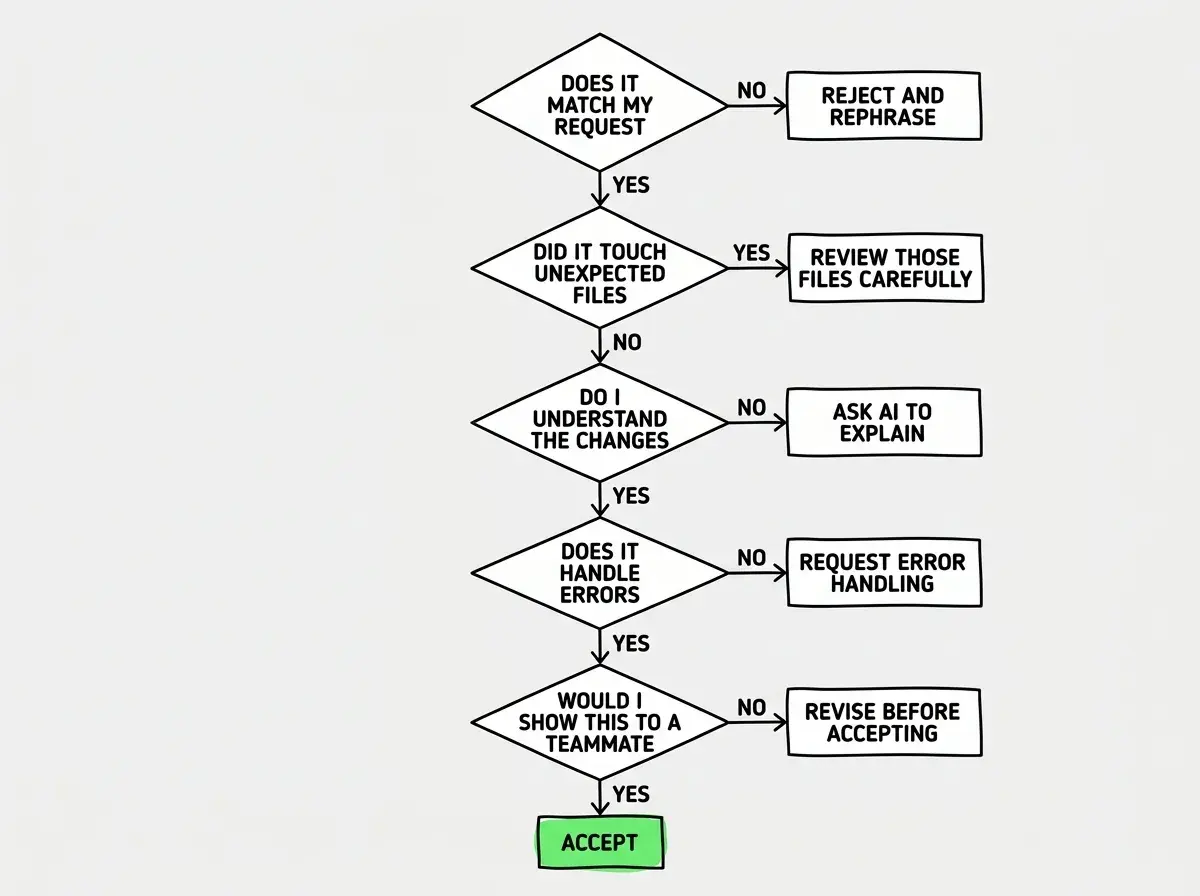
Do I understand what the code is doing? You do not need to understand every syntax detail. But you should be able to explain in plain language what the new code does. If you cannot, ask the AI to explain it. "Walk me through what this code does step by step" is one of the most powerful prompts you can use. If the explanation does not make sense, do not accept the code. You would never let a contractor install something in your house that they could not explain to you.
Does it handle errors? AI-generated code often follows the "happy path," the scenario where everything goes right. But what happens when a user enters bad data? What happens when the network drops? What happens when the database is slow? If the AI did not account for errors, ask it to add error handling before you accept.
Would I feel comfortable showing this to someone else? This is your gut check. If a friend asked to see your project and you would feel nervous about this particular piece of code, that feeling is data. It means something about the change does not sit right, even if you cannot articulate exactly what.
You do not need to understand every line of code to review AI changes effectively. You need to understand the intent, the scope, and the risk. Those five questions cover all three. Use them every time, and the 41% revert rate drops dramatically for your projects.
When to Always Say Yes
Not every AI change needs deep scrutiny. Some categories of changes are almost always safe to accept, and learning to recognize them speeds up your workflow without adding risk.
Formatting and style fixes. If the AI reformats your code to be more consistent, adds proper indentation, or cleans up spacing, accept it. These changes are cosmetic and low risk.
Boilerplate and repetitive code. If you need ten similar form fields or a standard API endpoint that follows the same pattern as your existing ones, the AI handles this well. Repetitive code is where AI shines because there is little room for creative interpretation.
Small, isolated changes. A single function that does one thing, a CSS tweak, a text change. The smaller and more contained the change, the lower the risk. These are the equivalent of your contractor swapping out a light switch. Quick to verify, hard to get catastrophically wrong.
When to Always Push Back
Some changes deserve skepticism by default, regardless of how clean the code looks. These are the areas where AI tools most frequently produce code that looks right but is not.
Anything touching authentication or payments. Security-sensitive code is where the cost of a mistake is highest. If your AI modifies how users log in, how passwords are stored, or how payment information is processed, review it thoroughly or ask someone with security experience to look at it.
Database schema changes. Changing how your data is structured can break your entire application in ways that are difficult to reverse. If the AI suggests adding, removing, or renaming database columns, understand exactly why before accepting.
Dependency additions. When the AI installs new packages or libraries, check what they are. Every dependency is code written by someone else that now runs inside your application. Some AI tools add dependencies liberally, and each one increases your attack surface and maintenance burden.
Accepting AI code just because it works right now. The contractor analogy applies perfectly here. A wall might stand up today but collapse in a year if the framing is wrong. Code that runs without errors can still have security holes, performance problems, or logic that breaks when your user base grows. "It works" is not the same as "it is correct."
Large refactors you did not ask for. Sometimes you ask for a small change and the AI rewrites half your application. Even if the rewrite is an improvement, you did not authorize that work and you cannot verify it quickly. Reject it and ask again with a narrower scope.
Is AI Writing 90% of Code Now?
You may have seen headlines claiming AI writes 90% or more of the code at some companies. Those numbers are real but misleading. AI generating 90% of the code does not mean humans are only responsible for 10% of the quality. It means humans are responsible for reviewing 9x more code than they personally wrote. The review burden actually increases as AI generates more code.
This is why the framework matters more now than ever. As AI writes more of your codebase, your role shifts from writing code to reviewing code. And reviewing AI code is a skill that requires practice, just like reviewing a contractor's work requires knowing enough about construction to spot problems.
Learn the fundamentals that make AI-assisted development work.
Explore the basicsBuilding Your Review Muscle
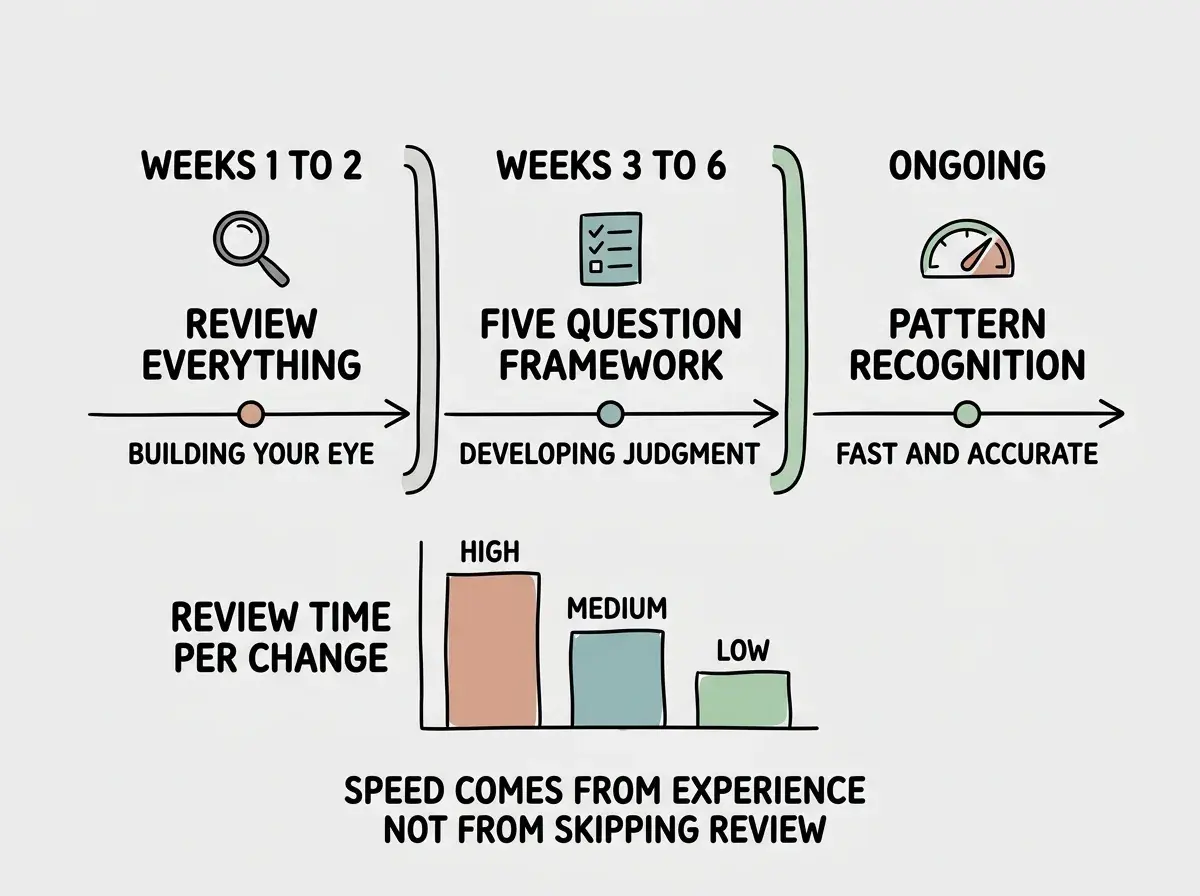
The five-question framework works immediately, but it works better over time as you develop intuition. Here is how to build that muscle.
Start by reviewing everything for the first two weeks. Yes, everything. Even the changes that seem obviously correct. You are training your eye to spot patterns. After two weeks, you will naturally start recognizing which changes need deep review and which ones you can approve quickly.
Keep a "reject journal." Every time you reject an AI suggestion, write one sentence about why. After a month, read through your journal. You will see patterns. Maybe your AI tool consistently adds unnecessary complexity. Maybe it always misses error handling. Those patterns become your personal checklist items.
Talk to the AI about its own code. After it generates something, ask "What are the potential problems with this approach?" AI tools are surprisingly good at critiquing their own output when asked directly. It is like asking your contractor, "What would you do differently if budget was not a concern?" The answer often reveals compromises you did not know were being made.
The Homeowner Mindset
The developers who are most productive with AI tools are not the ones who accept everything. They are not the ones who reject everything either. They are the ones who developed a reliable, fast review process that catches the important problems without slowing them down to a crawl.
You hired the best contractor in town. They are fast, skilled, and available 24/7. But you are still the homeowner. You still walk through the work before signing off. You still ask questions when something looks different from what you expected. And you still have the final say on what stays and what gets torn out.
Trust the speed. Verify the output. And never feel bad about saying no.
Start with the habits that prevent the problems everyone else runs into.
Get started