You sit down to build something with AI. Three hours later you have seventeen open tabs, a half-working feature that broke two other things, and a creeping sense that you are going in circles. Sound familiar? You are not alone. Ninety-two percent of developers now use AI tools daily, but most of them have no system for keeping sessions productive. The 15-minute sprint fixes that.
Think of it like the Pomodoro technique, but for building. Instead of working in vague, open-ended sessions, you treat every 15 minutes as a single building block. One block, one feature, one test, one commit. Then you step back, look at what you have, and decide which block comes next. Short focused bursts of creation, stacked on top of each other, build real products faster than marathon sessions ever will.
Why Long AI Coding Sessions Fall Apart
The problem with long sessions is not your focus or your skill. It is the nature of AI-assisted coding itself. Every prompt you send branches the conversation in a new direction. After an hour, you and the AI are juggling context from dozens of exchanges. The AI starts contradicting its earlier suggestions. You start losing track of what works and what was an experiment.
Long sessions also invite scope creep. You start building a login page and suddenly you are designing a full authentication system with OAuth, password reset flows, and session management. Three hours later, none of it works because you tried to build everything at once.
The 15-minute sprint prevents both problems. When you know you only have 15 minutes, you pick the smallest useful thing and build just that. No scope creep. No context collapse. Just one building block, solid and tested, ready for the next one.
The 15-minute sprint is not about speed. It is about focus. Each sprint produces one tested, working piece of your project. Like stacking building blocks, each piece is small on its own, but ten blocks stacked over a morning session give you a working product. The constraint of the timer is what keeps each block clean, complete, and actually functional.
The Anatomy of a Single Sprint
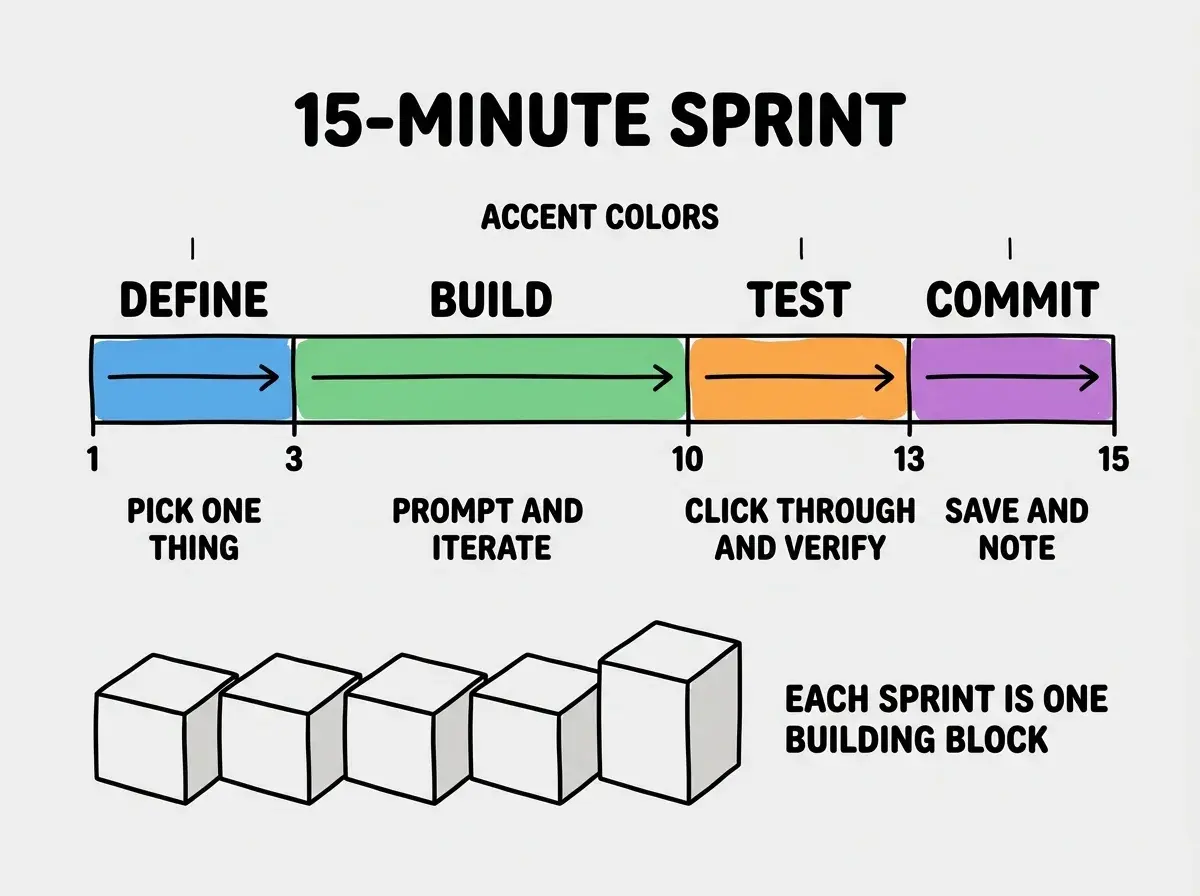
Every 15-minute sprint follows the same four-step rhythm. This predictability is the point. You should not have to think about the process. The process should free you to think about the product.
Minutes 1 through 3: Define the block. Write down one sentence describing what this sprint will produce. "Add a signup form with email and password fields." "Make the navigation bar sticky on scroll." "Add a loading spinner to the search button." If you cannot describe it in one sentence, it is too big. Break it down further.
Minutes 3 through 10: Build it with AI. Send your prompt, review what the AI generates, and iterate. You should need no more than two or three exchanges. If you are on your fifth back-and-forth and the feature still is not working, something is wrong with your prompt or the scope is too large. Stop, simplify, and try again.
Minutes 10 through 13: Test it. Click through the feature. Try to break it. Check that it did not break anything else. This is the step most people skip, and it is the step that saves you from compounding bugs across multiple sprints.
Minutes 13 through 15: Commit and note. Save your work. Write a one-line note about what you built and any issues you noticed. This note becomes the starting context for your next sprint.
How to Break a Project Into Sprint-Sized Blocks
The hardest part of this method is not the sprinting. It is the breaking down. Most people look at their project idea and see one giant thing. You need to see it as a stack of small blocks.
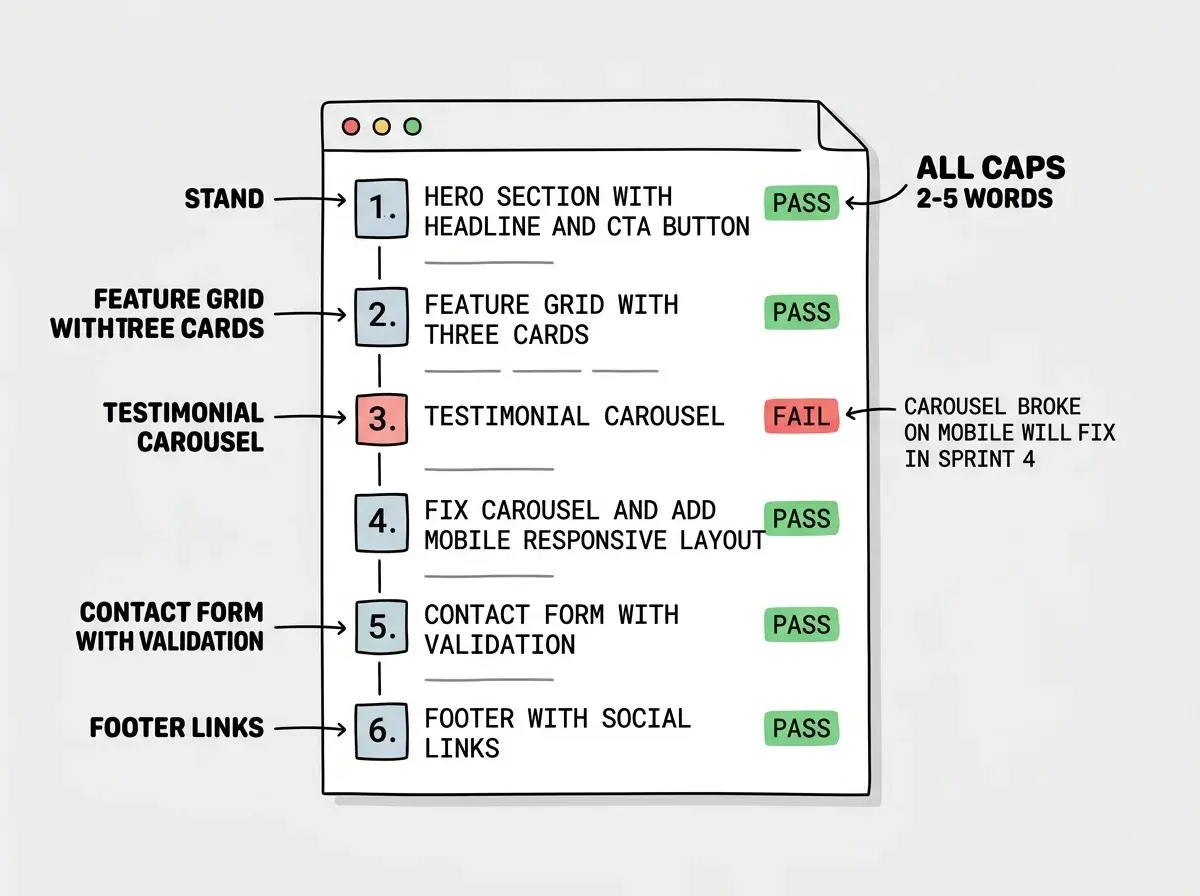
Start with what the user sees first. If you are building a landing page, your first sprint is the hero section with a headline and a call-to-action button. Not the whole page. Just the top section. Your second sprint adds the feature grid below it. Your third sprint adds the testimonial section. Each sprint produces a visible, testable piece.
For an app, start with the simplest possible version of the core interaction. If you are building a task manager, sprint one creates a text input and a list that displays whatever you type. That is it. Sprint two adds the ability to delete items. Sprint three adds the ability to mark items complete. Each sprint makes the app slightly more useful.
Here is a real breakdown for a simple invoice generator, the kind of tool a freelancer might build in a morning:
- Basic form with client name, amount, and due date fields
- Preview panel that displays the form data as a formatted invoice
- Add line items (description, quantity, rate) with automatic total calculation
- PDF export button
- Save and load invoices from local storage
- Simple styling pass to make it look professional
Six sprints. Ninety minutes total. A working invoice generator. Each sprint builds on the last, and each one produces something you can test independently.
Trying to build "the whole feature" in one sprint instead of breaking it into visible layers. If you are building a dashboard, do not try to add the sidebar navigation, the data cards, and the chart in one sprint. Build the sidebar first. Test it. Then add the cards in the next sprint. Layers, not bundles. When you bundle features, one broken piece makes it impossible to tell what went wrong. When you layer them, debugging takes seconds because you know exactly which block introduced the problem.
Making Sprints Work With AI Tools
The 15-minute sprint method works with any AI coding tool, but a few habits make it dramatically more effective.
Start each sprint with a fresh, specific prompt. Do not continue a long conversation thread. If your AI tool supports it, start a new chat for each sprint. This gives the AI clean context and prevents it from referencing old, possibly broken code from earlier exchanges.
Include your current state in the prompt. "I have a React app with a working signup form. Now I want to add email validation that shows an inline error message when the format is wrong." That one sentence of context helps the AI generate code that fits what you already have, instead of reinventing your entire component structure.
Test before you iterate. When the AI gives you code, test it before asking for changes. Most people read the AI's output, spot something they want to change, and immediately send another prompt. This stacks untested changes. Instead, run the code, verify it works, and then ask for refinements in the next sprint.
Keep a sprint log. A simple text file works. Each entry has a number, a one-line description, and a pass or fail note. After ten sprints, this log becomes a roadmap of your entire project. You can see exactly when things broke, what you built in which order, and where you might want to revisit.
When to Break the Rules
The 15-minute timer is a guideline, not a law. Some sprints will take 8 minutes because the feature is tiny. Some will take 20 because the AI needs an extra round of iteration. That is fine. The point is not religious adherence to a timer. The point is the mindset of small, complete, tested increments.
There are also moments when you should deliberately ignore the timer. If you are in a genuine flow state and the code is pouring out perfectly, keep going. The sprint method is medicine for the common problem, those aimless three-hour sessions. If you are genuinely productive, you do not need the medicine.
But be honest with yourself. "I am in flow" and "I am down a rabbit hole" feel identical from the inside. The difference is output. If you have been coding for 45 minutes and you have three working, tested features to show for it, you are in flow. If you have been coding for 45 minutes and you are still debugging the first thing, you are in a rabbit hole. Set the timer.
Learn the foundations that make every sprint more productive.
Start with the basicsBuilding a Real Sprint Habit
The best way to internalize this method is to use it for your very next project. Pick something small, a personal landing page, a tip calculator, a simple bookmark manager. Set a timer on your phone for 15 minutes. Write your one-sentence goal for the sprint. Build, test, commit. Reset the timer. Repeat.
Most people find their rhythm after three or four sprints. The first sprint feels awkward because you are not used to scoping things so small. By the third sprint, you start naturally thinking in blocks. "This is a two-sprint feature" becomes your new way of estimating work.
After a week of working this way, you will notice something surprising. You ship more in five 15-minute sprints than you used to ship in a three-hour session. Not because you are working faster, but because you are not wasting time on context collapse, scope creep, and debugging tangled changes. Every minute counts because every minute has a purpose.
The 15-minute sprint is not a productivity hack. It is a building philosophy. Small blocks, stacked deliberately, tested individually. That is how real products get built, whether you are a founder prototyping your first idea, a career changer building a portfolio, or an indie hacker shipping a side project on weekends. Stop marathoning. Start sprinting.
Dig deeper
A few hand-picked sources if you want to go further.
Explore beginner-friendly projects you can finish in a handful of sprints.
See project ideas