You are three prompts deep into fixing a bug and every response from the AI makes things worse. The button that used to work is now gone entirely. A new error has appeared that did not exist ten minutes ago. You are staring at your screen thinking, "How do I get out of this?" I have been exactly where you are, and the answer is simpler than you think.
Every building has emergency exit routes. They are clearly marked, they lead somewhere safe, and they exist because the people who designed the building knew that things go wrong. Your vibe coding workflow needs the same thing. Not because AI is bad at coding, but because 92% of developers now use AI daily, and when 41% of AI-generated code ends up getting reverted, you need a reliable way to get back to safety when things spiral.
This is your escape hatch playbook. Five strategies, in order, for the moment when AI keeps breaking your code and you do not know what to do next.
Stop Prompting Immediately
This is the hardest step and the most important one. When AI keeps breaking things, your instinct is to send one more prompt. "Fix the error you just created." "Undo what you just did." "Go back to how it was before." Each of these prompts adds more code, more changes, and more confusion. The AI does not remember what "before" looked like. It only sees the current mess and tries to make it better, which usually means making it different, which usually means making it worse.
Think of it like taking a wrong turn in an unfamiliar building. If you keep walking faster, you do not find the exit sooner. You get more lost. The first thing you do is stop moving, look for the emergency exit signs, and orient yourself.
Close the AI chat. Do not type another prompt. Take a breath. The damage is done, and no additional prompt is going to magically undo a chain of bad changes.
The moment you notice AI making things worse with each prompt, stop immediately. Every additional prompt adds more broken code on top of already broken code. The AI cannot reliably undo its own chain of mistakes because it does not have a true memory of what your code looked like before the spiral started.
Check Your Last Known Good State
Every emergency exit route leads to a safe assembly point. In your codebase, that safe point is your last commit. If you have been committing regularly, you might only be a few minutes of work away from a version that actually worked.
Run git log and look at your recent commits. Find the last one where things were working. That is your assembly point. If you have not been committing regularly, this is the moment where that lesson burns itself into your memory forever. (We will talk about preventing this situation in a moment.)
If you do have a recent commit, run git diff to see exactly what changed between that working state and the current broken state. This diff is your map. It shows you every exit route the AI took you away from and, more importantly, how far away you are from safety.
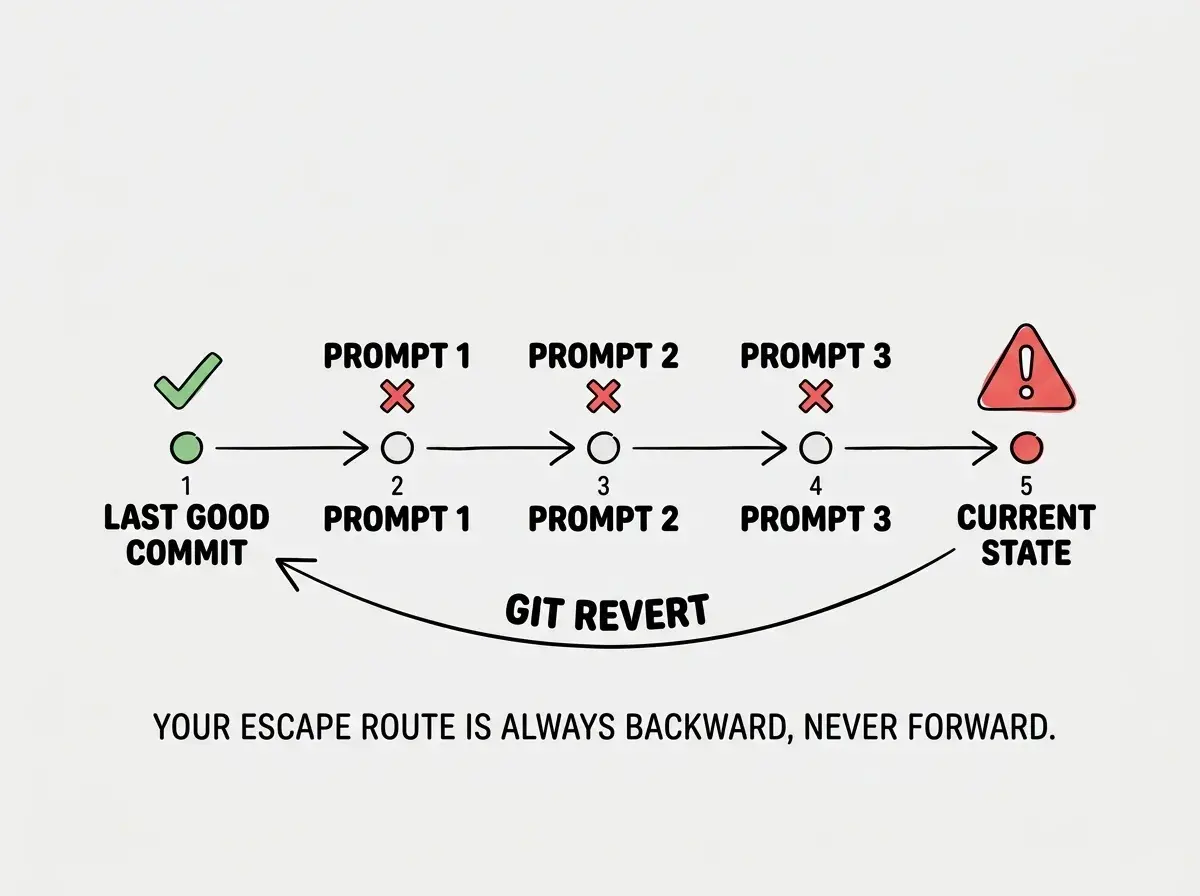
Why does my code not work in AI? This is one of the most common questions people search for when they hit this wall. The answer is that AI coding tools generate code based on patterns, not understanding. When you describe a problem, the AI generates a plausible solution. When that solution creates a new problem, the AI generates another plausible solution for the new problem, without fully grasping how the two solutions interact. Each fix is locally reasonable but globally destructive. The code does not work because the AI is solving a different problem with each prompt while you think it is solving the same one.
Revert to Safety
This is where the escape hatch actually opens. Once you have identified your last good commit, use it.
If your last commit was recent (less than an hour ago):
- Run
git stashto save your current changes somewhere retrievable, just in case - Run
git checkout .to restore all files to the last committed state - Verify the app works again
- Breathe
If your last commit was a long time ago and you have made real progress mixed with AI damage:
- Run
git diff > changes.txtto save a record of everything that changed - Run
git stashto get back to the last commit - Open
changes.txtand manually identify which changes were yours (the good ones) versus which were the AI spiral (the bad ones) - Apply only the good changes back, one at a time
If you never committed (the worst case):
- Copy your entire project folder right now, before doing anything else
- This copy is your insurance policy
- Now you can experiment with reverting files individually without fear of losing everything
The key insight is that reverting is not failure. Every building evacuation drill teaches you that leaving through the emergency exit is the correct response to a fire. You do not stay and fight the fire with a cup of water. You get to safety first and then figure out what happened.
Restart the Conversation With Context
Once you are back at a working state, you need to approach the original problem differently. The AI chat that spiraled into chaos is contaminated. The conversation history is full of broken code, failed fixes, and confused context. Starting a new conversation is not giving up. It is finding a clean emergency exit instead of trying to navigate through smoke.
In your new conversation, provide three things:
- The working code that you just reverted to
- The specific thing you want to change, described in one sentence
- What went wrong last time, so the AI can avoid the same path
This is dramatically more effective than continuing a broken conversation. You are giving the AI a clean starting point, a clear destination, and a warning about the dangerous route.
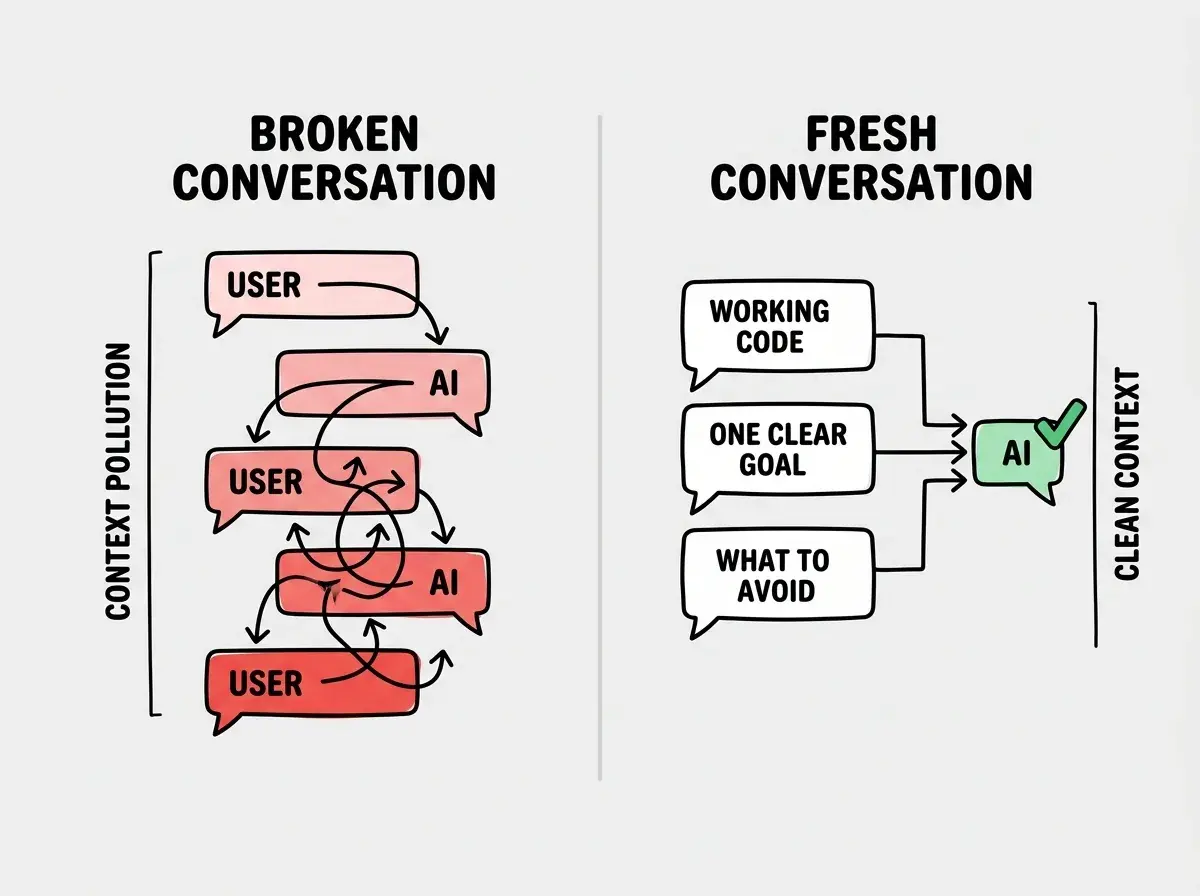
How to protect code from AI? The answer is not to prevent AI from touching your code. It is to create structure that limits the blast radius when something goes wrong. Small commits, clear prompts, and fresh conversations are your protective barriers. They do not stop AI from making mistakes, but they guarantee that no single mistake can destroy your project.
Build Your Permanent Escape Routes
Now that you are out of the crisis, it is time to install permanent emergency exits so you never get this stuck again. These are the habits that separate vibe coders who occasionally hit bumps from vibe coders who lose entire weekends to AI-generated chaos.
Treating git commits as something you do at the end of a session instead of before every AI interaction. If you only commit when you are "done," you will never have a safe state to revert to when things go wrong. Commit before you prompt. Every single time.
Commit before every AI prompt. This is the single most important habit in this entire playbook. Before you ask the AI to change anything, commit what you have. Even if it is messy. Even if it is incomplete. That commit is your emergency exit. Make the commit message something simple like "checkpoint before AI change" so you can find it later.
Keep prompts small and specific. "Build me a dashboard with charts, filters, and user authentication" is not a prompt. It is a prayer. The bigger the ask, the more code the AI generates, and the harder it is to revert when something breaks. Ask for one thing at a time. Get it working. Commit. Then ask for the next thing.
Test after every AI change. Before you send the next prompt, verify that the current change actually works. Click the button. Submit the form. Check the page. If it is broken now, fix it now, while the change is small and the context is fresh. Do not stack three AI changes and then discover that the first one broke everything.
Use the "explain first" technique. Before asking the AI to write code, ask it to explain its approach. "How would you add pagination to this list?" If the explanation sounds wrong or confusing, you have saved yourself an entire spiral. Redirect the approach before any code gets written.
Set a three-prompt limit. If the AI has not solved your problem in three prompts, stop. Do not send a fourth. Revert to your last good state and try a completely different approach. Three prompts is enough to solve most well-defined problems. If it is taking more, the problem is not well-defined, or the AI is going down a bad path.
Your Emergency Checklist
When AI keeps breaking your code, follow these steps in order:
- Stop prompting. Close the chat. Do not send "one more fix."
- Check git log. Find your last working commit.
- Revert. Use
git stashorgit checkout .to get back to safety. - Start fresh. New conversation, clean context, one clear goal.
- Commit before prompting. Install the habit that prevents this from happening again.
This is not a complicated system. It is an emergency exit route, and like every good emergency exit, it works because it is simple enough to follow when you are panicking.
The 41% revert rate is not a verdict on AI coding tools. It is a measurement of what happens when developers do not have escape routes. With this playbook, you are not part of that statistic. You are the person who knows exactly where the exits are, and you never hesitate to use them.
Start with the fundamentals so you never have to panic in the first place.
Start from the beginningThe next time AI keeps breaking your code, you will not freeze. You will not send twelve more prompts hoping the AI figures it out. You will stop, revert, restart, and get back to building. That is not a workaround. That is how every experienced vibe coder operates, and now you have the same playbook they do.
Learn the habits and workflows that keep your projects on track.
Explore the guides