If you want to build one feature at a time with AI, you need to resist the temptation to describe your entire product in a single prompt. Build small first, ship one piece, verify it works, then move on. That single habit separates projects that launch from projects that collapse under their own ambition.
I have watched this pattern play out dozens of times. Someone discovers an AI coding tool, realizes it can generate an entire app from a paragraph of instructions, and immediately describes a full SaaS platform with user authentication, a dashboard, payment processing, and email notifications. The AI happily generates thousands of lines of code. The person pastes it in, hits run, and stares at a wall of errors. An hour later, they are debugging code they did not write, fixing problems they cannot isolate. Two days later, the project is abandoned.
The fix is embarrassingly simple. Build one feature at a time.
Why AI Makes You Want to Build Everything at Once
AI coding tools are genuinely impressive. 92% of US developers now use them daily, and for good reason. You can describe a login page and get working code in seconds. You can ask for a database schema and receive a complete migration file. The speed is intoxicating, and it creates a dangerous illusion: if the AI can generate one feature instantly, why not generate ten features at once?
The answer is the 70% wall. AI reliably gets you about 70% of the way to working software. That first 70% feels like magic. The last 30%, the part where edge cases surface, components need to talk to each other, and real user behavior meets generated assumptions, is where projects succeed or fail.
The 70% wall is real. AI gets you 70% of any feature quickly and reliably. The remaining 30% requires your attention, testing, and iteration. When you build ten features at once, you hit ten 70% walls simultaneously, creating a tangled mess that is nearly impossible to debug. When you build one feature at a time, you only face one 30% gap at a time, and each one is manageable.
That 30% gap is completely solvable when you are looking at a single, isolated feature. It becomes a nightmare when you have generated an entire application and every broken piece depends on three other broken pieces.
The Lego Set Analogy for AI Development
Think of your project like a Lego set with a thousand pieces. You open the box, and every piece is sitting in a pile on the table. You have two choices. Dump all the pieces out, try to connect random sections simultaneously, and hope the structure holds together. Or follow the booklet: build the base, attach section one, verify it is stable, then move on to section two.
AI coding is the same. Each prompt to your AI tool is like building one section of the Lego set. When you ask for a login page, you get the pieces for a login page. You snap them together, verify the login works, and move on. When you ask for a login page, a dashboard, a payment system, and an email service all at once, you get a thousand pieces dumped on the table with no clear connection points between them.
The incremental approach works better for a specific technical reason. AI tools have a context window, a limit on how much information they can hold in memory at once. When you give the AI a focused prompt about one feature, it can dedicate its full context to getting that feature right. When you describe ten features, the AI spreads its attention across all of them, producing shallower, more generic code for each one. It is the difference between asking someone to cook you a perfect omelette versus asking them to prepare a ten-course meal in five minutes.
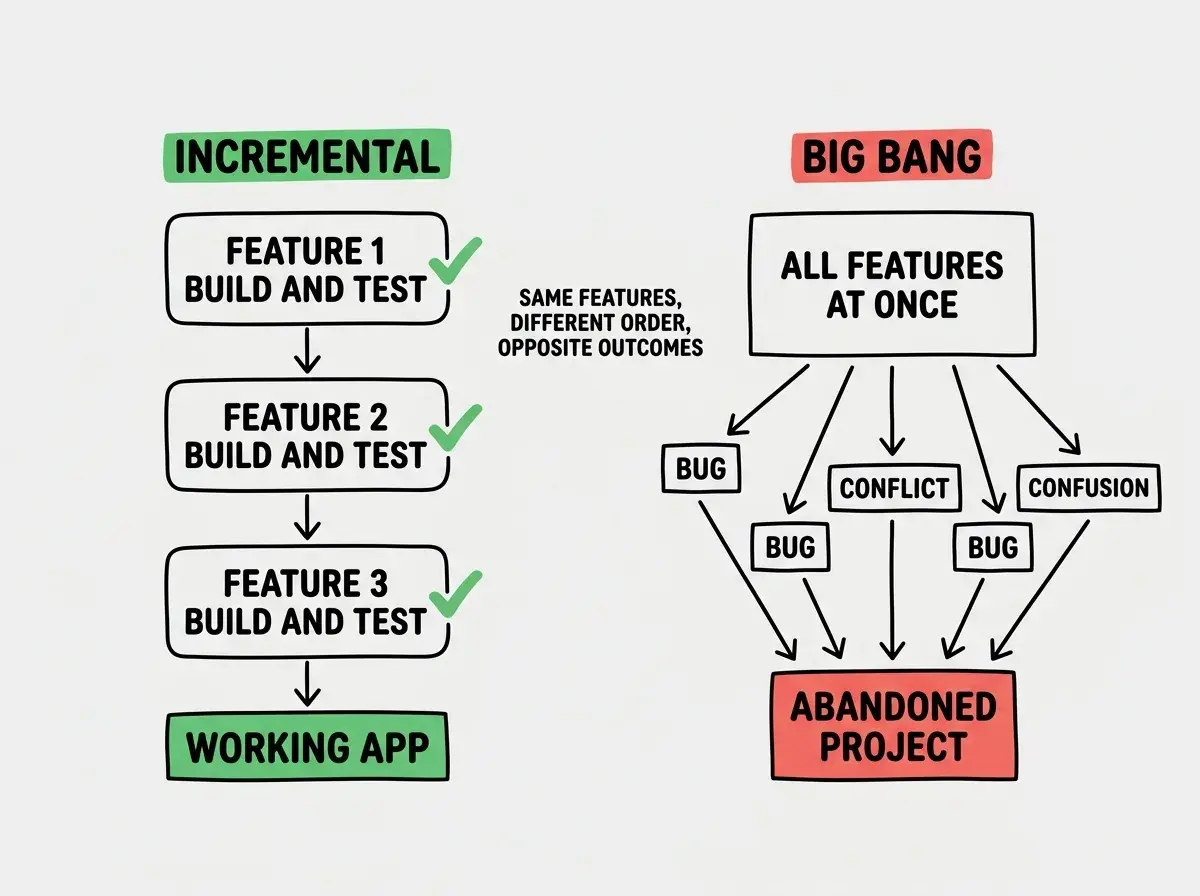
The Lego analogy holds even further. When you finish a section of a Lego set, you can pick it up and inspect it. You can see if a piece is missing. You can fix one wobbly connection without disassembling the whole structure. That is exactly what happens when you build one feature at a time with AI. Each piece is small enough to understand, test, and fix.
The One Feature at a Time Workflow
Here is the practical workflow that works for building with AI tools. It is not complicated, but it requires discipline because the temptation to skip ahead is always there.
Step 1: Write a one-sentence description of the feature. Not the product. Not the vision. One feature. "Users can sign up with their email address and create an account." If your sentence has the word "and" connecting two unrelated actions, split it into two features.
Step 2: Prompt the AI for just that feature. Give it context about your existing project (the tech stack, file structure, what already exists) but only ask it to build the one thing. Be specific about what "done" looks like. "The signup form should validate the email, check for duplicates, hash the password, and redirect to a welcome page."
Step 3: Get the feature running locally. Paste the code, run it, and test it yourself. Click every button. Enter bad data. Try to break it. This is where you close the 30% gap for this feature, while it is small and isolated.
Step 4: Commit the working feature. Save your progress. Make a git commit, copy your files, whatever your method is. Lock in the working state before moving on.
Step 5: Repeat with the next feature. Now that feature one is solid, describe feature two. Give the AI context about what already exists ("I have a working signup flow, now I need a user profile page") and let it build on a stable foundation.
Start with the foundations and learn the workflow that actually works.
Explore the fundamentalsThis workflow feels slower at first. You will watch someone on social media generate an entire app in one prompt and feel like you are falling behind. You are not. That person is about to spend three days debugging. You are about to have a working feature in thirty minutes.
What Happens When You Build Too Big Too Fast
Let me walk through the specific technical reasons that building too much at once fails. Understanding these will help you resist the temptation when your ambition starts outpacing your process.
The first problem is context window degradation. Every AI tool has a limit on how much text it can process at once. When you ask for a complete application, the early parts of your conversation get pushed out of the AI's working memory as the conversation grows. The AI starts contradicting its own earlier code. Functions reference variables defined in a file the AI has already forgotten about. By prompt fifteen, the AI is effectively working with amnesia about the decisions it made in prompt three.
The second problem is cascading dependencies. When you build features A through E simultaneously, feature C might depend on how feature A handles user sessions. But feature A's session handling was generated generically because the AI did not know about feature C's requirements yet. Now you need to refactor A to support C, which breaks B, which relied on A's original session format. When you build incrementally, feature C gets built on top of a working, tested feature A. The dependency is real and verified, not assumed.
The third problem is debugging complexity. When a single feature breaks, you have one place to look. When five features are broken simultaneously, you face what engineers call a "fault isolation problem." Is the blank screen caused by the authentication layer, the database query, the frontend rendering, or the API route? The answer could be any of them, or all of them.
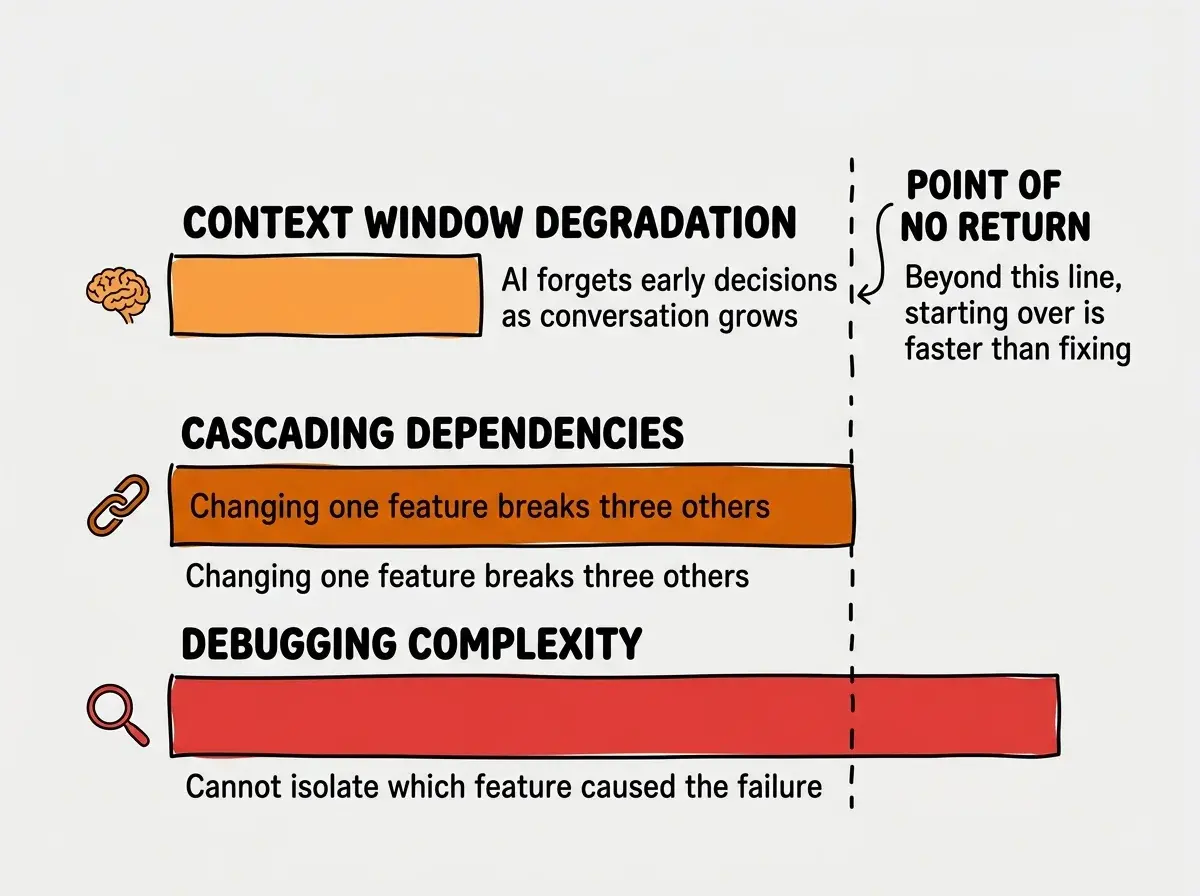
These problems compound. Context window degradation leads to bad dependencies, which amplify debugging complexity. By the time you realize something is wrong, untangling the mess takes longer than rebuilding from scratch. This is why so many ambitious AI projects get abandoned, not because the creators lack skill, but because the project architecture made success nearly impossible.
Treating AI-generated code as a finished product. When the AI gives you a login system, it is a first draft, not a deployed feature. You would not publish the first draft of an important email without reading it. Do not ship the first draft of your authentication system without testing it. Build it, test it, fix the 30% gap, then move on. Skipping the verification step for one feature is how "build small" silently becomes "build everything untested."
The good news is that incremental development is actually faster in total time. Each individual feature takes a bit longer because you are testing and verifying, but you never hit the catastrophic failure point where everything breaks at once and you lose days to debugging.
Dig deeper
A few hand-picked sources if you want to go further.
What This Means For You
- If you are a founder: Your instinct is to describe your full product vision to the AI and get a prototype as fast as possible. Fight that instinct. Build the single most important feature first, get it working, and show it to one potential customer. Their feedback will change what you build next anyway. Building everything at once means building features your customers never asked for.
- If you are a career changer: The one-feature-at-a-time workflow builds genuine understanding. Each feature you build and test teaches you something about how web apps work. When you generate an entire app at once, you learn nothing because you cannot trace any behavior back to the code that produces it. Incremental building is how you turn AI-assisted coding into real skills.
- If you are a student or creative: Start even smaller than you think. Your first feature should take fifteen minutes to build and test. A form that saves data. A page that displays a list. A button that triggers an action. These tiny wins build momentum and teach you the rhythm that scales to any size project.
Pick one feature. Just one. Build it, test it, and ship it today.
See what to build first