Iterative prompting is the difference between people who build real applications with AI and people who quit after one messy output. The cycle is simple: prompt, review, test, repeat. Instead of chasing a single perfect prompt, you shape your app through rounds of small refinements, and that process is how 92% of developers who use AI daily actually get things done.
Most beginners assume the goal is to write one prompt so good that the AI nails everything on the first try. That expectation is the source of almost all early frustration. The best vibe coders treat every prompt as a starting point, not a finish line. They expect to iterate. And because they expect it, they are faster, calmer, and more effective than anyone trying to get it perfect in one shot.
What Is Iterative Prompting in AI
Iterative prompting is the practice of refining AI output through multiple rounds of conversation rather than trying to get everything right in a single message. You send a prompt, evaluate what comes back, identify what needs to change, and send a follow-up that steers the AI closer to what you actually want. Each round narrows the gap between the AI's output and your vision.
This is not a workaround for a limitation. It is the intended workflow. Large language models are probabilistic, meaning they make their best guess based on the information you provide. More information across multiple exchanges produces dramatically better results than cramming everything into one massive prompt. A 2024 Stack Overflow survey found that 46% of all committed code is now AI-generated, and virtually none of that code was produced by a single prompt. It was shaped through iteration.
Iterative prompting is a conversation, not a command. You are collaborating with the AI, not dictating to it. Each round gives the AI more context about your preferences, your constraints, and your specific situation.
Code quality improves by an average of 40-60% between the first prompt and the third iteration, according to research from Google's AI-assisted development teams. The first output is a rough draft. The third or fourth is where real quality emerges. If you are judging AI coding by the first response alone, you are evaluating a rough sketch and calling it the final painting.
The key mindset shift is accepting that iteration is not failure. It is the process. Every professional workflow, from writing to design to engineering, involves drafts and revisions. AI coding is no different.
The Pottery Wheel Analogy for AI Coding
Imagine you are sitting at a pottery wheel. You drop a lump of clay onto the center and start the wheel spinning. That first lump is shapeless, rough, and nothing like the bowl you have in your head. But you do not throw the clay away. You start shaping it.
Your first prompt is the lump of clay. It gets something onto the wheel. Maybe the AI gives you a landing page with the wrong layout, or a form that is missing validation, or a dashboard with ugly colors. That is fine. The clay is on the wheel. Now you can work with it.
The review step is where you slow the wheel and look at what you have. You compare the AI's output against what you actually wanted. Where is the shape too thick? Too thin? Completely wrong? You are not rewriting everything from scratch. You are identifying the specific places where the clay needs more pressure or less.
The test step is spinning the wheel again. You try the feature, click the buttons, resize the browser, enter bad data into the form. Does it wobble? Does it hold its shape? Testing reveals problems that looking at code never will, because users do not read code. They click things.
And then you repeat. You apply pressure where the shape needs adjustment, you smooth out the rough spots, and you spin it again. Each cycle, the bowl gets closer to what you envisioned. After three or four rounds, you have something that actually works, and it came from that same shapeless lump you started with.
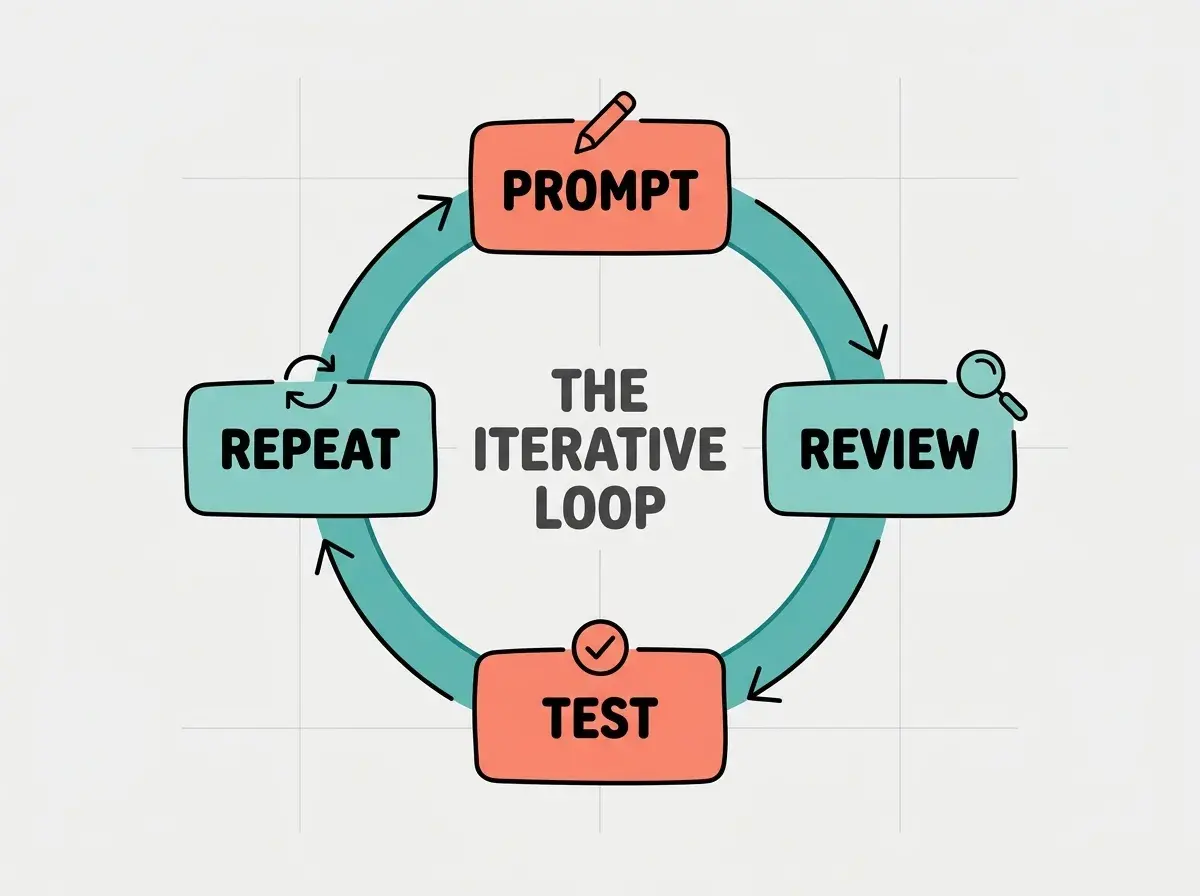
The pottery wheel analogy holds up because it captures something important about patience. A potter does not get frustrated that the first spin does not produce a finished bowl. They know the process takes multiple passes. The same patience, applied to AI coding, transforms the experience from frustrating to genuinely enjoyable.
How to Do Iterative Prompting
Let me walk you through each step of the loop with a concrete example. Say you are building a simple habit tracker, something that lets users mark whether they completed a daily habit.
Step 1, Prompt. Start with a clear but not exhaustive description. "Build a habit tracker page. It should show a list of habits with checkboxes for the current week. Each day gets a column, Monday through Sunday. When I check a box, it should stay checked. Use a clean, minimal design with a white background." That is specific enough to get something useful but leaves room for the AI to make reasonable decisions about details.
Step 2, Review. The AI generates a habit tracker. Look at it carefully. The layout is a table, which is fine, but the checkboxes are tiny. The habit names are cut off on mobile. There is no way to add new habits. And the font feels too corporate for a personal app. You now have a list of specific things to address, and that list is your next prompt.
Step 3, Test. Click every checkbox. Refresh the page and see if they stay checked. Resize your browser to phone width. Try adding a habit with a very long name. Try checking every box in a row. Testing is where you discover problems the AI did not anticipate and you did not think to specify. Maybe the checkboxes work, but they do not save to any state. Maybe the table breaks on narrow screens.
Step 4, Repeat. Now send your follow-up. "The checkboxes are too small on mobile, make them at least 24px. The habit names get cut off on narrow screens, so add text truncation with a tooltip on hover. Add a plus button at the bottom to create new habits. And switch the font to something friendlier, like Inter or Nunito." This prompt is laser-focused because you reviewed and tested first. You are not guessing at improvements. You are fixing specific problems you observed.
Two or three more rounds, and your habit tracker goes from a rough prototype to something you would actually use daily.
The best way to learn iterative prompting is to practice it. Pick a simple project, open your favorite AI coding tool, and run through the four-step cycle yourself.
Explore Beginner ProjectsThe real power of this approach becomes clear when you compare it to the alternative. Without the loop, most beginners write a prompt, dislike the result, rewrite from scratch, dislike that result too, and conclude that AI coding does not work. With the loop, they refine their way to a good result every time.
When to Stop Iterating and Move On
Knowing when to stop is just as important as knowing how to iterate. The pottery wheel analogy helps here too. At some point, the bowl is done. More shaping will not improve it, and it might actually make it worse. Overworking clay makes it thin and fragile. Overworking code makes it bloated and buggy.
Here are three signals that a feature is ready to ship. First, it does what you specified and handles the obvious edge cases (empty states, long text, mobile screens). Second, you have tested it by actually using it, not just looking at it. Third, the remaining imperfections are cosmetic, not functional. If the button color is slightly off but the feature works correctly, ship it. You can adjust colors in a future iteration.
The trap most beginners fall into is perfectionism. They keep iterating on one feature until it is flawless while the rest of their app does not exist. A working app with five decent features beats a hypothetical app with one perfect feature. The clay on the wheel is worth more than the clay still in the bag.
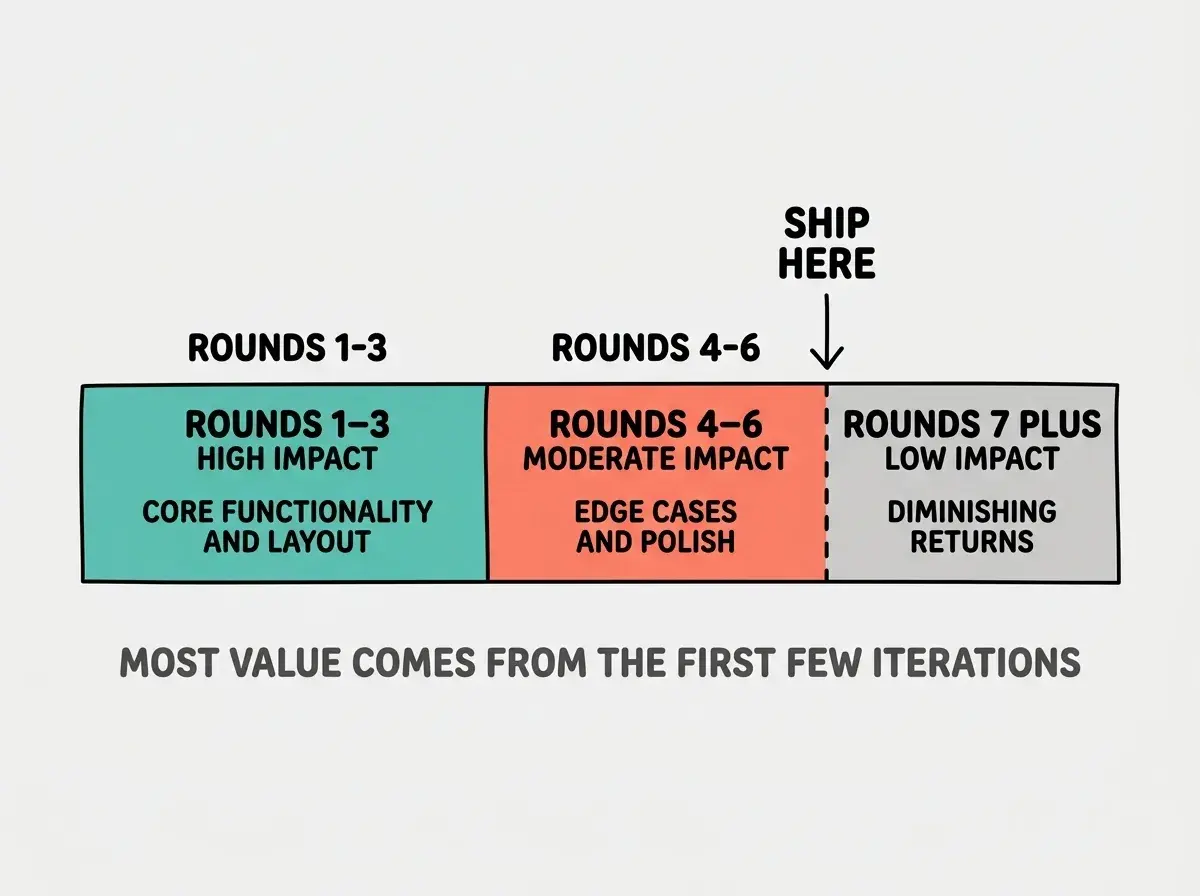
A good rule of thumb is the three-round check. After three rounds of iteration on a single feature, pause and ask yourself whether the remaining issues are worth another round or whether your time is better spent moving to the next feature. Usually, it is time to move on.
Beginners often iterate on the wrong thing. They spend five rounds perfecting a button's hover animation while the form behind it does not validate input. Always prioritize functionality over aesthetics in your iteration cycles. Make it work first, make it pretty second. If you find yourself iterating on visual details before the feature actually functions correctly, stop, step back, and redirect your next prompt toward behavior instead of appearance.
This does not mean aesthetics do not matter. But a beautiful feature that does not work is worse than a plain feature that does. Get the behavior right first, then use a dedicated polish round to clean up the visuals.
Dig deeper
A few hand-picked sources if you want to go further.
What This Means For You
The iterative prompting loop works differently depending on who you are, but it works for everyone.
-
If you are a founder, this loop is your product development process. Each iteration is a mini product cycle. You do not need a development team to run it. You need a clear vision and the discipline to review and test before prompting again.
-
If you are a career changer, this loop is the skill that makes you employable. Companies hiring for AI-assisted roles want people who can systematically improve AI output through iteration. Practice on personal projects and build a portfolio that demonstrates this workflow.
-
If you are a student, this loop teaches you how software actually gets built. Professional development has always been iterative. The AI just makes iterations faster. Learn this cycle now, and you enter the workforce with a skill that 92% of working developers already use daily.
The prompt, review, test, repeat cycle is the foundation of everything else in vibe coding. Once you internalize this workflow, every other technique builds on top of it.
Start Your First Project