There is a specific kind of frustration that only vibe coders know. You paste an error into your AI tool. It generates a fix. You accept it, refresh, and now there are two errors where there was one. You paste those in. The AI generates another fix. Three errors. You are moving faster than ever and your app is getting worse with every cycle.
That is AI debugging making things worse, and it happens more often than anyone wants to admit. Research shows that 92% of US developers use AI coding tools daily. That same research shows 41% of AI-generated code ends up being reverted. The gap between those two numbers is where this article lives.
Why AI Fixes Symptoms Instead of Problems
To understand why AI debugging so often makes things worse, you need to understand what the AI actually does when you paste in an error message.
The AI does not read your codebase and reason about the root cause. It pattern-matches your error message against millions of similar errors it has seen in training data, finds the most common fix for that pattern, and applies it. In most cases, the most common fix is a symptom-level patch: add a null check, wrap something in a try-catch, initialize a variable that was undefined.
These patches work in the narrow sense that the specific error disappears. But "error disappears" and "bug is fixed" are two completely different things. The null check silences the TypeError but does not fix the data fetching logic that returns null when it should return an object. The try-catch swallows the exception but does not address why the function throws in the first place. The problem is still there. It just moved.
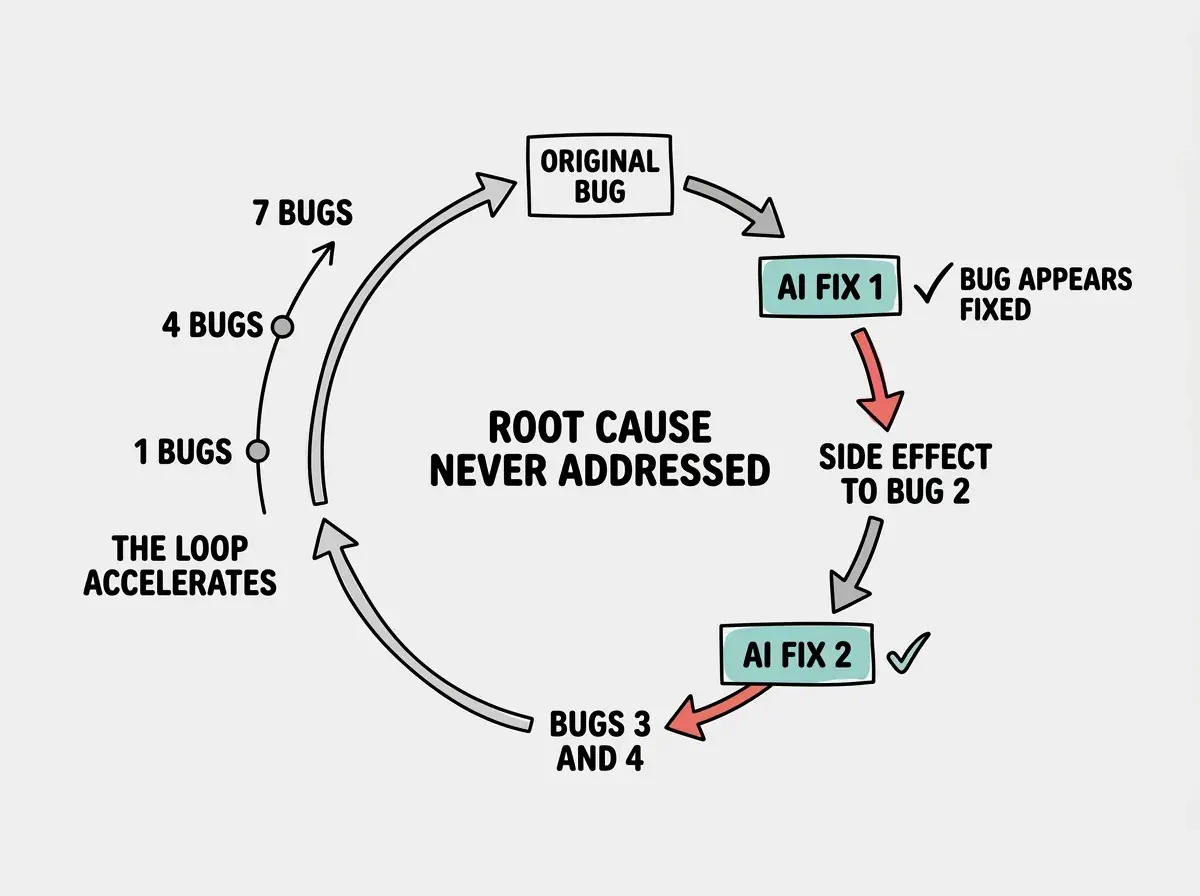
This is how one bug becomes four. Fix the symptom in one place and the underlying cause expresses itself somewhere else, in a different form, in a file you were not expecting. Each new symptom looks unrelated to the original problem because it is downstream rather than adjacent. The AI treats each new error as a fresh problem to patch, so each patch adds more symptom-level duct tape, and the actual bug digs deeper into the codebase.
The Whack-a-Mole Loop in Practice
Here is exactly what happened on a project I worked on last year. A dashboard component was throwing a TypeError when the page loaded. I pasted the error into my AI tool. The fix was a conditional render wrapping the component. The TypeError went away.
Thirty minutes later, a completely separate part of the app stopped working. The sidebar navigation was not highlighting the active route. Unrelated, right? I pasted the error in. The AI rewrote the navigation logic. The sidebar started working again.
An hour after that, the dashboard data was stale. It was not refreshing when the user navigated back to it. The AI added a key prop to force remounts. That seemed to fix it.
By the end of the day I had made seven separate AI-assisted changes, each one seemingly fixing a different bug, each one feeling like progress. The next morning I discovered that the original conditional render had broken the data context that three components depended on. Every bug that followed was a symptom of that first bad fix. I had spent a full working day making things worse.
That is the whack-a-mole bug loop. You are always swinging the mallet. You never stop to look at where the moles are actually coming from.
The Compulsive Accept Trap Inside the Loop
There is a second failure mode happening simultaneously: the compulsive accept trap. When AI fixes keep coming fast, each one looking clean and formatted and confident, you stop reading them. You scan for whether the error you pasted is mentioned in the solution. If it is, you hit accept.
This is not laziness. It is a psychologically predictable response to high-velocity, high-confidence output. The AI never says "I am not sure about this." It never hedges. It generates polished, well-structured code that looks like it was written by a senior developer. Your brain pattern-matches visual signals of quality, clean formatting, clear variable names, proper indentation, and reads them as signals of correctness. They are not the same thing.
The 400-hour exhaustion wall comes from this combination. The loop moves fast. The fixes look good. You accept everything. The codebase degrades without any obvious moment where you made the wrong decision. One developer described the endpoint: they had become "QA testing work of a bad engineer" and were exhausted. Not from one bad decision but from hundreds of small acceptances that compounded over months.
AI debugging makes things worse not because the AI is bad at coding, but because it is optimized to make errors disappear rather than to find root causes. Each symptom-level fix looks like progress while the actual bug gets buried deeper, generating new symptoms in new locations. The loop accelerates the longer you let it run.
The moment to recognize you are in the loop is when new errors appear in files you did not intend to change. That is the tell. If you fixed a button component and now your authentication flow is broken, an AI suggestion touched something it should not have. Stop immediately. The loop is in motion.
What Manual Debugging Actually Looks Like
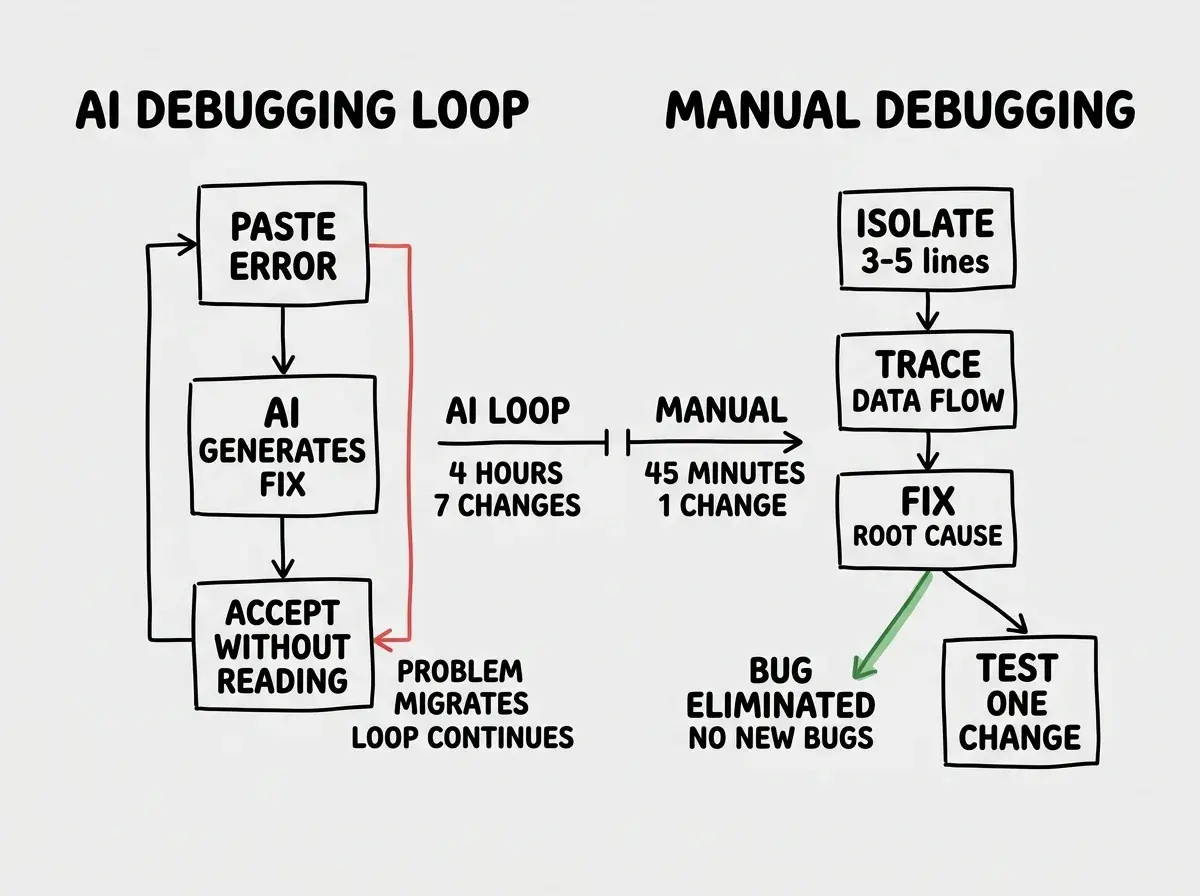
Switching to manual debugging does not mean reading every line of code or becoming an expert programmer overnight. It means doing three specific things that AI cannot do for you: isolate, trace, and test deliberately.
Isolate the bug before you ask for any fix. This is the step that AI debugging skips entirely. Before you paste any error into your tool, your job is to find the smallest possible code unit that reproduces the problem. Comment out everything around the failing function. Add a single console.log before the line that throws. Confirm exactly where the failure originates, not where the error appears in the stack trace, but where the bad data or bad logic first enters the system.
Most bugs, when properly isolated, turn out to be three to five lines of code. The AI fix usually touches twenty lines because the AI is guessing at what the problem might be. Isolation removes the guesswork.
Trace the data, not the error. Error messages tell you where things broke. They do not tell you why. Manual debugging means following the data backward from the failure point. If your component received null when it expected an object, trace where that data comes from. Is the API call returning null? Is there a transformation step that converts valid data to null under certain conditions? Is there a race condition where the component renders before the fetch completes?
Add console.logs at each step in the data journey and read the output in sequence. This takes ten minutes and tells you exactly which step introduced the problem. That is the root cause. Fix that one place and the downstream symptoms vanish on their own.
Test one change at a time. When you do ask the AI for help after doing this investigation, ask for one specific fix to one specific function. Not "fix the authentication bug." Ask "this function returns null when the userId is undefined; here is the function; here is the expected behavior." Paste only the relevant code. The AI now has a focused problem and a constrained solution space. The fix will be surgical rather than sweeping.
After the fix, test before accepting the next suggestion. Not after three fixes. After one. Run the specific scenario that was breaking. Confirm it works. Then and only then proceed to anything else.
When to Put the AI Down
The decision to stop using AI for a debugging session should be automatic once any of these three things is true.
You have made more than three AI-assisted changes to the same area of code in the same session. If three fixes have not resolved the problem, the AI is not understanding the root cause. More fixes will make the situation worse. Stop.
A new error appeared in a file that was not related to your original problem. The AI made a cascading change. You need to find out what it touched before you touch anything else. Run a git diff, read every file the AI modified, and manually revert anything that was not directly related to your stated fix.
You cannot explain in one sentence what the current bug is. If the problem has become "my app is broken in multiple places," you are past the point where AI can help. The AI needs a specific problem to produce a specific fix. "Broken in multiple places" is not a specific problem. It is the symptom of a debugging session that went wrong.
In all three cases, the move is the same. Stop prompting. Open your terminal. Start with a console.log at the highest level of the component or function that is failing. Read the output. Follow the data. Find the one line where the wrong thing happens. Fix that line manually or ask the AI for a targeted fix on that line only.
Using AI to debug a bug that was itself introduced by a previous AI fix. When you are debugging AI-generated code with the same AI tool, the context window fills with failed attempts and the model loses track of your actual codebase. Open a new conversation, paste only the relevant function, and describe the specific mismatch between what the function does and what it should do.
Committing Before You Debug
There is one habit that makes everything else in this article easier. Commit your code before you start any debugging session, AI-assisted or manual.
Run git add on your working files. Write a commit message that says exactly what state the project is in: "pre-debugging commit, feature X works, button Y is broken." Now you have a checkpoint.
When the debugging session goes sideways, and sometimes it will, you revert to this commit in ten seconds. No lost work. No mystery about what changed. No accumulated AI modifications that you cannot untangle. You are back to a known state with a precise description of exactly one bug.
This habit eliminates the panic that drives compulsive acceptance. The reason people keep hitting accept on AI fixes they have not read is fear. Fear of losing the progress they made before the bug appeared. A clean commit removes that fear. You can reject any fix without consequence. That freedom to reject is what makes it possible to actually evaluate each fix before accepting it.
The right habits make the difference between shipping and spinning.
Start hereWhat This Means for You
AI debugging making things worse is not an edge case. It is the default outcome when you skip isolation, accept fixes without reading them, and let a single conversation run past its usefulness. The whack-a-mole loop is the natural result of asking a pattern-matching system to do root-cause analysis.
The good news is that the loop has a hard stop. The moment you isolate the actual bug, trace the data to find where things go wrong, and make one targeted change rather than a cascade of patches, the loop ends. You are not debugging faster. You are debugging correctly, which means you only have to do it once.
Manual debugging skills are not a fallback for when AI fails. They are the prerequisite for using AI debugging effectively. You need to know what the root cause is before the AI can fix it for you. The AI handles the mechanics of the fix. You handle the thinking that makes the fix real.
- If you are a solo founder, budget thirty minutes of manual investigation before you open any AI tool for a debugging session. That time pays back five-to-one in avoided loop cycles.
- If you are a career changer, console.log is your best friend. It is not elegant. It is not sophisticated. It works every time and it teaches you more about how your app works than any AI explanation.
- If you are a developer who uses AI daily, the 41% revert rate is not happening to other people. It is happening in your codebase. Start reading diffs before accepting fixes, and make the commit-before-debugging habit as automatic as saving a file.
One good debugging session builds more confidence than a hundred AI accepts.
Keep reading