The 50 most common errors in vibe-coded apps fall into five predictable categories: build failures, runtime crashes, API and data problems, authentication issues, and deployment errors. Knowing these categories and their fixes before you encounter them turns hours of confused debugging into minutes of targeted problem-solving.
AI-generated code produces recognizable patterns of errors because large language models make consistent types of mistakes. They hallucinate API endpoints, forget error handling, mismanage state, and generate code that works in isolation but breaks when combined with other generated code. This guide is your quick-reference for every error you are likely to hit.
Why AI-Generated Code Produces Predictable Errors
AI coding tools are wrong 30 to 40% of the time on complex tasks. That number comes from multiple studies and real-world usage data. The encouraging part is that the mistakes are not random. They cluster into patterns, and once you recognize a pattern, the fix is usually straightforward.
The most common root cause is context loss. AI tools generate each piece of code with limited awareness of the full system. A function that works in isolation breaks when combined with another file's state management. An API route that handles the happy path crashes on unexpected input.
A study found that 41% of AI-generated code gets reverted within two weeks. The reason is not that AI writes bad code. It is that AI writes code without understanding the system it operates within. Learning to spot the patterns below saves you from becoming part of that 41%.
The second root cause is outdated training data. AI models recommend deprecated APIs and generate patterns that were best practice two years ago. Always verify that generated code uses current APIs and dependencies.
Build and Compilation Errors
These errors prevent your app from starting. They show up in your terminal or build log, not in the browser.
1. Module not found. AI references a package that is not installed. Fix: run npm install [package-name].
2. Cannot find module './Component'. Wrong import path or missing file. Fix: verify the file exists at the exact path. Check case sensitivity (Linux is case-sensitive, Mac is not).
3. Type error: Property does not exist. TypeScript mismatch. Fix: read the type definition and match the correct property name.
4. JSX expressions must have one parent element. AI forgot to wrap multiple elements in a fragment. Fix: add <>...</> around the return statement.
5. Unexpected token. Syntax error, missing bracket or mismatched quote. Fix: check the error line number, look for unclosed brackets above it.
6. Duplicate identifier. AI generated the same name twice. Fix: rename one or remove the duplicate.
7. 'X' is not assignable to type 'Y'. TypeScript type mismatch. Fix: check what the function expects and adjust the input.
8. Cannot use import statement outside a module. Mixing ES modules and CommonJS. Fix: add "type": "module" to package.json or use require().
9. 'React' must be in scope when using JSX. Older import requirement. Fix: add import React from 'react' or use a React version with automatic JSX transform.
10. Invalid hook call. Hooks called conditionally or outside components. Fix: move hooks to the top level of your component function.
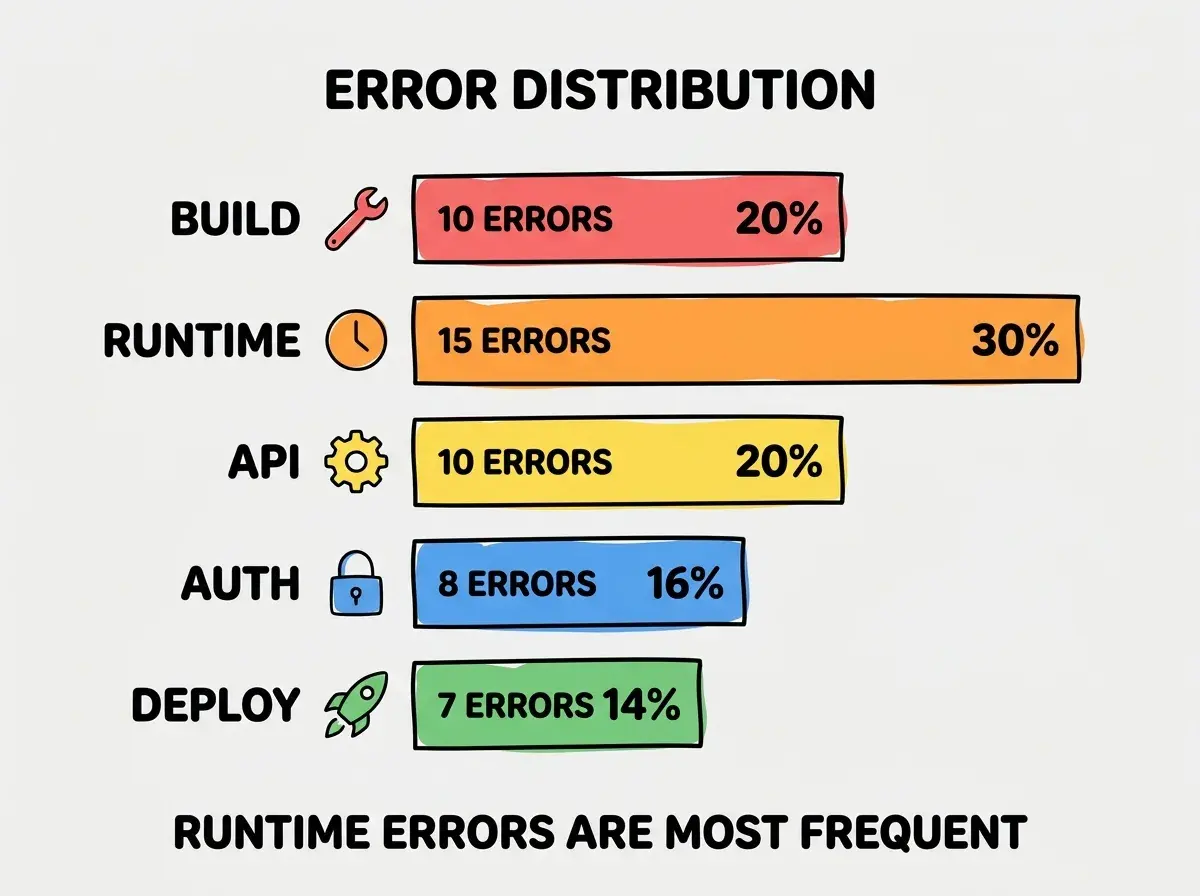
Most build errors have clear, specific error messages. The fix is almost always in the line referenced by the error.
Runtime and Logic Errors
These errors happen while your app is running. The app loads, but something breaks during use.
11. Cannot read properties of undefined. The most common runtime error. AI assumed a value exists when it might be null. Fix: add optional chaining (?.) or a null check.
12. Hydration mismatch (Next.js). Server HTML does not match client output. Fix: wrap browser-only code (window, localStorage) in useEffect.
13. Infinite re-render loop. useEffect updates state that triggers itself. Fix: check the dependency array and ensure updates do not re-trigger the effect.
14. State not updating. React state is asynchronous. AI reads state right after setting it. Fix: use the functional form of setState.
15. Memory leak in useEffect. Missing cleanup for subscriptions or intervals. Fix: return a cleanup function from the effect.
16. Maximum call stack size exceeded. Infinite recursion without a base case. Fix: add a termination condition.
17. Array index out of bounds. AI assumes an array has elements. Fix: check array.length > 0 before accessing indices.
18. Off-by-one error in pagination. Zero-indexed vs one-indexed mismatch. Fix: verify your pagination indexing matches the API.
19. Race condition in async operations. Two async calls modify the same data. Fix: use proper async/await sequencing.
20. Stale closure in event handlers. Handlers capture old state values. Fix: use useRef for current values or functional setState.
Most errors have a five-minute fix once you know the pattern. Bookmark this page for your next debugging session.
See all debugging guides21. Date/timezone issues. AI generates dates without timezone awareness. Fix: use UTC for storage and convert to local time only for display.
22. Floating-point precision errors. 0.1 + 0.2 !== 0.3 in JavaScript. Fix: use integer math (cents instead of dollars) for financial calculations.
23. String encoding issues. Special characters break through URLs or JSON. Fix: use encodeURIComponent() for URLs and proper escaping for SQL.
24. CSS specificity conflicts. Tailwind classes conflict with component library styles. Fix: restructure to avoid competing selectors.
25. Missing loading and error states. AI generates the success case but no loading spinner or error message. Fix: add isLoading and isError checks to every data-fetching component.
API and Data Errors
These errors involve communication between your frontend, backend, and external services.
26. CORS error. Frontend and backend on different origins. Fix: add CORS headers to your API routes.
27. 401 Unauthorized. Missing or expired auth token. Fix: check that tokens are in request headers and refresh expired tokens.
28. 404 Not Found on API routes. Route path does not match file structure. Fix: verify the route file exists at the correct path.
29. 429 Too Many Requests. Hitting rate limits. Fix: add retry logic with exponential backoff and cache responses.
30. JSON parse error. API returns HTML instead of JSON. Fix: check the endpoint URL and handle non-JSON responses.
31. Database connection timeout. Too many concurrent connections. Fix: use connection pooling and close connections properly.
32. SQL injection vulnerability. AI concatenates user input into SQL strings. Fix: always use parameterized queries.
33. Missing environment variable. AI references a variable that exists locally but not in production. Fix: verify all required environment variables are set in your hosting platform's dashboard.
34. Webhook signature verification failure. Stripe or other service webhooks fail because the signature check uses the wrong secret. Fix: use the production webhook secret, not the test mode secret.
35. Data serialization error. Sending a Date object, BigInt, or undefined through JSON. Fix: transform non-serializable values before sending them through API responses.
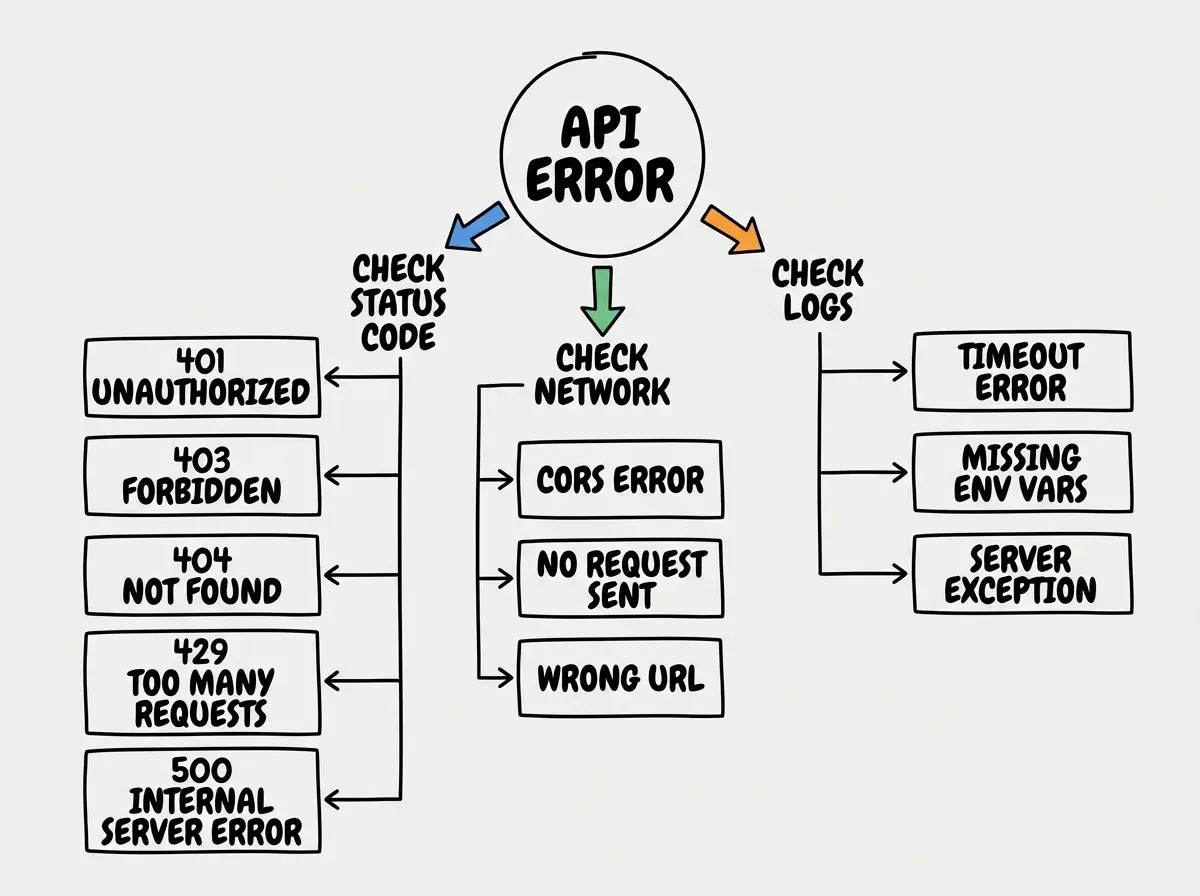
When you hit an API error, always check three things in order: the HTTP status code, the browser network tab, and the server logs.
Authentication and Authorization Errors
36. Redirect loop on login page. Middleware redirects unauthenticated users to login, but the login page itself triggers the redirect. Fix: exclude the login route from your auth middleware.
37. Session not persisting. Cookies not set correctly due to missing SameSite, Secure, or HttpOnly flags. Fix: configure cookie settings to match your deployment (HTTPS requires Secure: true).
38. OAuth callback URL mismatch. The callback URL in your OAuth provider dashboard does not match your actual URL. Fix: update the callback URL to match your production domain exactly.
39. Row Level Security blocking all queries. Supabase RLS enabled but no policies created, which defaults to blocking everything. Fix: create explicit RLS policies for SELECT, INSERT, UPDATE, and DELETE operations.
40. Token stored in localStorage. AI stores auth tokens in localStorage, vulnerable to XSS. Fix: use HttpOnly cookies.
41. Missing authorization check. AI forgets to verify user permissions. Fix: add role checks at the beginning of every protected route.
42. Password reset token not expiring. Fix: set a 15 to 60 minute expiration on reset tokens.
43. CSRF vulnerability. AI skips CSRF protection on form submissions. Fix: use framework-provided CSRF tokens.
Deployment Errors
44. Build works locally, fails in CI. Different Node.js versions, missing environment variables, or case-sensitive file paths. Fix: match your local Node version to your CI environment and check all env vars.
45. Serverless function timeout. Function exceeds the platform's execution time limit (10 seconds on Vercel free tier). Fix: optimize the function, move heavy processing to background jobs, or upgrade your plan.
46. Out of memory during build. Large dependencies or unoptimized images. Fix: optimize images at upload time and tree-shake unused dependencies.
47. Mixed content warning. HTTPS page loading HTTP resources. Fix: ensure all external URLs use HTTPS.
48. Static generation error for dynamic data. Next.js tries to statically generate a page that needs runtime data. Fix: use dynamic = 'force-dynamic'.
49. Domain SSL certificate error. DNS propagation incomplete. Fix: wait up to 48 hours for propagation, verify your platform shows a valid certificate.
50. Cold start latency. Serverless functions take 1 to 5 seconds on first invocation. Fix: use edge functions for latency-sensitive routes.
Trying to debug errors by asking AI to fix them without providing the actual error message. AI needs the specific error text, the file it occurred in, and what you were doing when it happened. Vague prompts like "my app is broken, fix it" produce vague fixes that often introduce new bugs. Copy-paste the exact error message into your AI tool.
Bookmark this page. You will encounter at least 20 of these errors in your first serious project, and having the fix ready saves hours of frustrated searching.
What This Means For You
- If you're a founder: Focus on errors 1-10 (build), 11-15 (runtime basics), and 26-28 (API). These cover 80% of what you will encounter in your first project. Save the rest for when you hit them.
- If you're changing careers: Understanding these error patterns is one of the fastest ways to build debugging intuition. Work through each category and try to trigger the errors intentionally so you recognize them in the wild.
- If you're a student: This list is effectively a study guide for practical software engineering. Each error teaches a concept that textbooks cover in theory but that you need to experience to truly understand.
Search for the exact error message. If it is not on this list, it is probably a variation of one that is.
See all debugging guides