Version control is a system that records every change made to your project so you can go back to any previous version at any time. If you have ever accidentally deleted something important and wished you could undo it, version control is that wish granted for your entire codebase. It tracks who changed what, when they changed it, and why.
You do not need to be a developer to understand version control. You already use a version of it every day. And once you see the concept clearly, you will wonder how anyone builds software without it.
The Save Point That Explains Everything
Think of version control like save points in a video game.
When you play a difficult game, you save before a boss fight. If you lose, you reload that save and try again. You do not restart the entire game from the beginning. You just go back to the moment before things went wrong.
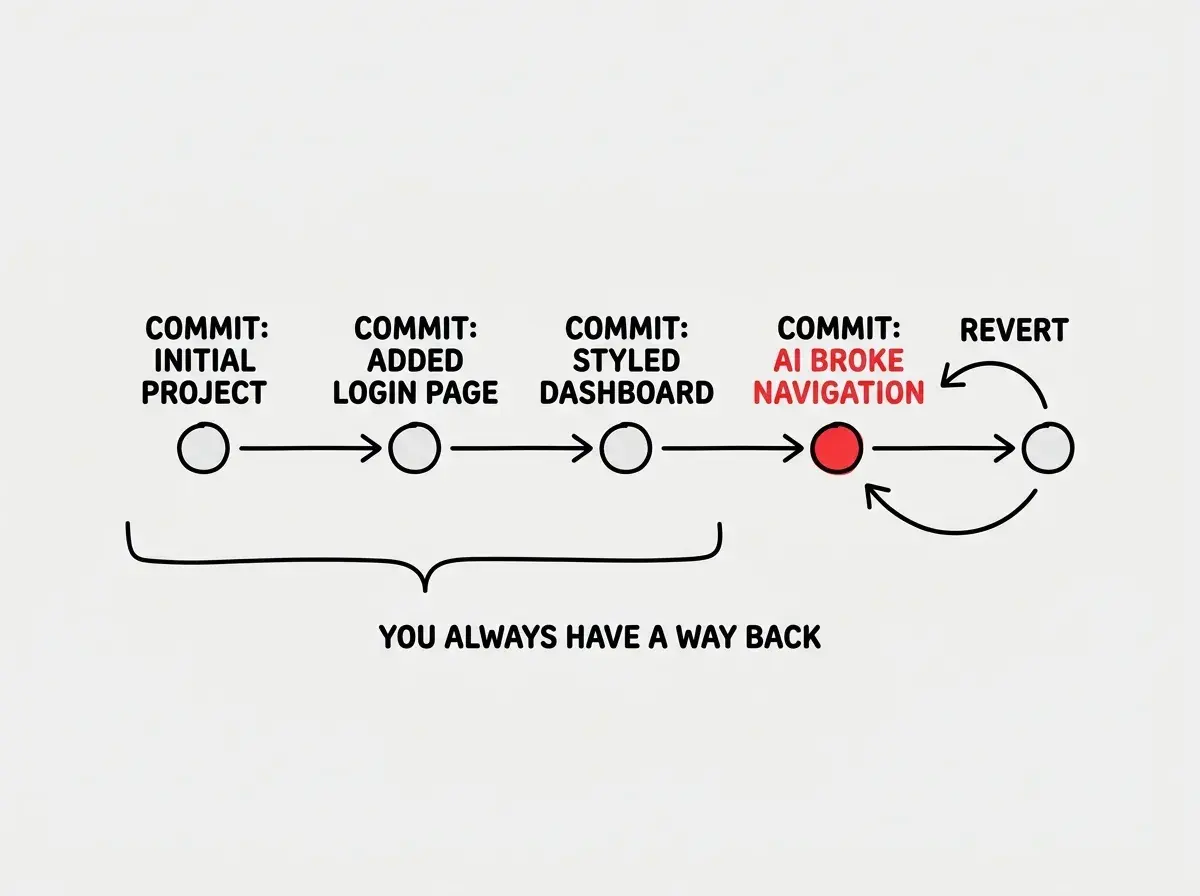
Version control works exactly the same way for your code. Every time you save a checkpoint (called a "commit"), you create a save point. If your AI coding tool introduces a bug, breaks a feature, or takes your project in the wrong direction, you reload a previous save. Your project snaps back to the moment before things went sideways, and you try again.
The difference between a video game and version control is that version control keeps every save point forever. Not just your most recent one. Every single checkpoint you have ever created stays available. You could jump back to what your project looked like three weeks ago, compare it to yesterday, and cherry-pick specific changes to keep or discard.
The Core Concepts in Plain Language
This confuses everyone at first because version control has its own vocabulary. But every term maps back to the save point analogy.
A commit is a save point. When you "commit" your changes, you are creating a snapshot of your entire project at that moment. Each commit gets a message describing what changed, like a label on your save file. "Added login page" or "Fixed broken navigation" or "Removed that weird animation the AI added."
A repository is your save file. The repository (or "repo") is the container that holds your project and all of its save points. Think of it as the memory card that stores every save you have ever made.
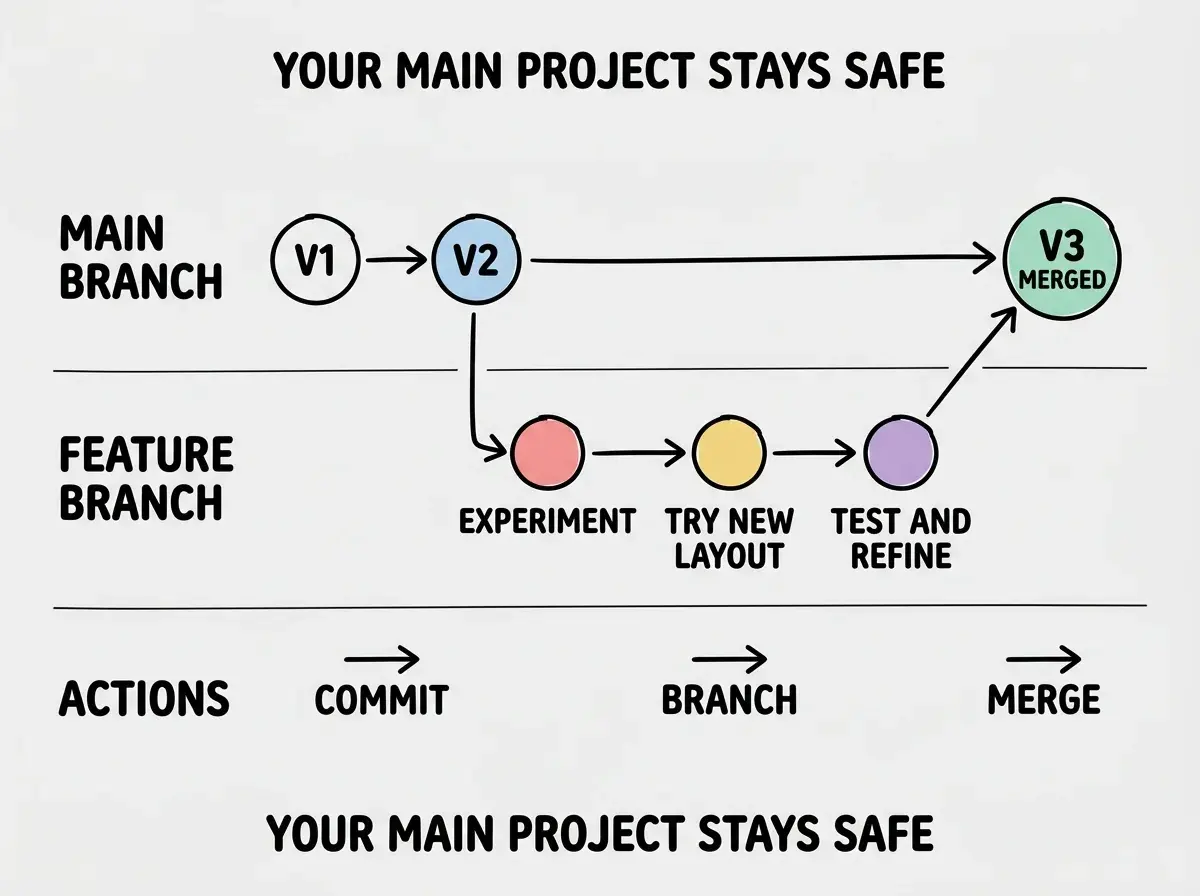
A branch is an alternate timeline. This is where the analogy gets powerful. Imagine you are playing a game and you want to try two different strategies for the same boss fight. You create two separate save files from the same starting point. One branch tries the aggressive approach, the other tries stealth. You play both out, see which one works better, and then continue with the winning strategy.
In version control, branches let you experiment without risk. You create a branch, try something new, and if it works, you merge it back into your main project. If it fails, you delete the branch and nothing in your main project was ever touched.
Reverting is reloading a save. When something breaks, you "revert" to a previous commit. Your project snaps back to that exact state. The broken changes disappear. Your working version returns.
Version control is not about tracking code for tracking's sake. It is about giving you the confidence to experiment freely. When you know you can always go back, you stop being afraid to try things. That fearlessness is what makes vibe coding possible, because working with AI means constantly trying, evaluating, and sometimes undoing.
Why This Is Non-Negotiable for Vibe Coding
Here is the thing about working with AI coding tools. They are brilliant and unpredictable at the same time. An AI might generate fifty lines of perfect code, then on the next prompt, rewrite something that was already working and break three features.
Without version control, you are stuck. You have to manually figure out what changed, what broke, and how to fix it. With version control, you compare the current broken state to your last working save point, see exactly what the AI changed, and undo just the problematic parts.
This is called "defensive committing," and experienced developers do it constantly. Before asking an AI to make a big change, they commit. That way, if the AI's output is bad, they revert in seconds. The entire failed experiment vanishes.
You might think version control is only for teams of developers working together. But actually, it is even more important for solo vibe coders. When you are the only person on a project and your AI assistant makes a change you do not understand, version control is your safety net. It is the difference between losing an afternoon of work and losing five seconds.
Git and GitHub, Separated
Two terms you will hear constantly are Git and GitHub. They sound similar but serve different purposes.
Git is the version control system itself. It is the technology that creates save points, manages branches, and handles reverting. Git runs on your computer and tracks changes locally. Think of Git as the save system built into the game.
GitHub is a website where you store your repository online. It is like cloud storage for your save files. If your computer dies, your project and all its save points are safe on GitHub. It also lets other people (or your AI tools) access the code.
You use Git to create commits and branches. You use GitHub to store them online and collaborate. Most AI coding tools connect to GitHub directly, which is why you will see it mentioned in nearly every vibe coding tutorial.
There are alternatives to GitHub, like GitLab and Bitbucket, but GitHub is by far the most common. It is where the vast majority of open-source projects live, and it is the platform that AI coding tools are most tightly integrated with.
Learn the foundational concepts that make working with AI tools click.
Start learningThe Three Moves You Will Use Every Day
Version control can do hundreds of things, but as a vibe coder, you will use three moves constantly.
Move 1: Commit before experimenting. About to ask the AI to refactor your entire page? Commit first. About to try a new feature? Commit first. This takes five seconds and gives you a guaranteed rollback point.
Move 2: Branch for big changes. If you are trying something risky, like redesigning a page or adding a complex feature, create a branch. Work on the branch. If it works, merge it in. If it fails, delete the branch. Your main project stays untouched.
Move 3: Revert when things break. Something went wrong and you cannot figure out what the AI changed? Do not spend an hour debugging. Revert to your last commit and try again with a better prompt. This is not giving up. This is working smart.
Senior developers ship 2.5 times more AI-generated code than juniors, and a big part of that speed comes from knowing when to commit and when to revert. They do not waste time fixing bad AI output. They undo it and try again.
What You Do Not Need to Know (Yet)
This is permission to not know things. You do not need to memorize Git commands. AI tools and visual interfaces like GitHub Desktop or VS Code's built-in Git panel handle the commands for you. You click buttons, write short descriptions, and the tool does the rest.
You do not need to understand rebasing, cherry-picking, or merge conflict resolution strategies. Those are advanced techniques that matter for large teams. As a solo vibe coder, commits, branches, and reverts cover 95% of what you need.
Not committing often enough. New vibe coders sometimes work for hours without a single commit, then lose everything when an AI change breaks their project. Commit after every meaningful change, even if it feels excessive. A good rule is to commit every time something works. Finished a new section? Commit. Fixed a bug? Commit. Like it how it looks right now? Commit. You cannot have too many save points.
The depth comes with experience. After a few projects, you will develop a rhythm for when to commit, when to branch, and when to revert. That intuition builds through doing, not through studying documentation.
What This Means For You
Version control is your safety net, your undo button, and your confidence builder. It lets you work with AI tools fearlessly because you always have a way back.
- If you are a founder building a product: Version control protects your investment. Every hour of development is preserved in your commit history. If a contractor, co-founder, or AI tool makes changes you do not like, you can always roll back. It also gives you a clear record of what was built and when, which matters for due diligence and intellectual property.
- If you are a career changer learning vibe coding: Start using version control from your very first project, even if it feels unnecessary. The habit of committing before experimenting will save you dozens of frustrating hours. Use GitHub Desktop if the command line feels intimidating. The visual interface makes commits and branches feel as natural as saving a document.
- If you are a student exploring technology: Understanding version control gives you a skill that transfers everywhere. Every software team in the world uses Git. Learning it now, even at a basic level, gives you common ground with professional developers and makes your portfolio projects look more credible.
Version control is just one piece of the puzzle. Learn what else you need to start building.
Keep exploring