A defensive commit is a git commit you make right before you let AI change your code. Think of it like a save point in a video game. You would never fight a boss without saving first, right? The same logic applies every time you hand your codebase to an AI tool and say "refactor this" or "add authentication" or "fix this bug."
92% of US developers now use AI coding tools daily. That is not a typo. Nearly everyone building software is letting AI write or rewrite their code on a regular basis. And here is the part nobody talks about: 41% of AI-generated code ends up getting reverted. Almost half. That means roughly half the time your AI assistant touches your project, you are going to want to undo what it did.
Without a save point, undoing becomes a nightmare. You are stuck trying to remember what your code looked like ten minutes ago, manually piecing together files from memory. With a defensive commit, you type one command and you are back to safety.
Why AI Changes Are Riskier Than You Think
When you write code yourself, you change one thing at a time. You add a button, test it, then move on. AI does not work that way. When you ask an AI tool to "add a login page," it might modify five files, create three new ones, update your configuration, and restructure your folder layout. All at once. With zero warning about what it plans to touch.
That is like walking into a boss fight where the boss can attack from five directions simultaneously. You would absolutely save your game first.
The problem gets worse because AI changes look correct at first glance. The code compiles. The page renders. But buried three files deep, the AI silently removed an important validation check, changed a database query, or overwrote a config value you spent an hour getting right. You might not notice for days. By then, if you never made a save point, that work is gone forever.
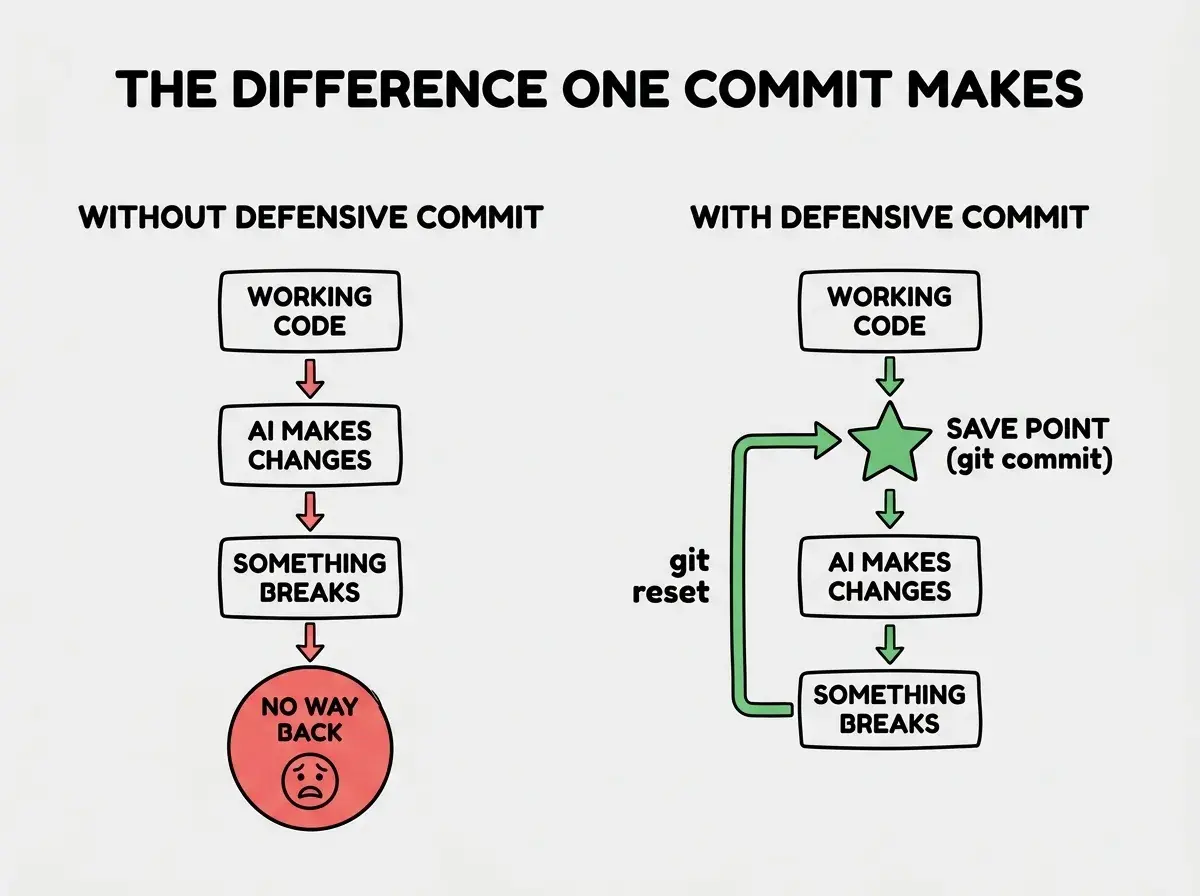
This is not a hypothetical scenario. It happens every day to vibe coders who are moving fast, excited about what AI can build, and not thinking about version control. The fix takes ten seconds.
What You Need to Know About Git (Just the Basics)
If you have never used git, here is the minimum you need. Git is a tool that tracks changes to your files over time. Every time you "commit," git takes a snapshot of your entire project at that moment. You can jump back to any snapshot whenever you want.
You need exactly three commands for defensive commits. That is it. Three commands and you have a safety net for every AI interaction.
First, open your terminal. If you are using VS Code, press Ctrl+backtick (or Cmd+backtick on Mac) to open the built-in terminal. If you are using Cursor or another AI editor, look for a Terminal tab at the bottom of the window.
Command 1: Check what changed
git status
This shows you which files have been modified, added, or deleted since your last commit. Run this before anything else so you know what you are about to save.
Command 2: Stage everything
git add .
This tells git "I want to include all current changes in my next snapshot." The dot means "everything in this folder."
Command 3: Create the save point
git commit -m "save point before AI refactor"
This creates the actual snapshot. The text in quotes is your note to yourself about why you saved. Make it descriptive enough that you will understand it tomorrow.
That is the whole process. Three commands, ten seconds, and your work is protected.
The defensive commit is not about writing perfect commit messages or following git best practices. It is about one thing: creating a save point you can return to if AI breaks something. Even a commit message that just says "save before AI changes" is infinitely better than no commit at all. Do not let perfectionism stop you from protecting your work.
When to Make Defensive Commits
Not every AI interaction needs a save point. If you are asking your AI to explain a concept or write a comment, your code is not changing. But any time the AI is about to modify, create, or delete files, you need a defensive commit first.
Here is a practical list of moments that should trigger a save:
Always commit before:
- Asking AI to refactor or restructure existing code
- Adding a new feature that touches multiple files
- Letting AI "fix" a bug (the fix often creates new bugs)
- Running any AI command that modifies your project automatically
- Trying a suggestion you are not 100% sure about
You can skip it when:
- The AI is only generating a single new file you have not touched yet
- You are reading AI explanations without applying changes
- You already committed less than a minute ago and nothing changed since
Think of it this way: in a video game, you save before boss fights, before opening mystery chests, and before making any choice you cannot reverse. AI modifications are all three at once. You do not know exactly what will happen, you cannot easily reverse it without a save point, and the stakes are your entire working project.
How to Undo When AI Breaks Things
So you made your defensive commit, the AI changed your code, and now something is broken. Time to load your save point. You have two options depending on how bad the damage is.
Option A: Undo everything the AI did
git checkout .
This resets all modified files back to your last commit. Any changes the AI made since your save point disappear. Clean slate, working code, no stress.
Option B: Keep some changes, undo others
git diff
This shows you exactly what changed since your last commit, line by line. You can review what the AI did and then selectively undo specific files:
git checkout -- filename.js
Replace filename.js with whichever file you want to restore. This lets you keep the AI changes that worked while reverting the ones that did not.
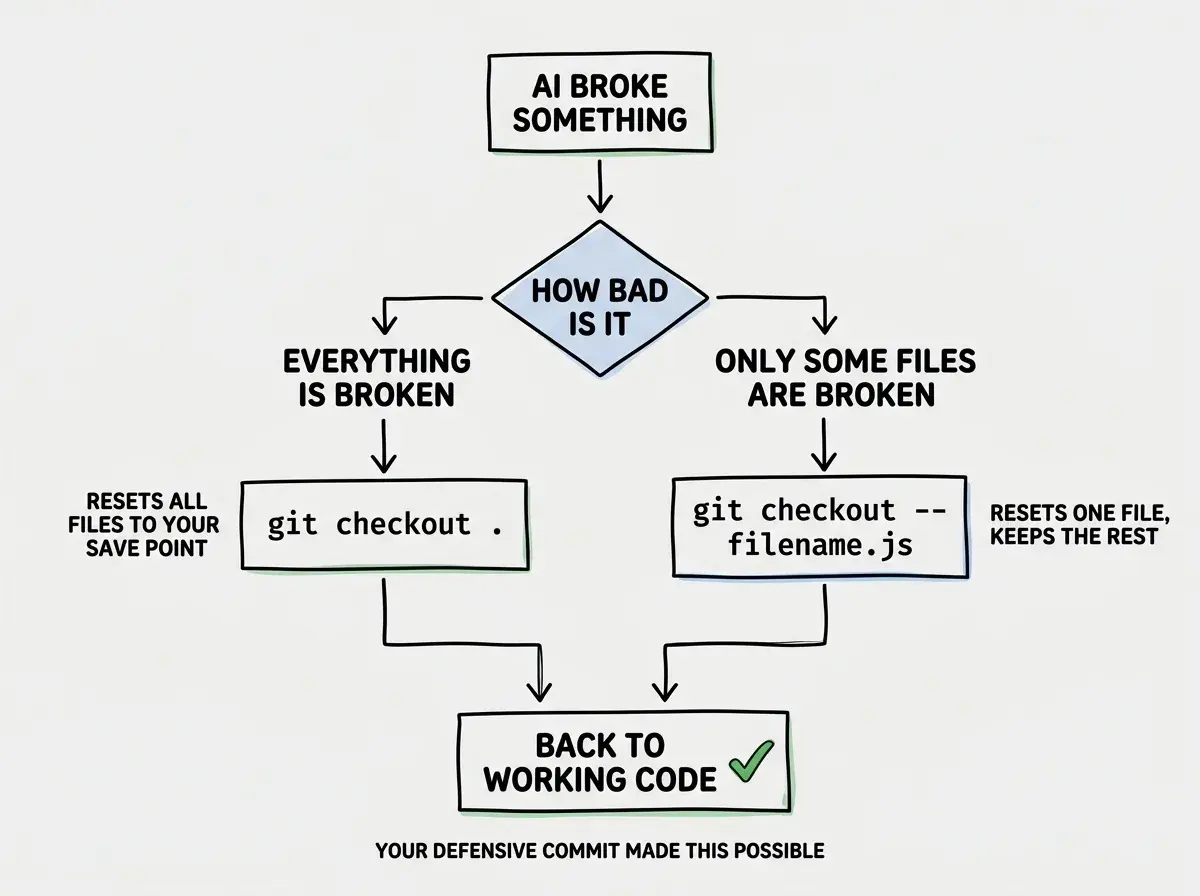
This is the real power of defensive commits. They turn every AI interaction from a permanent, irreversible change into a safe experiment. If the experiment works, great. If it does not, you are back to your save point in seconds.
Waiting too long between defensive commits. Some people make one commit at the start of a coding session and then let AI make fifteen changes over the next hour without saving again. That is like playing through an entire dungeon without saving once. If anything goes wrong, you lose everything since that first save. Commit after every successful AI change, not just before the first one. Each working state deserves its own save point.
Building the Habit
The hardest part is remembering to do it. Here are three tricks that make defensive commits automatic.
Make it a verbal trigger. Every time you are about to type a prompt to your AI tool, pause and ask yourself: "Would I be upset if this breaks everything?" If the answer is yes, commit first. After a week, this becomes instinct.
Use short commit messages. Do not overthink the message. "save before AI auth changes" and "working state before refactor" are both perfectly fine. The goal is speed, not poetry. You are saving a game, not writing documentation.
Set a timer if you need to. When you are deep in a vibe coding session, time disappears. Set a 15-minute recurring timer on your phone. Every time it goes off, check if you have uncommitted changes worth protecting. If you do, commit them.
The pattern is simple: save, experiment, evaluate. Save your working code, let the AI try something, then decide whether to keep the changes or load your save point. Repeat this loop and you will never lose work to an AI change again.
Defensive commits are one of the foundational habits that separate successful vibe coders from frustrated ones.
Explore more foundationsDig deeper
A few hand-picked sources if you want to go further.
What This Means For You
- If you are a founder: Your product is your business. One bad AI refactor without a save point can cost you a day of work or more. Ten seconds of committing before each AI interaction is the cheapest insurance you will ever buy. Start today, even if your project is small.
- If you are a career changer: Learning defensive commits now sets you apart. Professional developers commit constantly, and understanding why gives you an advantage in interviews and on teams. It shows you think about risk, not just features.
- If you are a student: Build this habit before your projects get complex. The students who lose a weekend of work to a bad AI suggestion and have no way to recover are the ones who quit. The ones who commit defensively keep building, keep learning, and keep shipping.
Version control is not glamorous. It is not the exciting part of building with AI. But it is the thing that lets you keep building when experiments fail. Every AI interaction is an experiment. Every experiment deserves a save point.
Now that you know how to protect your work, put it into practice on a real project.
Browse project tutorials