Security is the practice of protecting your app, your users, and their data from people who want to exploit it. If you are building with AI tools, this topic is not optional. A 2025 study by Veracode found that 45% of AI-generated code introduced security flaws. That is nearly half. And there is a joke circulating in the developer community that captures the mood perfectly: "The S in vibe coding stands for security."
The joke lands because there is no S in "vibe coding." That is the point.
But here is the good news. Security is not magic. It follows predictable patterns. And once you understand those patterns, you can protect your app the same way you protect your house, by making sure the locks are in the right places.
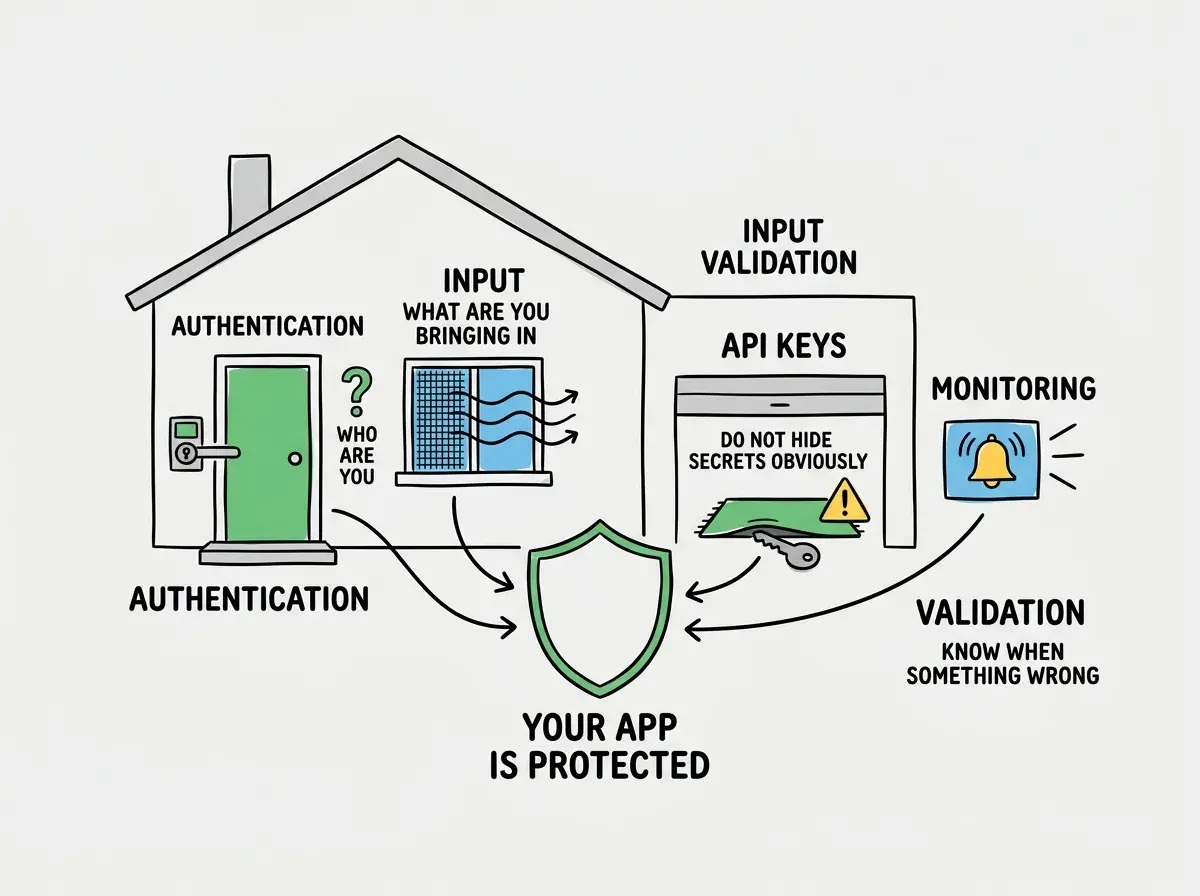
Your App Is a House
Think of your app as a house. A house has a front door, windows, a garage, maybe a back entrance. Each one is a way in. Security is the system of locks, alarms, and habits that keeps uninvited people out.
Most burglaries do not happen through forced entry. They happen through unlocked windows, open garage doors, and spare keys left under the doormat. App security works the same way. The majority of breaches are not sophisticated hacking operations. They are someone walking through a door you forgot to lock.
This analogy carries through every concept in this article. Once you see your app as a house, security stops being abstract and starts being obvious.
The Front Door Lock (Authentication)
Authentication is the front door lock on your house. It answers one question: who are you?
When a user logs in with a username and password, that is authentication. When they use Google Sign-In, that is authentication. When they scan their fingerprint, that is authentication. The mechanism varies, but the purpose is always the same. Prove you are who you claim to be.
This confuses everyone at first because authentication gets mixed up with a related but different concept: authorization. Here is the simplest way to separate them.
Authentication is the front door lock. It controls who gets in. Authorization is the rules about which rooms they can access once inside. A hotel guest is authenticated when they check in at the front desk. They are authorized to enter room 304, but not room 305. Both matter. But they are different locks.
You might think that using a service like Supabase or Firebase handles all of this automatically. But actually, these services handle authentication (the front door lock) while leaving authorization (which rooms each user can access) largely up to you. This is exactly what went wrong with Lovable's CVE-2025-48757. The AI-built apps had front doors, but the individual rooms inside were wide open. Over 170 production apps were exposed because Row Level Security, the authorization layer, was never configured.
The Window Screens (Input Validation)
Your front door might be locked, but what about the windows? In an app, the windows are every place a user can type or paste something: forms, search bars, comment boxes, URL parameters.
Input validation is the screen on your windows. It lets fresh air in (legitimate data) while keeping bugs out (malicious code). Without input validation, someone can type a snippet of code into your search bar, and your app will actually run it. This is called Cross-Site Scripting, or XSS, and AI-generated code is 2.74 times more likely to introduce this vulnerability.
Imagine your app has a comment section. A normal user types "Great article!" A malicious user types JavaScript code that steals session cookies from everyone who views that comment. Without input validation, your app treats both inputs the same way: it trusts them and displays them.
The fix is straightforward. Never trust user input. Always validate it, sanitize it, and treat it as potentially hostile. It is like putting screens on every window in your house. Not exciting work, but essential.
CSRF, or Cross-Site Request Forgery, is the related cousin. If XSS is someone climbing through your window, CSRF is someone tricking you into unlocking your own door. A malicious website makes your browser send a request to your app while you are still logged in, performing actions you never intended. The protection is a special token (like a unique key) that proves the request actually came from your app, not from somewhere else.
Security is not about being unhackable. It is about not being the easiest target. Most attacks are automated scripts scanning millions of apps for common vulnerabilities: exposed API keys, missing input validation, no authentication on sensitive routes. Locking the obvious entry points stops the vast majority of threats. You do not need a fortress. You need a house where all the doors and windows are actually locked.
The Spare Key Under the Doormat (API Keys)
This is the most common security mistake in vibe-coded apps, and it is the easiest to understand. An API key is a password that lets your app talk to other services. Your Supabase key, your Stripe key, your OpenAI key. These are the master keys to your house.
Leaving an API key in your frontend code is like leaving a spare key under the doormat. Anyone who looks can find it. And "anyone who looks" is not hypothetical. Automated bots scan public code repositories constantly, looking for exposed keys. The Moltbook breach leaked 1.5 million authentication tokens and 35,000 emails, partly because secrets were not properly secured.
The rule is simple. API keys belong in environment variables on your server, never in code that runs in the browser. If you can see it by right-clicking and choosing "View Source," it is not secure.
Understanding security basics is one of the most valuable things you can learn as a builder.
Learn more fundamentalsThe Security System (Monitoring)
A house with good locks but no alarm system has a blind spot. You will not know when someone tries to break in, and you will not know if they succeed.
Monitoring is your security system. It watches for unusual activity: a user trying thousands of passwords, a sudden spike in database queries, someone accessing admin routes they should not know about. Tools like Sentry for error tracking or LogRocket for session recording give you visibility into what is happening inside your app.
You do not need enterprise-grade monitoring on day one. But you need something. At minimum, log failed login attempts and set up alerts for unusual patterns.
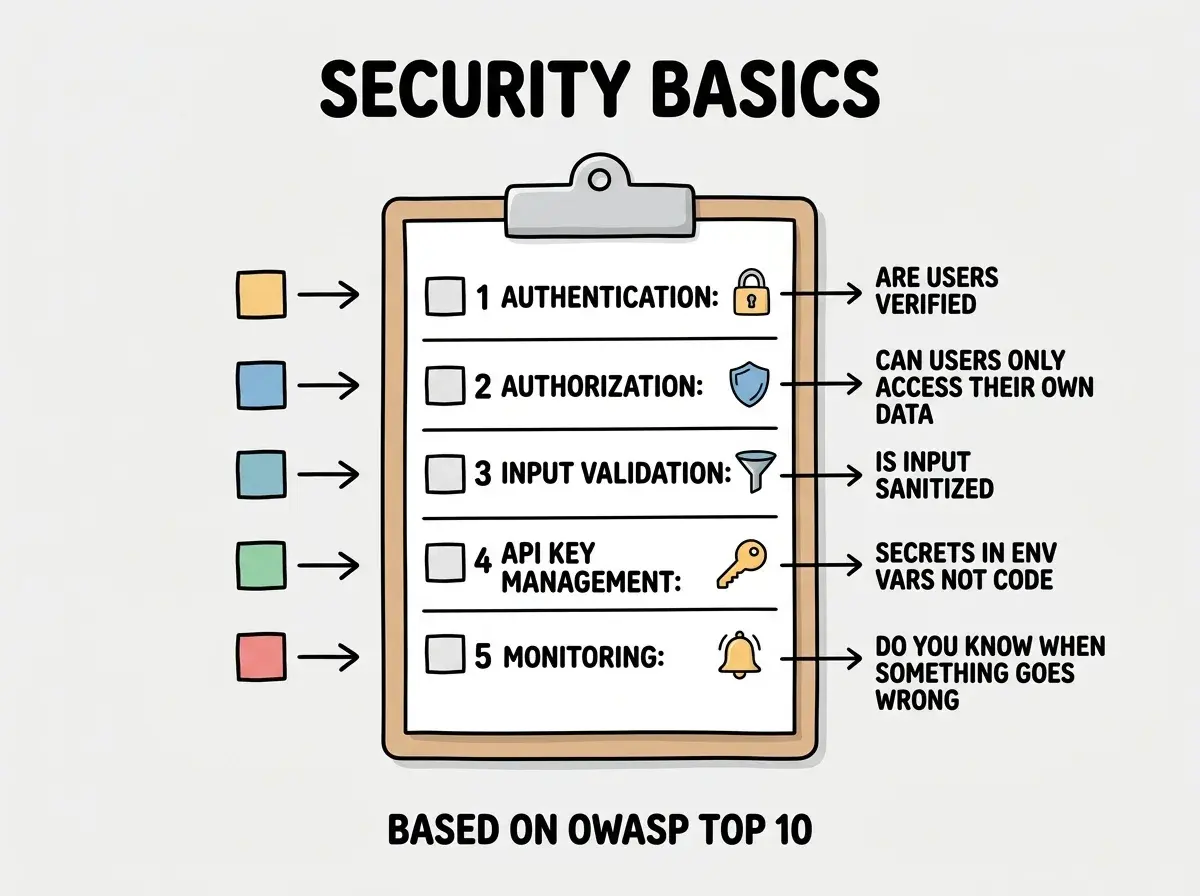
The OWASP Top 10 (Your Home Security Checklist)
OWASP, the Open Worldwide Application Security Project, publishes a list of the ten most common security vulnerabilities in web applications. Think of it as a home security checklist, the ten things a locksmith would check during a home inspection.
The full list gets technical, but the themes are familiar. Broken access control (rooms without locks). Injection attacks (unscreened windows). Security misconfiguration (the garage door left open because nobody changed the default setting). Outdated components (a lock so old that every burglar knows how to pick it).
You do not need to memorize the OWASP Top 10. You need to know it exists so you can reference it, and so you can ask your AI tool "does this code follow OWASP guidelines?" That single question catches a surprising number of issues.
Why AI Makes This Harder (and What to Do About It)
AI coding tools optimize for "make it work." They are not optimizing for "make it secure." When you ask an AI to add user authentication, it will get the login screen working. Whether it properly validates tokens, sets secure cookie flags, or implements rate limiting is another question entirely.
This is not a reason to stop using AI. It is a reason to check the locks after AI builds the house. Here is a practical approach.
After AI generates any code that handles user data, authentication, or payments, ask it directly: "What are the security vulnerabilities in this code?" AI tools are actually quite good at finding security issues when asked. They just do not prioritize security when generating code unprompted.
Use security linting tools. ESLint plugins like eslint-plugin-security automatically flag common vulnerabilities. It is like having a locksmith review the house after the builder finishes.
Never skip the environment variable step. Every time AI puts an API key directly in your code (and it will), move it to a .env file immediately.
Assuming that because your app is small, nobody will attack it. Automated scanning bots do not care how many users you have. They scan every publicly accessible app for known vulnerabilities. A brand new app with three users and an exposed API key is just as attractive as a large one. Lock the doors from day one, not after a break-in.
What This Means For You
Security is the locks on your house. You need a front door lock (authentication), window screens (input validation), no spare keys under the doormat (proper API key management), and a security system (monitoring). Most break-ins happen through unlocked windows, not forced entry, and most security breaches exploit basic oversights rather than sophisticated techniques.
- If you are a founder building a product: Security breaches kill user trust instantly. The cost of adding basic security from day one is trivial compared to the cost of a breach. When evaluating AI-generated code, always ask about authentication, authorization, and API key handling. The Lovable incident showed that even popular platforms can ship insecure defaults.
- If you are a career changer learning to build: Make security part of your workflow, not an afterthought. Every time you build a feature that handles user data, run through the checklist: authentication, authorization, input validation, API key management. This habit will set you apart from builders who ignore security until something breaks.
- If you are a student exploring app development: Understanding security fundamentals makes you more valuable than knowing any single framework. Learn the OWASP Top 10 concepts, practice identifying vulnerabilities, and build the habit of asking "how could someone misuse this?" about every feature you create.
Security is one piece of the puzzle. Learn the other fundamentals that help you build with confidence.
Explore more