Testing is the process of verifying that your app actually does what it is supposed to do. Not what you hope it does. Not what it seemed to do when you tried it once. What it provably, repeatably, reliably does under all the conditions your users will throw at it.
This is where a lot of vibe coders get uncomfortable. Building is exciting. Testing feels like paperwork. But 45% of AI-generated code introduces security flaws, and apps that skip testing consistently break in ways that destroy trust. Testing is not the boring part after building. It is the part that determines whether what you built actually works.
The Dress Rehearsal Before Opening Night
Think of your app as a theater production. You have written the script (your code), built the sets (your interface), and hired the actors (your features). Opening night is when real users start using your app.
A dress rehearsal is a full run-through of the show before the audience arrives. You check that every actor knows their lines. You verify that the set changes happen smoothly. You confirm the lighting cues fire at the right moments. You run through the entire performance looking for problems while there is still time to fix them.
Nobody would dream of opening a Broadway show without a dress rehearsal. But vibe coders skip testing constantly, performing live for the audience on the first night and hoping nothing goes wrong.
Testing is your dress rehearsal. It catches problems that are cheap to fix now but catastrophic to discover later.
The Three Types of Software Testing
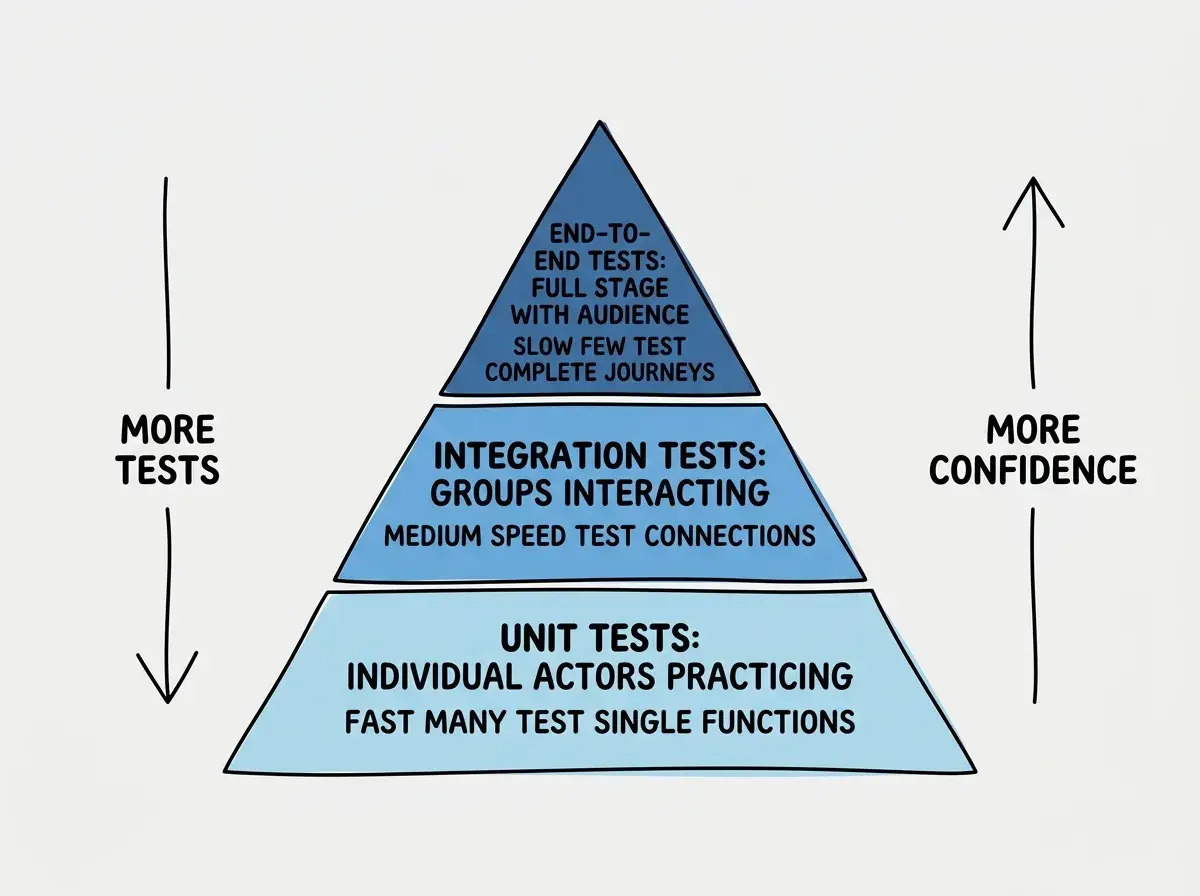
This confuses everyone at first because "testing" sounds like one activity. It is actually three levels, each checking your app at a different scale. The theater analogy makes the levels intuitive.
Unit tests (rehearsing individual scenes). A unit test checks one small piece of your app in isolation. Does the login function correctly validate an email address? Does the price calculator apply the right discount? Does the date formatter show dates in the correct format?
These are like rehearsing a single scene. You pull out one actor, give them their lines, and verify they deliver them correctly. You are not testing the full show. You are testing one piece to make sure it works on its own before combining it with everything else.
Integration tests (rehearsing scene transitions). An integration test checks that multiple pieces work together. Does the signup form correctly send data to the database and return a confirmation? Does the shopping cart update the total when you add an item and then correctly pass that total to the checkout page?
These are like rehearsing the transitions between scenes. Each scene might work perfectly on its own, but does the lighting change happen at the right time? Does the set move smoothly between acts? Integration tests catch the problems that only appear when pieces interact.
End-to-end tests (the full dress rehearsal). An end-to-end test runs through an entire user journey from start to finish. Open the app, create an account, browse products, add one to the cart, enter payment info, complete the purchase, receive a confirmation email. Every step, tested in sequence, exactly as a real user would experience it.
This is the full dress rehearsal. Everything runs together. If something breaks, you know the audience would have seen it.
Why AI Makes Testing Easier (and Also Trickier)
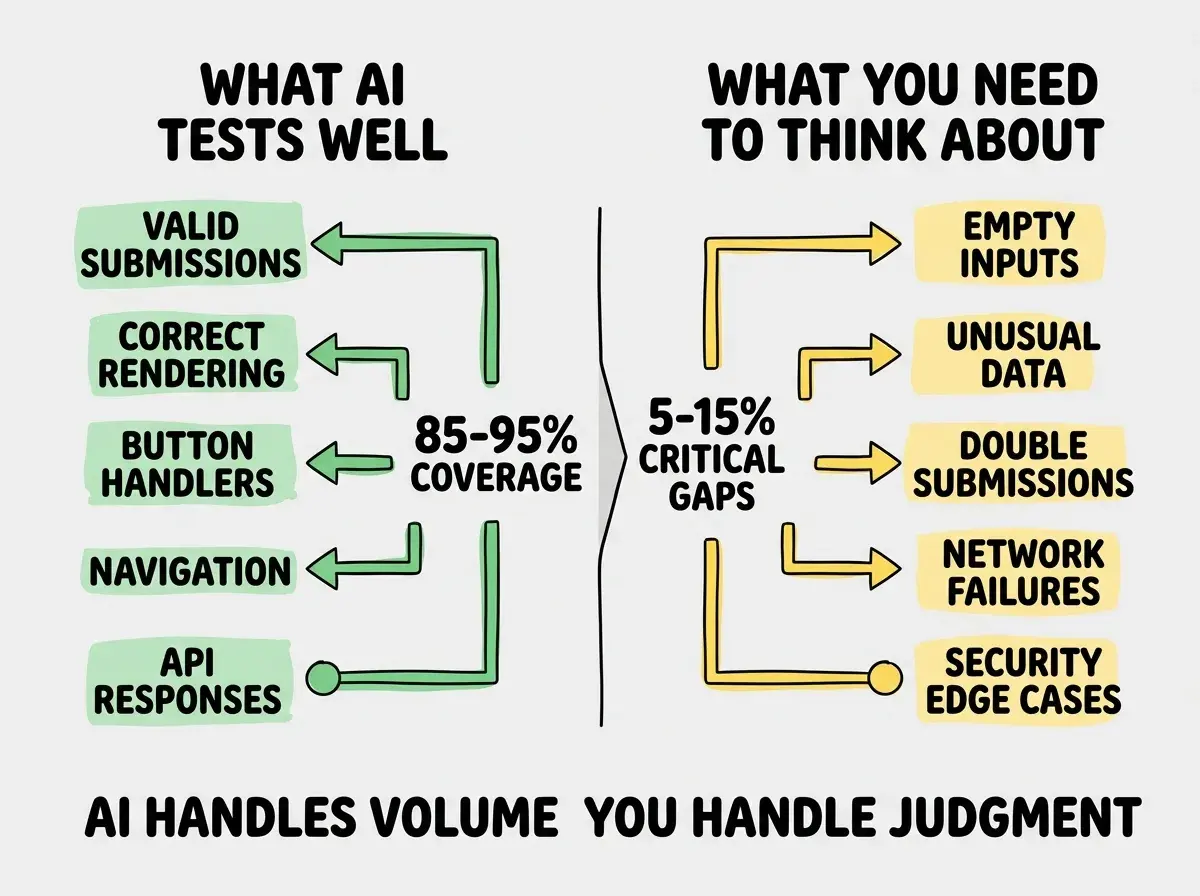
Here is the genuinely good news. AI tools are remarkably good at generating tests. Studies show a 50% or greater efficiency improvement when using AI for test generation, with tools routinely achieving 85-95% code coverage automatically.
Tell your AI tool "write unit tests for this signup form component" and it will produce a comprehensive set of tests covering the obvious scenarios. Does the form show an error when the email is empty? Does it accept a valid email? Does it reject an obviously invalid format?
This is like having an assistant director who can automatically script basic rehearsals for every scene. They know the standard things to check. They are fast and thorough on the fundamentals.
But here is the tricky part. AI handles the happy path beautifully but misses the edge cases.
AI tools can generate tests that cover 85-95% of standard scenarios automatically. But they consistently miss edge cases, the unusual situations where things break unexpectedly. The 5-15% the AI misses is where the most damaging bugs live. Your job is not to write all the tests yourself. It is to think about the scenarios the AI would not think of.
The Happy Path vs The Edge Cases
The happy path is the scenario where everything goes right. The user enters a valid email, a strong password, clicks submit, and gets a confirmation. This is the main performance, the scene as scripted.
Edge cases are all the things that can go differently. What if the user enters an email with spaces? What if they paste a password that is 10,000 characters long? What if they double-click the submit button and send the form twice? What if their internet connection drops halfway through submission? What if they enter a negative number for quantity?
You might think these scenarios are rare and not worth worrying about. But actually, edge cases are where most real-world bugs live. Users do unexpected things constantly. They paste text with invisible characters, navigate back and forward in ways you never anticipated, and use your app on screen sizes you never tested.
AI tools handle the happy path well but consistently miss negative numbers, empty strings, race conditions, and unusual input combinations. AI generates tests based on common patterns, and edge cases are by definition uncommon.
Your role is to think about the weird stuff. What happens if the API returns data in a different format? What happens if two users try to buy the last item at the exact same time?
Testing is one of the skills that separates hobby projects from production apps. Learn the full toolkit.
Learn the basicsHow to Test Without Writing Tests Yourself
For vibe coders who are not writing code directly, here is the practical approach to testing.
Ask the AI to generate tests. After building a feature, prompt: "Write unit tests for this component that cover both the happy path and edge cases. Include tests for empty inputs, invalid data, and error states." Adding "edge cases" to your prompt nudges the AI to go beyond the obvious.
Run the tests. Most projects have a test command (usually npm test or npm run test). Run it. If tests pass, green lights. If they fail, you have caught a problem before your users did.
Do manual testing. Click through your app the way a user would. But also click through it the way a user would not. Try submitting empty forms. Try refreshing the page mid-action. Try using the back button. These manual explorations catch issues that automated tests miss, especially visual and interaction bugs.
Test on different devices. Open your app on your phone. Try it in a different browser. Resize the window to a tiny size. Responsive design issues are among the most common bugs in vibe-coded apps, and they are invisible until you actually look at different screen sizes.
Treating testing as a one-time activity at the end of the project. Testing works best as a continuous practice, not a final checkpoint. Every time you add a feature or fix a bug, run the existing tests to make sure you did not break anything that was previously working. This is called regression testing, and skipping it is the number one reason that fixing one bug creates three new ones.
Test Coverage and What It Actually Tells You
Test coverage is a percentage showing how much of your code is tested. AI tools can get you to 85-95% coverage automatically, which is a great starting point. But coverage can be misleading. Having a test that runs through a line of code is not the same as having a test that verifies that line works correctly in every situation.
Your dress rehearsal might cover every scene in the play, but if you only rehearsed each scene once with no interruptions, you have not tested what happens when an actor forgets a line. Coverage tells you what you tested. It does not tell you how well you tested it.
The practical target: use AI to get to 80-90% coverage for the fundamentals, then spend your human thinking time on the edge cases that matter most for your specific app.
What This Means For You
Testing is a dress rehearsal that proves your app works before users find out it does not. AI tools handle the bulk of test generation, but edge cases require your human judgment. Building testing into your workflow from the start prevents the cascade of bugs that derails projects.
- If you are a founder building a product: Testing is not a luxury for "later when we have time." It is insurance against your app breaking during a demo or a launch. Ask your AI tool to generate tests for every core feature and run them before every major change. The few minutes this adds saves hours of emergency fixes.
- If you are a senior developer evaluating AI-generated code: AI test generation is a legitimate productivity multiplier for boilerplate coverage. Use it for the 85% of tests that cover standard paths, then invest your expertise in edge cases, security scenarios, and integration points where AI falls short.
- If you are an indie hacker shipping fast: After building each feature, ask the AI to write tests, run them, then spend five minutes manually testing the weirdest inputs you can think of. Empty strings, negative numbers, special characters. Those five minutes catch the bugs that cost you users. Shipping fast does not mean shipping broken.
Testing is one piece of the puzzle. Explore the other fundamentals that turn ideas into working products.
Explore more