Open any app on your phone right now. Notice how it knows things. Your shopping cart remembers what you added. Your music player knows which song is playing and how far into it you are. A form you are filling out keeps track of what you have typed so far, even before you hit submit.
All of that is state. It is the information your app is holding onto right now, at this very moment, that determines what you see and what happens next.
This concept confuses everyone at first. Not because it is complicated, but because it is so fundamental that it hides in plain sight. Once you see it, though, you will understand why apps behave the way they do, why certain bugs happen, and why even AI tools struggle to get it right.
The Scoreboard at a Basketball Game
Imagine you are sitting in an arena watching a basketball game. Up on the scoreboard, you can see several pieces of information: the score for each team, the time remaining, the quarter, the number of fouls for each team, and who has possession.
That scoreboard is state. It represents everything that is true about the game right now.
When a player makes a three-pointer, the score updates. When the clock ticks, the time changes. When a foul is called, the foul count goes up. Every event in the game triggers an update to some part of the scoreboard. And every person watching the game, whether they are in the arena, watching on TV, or checking their phone, sees the same updated information.
Your app works the same way. Every interactive element is part of a scoreboard. A dropdown menu is either open or closed. A shopping cart contains zero or more items. A user is either logged in or logged out. A form field contains whatever the user has typed. Each of these is a piece of state, and when any piece changes, the app updates what it shows you.
Different Parts of the Scoreboard
Not every piece of state belongs in the same place, just like not every piece of game information shows on the main scoreboard.
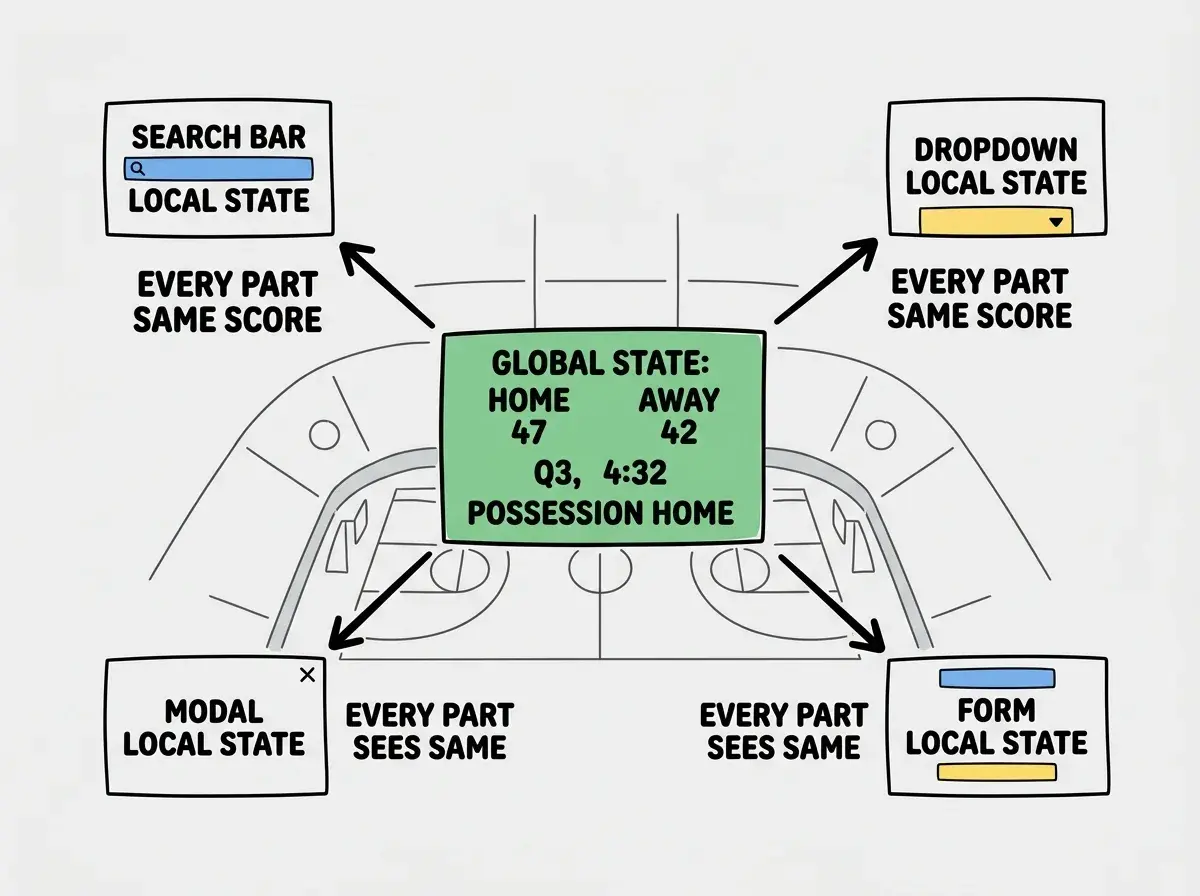
Local state is like the individual stats shown on a player's personal display. It matters to one specific part of the app and nowhere else. When you type into a search box, the text you have entered so far is local state. The rest of the app does not need to know what you have typed until you hit search. When a dropdown menu opens, that open/closed status is local state. Only that dropdown cares about it.
Global state is the main scoreboard that everyone in the arena watches. It is information that multiple parts of the app need to know about simultaneously. The logged-in user's identity is global state because the navigation bar, the profile page, the settings page, and the checkout flow all need to know who is using the app. A shopping cart is global state because the cart icon in the header, the checkout page, and the order summary all display the same items.
The distinction matters because managing state in the wrong place creates confusion. Imagine if each section of the arena had its own independent scoreboard that updated at different times. Fans would argue about the actual score. The game would feel broken.
Apps work the same way. When global information is managed in scattered local places instead of one central source of truth, different parts of the app show different things. A user logs out, but the navigation bar still shows their name. An item gets removed from the cart, but the badge still shows the old count. These are state bugs, and they are among the most common problems in interactive apps.
Why State Makes Apps Feel Alive
Without state, an app would be a static document. Like a printed page, it would show the same thing to everyone, all the time, no matter what anyone did. State is what turns a document into an experience.
Think about what happens when you click "Add to Cart" on a shopping site. The button click is an event. That event triggers a state change (the cart now contains one more item). The state change triggers the app to re-render (the cart icon updates, the button changes to say "Added"). The whole sequence happens in milliseconds, and it is state driving every step. This event-then-state-change-then-re-render cycle is the heartbeat of every interactive app.
You might think state is just about storing data, like a database. But actually, state is specifically about data that changes during use and that the app needs to react to immediately. Your database stores your product catalog, which rarely changes. State tracks whether the user has filtered that catalog by price, which changes constantly. The database is the record book; state is the live scoreboard.
State is the information your app holds right now that determines what the user sees and what happens next. When state changes, the app automatically updates to reflect the new reality. This is what makes apps feel interactive and responsive rather than static and lifeless.
How State Works in React (The Short Version)
If you are using React (and most vibe coders are), state has a specific mechanism. React gives you a tool called useState that creates a piece of state and a function to update it.
Here is the concept in plain language. You tell React: "I need to track a count that starts at zero." React gives you two things: the current count, and a button you can press to change it. Whenever you press that button (call that update function), React automatically re-draws everything that depends on that count.
Back to the scoreboard analogy. useState is like installing one section of the scoreboard. You decide what it tracks (score, time, fouls), set its starting value, and get a control that updates it. When the control fires, everyone watching that section of the board sees the new value instantly.
For global state (information that many parts of the app need), React offers Context and third-party tools like Zustand or Redux. These are like upgrading from section-specific displays to the main arena scoreboard. They make one piece of state visible to every component in the app without having to pass it through each layer manually.
Understanding state is one of the most important concepts for working with AI tools effectively.
Learn more basicsWhy State Confuses AI Tools
Here is something most tutorials will not tell you. State management is the concept that confuses AI coding tools the most. Not sometimes. Consistently.
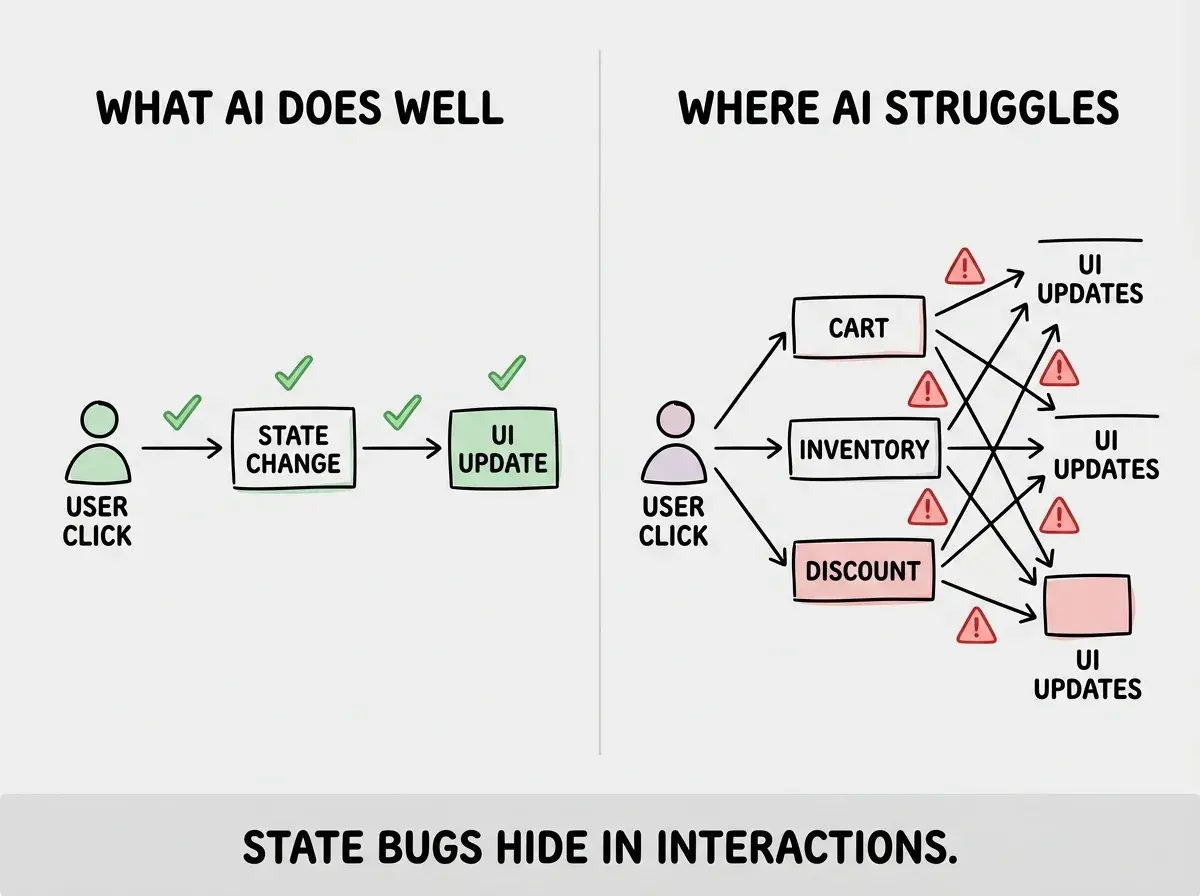
AI tools are excellent at generating visual layouts, writing API calls, and creating forms. But when logic involves multiple pieces of state interacting with each other, they frequently get confused.
The reason connects back to the scoreboard analogy. Imagine asking someone to manage a scoreboard when they can only see one section at a time. They might update the score correctly, but forget to reset the shot clock. Each individual piece works, but the coordination between pieces breaks down.
AI tools face the same challenge. A shopping cart that needs to update the total, apply a discount code, and check inventory simultaneously involves several pieces of state that depend on each other. AI tools often get some of those interactions right and others wrong.
This is useful to know as a vibe coder. When your AI-generated app has a bug, check the state management first. Is a piece of state updating when it should not? Is one part of the app reading stale data because it is not connected to the right source of truth? These are the most common categories of bugs in AI-generated code.
The Most Common State Mistakes
These patterns will save you hours of debugging.
Duplicated state. Storing the same information in two places and updating only one. If the user's name lives in both the navigation and the profile component independently, changing it in one place leaves the other showing the old value. The fix is a single source of truth where that state lives, and everything else reads from it.
Stale state. The app shows old information because a component did not re-render when data changed. It is the equivalent of one section of the arena scoreboard freezing while the game continues.
Unnecessary state. Storing something in state when it could be calculated from other state. If you track both a list of cart items and the total count, the count is redundant. Redundant state creates opportunities for values to fall out of sync.
Treating every piece of data as state. Not everything needs to be in state. If a value never changes during the user's session, it is not state. If a value can be calculated from other state, it does not need its own state. Over-using state makes apps slower, harder to debug, and more confusing for AI tools to work with. Ask yourself: does this value change while the user interacts with the app? If not, it is not state.
When State Gets Complex
For simple apps, state is straightforward. A few pieces of local state handle everything. As apps grow, state management becomes a real challenge. A project management tool needs to track projects, tasks, assignments, filters, sidebar visibility, and notifications. All of these interact, and keeping them consistent is genuinely hard.
This is where state management libraries earn their place. Tools like Zustand create a centralized store (think of it as upgrading from a basic scoreboard to a full broadcast production system) that manages complex state in one place and keeps every part of the app in sync. For your first projects, React's built-in useState handles most needs perfectly. But knowing these tools exist helps you recognize the moment your project outgrows simple patterns.
What This Means For You
State is the live scoreboard of your app. It tracks what is happening right now, updates when events occur, and drives what users see. Understanding state helps you debug problems, communicate with AI tools, and build apps that feel responsive.
- If you are a founder building a product: State bugs are the most common reason an app "feels broken" even when nothing is technically crashed. If users report that buttons do not update, data appears stale, or the app shows inconsistent information across pages, the problem is almost certainly state management. Knowing this helps you give better bug reports and evaluate whether a technical hire understands the fundamentals.
- If you are a career changer learning to build: Spend extra time with state. It is the single concept that separates static websites from interactive applications. Build a small counter app first. Then a to-do list. Then a shopping cart. Each project adds a layer of state complexity that builds your intuition. When AI tools generate buggy code, checking state is always your best first move.
- If you are a student exploring development: State is a universal concept, not just a React thing. Every framework, every language, and every platform deals with state. Learning to think about state clearly (what is it, where does it live, what changes it, what depends on it) gives you a mental model that transfers everywhere.
State is one of many core concepts that make vibe coding click. Keep building your foundation.
Explore more