Open any AI coding tool right now. Ask it to build you a landing page, a dashboard, or a SaaS app. Nine times out of ten, it will reach for the same three technologies: React, Next.js, and Tailwind CSS. This is not a coincidence. It is the result of how AI models learn and why certain tools work better with them than others.
If you are a founder, career changer, or student figuring out where to start, this pattern matters. Understanding why AI defaults to this React Next.js Tailwind AI stack gives you a real advantage. You will know what your tools are doing and how to get better results from day one.
Here is the stat that sets the scene: 92% of developers now use AI tools daily, and 46% of all code being written is AI-generated. The tools doing that generation have strong opinions about which technologies they prefer.
The LEGO System That Explains Everything
Think of React, Next.js, and Tailwind CSS as a LEGO system. Not random blocks thrown into a bin, but one of those organized sets where every piece is designed to snap together with every other piece.
React is the collection of individual bricks. Each brick is a component: a button, a card, a navigation bar, a form. You build your app by snapping these bricks together. Need a signup page? Snap a form component onto a layout component, add a button component, and you have a working page. Every piece is self-contained, reusable, and predictable.
Next.js is the baseplate and the instruction manual. It gives React structure. Without Next.js, your pile of React bricks is just a pile. Next.js tells them how to organize: this page goes here, this data loads there, this route handles that. It also handles the things beginners never want to think about, like making your app fast, making it work for search engines, and deploying it to the internet.
Tailwind CSS is the color and finish system. Instead of painting each brick by hand (writing custom CSS from scratch), Tailwind gives you a pre-built palette. Want a blue button with rounded corners and a shadow? You snap on those style pieces directly. bg-blue-500 rounded-lg shadow-md. The naming is so descriptive that both humans and AI can read it instantly.
This LEGO analogy is not just a teaching tool. It explains why AI loves this combination. Every piece is modular, clearly named, and connects in predictable ways. For an AI that learned to code by reading millions of projects, this consistency is pure gold.
Why AI Tools Pick This Stack Every Time
AI coding tools like Cursor, Claude, and GitHub Copilot learned from the internet's largest collection of open-source code. React dominates that collection. It has been the most-used frontend framework for over a decade, powering Facebook, Instagram, Airbnb, Netflix, and millions of smaller projects.
This creates a feedback loop. AI generates React code. Developers ship it. That code enters the training data. AI gets even better at React. The cycle accelerates.
Tailwind CSS fits into this loop perfectly. Traditional CSS is freeform. You can name your classes anything, structure your files however you want, and organize things in a thousand different ways. That freedom is great for human creativity but terrible for AI prediction. Tailwind eliminates that ambiguity. Every utility class has one name and one job. text-center centers text. mt-4 adds margin to the top. There is exactly one way to express each visual idea.
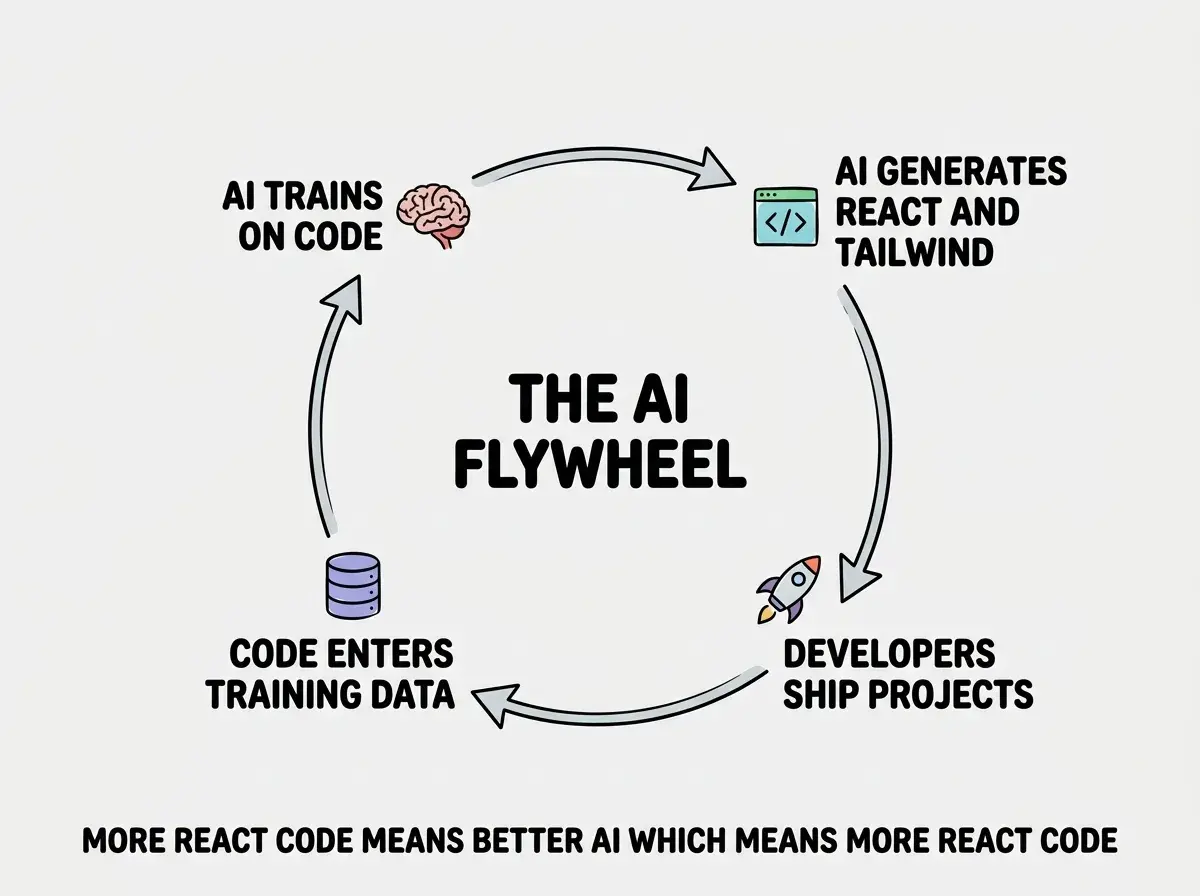
This is why AI can generate a complete, well-styled React component in seconds. It is not guessing. It is pattern-matching against millions of nearly identical examples. Ask it to do the same in an obscure framework and quality drops because the training data is thinner.
Is AI Killing Tailwind CSS
You might have seen the question floating around: "How is AI killing Tailwind CSS and why should you care?" The short answer is that AI is not killing Tailwind. It is doing the opposite.
The argument goes like this: if AI can write any CSS, why do we need Tailwind's utility classes? Just let AI write custom CSS from scratch. That logic sounds reasonable until you think about what happens after the code is generated.
When AI writes custom CSS, every project ends up with different naming conventions, different file structures, and different approaches to the same problems. Custom CSS is a snowflake. Every project is unique in ways that create friction for AI trying to maintain, modify, or debug it.
Tailwind is the opposite. A Tailwind project from one developer looks almost identical to one from another developer. The LEGO pieces are standardized. When you ask AI to "make the header sticky and add a blur effect," it knows exactly which utility classes to reach for because there is only one vocabulary to express that idea. This is why Tailwind adoption keeps growing alongside AI adoption, not shrinking.
AI tools do not just write code. They also read, modify, and debug it. Tailwind's standardized vocabulary makes all three of those tasks dramatically easier for AI. The more predictable the code, the better AI performs with it. That is why the React Next.js Tailwind AI stack keeps gaining momentum instead of losing it.
What Each Piece Actually Does For You
If you are new to all three of these tools, here is what matters at a practical level. You do not need to master any of them. You need to understand what they do so you can work with AI more effectively.
React handles the building blocks. Every screen in your app is made of components. A login form is a component. A product card is a component. A navigation bar is a component. React lets you build each one independently, then snap them together like LEGO bricks into full pages. When something breaks, you fix that one brick instead of tearing apart the entire structure.
Next.js handles the infrastructure. It takes your React components and turns them into a real website that loads fast, ranks in Google, and works on every device. It handles routing (so /about shows the about page), server-side rendering (so search engines can read your content), and deployment (so getting online is a single command). It is the LEGO baseplate that holds everything in place.
Tailwind CSS handles the appearance. Instead of writing complex stylesheets in a separate file, you add visual properties directly to your components. Need a card with a white background, padding, rounded corners, and a shadow? That is bg-white p-6 rounded-xl shadow-sm. The class names read like plain English. AI loves this because it can express any design using a finite, well-documented vocabulary.
Together, these three tools form a complete LEGO system. That modular, predictable structure is exactly what makes AI so effective with this stack.
Learn the fundamentals that help you get more from every AI coding tool.
Explore the guidesThe Practical Advantage For Beginners
Here is where this stops being abstract and starts affecting your daily experience with AI tools.
When you use the React, Next.js, and Tailwind stack, your AI conversations become dramatically more productive. You can say "add a testimonials section with three cards in a grid" and the AI knows exactly what to generate. It will create React components, style them with Tailwind utilities, and place them in the correct Next.js page structure. One prompt, working result.
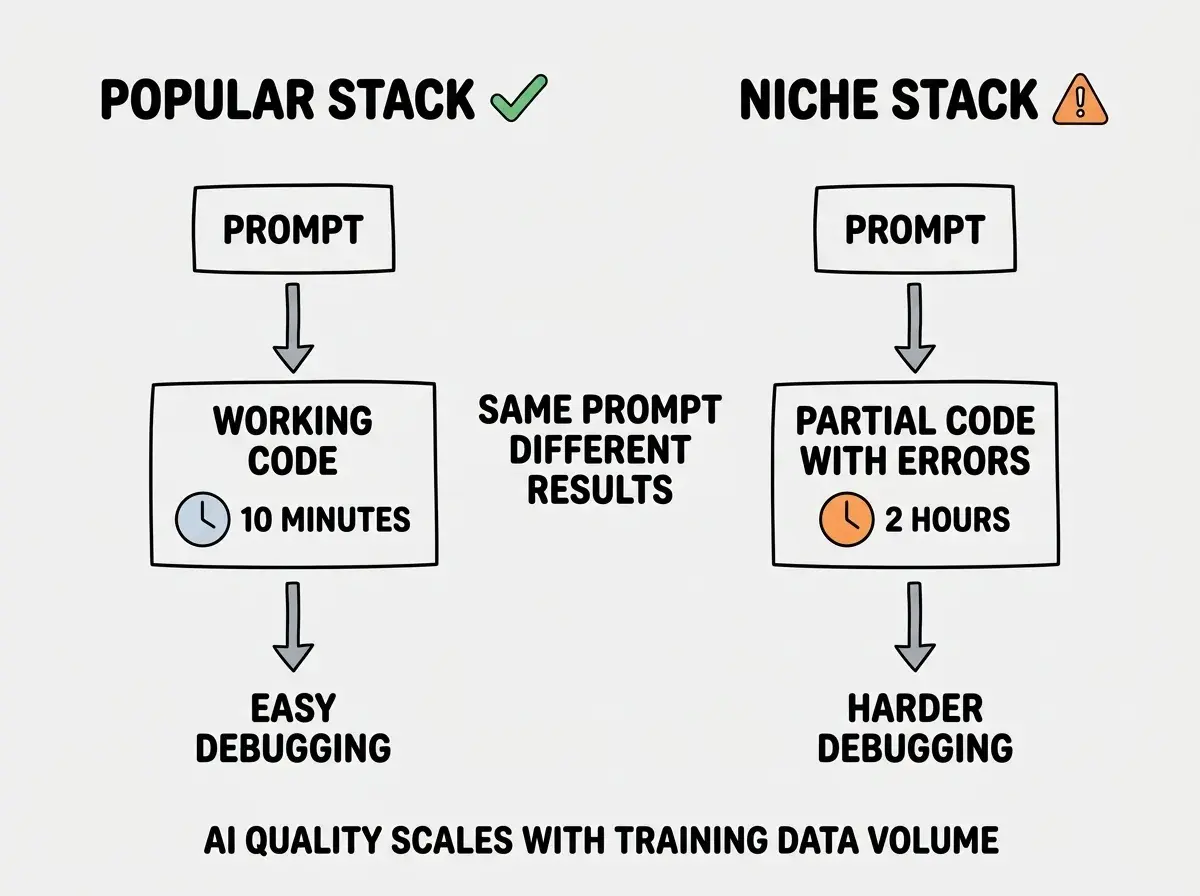
Try the same prompt with a less common framework and you will spend time debugging import errors, fixing incompatible styling, and explaining framework-specific patterns the AI half-remembers. The difference is not subtle. It is the difference between a 10-minute task and a 2-hour debugging session.
This matters even more when things go wrong. When your app breaks and you paste the error into an AI tool, its ability to diagnose the problem depends on how many similar problems it has seen before. With React and Tailwind, it has seen millions. With niche alternatives, it is working with a much smaller reference library.
Choosing a tech stack based on what sounds most impressive or what a blog post said is "better" in theory. For your first project, the best stack is the one AI tools know best. Theoretical advantages of alternative frameworks mean nothing if AI generates buggy code with them half the time. Start with React, Next.js, and Tailwind. Build three projects. Then evaluate alternatives from a position of experience, not speculation.
You Do Not Need to Master Any of This
Reading about React, Next.js, and Tailwind can feel overwhelming. Hundreds of tutorials, thousands of configuration options, an ocean of opinions about the "right" way to use each tool.
You do not need any of that yet. What you need is the mental model. React is the bricks. Next.js is the baseplate. Tailwind is the color system. They snap together. AI knows how to assemble them. Your job is to describe what you want clearly enough that AI can do the assembly well.
As you build projects, you will naturally pick up the details. But all of that comes through building, not through study. The LEGO system works because you do not need to understand injection molding to build a castle. You just need to know that bricks snap together and the instruction manual shows you the order.
Dig deeper
A few hand-picked sources if you want to go further.
What This Means For You
The React Next.js Tailwind AI stack is not just popular. It is the foundation that AI coding tools are built around. Understanding this gives you three practical advantages.
First, you get better results from AI tools immediately. Your prompts work better, debugging goes faster, and projects reach completion more often.
Second, you future-proof your learning. AI tools improve fastest on the technologies with the most training data. Every AI upgrade makes your existing knowledge more valuable, not less.
Third, you join the largest community. More tutorials, more answers, more examples for this stack than any other. You are never alone with a problem.
Whether you are a founder shipping a prototype, a career changer building a portfolio, or a student exploring what is possible, start here. Learn the LEGO system. Let AI do the assembly. Focus your energy on the ideas that make your project worth building.
Pick a guide and start building with the stack AI knows best.
Start building