Every time your app answers a question, it has a choice. It can walk to the filing cabinet, pull the drawer, find the folder, and read the answer. Or it can glance at the sticky note on its desk where it wrote the answer down five minutes ago.
Caching is the sticky note.
It is one of the most effective performance techniques in software, and one of the most commonly skipped steps in AI-generated code. If your vibe-coded app feels slow, there is a good chance it is walking to the filing cabinet on every single request when it could be reading from a sticky note.
The Sticky Note on Your Desk
Imagine you work at a busy office and people keep calling to ask for the same phone number. The first time, you walk to the filing cabinet in the back room, find the contact card, and read the number aloud. That takes two minutes.
The second caller asks for the same number. You could walk to the cabinet again. But instead, you grab a sticky note, write the number down, and stick it to your monitor. The next twenty callers get their answer in two seconds instead of two minutes.
That sticky note is a cache. The filing cabinet is your database. And the act of checking the sticky note before walking to the cabinet is exactly what caching does in software.
This confuses everyone at first because it sounds too simple to matter. But the difference between two seconds and two minutes, multiplied by thousands of requests per hour, is the difference between an app that feels snappy and one that makes users leave.
Cache Hits, Cache Misses, and Stale Notes
The caching world has specific vocabulary, but it maps perfectly to the sticky note analogy.
A cache hit is when the answer is already on your sticky note. Fast, cheap, no walking required.
A cache miss is when the sticky note does not have what they need. You walk to the filing cabinet, find the answer, and write it on a new sticky note for next time.
Every caching system tracks its hit rate. If 95% of requests are cache hits, your app is barely touching the database. If 50% are misses, you are walking to the cabinet half the time.
Then there is stale data. What if the person whose phone number you wrote down changes their number? Your sticky note is now wrong. Every caller gets outdated information until you throw away the old note and walk back to the cabinet.
Caching is a tradeoff between speed and freshness. The sticky note makes you faster, but it can become outdated. Every caching decision is about choosing the right balance: how long can you serve slightly old data before you need to check for updates? For a product catalog, an hour might be fine. For a stock price, even five seconds is too long.
This is where TTL comes in, which stands for Time to Live. It is a timer you set on each sticky note. "This note is valid for 60 seconds." After 60 seconds, the note expires, and the next request triggers a fresh walk to the cabinet. TTL is how you prevent stale data from lingering too long.
The Four Levels of Caching Explained
Your app does not have just one desk with sticky notes. It has multiple desks between the user and the filing cabinet, and each one can hold its own notes.
Browser caching is the sticky note on the user's own desk. Your browser saves downloaded images and stylesheets locally. Next visit, it uses the local copy instead of downloading again.
CDN caching is like hiring assistants in every city who keep their own sticky notes. A Content Delivery Network stores copies of your content on servers worldwide. A user in Tokyo gets served from Tokyo instead of waiting for data from Virginia.
In-memory caching (tools like Redis) is the fastest sticky note. You store frequently accessed data in RAM instead of on disk. Reading from RAM is roughly 100 times faster than reading from a database.
Database query caching is when the filing cabinet itself remembers recent requests. "Someone just asked for this exact folder five seconds ago, so I will keep it on top of the pile."
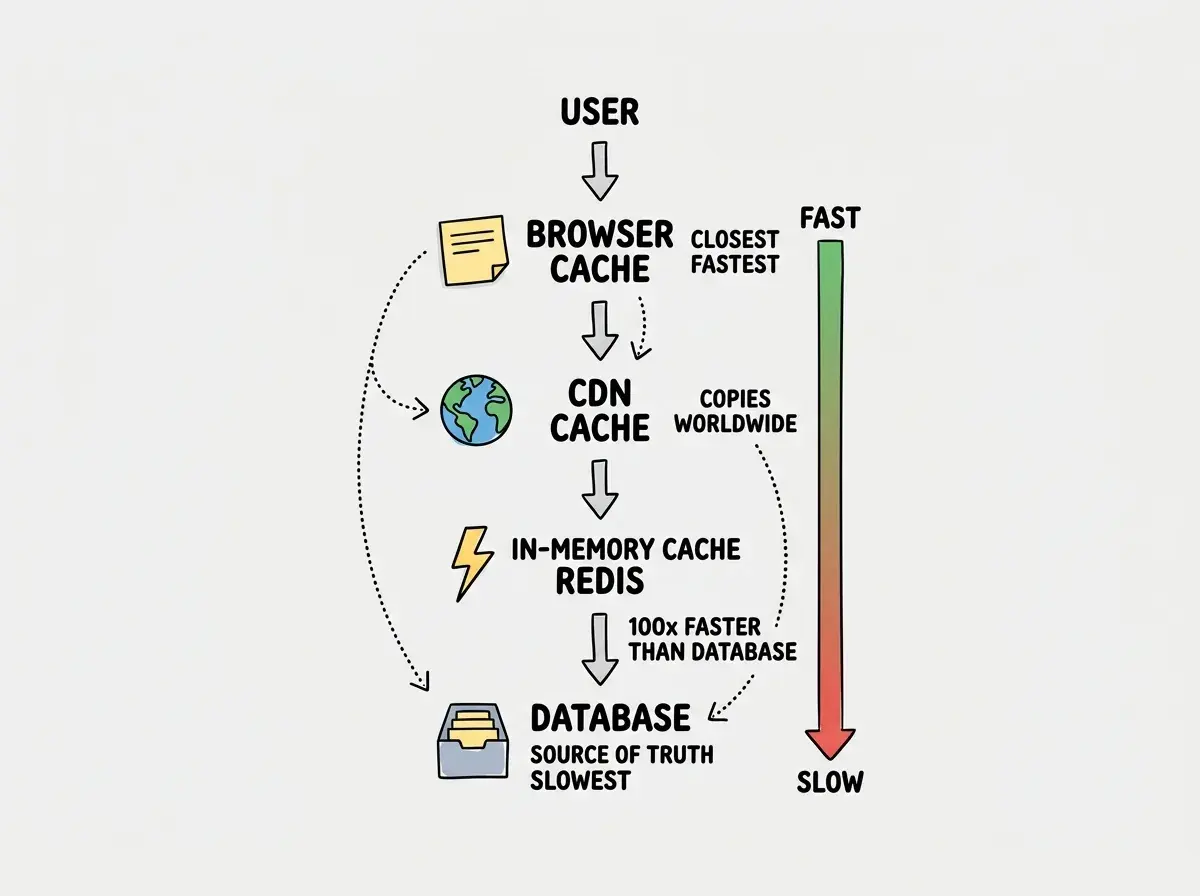
Each layer catches requests before they reach the next one. If the browser has the answer, the CDN never gets asked. If the CDN has it, Redis stays quiet. The best-performing apps stack multiple caching layers, and most requests never reach the database at all.
The Hardest Problem in Computer Science
There is a famous joke among developers: "There are only two hard things in computer science: cache invalidation and naming things."
Cache invalidation is the process of deciding when to throw away a sticky note and get fresh data. It sounds simple. It is not.
Imagine your e-commerce app caches a product's price. A store manager changes the price from $29.99 to $19.99 for a flash sale. If your cache TTL is one hour, some users see $29.99 and some see $19.99 for up to 60 minutes.
You might think you can just clear the cache every time data changes, and the problem goes away. But actually, cached data lives in dozens of places: the user's browser, CDN edge servers, a Redis cluster, and local memory on each application server. Clearing all of them simultaneously, without missing any, while handling thousands of concurrent requests, is genuinely difficult.
Understanding caching is just one piece of the performance puzzle. Learn the fundamentals that help you build better.
Explore moreWhy AI-Generated Code Skips Caching
Here is where this becomes urgent for vibe coders. AI coding tools are remarkably good at building features that work. But "works" and "works efficiently" are very different things.
When you ask an AI to build an API endpoint that fetches product data, it writes code that queries the database and returns the result. It works perfectly. But it queries the database on every single request, even if the same data was requested one second ago.
AI handles the happy path but misses performance issues that only surface at scale. Ten users? No problem. Ten thousand users per minute? Your database chokes, response times spike, and your hosting bill explodes.
The fix is surprisingly simple. After your AI generates a data-fetching function, ask it: "Add caching to this with a 5-minute TTL." Most AI tools implement it correctly when asked directly. They just never add it proactively.
A Practical Mental Model
When evaluating whether something should be cached, ask three questions.
How often is this requested? If the same data is fetched hundreds of times per minute, cache it. If it is requested once a day, caching adds complexity without benefit.
How often does it change? Product descriptions might change once a week. Stock prices change every second. Less frequent changes mean longer TTLs and more caching benefit.
How bad is stale data? A blog post five minutes old is fine. A bank balance one second old is not. This tolerance determines your TTL.
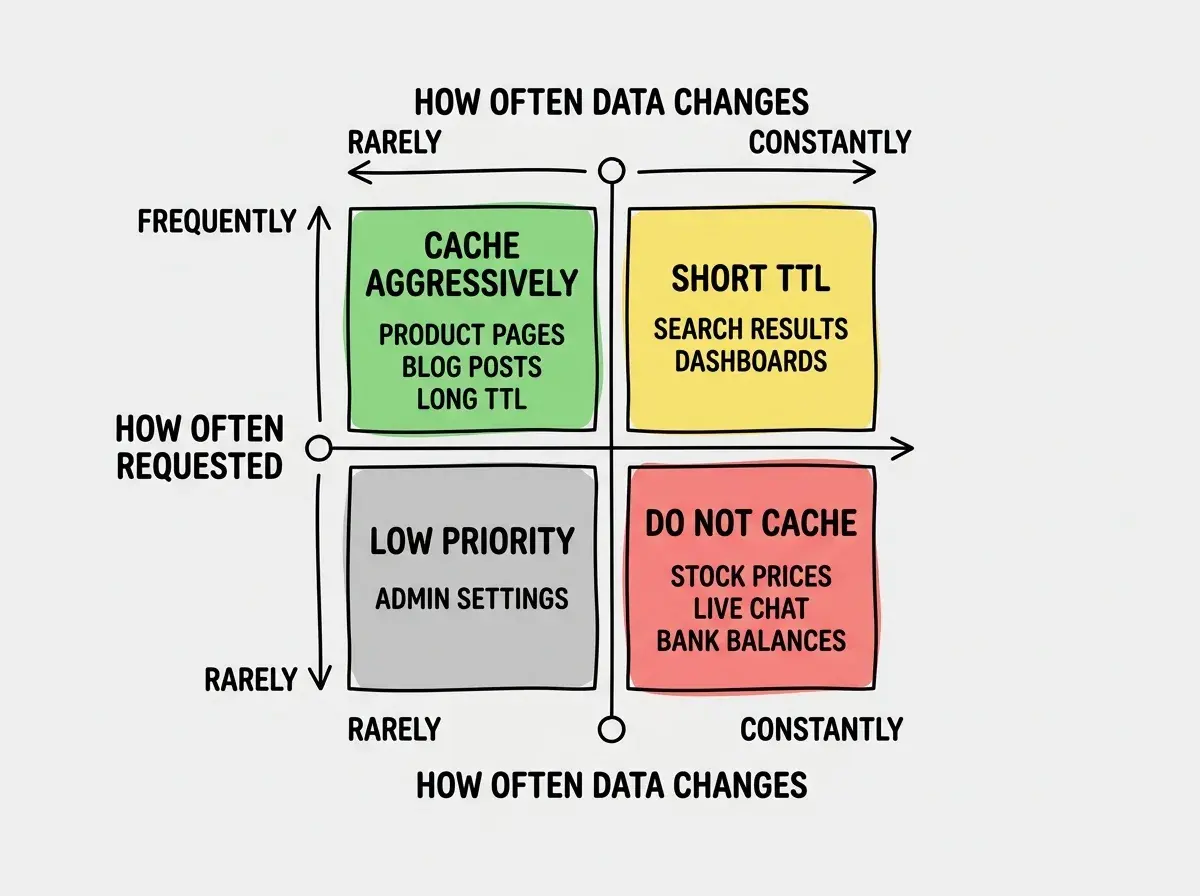
Most data in a typical web app falls into the top-left quadrant. Product pages, user profiles, blog posts, category listings. These change infrequently and are requested constantly. Caching them aggressively is one of the single biggest performance improvements you can make.
Treating caching as an advanced topic you will deal with "later." AI-generated code almost never adds caching on its own, which means every database query runs fresh on every request. For apps with even moderate traffic, this leads to slow response times, high database load, and unnecessarily expensive hosting bills. Add caching early, even a simple 60-second TTL on your most-hit endpoints, and you will prevent most performance problems before they start.
When Caching Goes Wrong
Caching is not a magic fix. Used carelessly, it creates bugs that are maddening to debug because the app works sometimes and fails other times, depending on whether data is cached or fresh.
The most common bug is serving personalized content from a shared cache. If User A's dashboard gets cached and User B sees User A's data, you have a serious privacy problem. The rule: never cache user-specific data in a shared cache unless the cache key includes the user's identity.
What This Means For You
Caching is the sticky note system for your app. It stores answers close to where they are needed so your app stops walking to the filing cabinet on every request.
- If you are a founder building a product: Ask your AI tool to add caching to every data-fetching endpoint before you launch. Even a simple 60-second TTL can cut your database costs dramatically and make your app feel instant. This is one of the highest-impact, lowest-effort improvements you can make.
- If you are a senior dev evaluating AI-generated code: Audit the data layer for missing caches. AI tools build functionally correct code that hits the database on every request. Adding caching, proper TTLs, and invalidation strategies to AI-generated backends is where your expertise creates the most value.
- If you are a student learning how apps work: Take any API endpoint and add a caching layer. Start with in-memory caching (a simple Map in JavaScript), graduate to Redis, and experiment with different TTLs. Watching cache hit rates climb from 0% to 95% is one of the most satisfying performance wins you will ever see.
Caching is just the beginning. Learn the performance fundamentals that separate working apps from great ones.
Keep learning