Every time you use an AI coding tool to build something, it installs packages. "Installing dependencies," the terminal says, and a progress bar fills up. Dozens of packages download in seconds. But what are those packages? Where do they come from? And should you trust them?
npm is the answer to most of those questions, and understanding it is one of those foundational concepts that makes everything else in modern development click.
The Grocery Store for Code
Think of npm as a massive grocery store, but instead of food, every shelf is stocked with pre-built code components. Need a date picker for your app? There is a package for that. Need to send emails? There is a package for that. Need to resize images, validate forms, connect to a database, or parse CSV files? Packages for all of it.
Without this grocery store, every developer would have to grow their own wheat, mill their own flour, and bake their own bread just to make a sandwich. npm lets you walk in, grab a loaf of bread off the shelf, and get back to making the sandwich.
The name stands for Node Package Manager, and it is the default package manager for JavaScript and Node.js projects. With over two million packages available and billions of downloads per week, it is the largest software registry in the world. When someone says "just npm install it," they mean "go grab that ingredient from the store."
How the Store Is Organized
This confuses everyone at first because npm is actually two things with the same name.
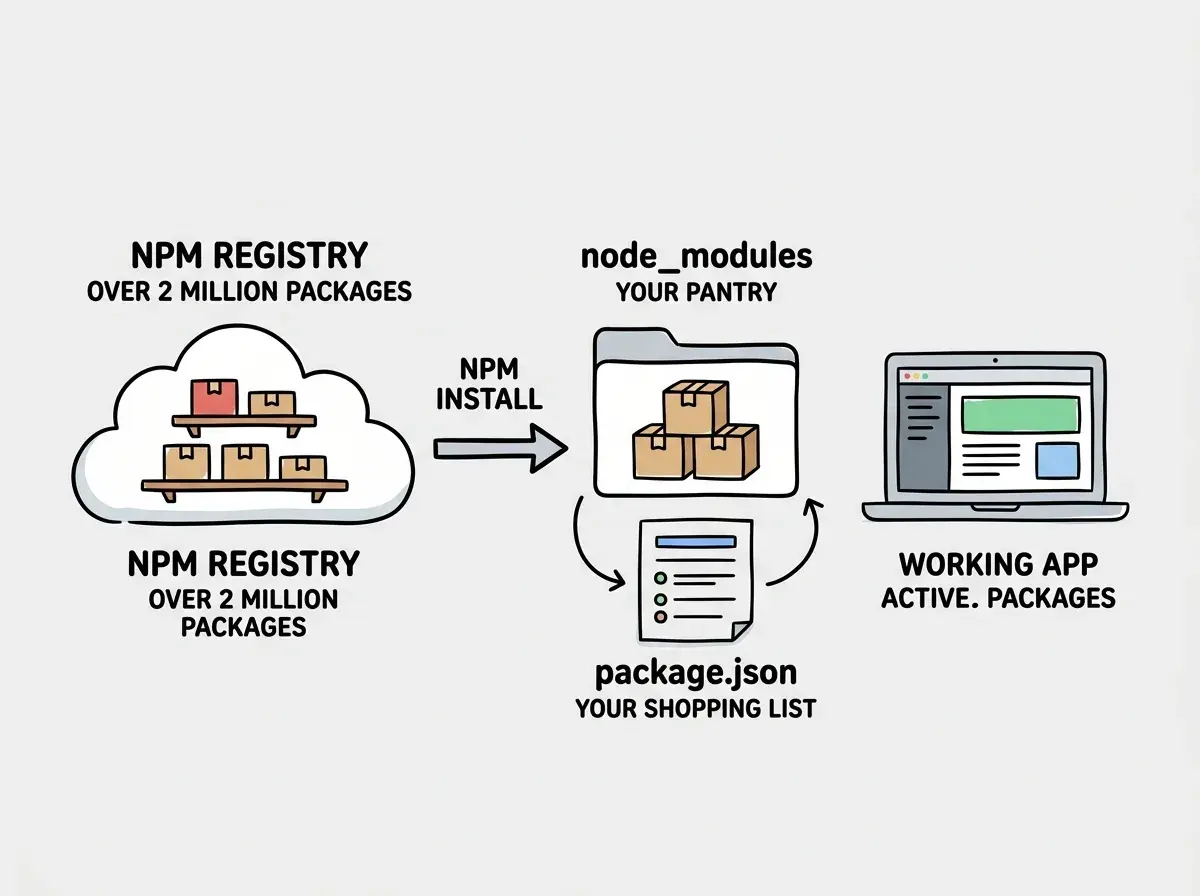
The registry is the store itself. It is a massive online database at npmjs.com where developers publish their packages for anyone to use. Think of it as the warehouse full of every ingredient ever created.
The CLI tool is your shopping cart. When you type npm install react in your terminal, the CLI tool goes to the registry, downloads the React package, and puts it in your project. The CLI comes pre-installed with Node.js, so if you have Node on your computer, you already have npm.
When a package gets installed, it lands in a folder called node_modules inside your project. This folder is your pantry. It holds every ingredient your project needs, including all the ingredients that those ingredients need (called dependencies). A single package might bring along dozens of its own dependencies, which is why node_modules can grow surprisingly large.
The package.json file is your shopping list. It records every package your project uses, along with the version numbers. When you share your project with someone else (or deploy it to a server), they run npm install and the shopping list tells npm exactly what to buy. Everyone ends up with the same pantry.
What Happens When You Run npm Install
Here is the full sequence, translated to grocery store terms.
You type npm install stripe because you want to add payment processing to your app. npm reads the command, goes to the registry (the store), finds the Stripe package, and checks what other packages Stripe depends on. Then it downloads Stripe and all of its dependencies into your node_modules folder. Finally, it updates your package.json to include Stripe on the shopping list.
The next time someone clones your project and runs npm install with no package name, npm reads the package.json file and downloads everything on the list. This is how teams stay in sync and how deployment servers know what your project needs.
Version numbers matter here. A package listed as "stripe": "^14.0.0" means "version 14, and accept minor updates." This keeps your project stable while still getting bug fixes. But version conflicts (where two packages need different versions of the same dependency) can cause headaches. This is one of the most common sources of confusing errors in JavaScript projects.
npm is a package manager that connects your project to a massive registry of pre-built code. The package.json file is your shopping list, node_modules is your pantry, and npm install is the trip to the store. You do not need to understand how every package works internally. You need to know that they exist, that they save you enormous amounts of time, and that choosing the right ones matters.
The Dark Side of the Grocery Store
Here is where things get serious. npm's openness is both its greatest strength and its biggest vulnerability. Anyone can publish a package to npm. There is no review process, no quality check, and no guarantee that a package does what it claims.
You might think that popular packages are always safe because millions of people use them. But actually, the risk is more subtle than that. Attackers do not just publish obviously malicious packages. They publish packages with names that are almost identical to popular ones, hoping you will mistype or that an AI tool will hallucinate the wrong name.
This brings us to a new and growing threat called slopsquatting. AI coding tools sometimes recommend packages that do not exist. The AI hallucinates a plausible-sounding package name, you try to install it, and it fails. That is the harmless version. The dangerous version is when attackers register those hallucinated names and fill them with malicious code.
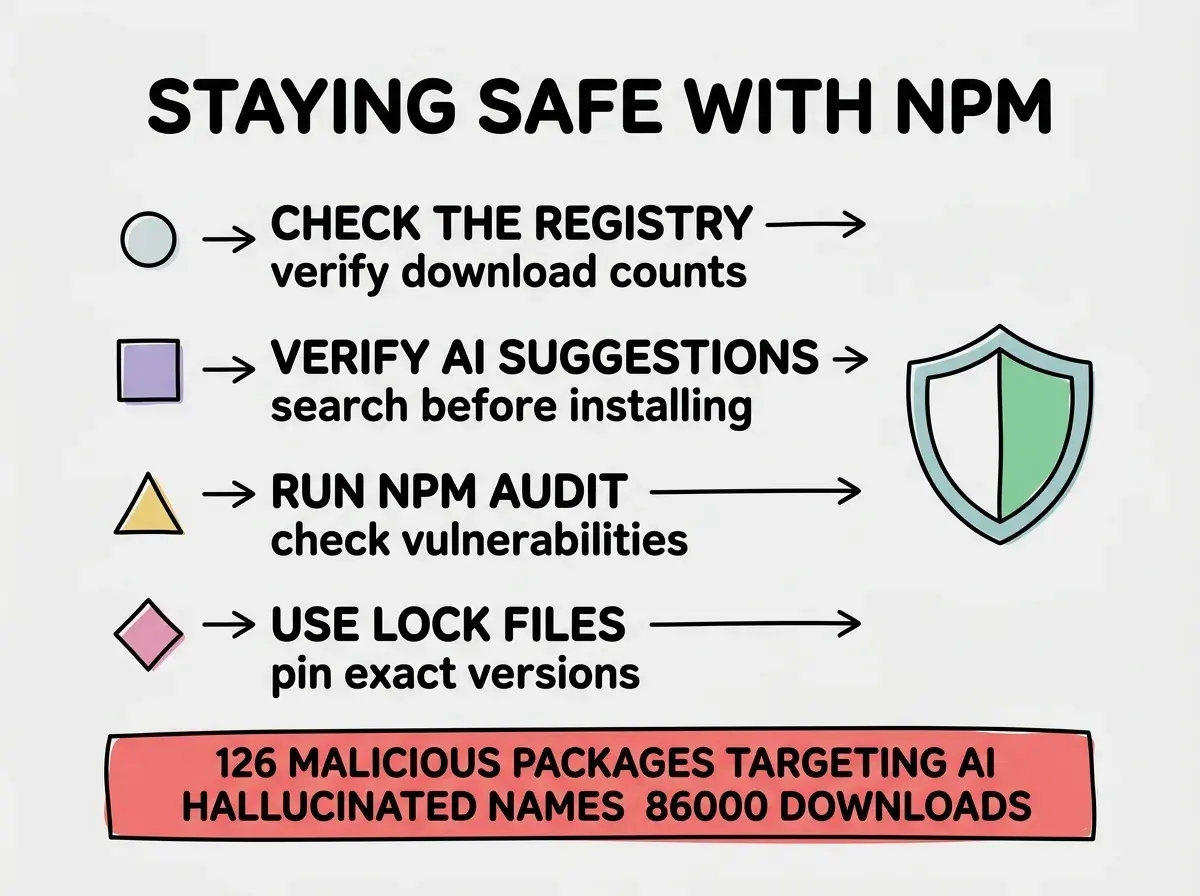
Researchers have identified at least 126 malicious packages published on npm that were specifically named to match common AI hallucinations. These packages collectively received over 86,000 downloads before being caught. Some of them stole environment variables (which often contain API keys and passwords). Others installed backdoors.
This is not a theoretical risk. It is happening right now, and it specifically targets people who build with AI tools.
Understanding your tools and their risks is part of building responsibly.
Learn the basicsHow to Stay Safe at the Store
Protecting yourself does not require deep technical knowledge. A few simple habits go a long way.
Check the package before installing. Visit npmjs.com and search for the package name. Look at the download count, the last publish date, and whether it has a linked GitHub repository. A legitimate, popular package will have thousands or millions of weekly downloads. A suspicious one will have almost none.
Verify AI recommendations. When an AI tool tells you to install a package, do not blindly run the command. Search for the package name first. If npmjs.com returns no results, the AI hallucinated it. If it returns a package with very few downloads and a recent publish date, be cautious.
Keep packages updated. Run npm audit periodically. This command checks your installed packages against a database of known vulnerabilities and tells you which ones need updating. It is like a recall notice for grocery items.
Use lock files. npm automatically creates a package-lock.json file that records the exact version of every package installed. This ensures that your production server installs the same versions you tested with, not newer (potentially compromised) ones.
npm and AI Coding Tools
If you are using Cursor, Bolt, Lovable, or any other AI coding tool, npm is running constantly in the background. Every time the AI adds a new feature to your app, there is a good chance it is installing a package to do the heavy lifting.
This is mostly a good thing. The AI saves you from reinventing the wheel. But it also means packages are being added to your project without you explicitly choosing them. Over time, your package.json can grow long and your node_modules folder can balloon.
Periodically review your package.json. Ask your AI tool: "What does each of these packages do, and are any unnecessary?" Cleaning out unused packages keeps your project lean and reduces your security surface.
Installing packages without checking if they are real. When an AI tool suggests npm install some-package-name, always verify the package exists on npmjs.com before running the command. AI tools hallucinate package names regularly, and attackers are actively exploiting this by publishing malicious packages under those fake names. A ten-second search can prevent a serious security incident.
Beyond npm
npm is not the only package manager. Yarn and pnpm are popular alternatives that work with the same npm registry but offer different performance characteristics. If your AI tool sets up a project with Yarn or pnpm, the concepts are identical. The store is the same; you are just using a different shopping cart.
Other programming languages have their own registries too. Python has pip, Ruby has gem, Rust has cargo. The pattern is universal: a central store of reusable code, a tool to install from it, and a file that tracks what you have installed.
What This Means For You
npm is the system that lets developers share and reuse code. Understanding it as a grocery store (registry is the store, packages are the ingredients, package.json is your list, node_modules is your pantry) gives you the mental model to navigate any JavaScript project.
- If you are a founder building a product: Every dependency in your package.json is a decision with security and maintenance implications. You do not need to audit each one personally, but you should know that your app relies on external code and that someone on your team should be reviewing what gets added. Ask about dependency hygiene the same way you would ask about financial controls.
- If you are a career changer learning to build: Get comfortable with
npm install,npm audit, and reading package.json. These are daily tools. When an AI suggests a package, verify it on npmjs.com before installing. This habit will protect you and set you apart from builders who install blindly. - If you are a student exploring technology: Understanding npm teaches you how the modern open-source ecosystem works. The idea that millions of developers share code freely through a central registry is one of the most powerful concepts in software. Learn to evaluate packages (downloads, maintenance activity, documentation) and you will make better choices in every project.
Knowing your tools and their tradeoffs is what separates confident builders from copy-pasters.
Explore more