Every time you visit a website, something invisible happens between your click and the page loading. Your request does not go straight to the app's main logic. It passes through a series of invisible checkpoints first. These checkpoints check your identity, log your visit, enforce security rules, and sometimes redirect you entirely, all before the app even knows you arrived.
These checkpoints are called middleware, and they are in virtually every web application you have ever used.
The Airport Security Analogy
Think of your app as an airport terminal. The gates (where planes depart) are your app's core logic, the pages, features, and data your users interact with. Every passenger (every request from a user's browser) needs to reach a gate. But nobody walks straight from the parking lot to the boarding gate.
First, you pass through a series of checkpoints. You show your ID at the entrance. You scan your boarding pass. You go through the security scanner. You might get pulled aside for additional screening. Each checkpoint has a single job, and each one decides whether you continue to the next checkpoint or get stopped.
Middleware works exactly the same way. Each piece of middleware is one checkpoint in a pipeline. A request enters the pipeline, passes through each checkpoint in order, and only reaches your app's core logic if every checkpoint approves it. If any checkpoint rejects the request, it never reaches the gate.
The order matters. You cannot go through the security scanner before showing your ID. You cannot board before scanning your boarding pass. Middleware runs in a specific sequence, and rearranging that sequence can break things in subtle ways.
The Main Types of Middleware Explained
This confuses everyone at first because middleware sounds abstract until you see concrete examples. Here are the checkpoints that exist in most web applications.
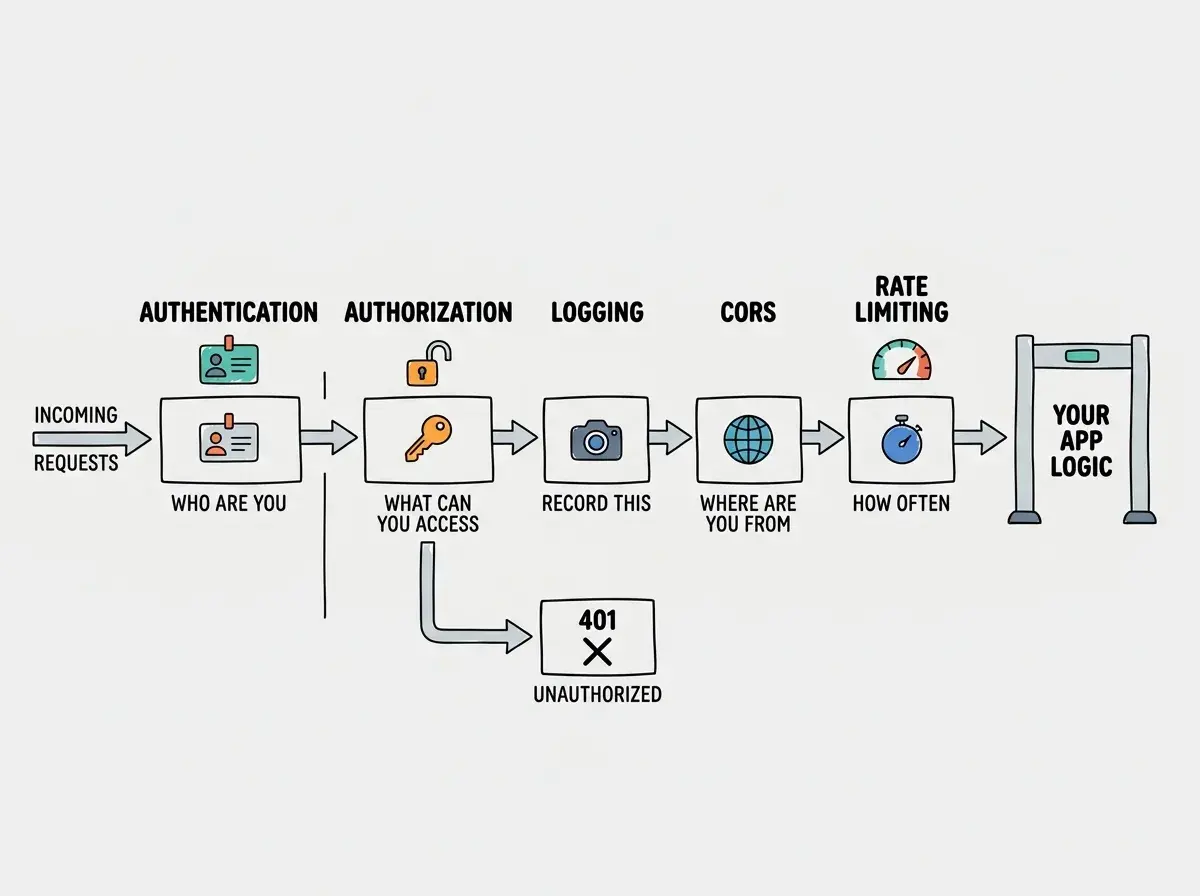
Authentication middleware (the ID check). This checkpoint looks at the incoming request and asks: "Who are you?" It checks for a session cookie, an API key, or a JWT token. If valid credentials are present, it attaches the user's identity to the request and passes it along. If no credentials are found, it might redirect you to a login page or return a 401 Unauthorized error.
Authorization middleware (the boarding pass check). Authentication tells you who someone is. Authorization tells you what they are allowed to do. This checkpoint asks: "You are User X, but are you allowed to access this page?" An admin dashboard, for example, might let authenticated users through the first checkpoint but stop non-admin users at this one.
Logging middleware (the security camera). This checkpoint does not stop anyone. It simply records that a request came through: the timestamp, the URL, the user, the response time. This data is invaluable for debugging and monitoring. Like airport security cameras, you rarely watch the footage in real time, but you are grateful it exists when something goes wrong.
CORS middleware (the international arrivals check). If you have read about CORS, this is where it lives. This checkpoint looks at where the request originated and decides whether to allow it based on the server's CORS configuration. It adds the appropriate headers to the response so the browser knows the request is permitted.
Rate limiting middleware (the crowd control). This checkpoint counts how many requests a user or IP address has made recently. If someone is making hundreds of requests per second (whether malicious or accidental), this middleware slows them down or blocks them entirely. Like a bouncer at a busy terminal, it prevents any single passenger from overwhelming the system.
The Pipeline Principle
The most important thing to understand about middleware is that it forms a pipeline. Requests flow through in one direction, and each checkpoint can do one of three things.
Pass it along. The middleware does its job (logging, attaching user info) and sends the request to the next checkpoint.
Modify it. The middleware adds information to the request (like the user's identity) or modifies the response (like adding security headers). The modified request continues down the pipeline.
Stop it. The middleware decides the request should not continue. It sends back a response (an error, a redirect) and the pipeline ends. The request never reaches your app's core logic.
You might think middleware makes your app slower because every request has to pass through multiple checkpoints. But actually, each checkpoint typically takes less than a millisecond. The security benefits far outweigh the negligible performance cost. An airport with no security checkpoints would be faster to walk through, but nobody wants to fly from that airport.
Middleware is a series of checkpoints that process every request before it reaches your app's main logic. Each checkpoint handles one concern (authentication, logging, security) and decides whether to pass the request along, modify it, or stop it. The checkpoints run in a specific order, and that order matters. Understanding middleware as an airport security pipeline makes the concept concrete and the debugging intuitive.
Middleware in Next.js
If you are building with Next.js (which most AI coding tools favor), middleware has a specific and powerful implementation. Next.js lets you create a single middleware.ts file at the root of your project. This file runs on every request before any page or API route is reached.
Next.js middleware runs at the edge, meaning it executes on servers close to the user rather than on a central server. This makes it extremely fast. It is ideal for tasks like redirecting users based on their location, checking authentication before loading a page, or rewriting URLs.
A common pattern is using Next.js middleware to protect routes. You check whether the user has a valid session cookie. If they do, the request continues to the protected page. If they do not, the middleware redirects them to the login page. The protected page never even loads for unauthenticated users.
In practice, you export a function called middleware that receives the request, checks a condition, and either calls NextResponse.next() (pass it along) or NextResponse.redirect() (stop and redirect). A config object specifies which routes the middleware applies to.
Understanding how middleware fits into the framework helps you build secure apps from the start.
Learn the basicsWhy AI-Generated Middleware Has Subtle Bugs
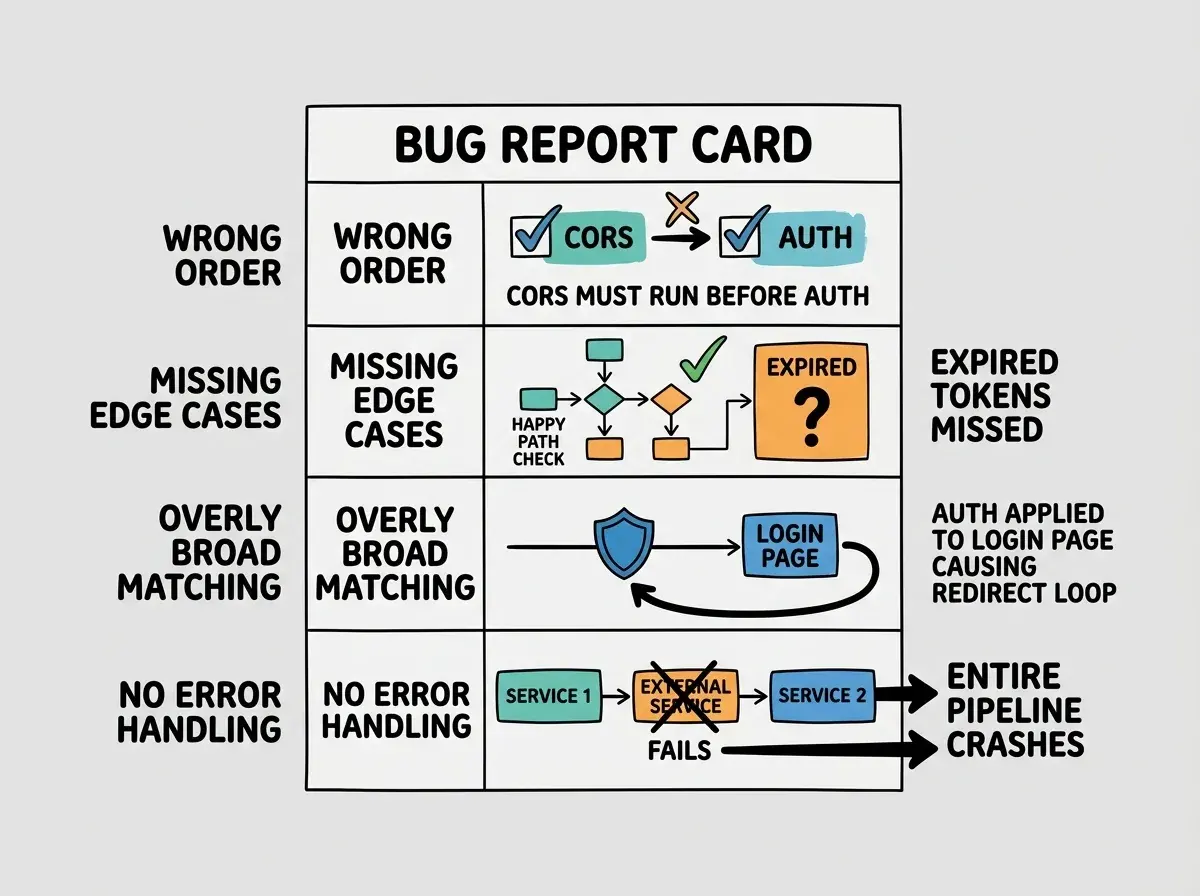
AI coding tools generate middleware frequently. Authentication checks, route protection, API rate limiting; these are common requests, and AI tools produce working code quickly. But the generated code often has subtle issues that are not immediately obvious.
Order-dependent bugs. The AI might place CORS middleware after authentication, which means preflight requests get rejected before CORS headers are added. The checkpoints work individually but fail because they are in the wrong sequence.
Missing edge cases. AI-generated auth middleware often checks for a session cookie but does not handle expired sessions or revoked tokens. The happy path works perfectly. The edge cases break silently.
Overly broad matching. The AI might apply auth middleware to every route, including your login page. Users cannot reach the login page because they are being redirected to the login page. This creates an infinite redirect loop.
Incomplete error handling. When middleware fails (the auth service is down, the database is unreachable), AI-generated code often crashes the entire pipeline instead of failing gracefully.
When reviewing AI-generated middleware, check four things: the order of checkpoints, the route matching rules, the edge cases for each check, and the error handling for external service failures.
Middleware Beyond Web Apps
The concept extends beyond web applications. Message queues use middleware to transform or filter messages. Cloud platforms use middleware for load balancing and request routing before traffic reaches your app.
Recognizing the pattern helps you think about architecture more clearly. Whenever you need to apply the same logic to many different requests, middleware is the right tool. It keeps shared logic in one place instead of duplicating it across every route or handler.
Putting too much logic in middleware. Middleware should handle cross-cutting concerns (authentication, logging, security headers) that apply broadly across your app. Business logic (calculating prices, processing orders, generating reports) belongs in your route handlers or service layer. When AI tools generate middleware that includes business logic, it becomes harder to test, harder to debug, and harder to change. If a middleware function is longer than 20 lines, it is probably doing too much.
What This Means For You
Middleware is the series of invisible checkpoints between a user's request and your app's response. Each checkpoint handles one concern (identity, permissions, logging, security), and the order they run in matters. Understanding this pipeline gives you a clear mental model for debugging and designing web applications.
- If you are a senior dev working with AI tools: Review the order and scope of AI-generated middleware carefully. The most common bugs are wrong checkpoint order, overly broad route matching, and missing auth edge cases. Establish a standard middleware stack early and instruct AI tools to follow it rather than generating patterns from scratch each time.
- If you are a career changer learning to build: You do not need to write middleware from scratch. Most frameworks provide clear patterns for it. What you need is the ability to read middleware code and understand what each checkpoint does. When something goes wrong (redirect loops, 401 errors on public pages), knowing that middleware is the likely cause saves hours of debugging.
- If you are a founder evaluating a codebase: Ask your team: "What does our middleware handle, and in what order?" The answer reveals how security and authentication are implemented. Well-organized middleware is a sign of a well-architected application. A tangled middleware layer is an early warning sign of technical debt.
Middleware is one of many architectural patterns that separate solid apps from fragile ones.
Explore more