JSON is a simple, human-readable format that apps use to exchange information with each other. Every time you check the weather on your phone, scroll through social media, or ask an AI tool to do something, JSON is carrying the data behind the scenes. It is the universal language that software uses to communicate.
You do not need to write JSON to understand it. You just need to see the pattern once, and it clicks. The structure is so simple that you will start recognizing it everywhere.
The Shipping Label That Explains Everything
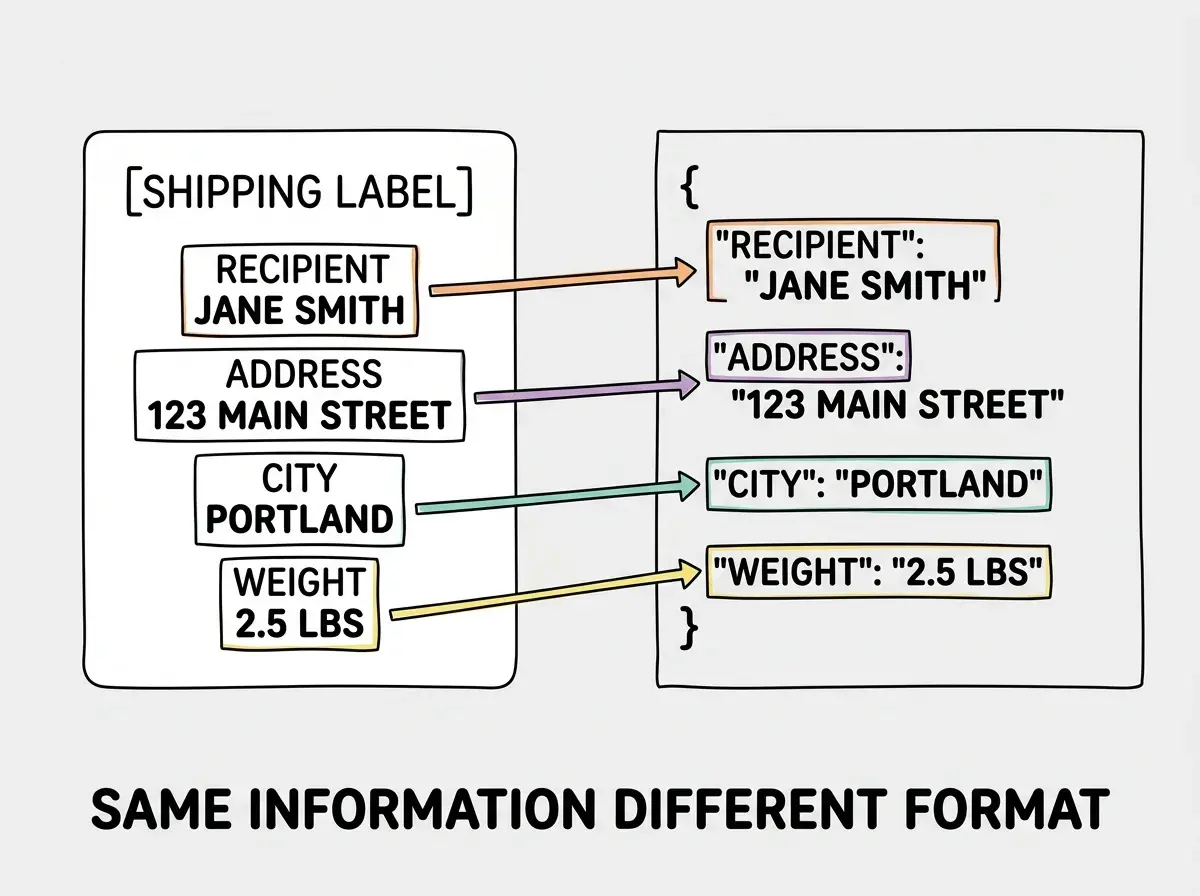
Think of JSON as a standardized shipping label.
When a warehouse sends a package, the label has specific fields: recipient name, street address, city, state, zip code, weight. Every shipping company in the world can read that label because the format is standardized. FedEx, UPS, DHL, the local postal service. They all know where to look for the address, where to find the tracking number, and how to route the package.
JSON works the same way for data. Instead of recipient and address, you have fields like username, email, and account status. Instead of shipping companies, you have apps, servers, databases, and AI tools. They all know how to read JSON because the format is universal.
Every field on the label has two parts: a name and a value. "Recipient: Jane Smith." "Weight: 2.5 lbs." "Fragile: yes." JSON uses the exact same structure. A name (called a "key") paired with a value. That is the entire concept.
What JSON Actually Looks Like
This confuses everyone at first because JSON looks like code, and code feels intimidating. But JSON is not code. It does not do anything. It does not run. It does not calculate. It is just a way to organize information, like a very structured form.
Here is what a shipping label would look like in JSON format:
{
  "recipient": "Jane Smith",
  "address": "123 Main Street",
  "city": "Portland",
  "state": "Oregon",
  "weight": 2.5,
  "fragile": true
}
That is it. Curly braces hold the data. Each line has a key (the label) in quotes, a colon, and then the value. Text values go in quotes. Numbers and true/false values do not. If you can read a form, you can read JSON.
Now here is what a user profile looks like in JSON:
{
  "username": "janesmith",
  "email": "jane@example.com",
  "plan": "pro",
  "projectCount": 12,
  "emailVerified": true
}
Same pattern. Keys on the left describe what the information is. Values on the right hold the actual data. Every app in the world can read this because the format is standardized, just like every shipping company can read a standard label.
JSON is not a programming language. It is a data format. It does not make decisions, run calculations, or perform actions. It just organizes information in a way that any app, any server, and any AI tool can understand. Think of it as the difference between a form and the person reading the form. JSON is the form.
Nesting and Lists, or Labels Within Labels
Shipping labels are flat. One level of information. But real-world data is more complex. A customer might have multiple addresses, or an order might contain several items. JSON handles this with two simple concepts: nesting and arrays.
Nesting is a label inside a label. Imagine a shipping label where the "address" field contains its own sub-fields: street, city, state, and zip. In JSON, you put curly braces inside curly braces:
{
  "recipient": "Jane Smith",
  "address": {
    "street": "123 Main Street",
    "city": "Portland",
    "state": "Oregon",
    "zip": "97201"
  }
}
The address is not a single value anymore. It is a group of related values bundled together.
An array is a list of items. What if the package contains multiple products? You use square brackets to create a list:
{
  "orderNumber": "A-1234",
  "items": ["Blue T-Shirt", "Running Shoes", "Water Bottle"],
  "totalPrice": 89.97
}
Square brackets mean "here is a list." Each item is separated by a comma. You can nest objects inside arrays too, which is how you get rich, detailed data structures. But the building blocks are always the same: keys, values, curly braces for groups, and square brackets for lists.
Where You Will See JSON as a Vibe Coder
You might think JSON is something only backend developers deal with. But actually, as a vibe coder, you will encounter it constantly. Here are the most common places.
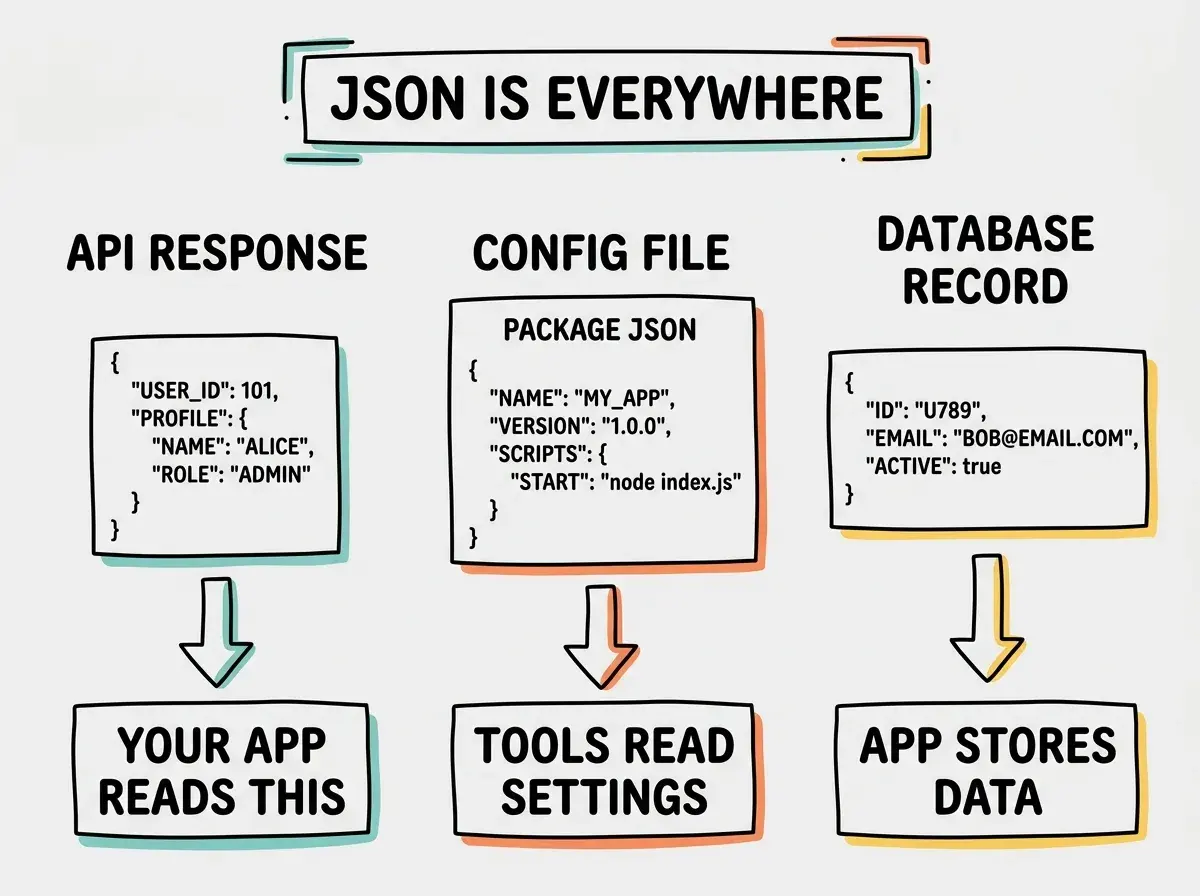
API responses. When your app asks a server for data (like fetching a user's profile or loading a list of products), the server sends back JSON. Every API in the world speaks JSON. When your AI coding tool connects your app to Stripe for payments, the payment data comes back as JSON. When it pulls weather data, that is JSON. When it fetches social media posts, also JSON.
Configuration files. Many tools store their settings in JSON files. If you have ever seen a package.json file in a project, that is JSON describing your project's dependencies and settings. Tsconfig, ESLint, and dozens of other tools use JSON for configuration.
AI tool inputs and outputs. When you interact with AI coding tools, the prompts and responses are often structured as JSON behind the scenes. When an AI tool generates code that fetches data from an API, it will parse JSON responses. Understanding the format helps you know what the AI is working with.
Database records. Modern databases, especially the ones popular with vibe coders like Supabase and Firebase, store and return data as JSON. When you save a user profile or retrieve an order history, the data travels in JSON format.
Understanding data formats is just one piece of vibe coding. Explore the other concepts that matter.
See the basicsReading JSON Without Writing It
Here is your practical superpower. You do not need to write JSON from scratch. AI tools handle that. What you need is the ability to read it, so that when something goes wrong, you can spot the problem.
The most common JSON errors are tiny and easy to catch once you know what to look for.
Missing comma. Every key-value pair except the last one needs a comma after it. A missing comma breaks everything.
Mismatched braces or brackets. Every opening curly brace needs a closing one. Every opening square bracket needs a closing one. If they do not match up, the JSON is invalid.
Wrong quote marks. JSON requires double quotes, not single quotes. If you see 'username' instead of "username", that is the problem.
You might think these tiny errors would not matter. But actually, a single missing comma will cause an entire API call to fail. Apps are strict about JSON formatting because they need perfect consistency to parse data reliably. The good news is that AI tools and code editors highlight these errors automatically. You just need to know what the red squiggly line is trying to tell you.
What You Do Not Need to Know (Yet)
This is permission to not know things. You do not need to understand JSON Schema, JSON Web Tokens (JWT), or JSONP. Those are specialized topics that come up in specific situations, and AI tools handle them for you.
You do not need to parse JSON manually. Every programming language has built-in tools for reading JSON, and your AI coding assistant will use them automatically. You do not need to memorize the syntax rules. Code editors will flag errors in real time.
Getting intimidated by deeply nested JSON. When you see a JSON response from an API that is fifty lines long with four levels of nesting, it looks overwhelming. But the structure is always the same: keys and values, curly braces for groups, square brackets for lists. Start at the top level and work your way in, one layer at a time. It is like reading a detailed shipping manifest. Lots of information, but each individual line is simple.
What you need right now is pattern recognition. When you see curly braces and key-value pairs, you know it is JSON. When an error says "unexpected token" or "invalid JSON," you know to check for missing commas and mismatched braces. That recognition is enough to be productive.
What This Means For You
JSON is the universal format for data exchange. Understanding its structure, even at a basic level, helps you work more effectively with AI tools, debug problems faster, and understand what is happening under the hood of your applications.
- If you are a founder building a product: When your AI tool or developer says "the API returns JSON," you now know exactly what that means. You can look at API responses yourself, verify that the data structure makes sense for your product, and have informed conversations about data architecture. This is especially useful when evaluating third-party services, because you can look at their API documentation and understand what data you will get back.
- If you are a career changer learning vibe coding: Practice reading JSON, not writing it. Open the browser developer tools on any website (right-click, Inspect, Network tab) and look at the API responses. They are all JSON. The more you see the format, the more natural it becomes. Within a week of casual observation, you will read JSON as easily as you read a spreadsheet.
- If you are a marketer working with tools: JSON shows up in analytics APIs, webhook payloads, and automation tool configurations. Understanding the format helps you set up integrations between marketing tools, read event tracking data, and troubleshoot when a Zapier or Make automation breaks because of a data format issue.
JSON is one piece of the technical vocabulary that makes vibe coding click. Keep building your knowledge.
Explore more