Imagine you ordered a package online and the delivery company gave you no tracking link and no notifications. The only way to know if your package arrived would be to walk to your front door every five minutes and check. All day. Every day. Until the package shows up.
That sounds exhausting, and it is exactly how many apps used to communicate with each other. Webhooks fixed that problem, and once you understand them, you will see them everywhere in modern software.
The Doorbell That Changed Everything
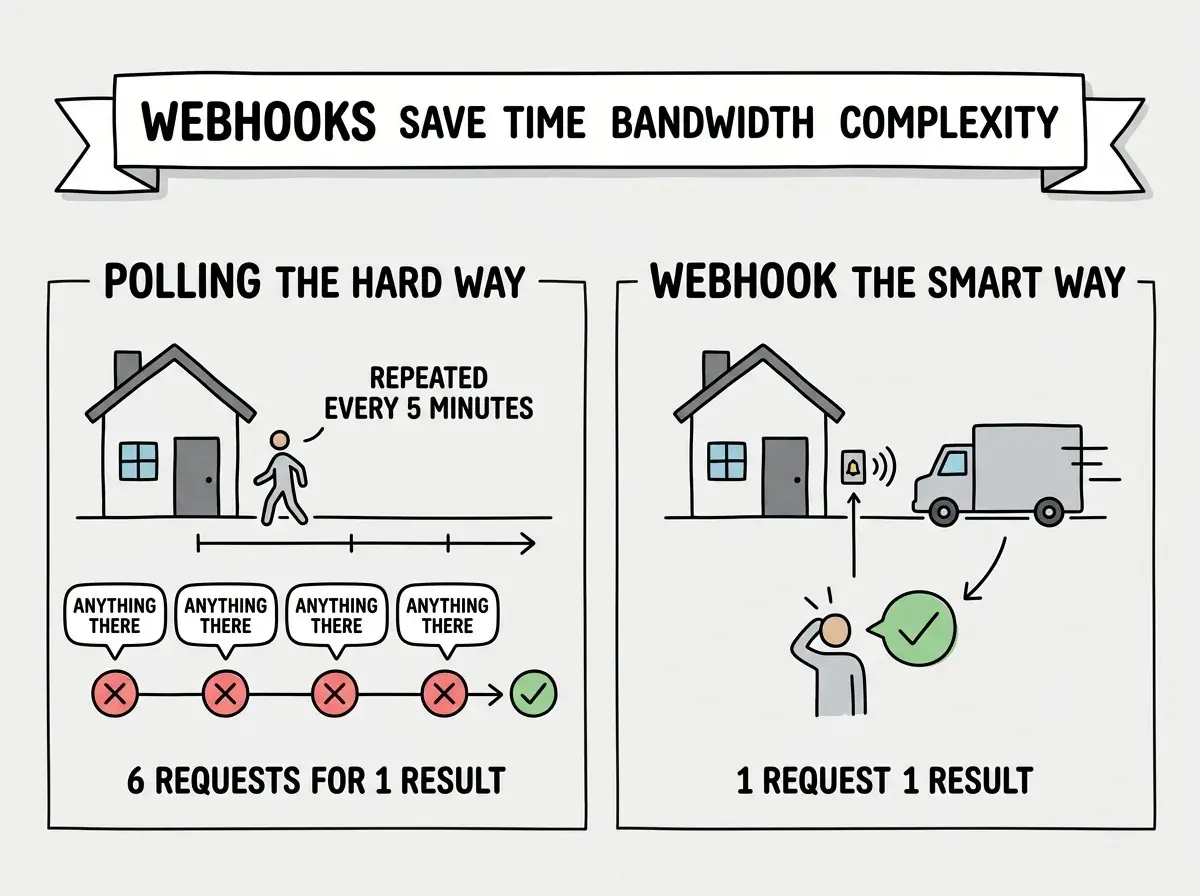
Think of your app as a house. Other services (payment processors, email tools, GitHub, Shopify) are delivery drivers who occasionally bring something to your door. Without a webhook, your app has to keep walking to the door to check: "Did anything arrive? How about now? Now?"
This constant checking is called polling. It works, but it is wasteful. Your app spends most of its time checking and finding nothing there.
A webhook is a doorbell. Instead of your app constantly checking, you give the delivery service your address and say: "Ring the doorbell when you have something for me." The delivery driver shows up, presses the button, and your app wakes up and handles whatever arrived. No wasted trips to the door. No missed deliveries.
That is the entire concept. A webhook is just a URL that one service calls when something interesting happens. Your app provides the URL (installs the doorbell), and the other service rings it with the relevant information whenever an event occurs.
How the Doorbell Actually Works
This confuses everyone at first because webhooks feel like magic. One service "just knows" to contact your app. But there is nothing magical about it. You set it up explicitly.
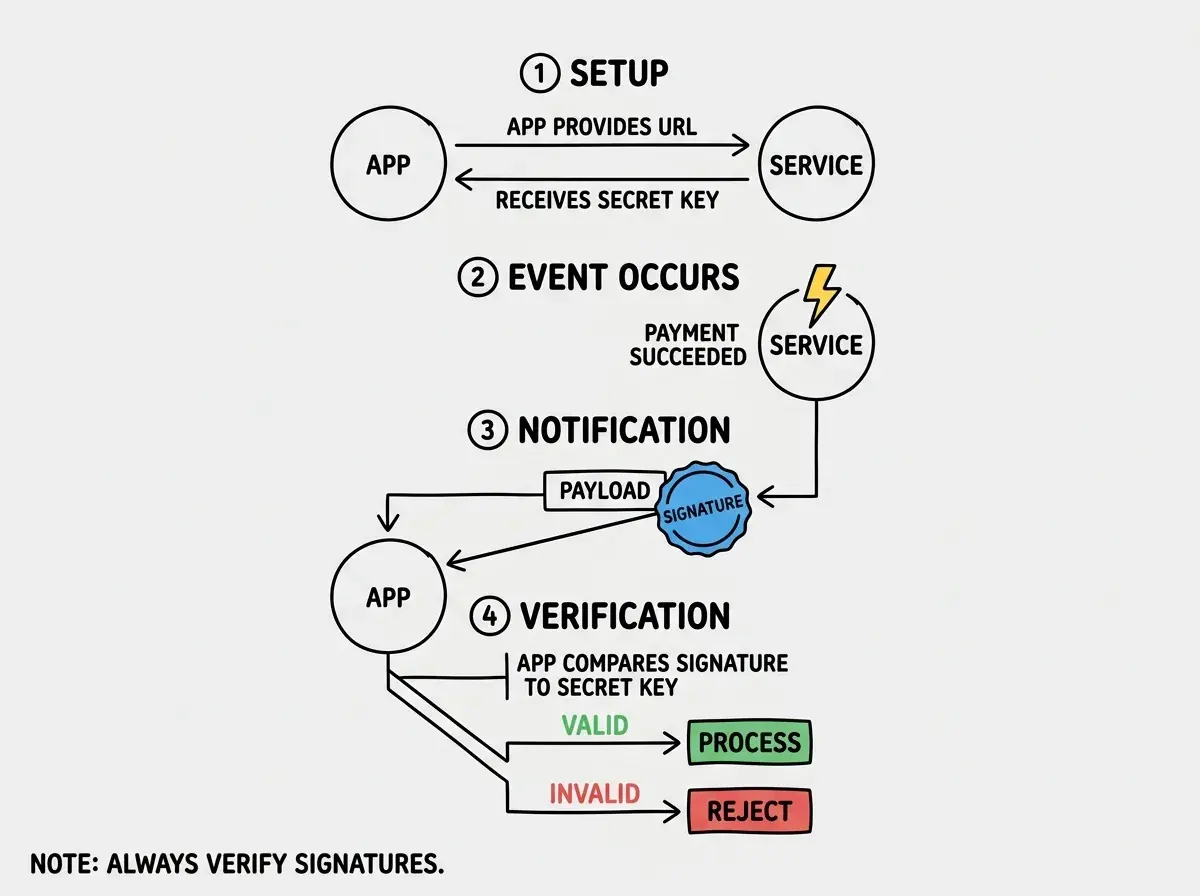
Here is the typical flow. You sign up for a service like Stripe (for payments). Somewhere in Stripe's dashboard, there is a section called "Webhooks" or "Event notifications." You paste in a URL from your app, something like https://myapp.com/api/webhooks/stripe. Then you choose which events you care about: payment succeeded, payment failed, subscription canceled.
From that point on, every time one of those events happens, Stripe sends an HTTP POST request to your URL. That request includes a payload, which is a bundle of data describing what happened. Your app receives the payload, reads the information, and takes action.
If a customer pays for a subscription, Stripe rings your doorbell with a payload that says "customer X just paid $49 for plan Y." Your app can then activate their account, send a welcome email, update your database, or do whatever else needs to happen.
The beauty is that this happens in near real-time. No delays. No polling. No wasted resources.
Real Examples You Will Encounter
Webhooks are not theoretical. If you are building anything beyond a static website, you will encounter them quickly. Here are the most common scenarios.
Stripe payment events. When a customer's credit card is charged, when a subscription renews, when a payment fails. Stripe sends a webhook so your app can respond instantly. Without this, you would have no idea a payment went through until you manually checked.
GitHub push events. When someone pushes code to a repository, GitHub can send a webhook to trigger a deployment. This is how platforms like Vercel and Cloudflare Pages know to rebuild your site. You push code, GitHub rings the doorbell, and the hosting platform starts building.
Shopify order events. When a customer places an order, Shopify sends a webhook to your fulfillment system. The warehouse knows to start packing immediately, without anyone checking a dashboard.
Email events. Services like Resend or SendGrid send webhooks when an email is delivered, opened, bounced, or marked as spam. Your app can update records in real time instead of guessing whether emails arrived.
The pattern is the same every time. Something happens in Service A, Service A rings your doorbell, and your app responds.
A webhook is a URL your app provides so other services can notify it when events occur. Instead of your app constantly asking "did anything happen?" (polling), the other service tells you when it does (pushing). You set it up once in the other service's dashboard, and from then on, events flow to your app automatically in near real-time.
The Payload Is the Message
When a webhook fires, it sends data along with the notification. This data is called the payload, and it is usually formatted as JSON (a structured text format that both humans and computers can read).
A Stripe payment webhook payload might include the customer's ID, the amount charged, the currency, the payment method, and the timestamp. Your app reads this payload and decides what to do with it.
You might think you need to handle every field in the payload. But actually, most webhook handlers only care about a few key pieces of information. A payment webhook handler might only need the customer ID and the payment status. Everything else is available if you need it later, but you do not have to process it all.
This is where AI coding tools are genuinely helpful. Tell your AI: "Set up a webhook endpoint for Stripe payment events that activates the user's subscription when payment succeeds." The AI will generate the endpoint, parse the relevant fields from the payload, and wire up the database update. The pattern is consistent enough that AI tools handle it well.
Webhooks are one of many integration patterns worth understanding.
Learn the basicsSecurity and the Doorbell Problem
Here is the catch with doorbells: anyone can ring them. If your webhook URL is just a regular endpoint on your app, anyone who discovers it could send fake events. Someone could pretend to be Stripe and tell your app that a payment succeeded when it did not.
This is why webhook secrets exist. When you set up a webhook in Stripe (or any reputable service), you receive a secret key. Every webhook request from Stripe includes a signature, a cryptographic stamp generated using that secret. Your app checks the signature before processing the event. If the signature does not match, the request is fake, and your app ignores it.
Think of it as a doorbell with a password. The delivery driver rings the bell and whispers the password through the door. If the password is wrong, you do not open up.
Never skip webhook signature verification. AI tools sometimes generate webhook handlers without this check, and it is a security hole. When setting up webhooks, always tell your AI: "Verify the webhook signature before processing the event."
Common Webhook Gotchas
A few practical issues come up when working with webhooks.
Your app must be reachable. The webhook sender needs a public URL to call. During local development, your app runs on localhost, which is not accessible from the internet. Tools like ngrok create a temporary public URL that tunnels to your local machine, solving this problem during development.
Webhook delivery is not guaranteed. Network hiccups happen. Most services retry failed webhook deliveries a few times, but your app should be designed to handle the case where a webhook never arrives. This usually means having a fallback check (a lightweight poll) for critical events.
Webhooks can arrive out of order. If a customer upgrades and then downgrades their subscription in quick succession, the two webhooks might arrive in the wrong order. Your app should use timestamps or event IDs to handle this gracefully rather than assuming events arrive sequentially.
Idempotency matters. The same webhook might be delivered more than once (retries after a timeout, for example). Your app should handle duplicate events without creating duplicate side effects. If a "payment succeeded" webhook arrives twice, you should not credit the customer's account twice.
Forgetting to verify webhook signatures in your handler. AI tools often generate webhook endpoints that accept any incoming request without checking if it genuinely came from the expected service. This means anyone who discovers your webhook URL could send fake events and manipulate your app. Always verify signatures, and always ask your AI tool to include signature verification when generating webhook handlers.
What This Means For You
A webhook is a notification system between apps. One service rings your app's doorbell (sends a request to your URL) when something important happens, delivering the relevant data so your app can respond in real time. Understanding this pattern unlocks most modern app integrations.
- If you are a founder building a product: Webhooks are how your app connects to payment processors, email services, and third-party platforms. When evaluating services, check whether they offer webhook support. Services with good webhook documentation (Stripe is the gold standard) save you days of integration work. Ask your technical team: "Are we verifying webhook signatures?"
- If you are an indie hacker shipping fast: Webhooks let you build reactive systems without complex infrastructure. A Stripe webhook that activates accounts on payment, a GitHub webhook that triggers deploys on push, these are the building blocks of products that feel polished. Set them up early and your app responds to events instantly instead of on a delay.
- If you are a senior dev working with AI tools: Watch for AI-generated webhook handlers that skip signature verification or lack idempotency. These are the two most common security and reliability gaps. Establish a webhook handler pattern in your codebase early (verify signature, check for duplicates, process event, return 200) and instruct your AI tool to follow it.
Webhooks are just one piece of building apps that work with other services.
Explore more