A domain name is the human-friendly address people type into their browser to reach your app. Instead of remembering a string of numbers like 192.168.1.1, people type "yourapp.com" and arrive at your website. DNS is the system that translates that friendly name into the actual server address behind the scenes.
You do not need to configure DNS records to understand this concept. You just need to see the analogy once, and the mystery disappears. Domains and DNS are not complicated. They are just unfamiliar.
The Phone Book That Explains Everything
Think of the internet as a massive city where every building has a numeric address. Your app lives at Building 104.21.56.78. Nobody is going to remember that.
So you give your building a name. "Jane's Bakery." Now people can say "I am going to Jane's Bakery" instead of "I am going to Building 104.21.56.78." That name is your domain.
But how does anyone know that "Jane's Bakery" is at Building 104.21.56.78? There is a phone book. A giant, constantly updated directory that maps every name to every numeric address. When someone says "take me to Jane's Bakery," the phone book looks up the name and routes them to the right building.
That phone book is DNS, the Domain Name System.
Every time you type a URL into your browser, this process happens. Your browser asks the DNS phone book "where is yourapp.com?" The phone book responds with the numeric address (called an IP address). Your browser connects to that address and loads the website. It takes milliseconds.
The Pieces in Plain Language
This confuses everyone at first because there are several pieces that sound similar. But each one has a distinct role, and the phone book analogy maps perfectly.
A domain name is the contact name. It is the human-readable label. "google.com," "yourapp.com," "janebakery.com." You buy domain names from companies called registrars (like Namecheap or Cloudflare). Buying a domain is like reserving a business name. It is yours as long as you keep paying the annual fee, typically ten to fifteen dollars per year.
An IP address is the phone number. It is the actual numeric location of the server where your app runs. IP addresses look like 104.21.56.78. Every server on the internet has one. You rarely need to interact with IP addresses directly, because DNS handles the translation for you.
DNS is the phone book. It is a global, distributed system that maps domain names to IP addresses. When you set up a domain for your app, you create entries in the phone book that say "this name points to this address." Those entries are called DNS records.
DNS records are the individual entries in the phone book. The most common types are A records (which point a domain to an IP address) and CNAME records (which point a domain to another domain). You do not need to memorize every record type. You need to know that records exist and that setting them up correctly is what makes your domain work.
When your domain is not working, the problem is almost always in the DNS records. The phone book has the wrong entry, or the entry has not been updated yet. It is always a specific record that is missing, incorrect, or still propagating. Your hosting provider's documentation will tell you exactly which records to set, and your AI coding tool can walk you through it step by step.
How a Domain Gets Connected to Your App
Here is the practical workflow. You have deployed your app and it is live at an ugly default URL like "your-project-abc123.vercel.app." Now you want people to reach it at "yourapp.com" instead.
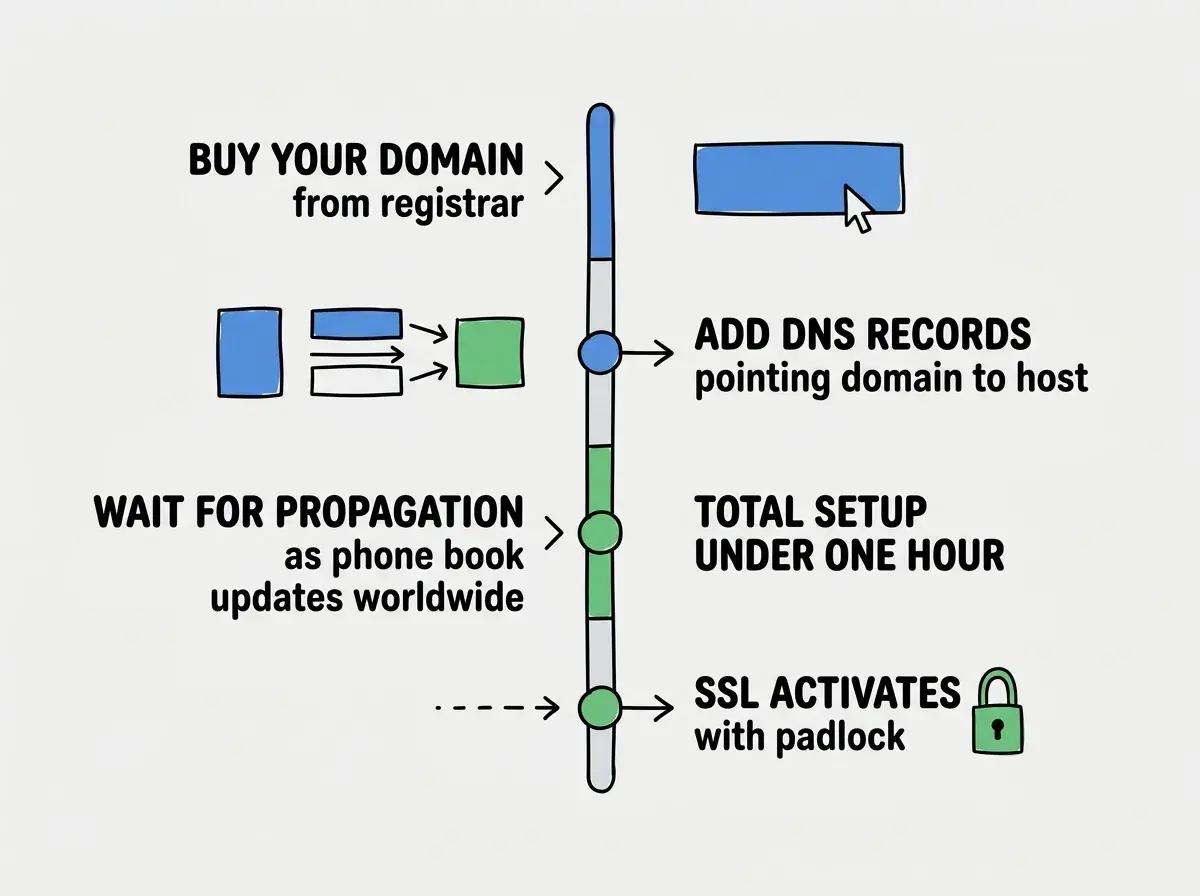
Step 1: Buy the domain. Go to a registrar like Namecheap or Cloudflare and search for the domain you want. If it is available, buy it. The domain is now yours, but it does not point anywhere yet. You have reserved the business name, but there is no entry in the phone book.
Step 2: Point the domain to your hosting provider. This is where you create the phone book entry. Your hosting provider gives you specific DNS records to add. Usually this means going to your registrar's DNS settings and adding an A record or CNAME record that points to your hosting provider's servers.
Step 3: Wait for propagation. When you add or change a DNS record, it takes time for the update to spread across the internet. This is called propagation, and it can take from a few minutes to 48 hours (though usually under an hour). During propagation, some people might see your new site while others still see nothing. The phone book is updating its copies around the world.
Step 4: SSL activates automatically. Most hosting providers set up SSL (the security certificate that puts the padlock icon in the browser). Once your domain resolves correctly, this happens within minutes.
That is the entire process. Buy the name, create the phone book entry, wait for it to spread.
Subdomains and Why They Matter
Your domain is like a building. Subdomains are rooms within that building.
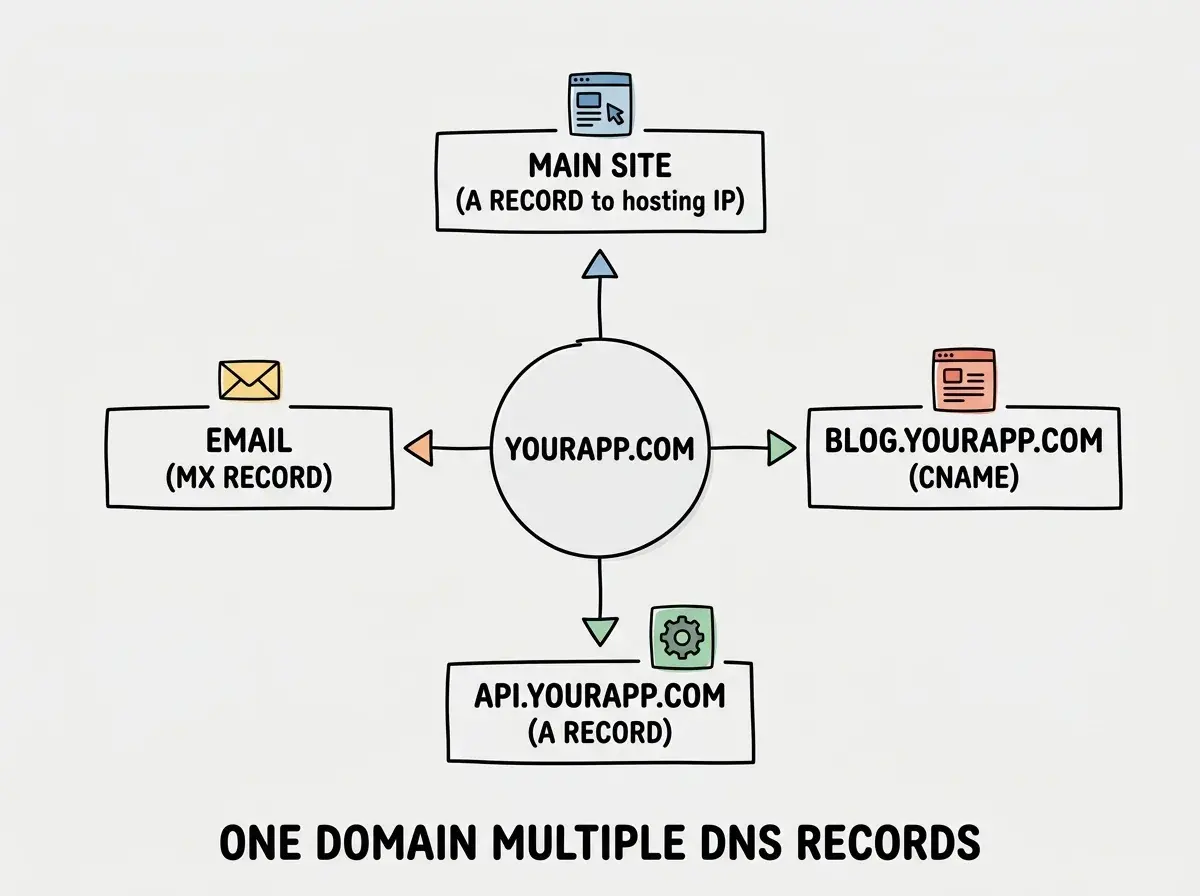
If your domain is "yourapp.com," you can create subdomains like "blog.yourapp.com," "api.yourapp.com," or "docs.yourapp.com." Each subdomain can point to a different server or different part of your infrastructure. They all share the same building name but occupy different rooms.
Creating a subdomain is just another DNS record. You add a CNAME or A record for "blog" that points to wherever your blog is hosted. The process is identical to setting up the main domain.
Subdomains let you organize different parts of your project independently. You can deploy your marketing site separately from your app, or run your documentation on a platform optimized for docs.
Understanding domains is one of the key concepts for shipping your app to real users.
Learn moreCommon DNS Scenarios You Will Actually Face
You might think DNS is a set-it-and-forget-it task. But actually, you will interact with DNS settings several times during the life of a project. Here are the situations that come up most often.
Switching hosting providers. If you move your app from Vercel to Cloudflare, you update your DNS records to point to the new provider. Same domain, new phone number in the phone book.
Adding email. If you want a professional email address like "hello@yourapp.com," you add MX records (mail exchange records) to your DNS. These tell the internet where to deliver email for your domain.
Verifying domain ownership. Some services (like Google Search Console or email providers) ask you to prove you own a domain by adding a specific TXT record. It is like putting a secret code in the phone book that only the true owner would know.
Troubleshooting. When your domain shows a blank page or an error, the first step is always to check the DNS records. Tools like "dnschecker.org" let you see exactly what records are set and whether they have propagated.
What You Do Not Need to Know (Yet)
This is permission to not know things. You do not need to understand recursive DNS resolvers, authoritative nameservers, or DNS caching hierarchies. Those are the internals of how the phone book system works, and they are not necessary for building projects.
You do not need to memorize all DNS record types. A records, CNAME records, and MX records cover 95% of what you will encounter. TXT records come up occasionally for verification. The rest are specialized.
Panicking when your domain does not work immediately after setting up DNS records. Propagation takes time. New vibe coders often change their DNS records multiple times in frustration, not realizing that each change restarts the propagation timer. Set your records once, wait an hour, and then check. If something is still wrong after an hour, then troubleshoot. Patience during propagation saves you from creating more problems.
You also do not need to understand DNSSEC or advanced DNS routing strategies. For vibe-coded projects, the basics are more than enough.
What This Means For You
A domain is your app's address on the internet, and DNS is the phone book that makes that address work. Understanding the relationship between domain names, IP addresses, and DNS records gives you the confidence to connect your projects to custom domains and troubleshoot when things do not resolve.
- If you are a founder building a product: Buy your domain early, even before you start building. Good domain names get taken quickly, and having one reserved gives your project legitimacy from day one. Use Cloudflare or Namecheap as your registrar. When you are ready to deploy, connecting the domain is a fifteen-minute task once you know which DNS records to add.
- If you are a career changer learning vibe coding: Set up a custom domain for your very first deployed project. The process will seem intimidating, but it is genuinely just adding two or three records to a form. Once you have done it once, you will never find it confusing again. Having a project at "yourname.com" instead of "random-string.vercel.app" makes your portfolio dramatically more professional.
- If you are a marketer working with tools: Understanding DNS helps you manage marketing infrastructure. Setting up a custom email domain, connecting landing pages, verifying your domain with Google Search Console, and configuring subdomains all require basic DNS knowledge. You do not need a developer for these tasks once you understand the phone book model.
Domains and DNS are the final piece of getting your project in front of real users. Keep building your knowledge.
Explore more