Deployment is the process of taking your app from your computer and putting it on the internet so that real people can use it. When your project runs on your laptop, only you can see it. Deployment is the step that makes it available to the world. It is the gap between "it works on my machine" and "anyone can visit my website."
This is the step where most vibe coders get stuck. Building the app is the fun part. Deploying it is where things get confusing. But once you see the analogy clearly, the confusion dissolves.
The Restaurant That Explains Everything
Think of deployment as the difference between cooking in your home kitchen and opening a restaurant.
In your home kitchen, you have total control. You know where every ingredient is. You know the quirks of your oven. When you cook at home, everything just works because you have set it up perfectly for yourself.
Opening a restaurant is different. Suddenly you need a commercial kitchen that meets health codes. You need a building with plumbing, electricity, and ventilation. You need a sign so people can find you. You need staff to keep things running when you are not there.
The food is the same. Your recipes have not changed. But the infrastructure around the food is completely different. That is deployment. Your code does not change, but the environment it runs in changes dramatically.
Localhost vs. Production
This confuses everyone at first, and it is the root of most deployment frustration.
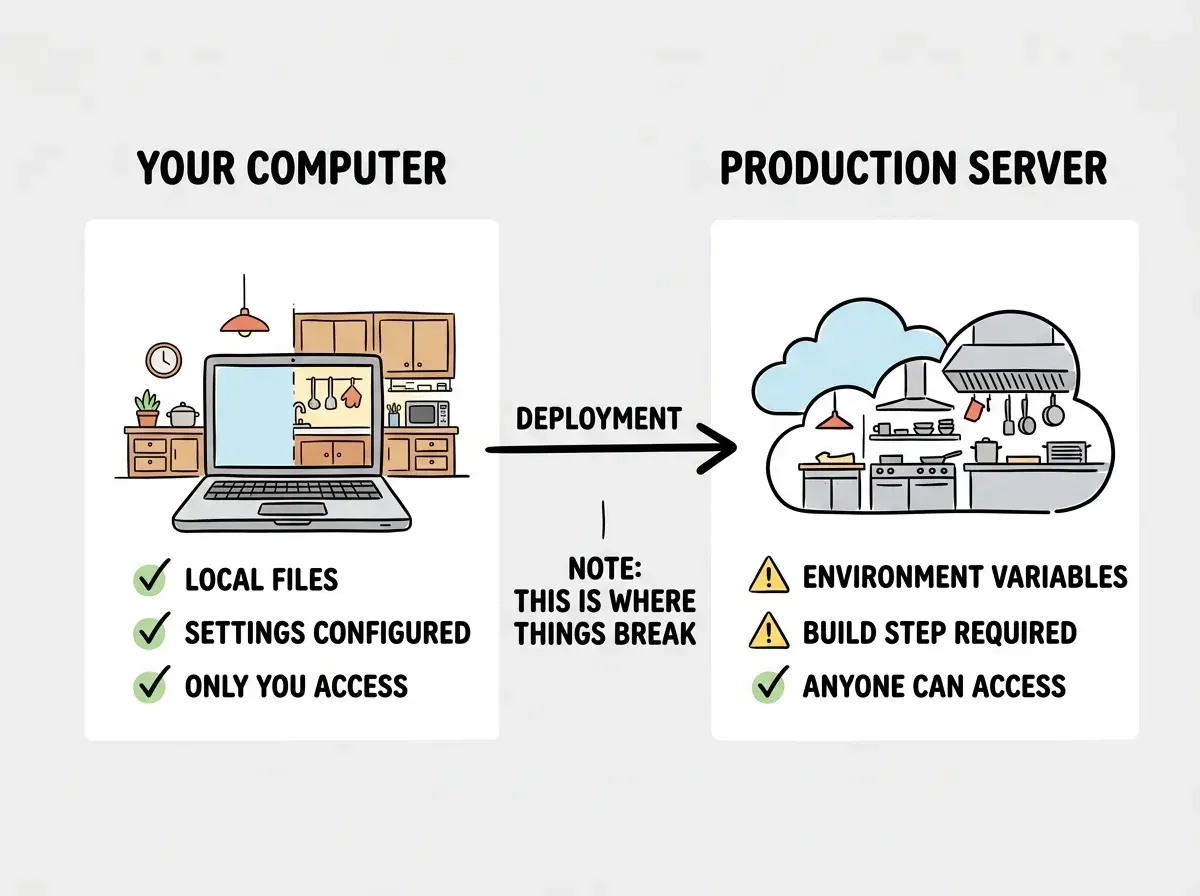
When you run your app on your computer, it lives at a special address called "localhost." This is your home kitchen. Only your computer can access it. It has access to all your files, all your settings, and all the shortcuts you have set up on your machine.
Production is the restaurant. It is a server somewhere on the internet, run by a hosting provider, that serves your app to anyone who visits. That server does not have your files, your settings, or your shortcuts. It has only what you explicitly send it.
This is why things break during deployment. Your app worked perfectly on localhost because it was relying on things that exist only on your machine: a database connection string saved in a local file, an API key stored in your settings, a font installed on your computer. When the app moves to production, those things are missing.
You might think that if your app works locally, deploying it should be automatic. But actually, the gap between localhost and production is where 90% of deployment problems live. Your home kitchen had everything you needed. The restaurant kitchen is empty until you stock it.
Deployment problems are almost never about your code being wrong. They are about your code expecting something that exists on your computer but does not exist on the server. Missing environment variables, wrong file paths, and unconfigured services cause the vast majority of failed deploys. When deployment fails, look at the environment first, not the code.
The Three Steps of Every Deployment
Every deployment, regardless of what platform you use, follows the same three steps. Understanding these steps makes the entire process less mysterious.
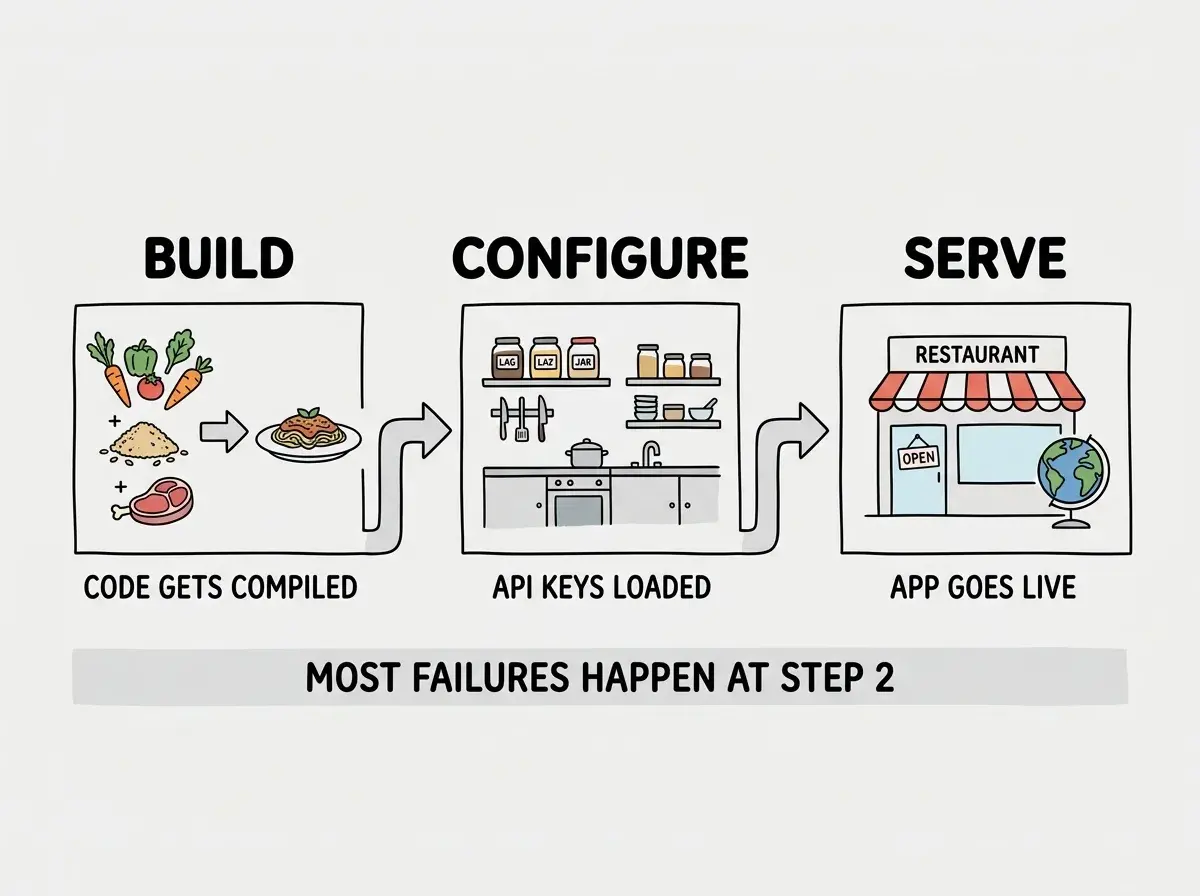
Step 1: Build. In the restaurant analogy, this is prep work. Your raw ingredients (source code) get transformed into finished dishes (optimized files). The build step compiles your code, bundles your assets, and creates the final version of your app that will be served to users. During the build, the system checks for errors, and if anything is broken, the build fails and tells you why.
Step 2: Configure. This is stocking the restaurant kitchen. Environment variables (API keys, database URLs, service credentials) get loaded into the production environment. These are the secret ingredients that your app needs but that should never be visible in your code. Every hosting provider has a section where you enter these values, and if you miss one, the app will crash when it tries to use the missing ingredient.
Step 3: Serve. The restaurant opens its doors. Your built, configured app is placed on a server and connected to a URL that anyone can visit. The hosting provider handles traffic, security certificates, and keeping the server running 24/7.
That is the entire process. Build, configure, serve. Most of the confusion comes from step two, because environment configuration is where things silently fail.
The Hosting Providers That Make It Easy
Modern hosting providers have made deployment dramatically simpler than it used to be. You do not need to rent a physical server, install an operating system, or configure networking.
Vercel is the most popular choice for vibe coders, especially if you are using Next.js. You connect your GitHub repository, and Vercel automatically builds and deploys your app every time you push new code.
Cloudflare Pages is fast, generous with its free tier, and runs your app on servers distributed globally. It requires a bit more configuration than Vercel but excels at performance and cost.
Netlify sits between the two in terms of simplicity. It handles most projects well and has a straightforward setup process.
All three work the same basic way. You connect your code repository, the provider builds your app, and it deploys to a URL. For your first deployment, any of them will work.
Deployment is one of the key concepts every vibe coder needs to understand. Build your foundation.
Learn the basicsWhy Deployment Is the Biggest Stumbling Block
Research on vibe coding consistently shows that deployment and infrastructure are the number one stumbling block for non-technical builders. Building the app is the exciting part, and AI tools make it feel easy. But deployment introduces a completely different kind of challenge.
The restaurant analogy explains why. Cooking is creative and forgiving. If you add a little too much salt, the dish is still edible. But restaurant infrastructure is binary. The health inspector either passes you or fails you. The gas line is either connected or it is not.
Deployment works the same way. Your code either builds successfully or it does not. The environment variable is either set or it is missing. There is no "close enough" with infrastructure.
This is why 63% of active vibe coding users, who are non-developers, find this stage particularly frustrating. The creative, conversational process of building with AI gives way to precise, unforgiving configuration. But deployment problems are almost always solvable, and they follow patterns. Once you have deployed three or four projects, you will recognize the common failure modes and fix them quickly.
What You Do Not Need to Know (Yet)
This is permission to not know things. You do not need to understand Docker, Kubernetes, or container orchestration. You do not need to know how to configure Nginx or manage SSL certificates manually. Modern hosting providers handle all of this behind the scenes.
You do not need to understand CI/CD pipelines, blue-green deployments, or canary releases. Those are advanced deployment strategies for large teams running mission-critical applications. For your projects, "push to GitHub and the hosting provider deploys automatically" is the entire workflow.
Ignoring error messages during failed deployments. When a build fails, the hosting provider gives you a log with specific error messages. New vibe coders often see a wall of text, feel overwhelmed, and start randomly changing things. Instead, scroll to the bottom of the error log and read the last error message. Copy that exact message and paste it to your AI coding tool. It will almost always tell you exactly what went wrong and how to fix it. The error log is your friend, not your enemy.
The depth comes with practice. Each deployment teaches you something. Your first deploy might take an afternoon of troubleshooting. Your fifth will take ten minutes. Your twentieth will take two. The pattern is always the same: build, configure, serve. You just get faster at spotting what is missing.
What This Means For You
Deployment is the bridge between a project on your computer and a product on the internet. It is the step that turns ideas into things people can actually use. Understanding the three steps (build, configure, serve) and knowing that most problems come from environment configuration gives you the mental model to troubleshoot effectively.
- If you are a founder building a product: Deployment is when your MVP becomes real. Understanding the process helps you set realistic timelines. Building the app might take a weekend with AI tools, but expect deployment to add another day or two for your first project. Choose a hosting provider early and deploy a simple version before you build everything. Deploying incrementally is much less painful than deploying a finished app all at once.
- If you are a career changer learning vibe coding: Deploy early and deploy often. Do not wait until your project is "finished" to attempt deployment. Deploy a basic "Hello World" page on your first day. That way, when you add features, you are deploying updates to a working app instead of doing everything for the first time at once. Vercel with a GitHub repository is the lowest-friction starting point.
- If you are a student exploring technology: Every deployment failure is a learning opportunity. Keep a note of what went wrong and how you fixed it. After five or six deployments, you will have a personal troubleshooting guide that covers the most common issues. That experience is exactly what separates students who can build from students who can ship.
Deployment is just one part of the journey from idea to live product. Learn what comes next.
Keep exploring