The difference between a localhost demo vs production is the difference between a sketch and a building. Your app works. The happy path flows beautifully. You recorded a demo video and it looks incredible. But somewhere between that localhost celebration and real users paying money, there is a gap that kills most vibe-coded projects. It does not have to kill yours.
Here is the moment every builder recognizes. You show your demo to a friend. They tap a button you never tested. They enter an email with a plus sign. They open it on their phone and half the layout is broken. They close the tab and come back, and their data is gone. Each of these is a tiny crack, and together they form a canyon between "it works on my machine" and "people will pay for this." The good news is that this canyon has a map. The things that are missing from your prototype are the same things missing from everyone's prototype, and they can be addressed systematically.
Why the Gap Catches Every Builder Off Guard
The gap exists because AI coding tools are optimized for the happy path. When you prompt Claude or Cursor to build a task manager, it builds a task manager that works when everything goes right. User creates account, adds tasks, checks them off. Beautiful. But production software has to handle what happens when things go wrong, when the network drops, when the user does something unexpected, when two people edit the same thing at once.
This is not a flaw in AI tools. It is the nature of building software. Traditional developers hit the same gap; they just have years of scar tissue that reminds them to handle edge cases. Vibe coders are building their scar tissue in real time, and that is completely fine. The key is knowing the gap exists before it surprises you.
A working demo covers roughly 20% of the code in a production application. The other 80% is error handling, edge cases, security, performance, accessibility, and monitoring. This ratio is consistent across every type of software, from simple landing pages to complex SaaS platforms.
The 80% figure is not made up. Studies of production codebases consistently show that the core "happy path" logic accounts for a small fraction of the total code. Most lines handle what happens when things fail, when inputs are unexpected, or when the system needs to recover gracefully. Your demo skips all of that, and that is exactly what demos should do. The problem starts when you try to ship the demo as a product.
The Iceberg of Production Software
Think of your application like an iceberg. The part above water, the part you can see and demo, is the user interface, the core features, the primary workflow. It looks complete. It feels done. But the mass below the waterline is what keeps the whole thing from sinking when it meets the open ocean of real users.
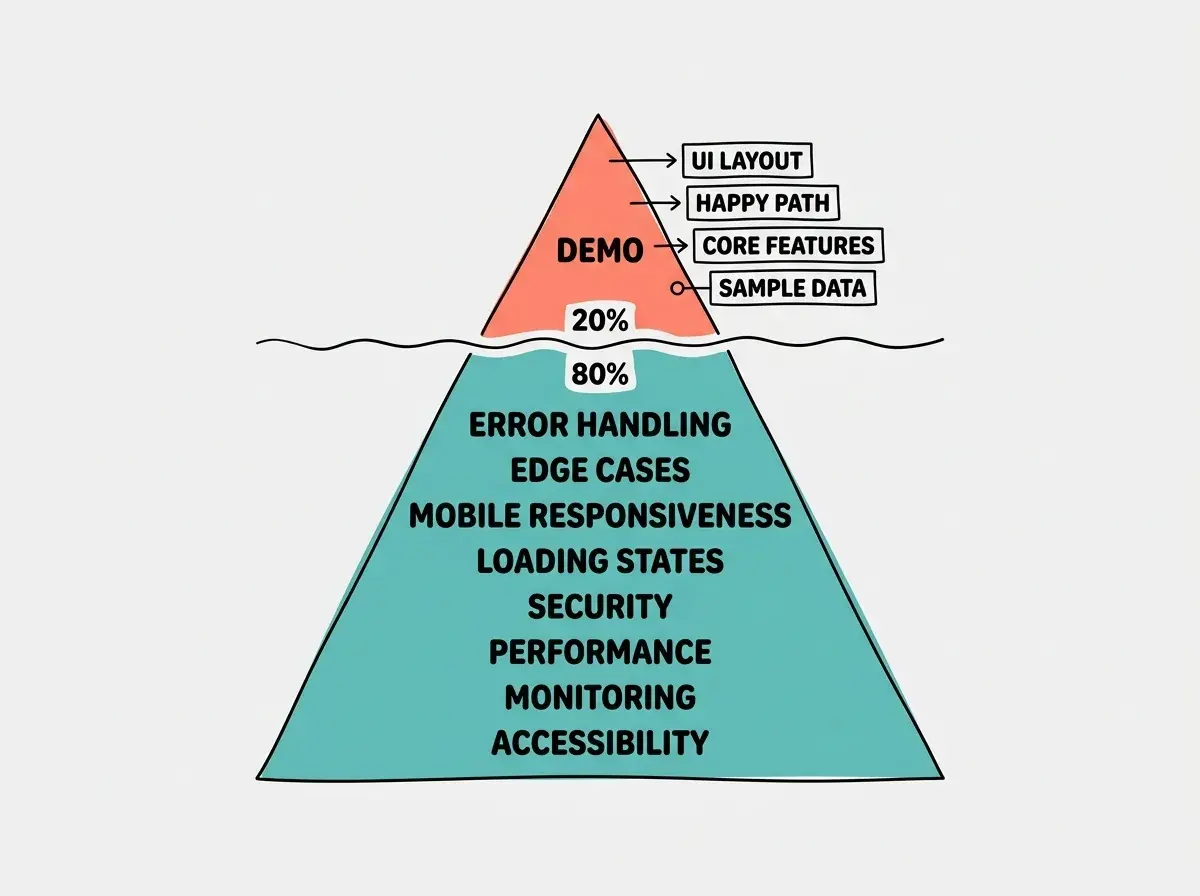
The iceberg analogy works because it explains why so many builders feel like they are "almost done" for weeks or months. You are done with the visible part. The invisible part is larger, but it is also less glamorous. Nobody records a demo video of their error handling. Nobody tweets about their loading states. But these invisible layers are what separate apps that retain users from apps that get uninstalled after three minutes.
Here is what sits below the waterline, grouped into categories that make it easier to tackle.
The Checklist of What is Actually Missing
Error handling. What happens when the API call fails? When the database is slow? When the user submits a form twice? Right now, your app probably shows a blank screen or a cryptic error. Production apps catch every failure and show the user something helpful, or retry silently.
Edge cases. What happens with empty states (no data yet)? With extremely long text? With special characters in names? With users in different time zones? Each edge case is small on its own, but collectively they determine whether your app feels polished or broken.
Mobile responsiveness. If you built your app on a laptop, there is a strong chance it looks terrible on a phone. Over 60% of web traffic is mobile. A layout that works at 1440 pixels wide and collapses at 375 pixels is not a minor issue. It is a dealbreaker for most of your potential users.
Loading states. When data is fetching, what does the user see? A blank page feels broken. A spinner feels slow. Skeleton screens feel fast. The difference between "this app is broken" and "this app is loading" is a few lines of UI code, but it dramatically changes user perception.
Security. Is your API authenticated? Can users access other users' data by changing a URL parameter? Are you sanitizing inputs? Are your environment variables actually secret? One security hole can destroy trust permanently. This is not optional.
Performance. Does your page load in under three seconds? Are you loading a 4MB hero image that could be 200KB? Are you fetching data you do not need? Performance issues compound. Each one shaves off a percentage of users who leave before the page finishes loading.
Monitoring. When something breaks in production, how will you know? If the answer is "a user will tell me," you will lose users before you hear about it. Basic error tracking and uptime monitoring are table stakes.
Every item above is a skill you can learn incrementally. Start with the guides that match where you are right now.
Browse all guidesThe checklist looks long, but here is the thing. You do not need to fix all of it before you ship. You need to fix enough of it that your first users have a good experience. Error handling on your critical paths, mobile responsiveness on your main screens, and basic security on your API endpoints. That is your minimum viable product gap closure.
How to Close the Gap Systematically
The worst approach is to look at that checklist and try to fix everything at once. The best approach is to work in passes, starting with the issues that affect the most users.
Pass one, the critical path. Identify the three to five screens your users will see most often. For a SaaS app, that is signup, the main dashboard, and the primary action (creating, editing, or viewing something). Make those three flows bulletproof. Handle errors. Make them responsive. Add loading states. This single pass eliminates 70% of the bad first impressions.
Pass two, security and data integrity. Add authentication checks to every API route. Validate inputs on the server side, never trust the client. Make sure users cannot see or modify each other's data. Run your app with the browser dev tools network tab open and look for requests that should not work but do.
Pass three, polish and monitoring. Add error tracking (Sentry has a free tier). Add basic analytics so you know which pages people actually visit. Compress your images. Test on a real phone, not just the browser's device emulator. Fix the five worst visual bugs on mobile.
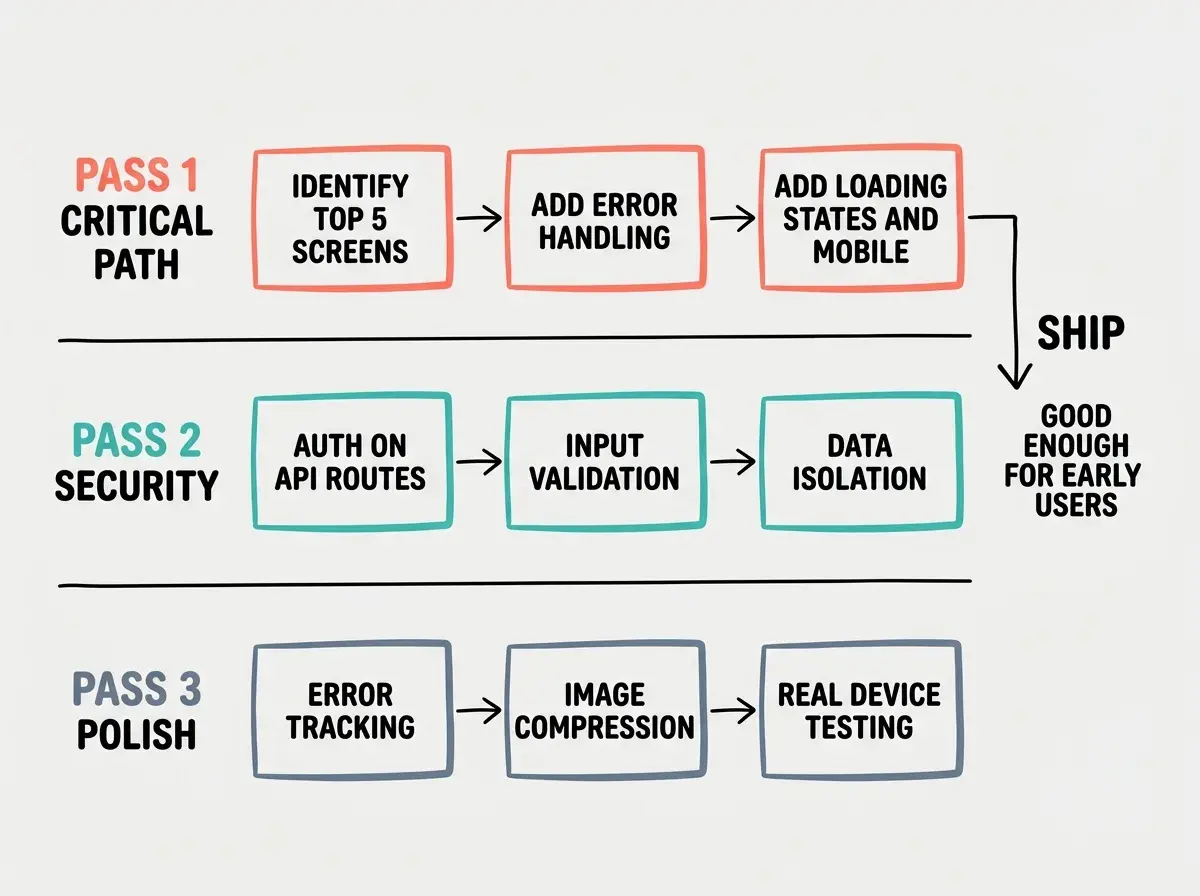
Each pass takes one to three days for a typical vibe-coded app. That means you can go from "working demo" to "shippable product" in roughly a week of focused work. Not months. Not a complete rewrite. A week of targeted effort on the things that actually matter.
Rewriting your app from scratch because the gap feels too big. The gap between your demo and a product is not a quality problem with your code. It is a completeness problem. Your code works for the happy path. You are adding coverage for the unhappy paths. A rewrite throws away the working code and starts the gap over from zero.
The rewrite impulse is strong, especially when you read about "best practices" and feel like your vibe-coded project is held together with duct tape. Resist it. The founders who ship are the ones who patch and improve, not the ones who restart. Your prototype has real value. It proves the concept works. Now you are hardening it, not replacing it.
Dig deeper
A few hand-picked sources if you want to go further.
What This Means For You
The program-to-product gap is real, but it is not a wall. It is a checklist. Here is how it applies to you specifically.
-
If you are a founder building your MVP, close the gap on your critical path first and ship. Real user feedback is worth more than perfect error handling on screens nobody visits. Get pass one done, ship to ten users, and do pass two while they are testing.
-
If you are a career changer building a portfolio project, the gap is actually your advantage. Anyone can demo a happy path. Showing that you handle errors, edge cases, and mobile layouts tells a hiring manager you think like a professional. Pick one project and take it through all three passes.
-
If you are an indie hacker trying to charge money, pass two is non-negotiable before you accept payments. Security holes and data integrity issues with paying customers are lawsuits waiting to happen. But you do not need perfection. You need "good enough that nothing breaks and nobody's data leaks."
The gap between your localhost demo and a shippable product is the same gap every builder faces. It is not a sign that your approach is wrong or that vibe coding does not work. It is the normal, predictable distance between a prototype and a product. Now that you can see it, you can close it.
Pick one project and start with pass one. Error handling, loading states, and mobile on your top five screens.
See all guides