You are building your first app with an AI coding tool. Everything looks great. The frontend is beautiful, the button clicks work, and then you try to fetch data from an API. A big red error appears in your browser console: "Access to fetch has been blocked by CORS policy." Your app was working five minutes ago. Nothing makes sense.
This confuses everyone at first. CORS errors are the single most common "what just happened?" moment for new builders. The error message is cryptic, the explanations online are dense, and the fixes feel like magic incantations. But the concept behind CORS is actually simple once you have the right mental model.
The Bouncer at the Club
Think of your browser as a bouncer standing at the door of a nightclub. The bouncer has one job: check whether each guest is on the list. If they are on the list, they get in. If they are not, they get turned away. The bouncer does not care if the guest is a good person, a celebrity, or the club owner's best friend. No list, no entry.
In this analogy, the "club" is the API or server your app is trying to talk to. The "guests" are requests coming from your app. And the "guest list" is a set of special instructions called CORS headers that the server sends back to your browser.
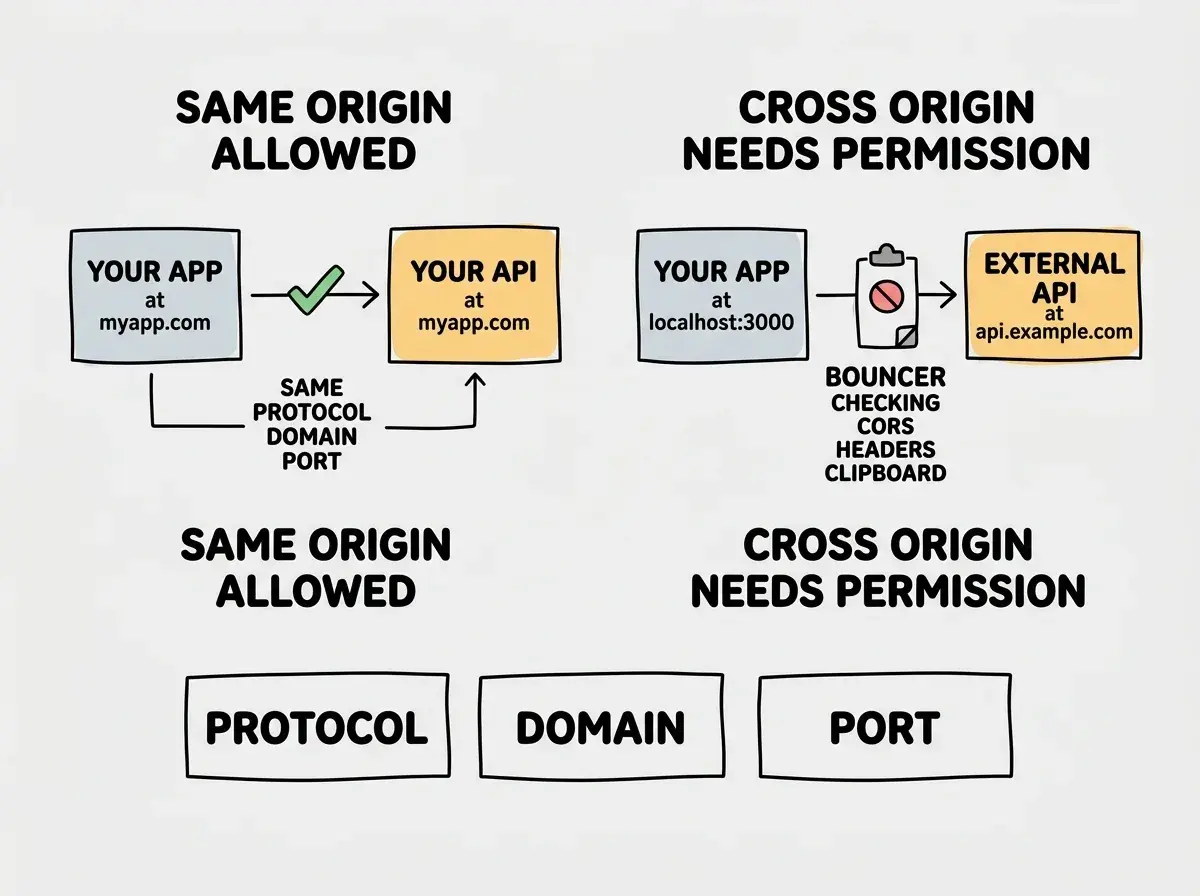
When your frontend (running at localhost:3000) tries to fetch data from an API (running at api.example.com), your browser acts as the bouncer. It checks whether api.example.com has put localhost:3000 on its guest list. If the server's response includes a CORS header saying "yes, localhost:3000 is allowed," the request goes through. If not, the bouncer blocks it.
That is the entire concept. Everything else is just details about how the guest list works.
What "Origin" Actually Means
The bouncer checks one specific thing: the origin of the request. An origin is the combination of three parts: the protocol (http or https), the domain (like example.com), and the port (like :3000).
So https://myapp.com and http://myapp.com are different origins, even though the domain is the same. And localhost:3000 and localhost:5000 are different origins, even though the domain is the same. Change any one of those three parts and you have a new origin.
The "same-origin policy" is the default rule browsers follow. It says: a webpage can only freely talk to its own origin. Anything else requires explicit permission. This is the foundational security rule of the web, and it has been there since the 1990s.
CORS, which stands for Cross-Origin Resource Sharing, is the system that lets servers grant that permission. It is not a wall. It is a door with a lock, and the server holds the key.
Why Only Browsers Care About This
Here is something that trips people up. If you test an API using a tool like Postman or a terminal command like curl, CORS errors never happen. The request works perfectly. Then you try the exact same request from your browser and it fails.
This is because CORS is a browser-only rule. Postman is not a bouncer. It is just a delivery driver who picks up whatever you ask for, no questions asked. Browsers, on the other hand, are designed to protect users. They enforce CORS because a malicious website could otherwise secretly make requests to your bank's API using your logged-in session.
You might think that CORS is the server blocking your request. But actually, the server responds just fine. It is your browser that looks at the response, notices the missing CORS headers, and throws the response away. The server did its job. The bouncer intercepted the delivery at the door.
The Preflight Check
Sometimes, before the bouncer even lets a guest approach the door, there is a preliminary check. This is called a preflight request.
For simple requests (basic GET requests with standard headers), the browser sends the request directly and checks the CORS headers on the response. But for more complex requests (POST requests with JSON data, requests with custom headers, or requests with authentication), the browser first sends a small "OPTIONS" request asking: "Hey, would you let a request like this through?"
Think of it like calling the club ahead of time. "I have a party of twelve and we are bringing our own champagne. Is that okay?" The club either says yes (and the bouncer lets everyone in) or says no (and the bouncer turns them away before they even arrive).
This preflight request is invisible to you as a developer. But it explains a confusing behavior: sometimes your CORS error happens on a request you never made. That phantom request is the preflight.
CORS is not your app breaking. It is your browser protecting users by enforcing a security rule. The fix is always on the server side, not the client side. You need the server (the club) to update its guest list (CORS headers) to include your app's origin. Your browser (the bouncer) is just doing its job.
How to Fix the Most Common CORS Errors
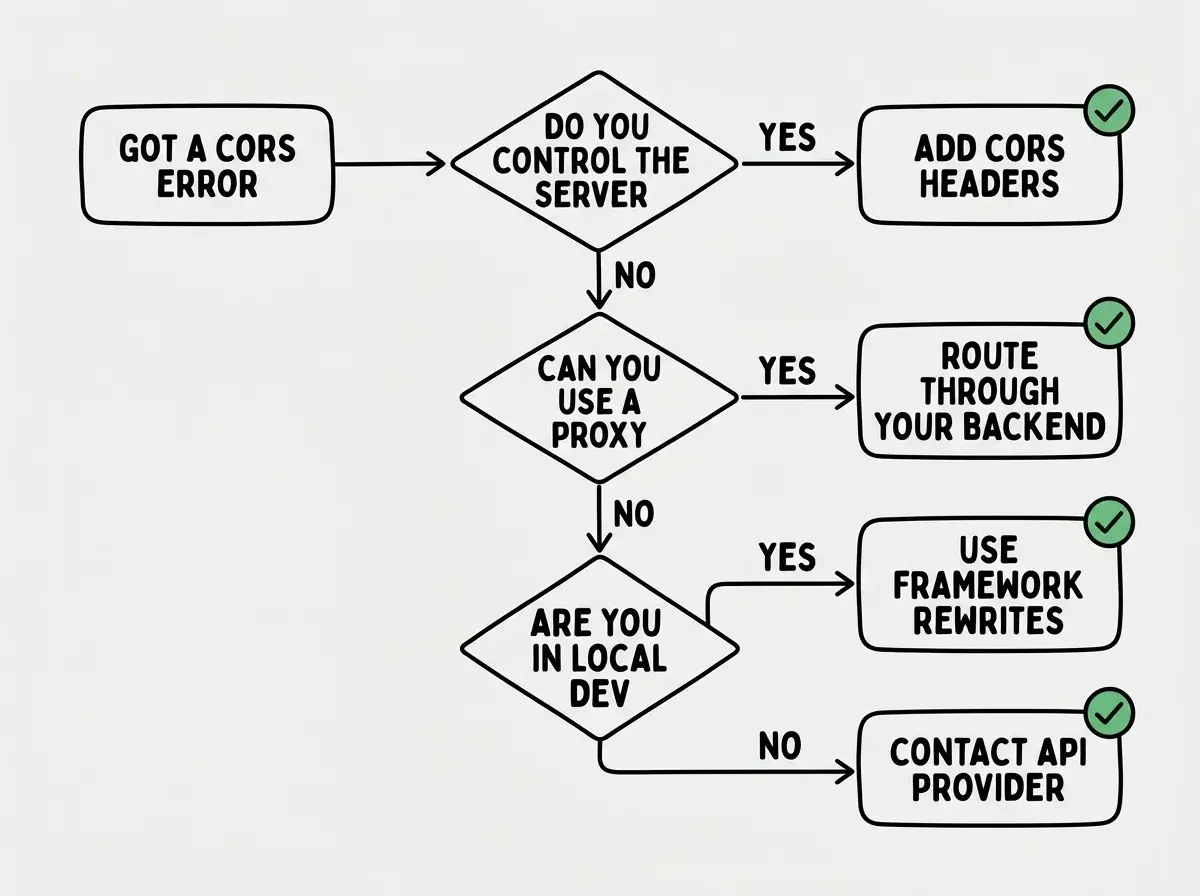
Now the practical part. When you hit a CORS error, the fix depends on who controls the server you are trying to reach.
If you control the server (your own API or backend): You need to add CORS headers to your server's responses. The most important header is Access-Control-Allow-Origin, which tells the browser which origins are allowed. In development, you might set this to * (meaning "everyone is on the guest list"). In production, you should list specific origins for security.
If you are using a third-party API: You cannot change their CORS headers. Instead, you route the request through your own server. Your frontend talks to your backend, and your backend talks to the third-party API. Since server-to-server requests do not go through a browser, there is no bouncer involved. This is called a proxy, and it is the most common workaround.
If you are in local development: Many frameworks like Next.js have built-in proxy configurations. You can set up a "rewrite" rule that makes your browser think the API request is going to your own origin, even though the server forwards it elsewhere. The bouncer sees a local address and waves it through.
Understanding browser errors like CORS is part of learning to build confidently.
Learn the basicsWhy AI Tools Generate CORS Errors
If you are using an AI coding tool to build your app, you will encounter CORS errors more often than you might expect. Here is why.
AI tools tend to generate frontend code that calls APIs directly from the browser. This is the most straightforward approach, and the code looks correct. But the AI does not always consider that the target API might not have CORS headers configured for your origin.
The AI also generates backend code separately from frontend code, and it does not always remember to add CORS middleware to the backend. You end up with two pieces that work individually but fail when connected, like a chef who made a perfect sauce and a perfect pasta but forgot to combine them.
When this happens, the fix is usually one line of configuration on your server. Tell the AI: "Add CORS headers to my API routes" or "Set up a proxy for this external API." Those specific instructions get you past the error in seconds.
CORS Is Not the Enemy
CORS feels like an obstacle when you are building, but it exists for a genuinely good reason. Without it, any website you visit could silently make requests to your email, your bank, or your cloud accounts using your active sessions. The same-origin policy is what prevents a random webpage from reading your Gmail inbox.
The frustration comes from encountering a security rule before understanding why it exists. Now that you know the bouncer analogy, CORS errors should feel less like mysterious failures and more like a checklist item: "Did I put my app on the server's guest list?"
Fixing CORS errors by disabling browser security or installing a "CORS unblock" browser extension. These tools turn off the bouncer entirely, which means your app works in your browser but breaks for every real user. Worse, they train you to ignore a security layer that exists for good reason. Always fix CORS on the server side. If you cannot modify the server, use a proxy.
What This Means For You
CORS is a browser security rule that blocks cross-origin requests unless the server explicitly allows them. Once you understand the bouncer analogy (browser checks the guest list, server writes the guest list), every CORS error becomes a solvable puzzle instead of a mystery.
- If you are a founder building a product: CORS errors during development do not mean your app is broken. They mean a security configuration is missing. When your AI tool generates a CORS error, tell it to "add CORS headers to the API" or "proxy this request through the backend." This is a five-minute fix, not a structural problem.
- If you are a career changer learning to build: Understanding CORS puts you ahead of many junior developers who still panic at the error message. Knowing that the fix is always server-side (add headers or use a proxy) gives you a reliable debugging pattern that works every time.
- If you are a senior dev working with AI tools: Watch for AI-generated code that calls external APIs directly from the client without considering CORS. Set up centralized CORS middleware or API proxy patterns early in your project so these errors never surface in the first place.
CORS is just one of many concepts that click once someone explains them clearly.
Explore more