An error message is your app telling you what went wrong, where it happened, and often how to fix it. When something breaks, your app does not silently fail. It leaves a note containing far more useful information than most people realize.
If you have ever seen a wall of red text in your browser console, your first instinct was probably to panic or close the window. That is completely natural. But those messages are not punishments. They are clues. And learning to read them is one of the most valuable skills a vibe coder can develop.
The Check Engine Light With a Mechanic's Note
Think of error messages like the check engine light on your car dashboard. When that light turns on, most people see it as one simple signal: something is wrong. But imagine if, instead of just a glowing orange icon, your car also printed a detailed note from a mechanic. "Your oxygen sensor in cylinder 3 is reading outside normal range. This is causing your fuel mixture to run rich. Replace the O2 sensor or check the wiring harness at connector B7."
That is what an error message actually is. Not just "something broke," but a specific note about what broke, where it happened, and frequently what you can do about it.
The problem is that the note is written in mechanic's language. If you do not know what an oxygen sensor does, the note feels useless. But you do not need to understand every word. You need to find the parts you can act on. "Cylinder 3" tells you where. "O2 sensor" tells you what. "Replace or check wiring" tells you what to do next. Error messages in code work exactly the same way.
The Main Types of Programming Errors
This confuses everyone at first because error messages look like one big intimidating block of text. But they actually fall into three clear categories, and each category tells you something different about what went wrong.
Syntax errors (the typo note). These are the simplest. The mechanic's note says "you spelled something wrong" or "you left out a punctuation mark." In code, a syntax error means the AI (or you) wrote something that does not follow the rules of the programming language. A missing comma, an unclosed parenthesis, a misspelled keyword.
These are the easiest to fix because the error message usually includes a line number and a caret (^) showing exactly where the issue is. Like your mechanic circling the exact bolt that is loose.
Runtime errors (the "it broke while running" note). These happen when the code is written correctly but something goes wrong while the app is actually running. Like a car that starts fine but stalls at the first red light. The syntax is fine, but the logic hits a situation it was not prepared for.
The most common runtime error vibe coders see is "Cannot read property of undefined." In plain English, this means the code tried to use something that does not exist yet. It expected data to be there, and it was not. Like reaching into a drawer for your car keys and finding the drawer empty.
Network errors (the "could not connect" note). These happen when your app tries to talk to another service and the conversation fails. Maybe your app is trying to reach a database and the connection times out. Maybe it is calling an API and getting rejected because the key is wrong.
Network errors usually include a status code, a three-digit number that tells you the category of problem. 404 means "the thing you asked for does not exist." 500 means "the other service broke." 401 means "you are not authorized." Once you learn a few, they become instantly recognizable.
Every error message has three useful parts: the type of error (what category of problem), the location (which file and line number), and the description (what specifically went wrong). You do not need to understand every word. Finding those three parts is enough to take action.
Reading the Note (Even When It Looks Scary)
Here is a real error message you might see when building with an AI coding tool:
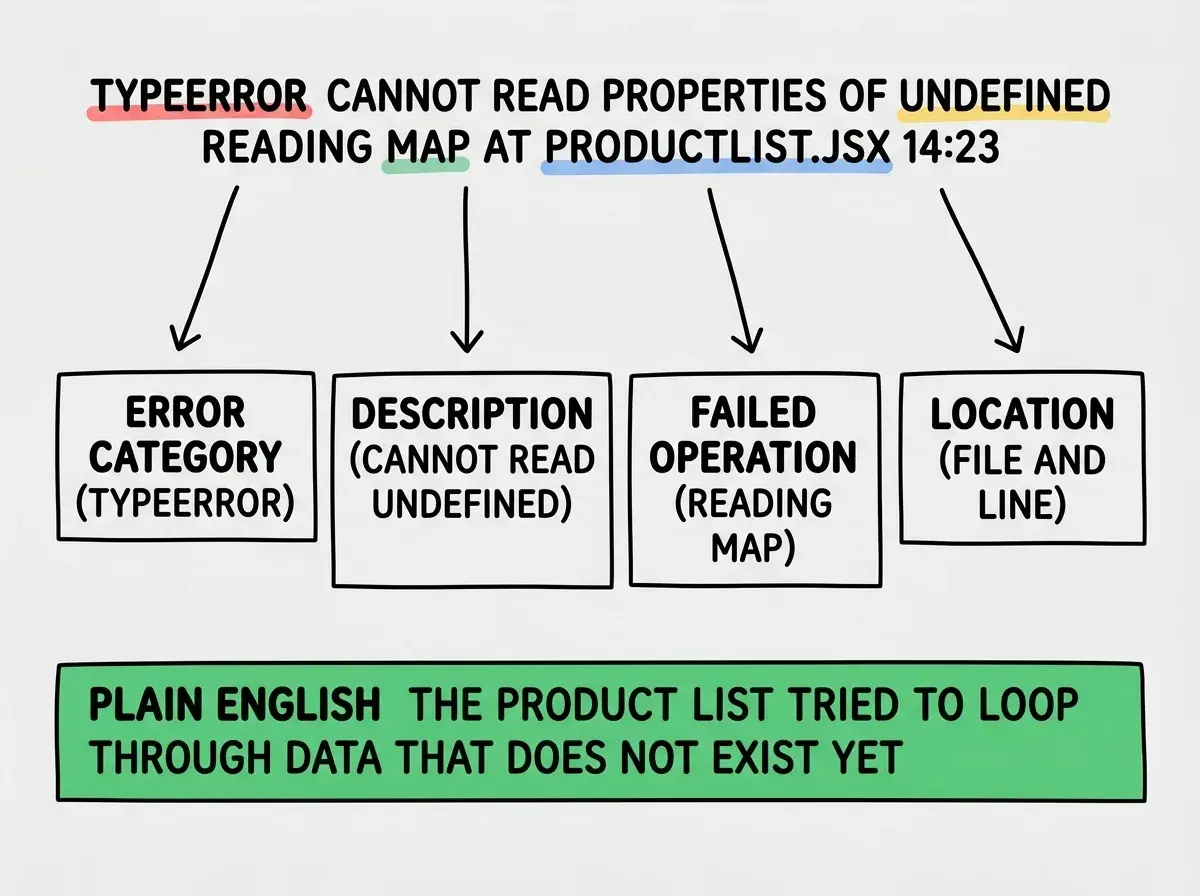
"TypeError: Cannot read properties of undefined (reading 'map') at ProductList (ProductList.jsx:14:23)"
This looks intimidating. But let us read it like the mechanic's note it is.
"TypeError" is the category. Something has the wrong type, meaning the code expected one kind of data but got another.
"Cannot read properties of undefined" is the description. The code tried to access something on a value that does not exist.
"reading 'map'" tells you the specific operation that failed. It tried to use a function called "map" (which loops through a list) on something that is not a list.
"ProductList.jsx:14:23" is the location. The file called ProductList.jsx, line 14, character 23.
So in plain English: "In your product list component, on line 14, the code tried to loop through a list of items, but the list does not exist yet." The fix is usually to add a check that says "only try to loop through this list if it actually has data."
You might think you need to understand JavaScript to decode error messages. But actually, most error messages follow this same pattern, and you can extract the useful parts without understanding the programming concepts underneath.
The Stack Trace (Following the Trail)
Sometimes an error message comes with a stack trace, a list of locations showing the path the code took before it crashed. This looks like a long list of file names and line numbers, and it is the most intimidating part of any error.
Think of it like a trail of breadcrumbs. The mechanic is not just telling you which part broke. They are showing you the sequence of events that led to the break.
For vibe coders, the practical rule is simple: find the first line in the stack trace that references a file from your project (not a library or framework file) and start there. That is where the actual problem occurred.
Understanding error messages is just one of the skills that makes vibe coding click.
Learn the basicsThe Copy-Paste Superpower
Here is the single most useful thing you can do with error messages: copy the entire message and paste it into your AI coding tool. The AI is excellent at reading error messages because it has seen millions of them. Paste the error, tell the AI which file it is happening in, and ask it to fix the problem.
"I am getting this error: TypeError: Cannot read properties of undefined (reading 'map') at ProductList.jsx:14. Here is my ProductList component. Can you fix it?"
The AI will almost always identify the problem and provide a corrected version. You do not need to fully understand the error yourself. You just need to capture it accurately and provide context. Do not paraphrase error messages or type them from memory. Copy and paste the exact text, because changing even one word can point the AI in the wrong direction.
Ignoring error messages and just asking the AI to "fix my code" without sharing the error. This forces the AI to guess what is wrong, and it will often fix something that was never broken while missing the actual issue. Always copy the full error message and paste it into the conversation. The error is the most valuable clue you have, and skipping it is like calling a mechanic and saying "my car is broken" without describing the symptoms.
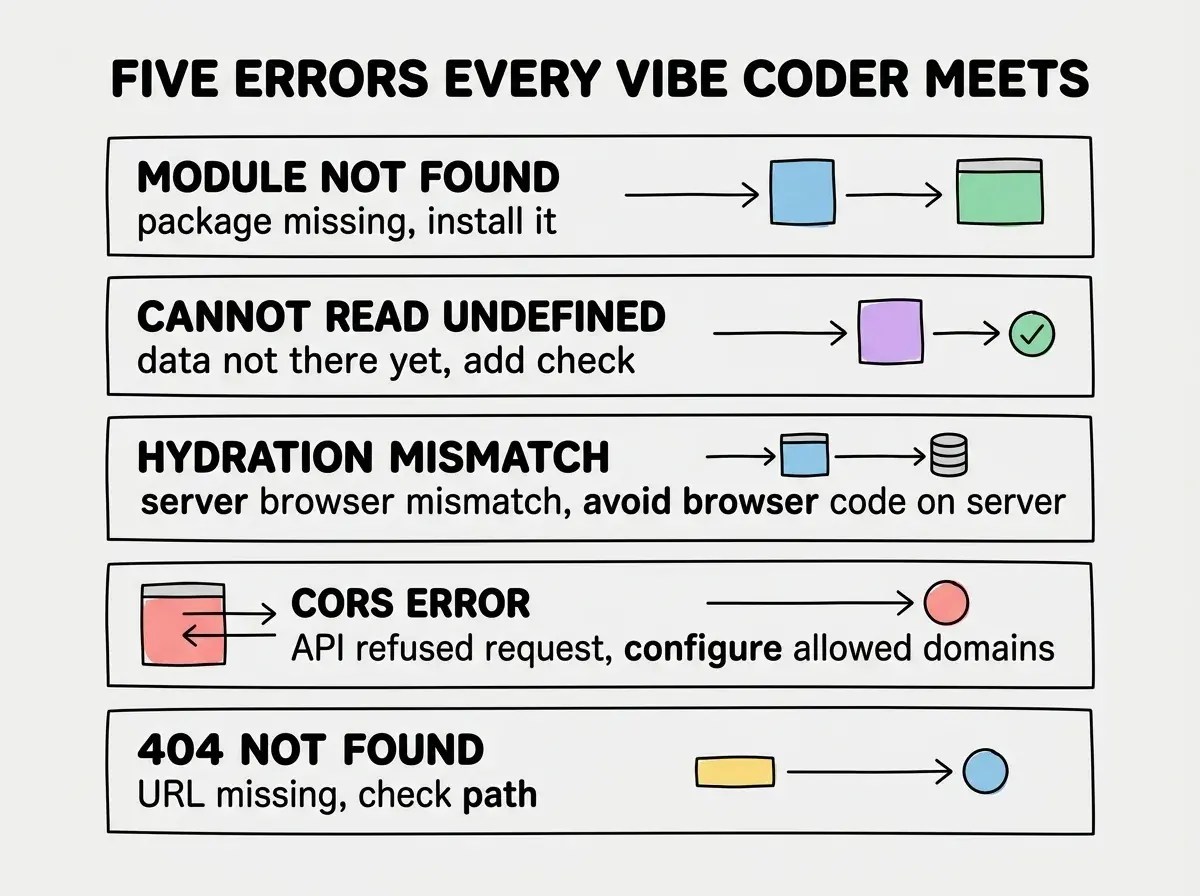
The Five Errors You Will See Most
As a vibe coder, certain errors show up far more often than others. Recognizing them saves you time.
"Module not found." The code is trying to use a package or file that is not installed or does not exist at the path specified. The fix is usually installing the missing package or correcting the file path.
"Cannot read properties of undefined." The code expected data that is not there yet. Usually a timing issue where the code runs before the data loads. The fix is adding a check for whether the data exists before using it.
"Hydration mismatch." Specific to React and Next.js. The server and browser produced different HTML, usually because browser-only features ran during server rendering.
"CORS error." Your app tried to call an API from the browser and the API refused the connection. The fix usually involves configuring the API server to allow requests from your domain.
"404 Not Found." The URL your app is trying to reach does not exist. Either the API endpoint is wrong or the resource was deleted.
What This Means For You
Error messages are clues, not catastrophes. They tell you the type of problem, the location in your code, and usually hint at the solution. Learning to read them is one of the fastest ways to become a more effective builder.
- If you are a founder building a product: Error messages are your early warning system. Even if you cannot fix issues yourself, reading the error and describing it to a developer or AI tool saves hours of back-and-forth communication.
- If you are a career changer learning to build: Make a habit of reading every error message before pasting it into AI. The pattern recognition builds up fast. After seeing "Cannot read properties of undefined" ten times, you will start anticipating and preventing it.
- If you are a marketer or creative using AI tools: You do not need to fix errors yourself. But knowing that errors are specific, actionable clues (not random failures) changes your relationship with the tools. Copy the error, paste it to the AI, and provide context. That workflow handles 90% of problems.
Error messages are just one piece of the vibe coding puzzle. Explore the fundamentals that make everything easier.
Explore more