You push your code to GitHub. Two minutes later, your app is live with the changes. No manual uploading, no copying files to a server, no crossing your fingers and refreshing the page. It just works.
If you have ever deployed an app through Vercel or Cloudflare Pages, you have already used CI/CD. You just might not have known it had a name, or understood the machinery running beneath that effortless experience.
CI/CD stands for Continuous Integration and Continuous Delivery (or Continuous Deployment, depending on who you ask). It is the system that automatically takes your code changes, checks them for problems, and delivers them to your users. Understanding it helps you build more reliably and debug problems when that two-minute magic suddenly stops working.
The Factory Assembly Line
Think of CI/CD as a factory assembly line with quality control checkpoints.
You create something new (a code change) and place it on the conveyor belt (push to GitHub). From that moment, the assembly line takes over. Quality inspection checks for defects (automated tests). Packaging assembles the final product (the build step). Shipping sends it out the door to customers (deployment).
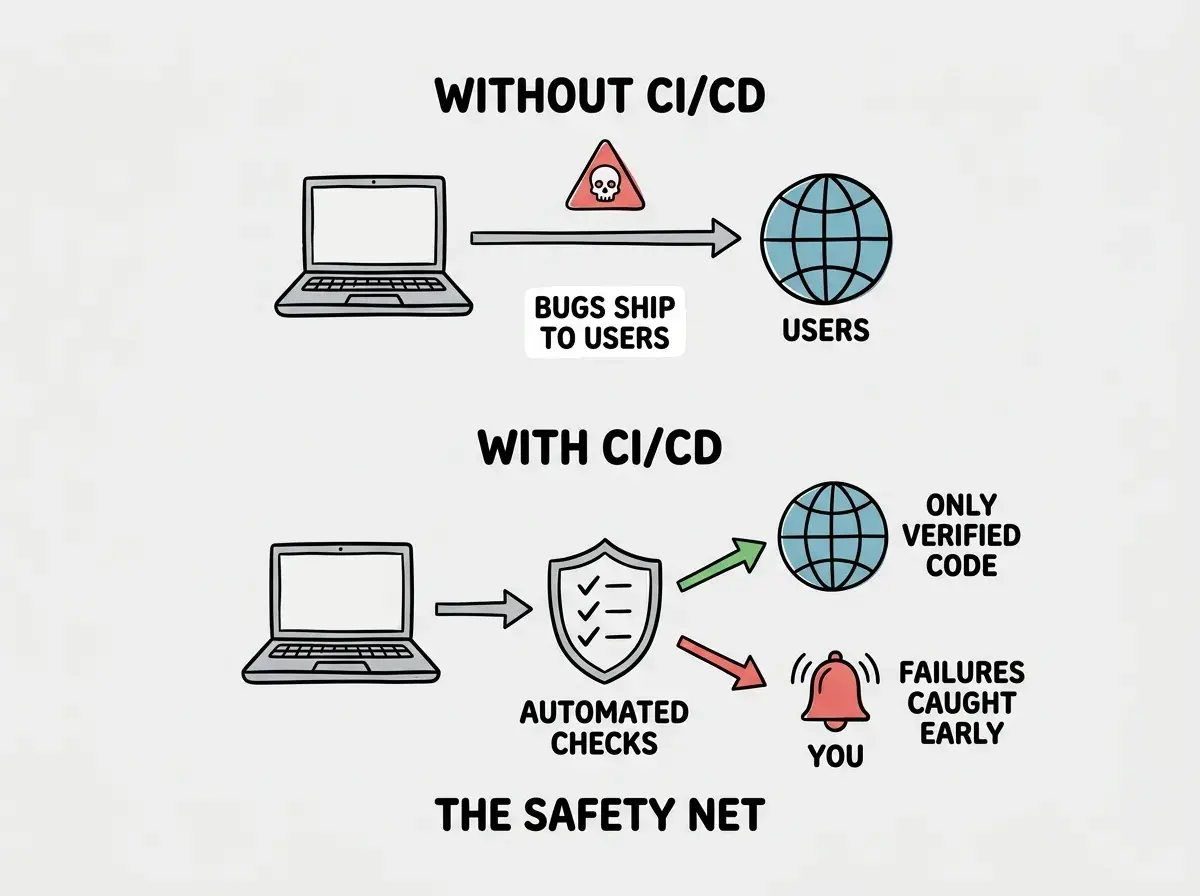
If anything fails at any station, the line stops and alerts you. The defective piece never reaches customers. This is the core idea behind CI/CD. Automate the path from code change to live app, with checkpoints that catch problems before users ever see them.
The Two Halves of CI/CD
This confuses everyone at first because CI and CD are bundled together like they are one thing, but they solve different problems. Breaking them apart makes the whole concept click.
Continuous Integration (CI) is the quality inspection station. Every time you push code changes, CI automatically combines (integrates) those changes and runs checks. Did the code break existing tests? Does it follow formatting rules? Can the application still build?
In the factory analogy, this is the inspector who examines every piece before it moves down the line. If it does not meet the standard, they pull it off and send it back with a note explaining what is wrong.
Continuous Delivery (CD) is the packaging and shipping station. Once CI confirms the changes pass inspection, CD builds your app, packages it, and either delivers it for human review or deploys directly to production.
The difference between Continuous Delivery and Continuous Deployment is subtle. Delivery means the package is ready and waiting for someone to press the button. Deployment means it ships automatically. Most vibe coders use Continuous Deployment without realizing it, because platforms like Vercel deploy every push automatically.
CI/CD is not one thing but two complementary systems. CI catches problems by automatically testing your code after every change. CD handles the packaging and delivery of verified code to your users. Together, they create an automated pipeline that replaces manual testing, building, and uploading. If you have ever pushed to GitHub and seen your site update automatically, you have been using both halves.
What Happens When You Push to GitHub
Let us trace a real push through the assembly line, because seeing the steps makes the abstraction concrete.
You fix a typo on your landing page and push the change to GitHub. Here is what happens in the next few minutes, completely automatically.
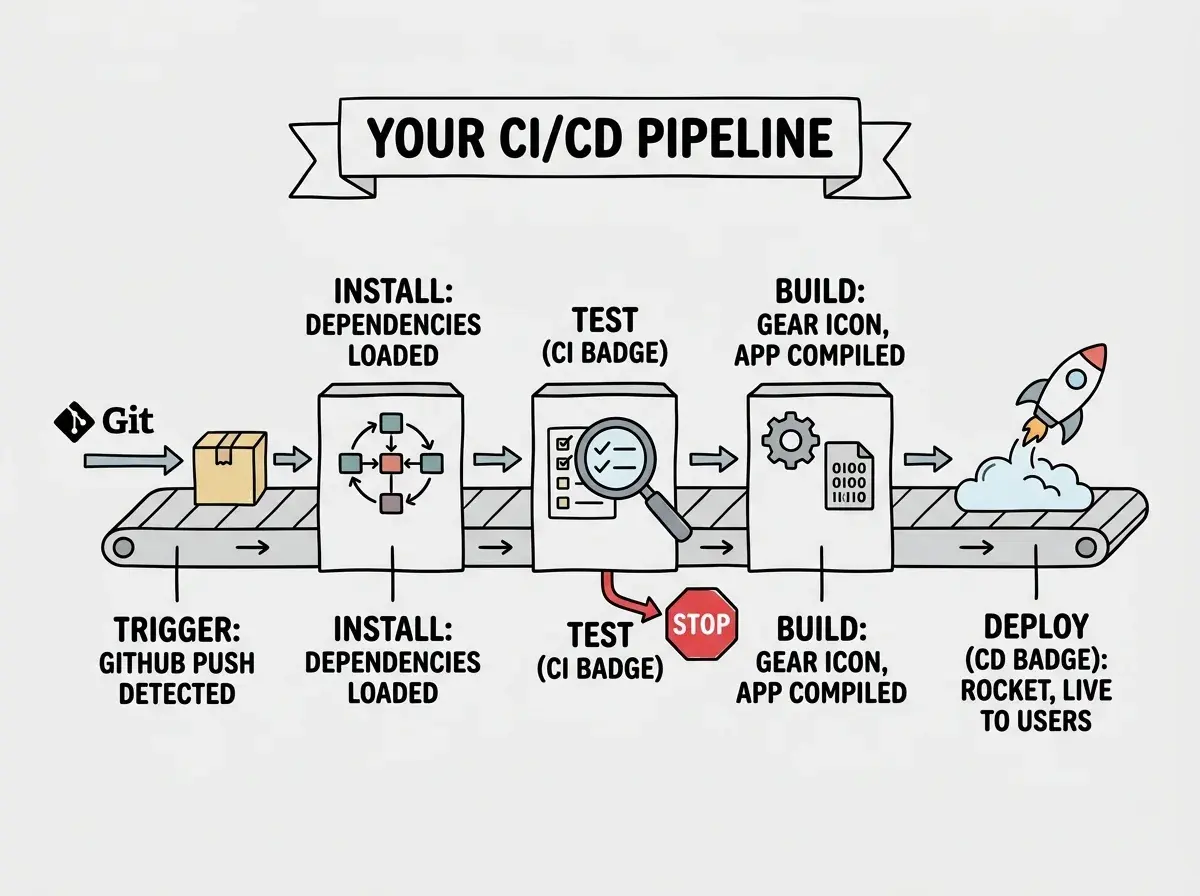
Station 1: Trigger. GitHub detects the new push and sends a signal to Vercel, Cloudflare Pages, or GitHub Actions. The raw material just arrived on the conveyor belt.
Station 2: Install. The system sets up a fresh environment and installs your project's dependencies. Every build starts from scratch so leftover materials from a previous run cannot cause problems.
Station 3: Test (CI). If you have automated tests, they run now. Unit tests, integration tests, linting. This is the quality inspection station. If any test fails, the line stops here and no broken code reaches your users.
Station 4: Build (CI/CD boundary). The system compiles your app into its final form. For a Next.js app, this means converting React components, MDX files, and API routes into optimized HTML, JavaScript, and server functions.
Station 5: Deploy (CD). The packaged app gets uploaded to your hosting platform's global network. Within seconds, servers around the world have the new version. Your product is now in the hands of customers.
The whole process typically takes one to five minutes. For a complex application with hundreds of tests, it might take ten or fifteen.
You Are Probably Already Using This
Here is the part that surprises most vibe coders. If you have connected a GitHub repository to Vercel, Netlify, or Cloudflare Pages, you already have CI/CD. You just never had to configure it manually.
You might think CI/CD requires complex setup and DevOps expertise. But actually, modern platforms have made the basic version invisible. Connect your repo to Vercel, push a change, and Vercel runs the build, checks for errors, and deploys automatically. That is CI/CD, wrapped in such a smooth experience that it does not feel like infrastructure.
The difference between this and a custom CI/CD pipeline is like a factory that only has packaging and shipping versus one with thorough quality inspection too. The platforms handle build and deploy, but they do not run your tests or check code quality. Adding those inspection stations is where GitHub Actions comes in.
Understand the systems that turn your code into live products, from deployment to automation.
Explore moreGitHub Actions and Custom Pipelines
GitHub Actions is the most popular tool for building custom CI/CD pipelines. It lets you define exactly what stations your assembly line should have.
A pipeline is defined in a YAML file in your repository. It specifies when to run (on every push, on pull requests, on a schedule), what environment to use, and what steps to execute. For a typical vibe-coded project, the pipeline might install dependencies, run the linter, run the test suite, and if everything passes, trigger a deployment. If any step fails, it stops and sends a notification.
You do not need GitHub Actions if your deployment platform handles everything you care about. But as your project grows and you want more quality checkpoints, a custom pipeline gives you control over exactly what gets inspected before code reaches your users.
When the Assembly Line Breaks
The assembly line will break. A test will fail, a build will error out, a deployment will timeout. This is not a problem; this is the system working as designed. The whole point is to catch failures before users do.
When something fails, check the logs. Every CI/CD system produces detailed logs telling you which station failed and why. "Test suite failed: expected 200 but received 404" is a test failure. "Module not found: @some/package" is an install failure.
The most common failures for vibe coders are build errors. Your app runs fine locally, but the build environment differs from your laptop. Missing environment variables, case-sensitive file systems (your Mac ignores capitalization but Linux does not), or undeclared dependencies. Each failure teaches you the difference between "works on my machine" and "works everywhere."
CI/CD Vocabulary That Actually Matters
A few terms you will encounter, translated to assembly line language.
Pipeline. The complete assembly line from start to finish. "Our pipeline takes four minutes" means the full journey from push to deployment takes four minutes.
Job. A single station on the line. Install, test, build, and deploy are each a job.
Workflow. The rules defining when the pipeline runs. "Run on every push to main" is a workflow.
Artifact. The finished product that comes off the line. For a web app, this is the compiled bundle of HTML, CSS, and JavaScript.
Green build / Red build. Green means every station passed. Red means something failed and the line stopped. You will see these colors on CI dashboards constantly.
Ignoring red builds because the app "seems to work fine." When your CI/CD pipeline reports a failure and you deploy manually to bypass it, you are walking past the quality inspector who just flagged a defect. The failure might be a flaky test, or it might be a real bug that only shows up under specific conditions. Investigate every red build. Fix it or remove the check if it is genuinely unnecessary. Never just work around it, because that trains you to ignore the safety system entirely.
What This Means For You
CI/CD is the automation layer that turns "I changed some code" into "my users have the update." Understanding it helps you build more reliably, debug deployment problems, and make informed decisions about your development workflow.
- If you are a founder building a product: CI/CD is the quality control system for your development process. As your team grows, a solid pipeline prevents the chaos of multiple people pushing code that breaks each other's work. The cost of setting up automated tests and deployment pipelines is tiny compared to shipping bugs to customers or spending hours on manual deployments.
- If you are a career changer moving into tech: Understanding CI/CD will set you apart in interviews and on the job. Many self-taught developers can build features but struggle with deployment and automation. Learn to read pipeline logs, fix failed builds, and write basic GitHub Actions workflows. These skills signal professional-level understanding, not just coding ability.
- If you are a student learning software development: Set up a GitHub Actions pipeline on your next project, even a simple one that just runs a linter. Getting comfortable with CI/CD early means you will never develop the bad habit of deploying manually. Every professional team uses some form of CI/CD, and understanding it from the start gives you a real advantage.
Learn how to build, test, and deploy your projects like a professional.
Start learning