You build something with AI. You click around, test every page, fill out forms, watch data flow in and out. Everything works. So you deploy it. And then something breaks. Maybe the whole app crashes. Maybe a single feature stops working. Maybe the API calls that were instant on your laptop now return errors.
This is not bad luck. This is not a random bug. This is the localhost-to-production gap, and it trips up virtually every new builder. The good news is that once you understand why these two environments are different, the mystery disappears. The failures become predictable, and predictable failures are fixable failures.
What Localhost Actually Is
When you run your app during development, you are not connecting to the internet. You are not accessing a server somewhere in the cloud. Your computer is pretending to be a server. That is literally what localhost means.
The word "localhost" is a nickname for "this machine." When your browser visits localhost:3000, it is talking to your own computer on port 3000. No network cables, no DNS, no internet connection required. Your laptop is both the customer and the restaurant, placing the order and cooking the food for itself.
This local server is designed for one person: you. It runs with full access to your file system, all your environment variables loaded from a .env file, no memory limits to speak of, and no security restrictions because there is no public traffic to protect against.
Localhost is comfortable, familiar, and forgiving. It is rehearsing a song alone in your bedroom. Nobody is watching, and if you mess up you just start over.
What Production Actually Is
Production is a real server on the internet, accessible to anyone with the URL. It might be a virtual machine on AWS, a container on Railway, or a serverless function on Vercel or Cloudflare. Whatever form it takes, production is a different computer than yours, running in a different place, under different rules.
When someone visits your deployed app, their browser sends a request across the internet to that server. The server processes the request and sends back a response. Unlike localhost, this server handles traffic from strangers, runs on hardware you have never touched, and operates under resource limits set by your hosting provider.
Localhost is your computer pretending to be a server for an audience of one. Production is a real server on the internet, serving everyone. The code is the same. Nearly everything else is different.
Production is the live performance. Same song you rehearsed in your bedroom, but now you are on stage. The microphone, the speakers, and the lighting are all different. The audience is real. And the things that did not matter during rehearsal suddenly matter a lot.
The Five Differences That Break Your App
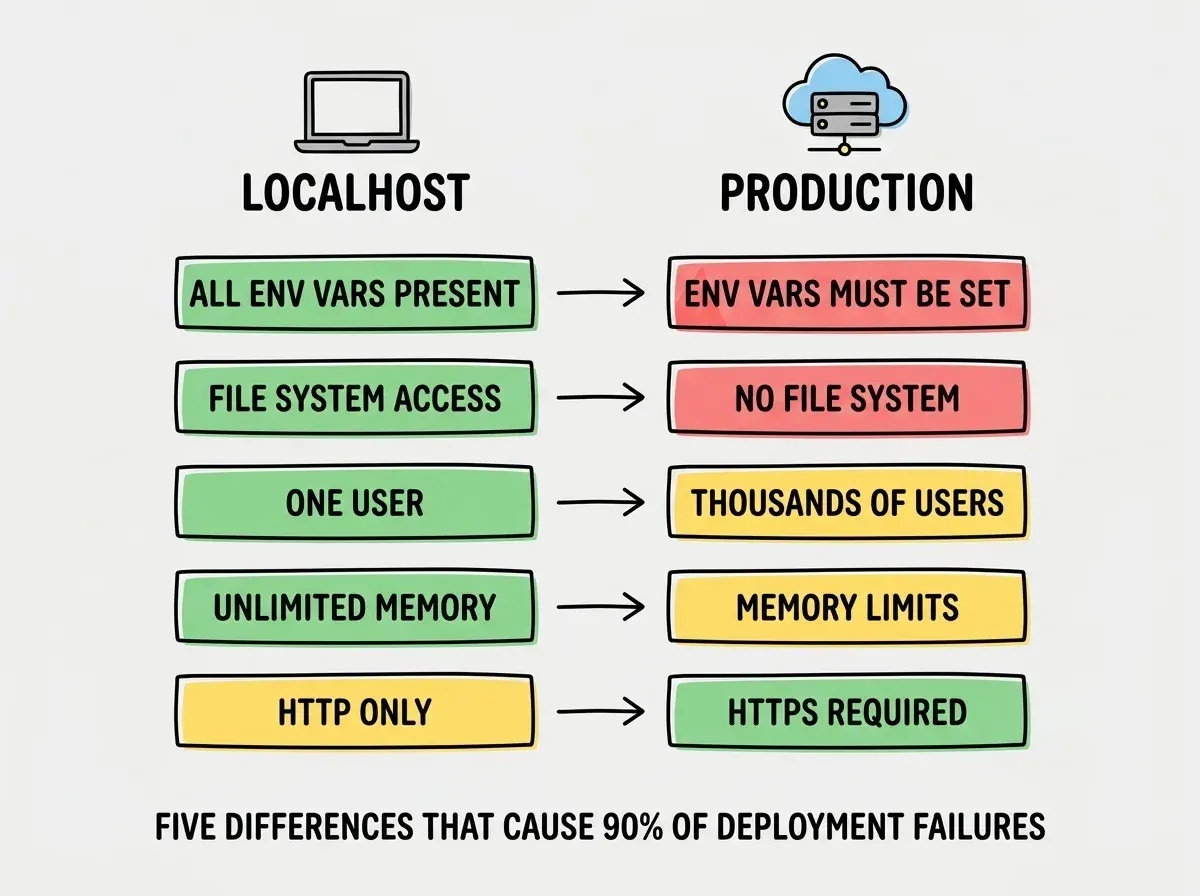
The gap between localhost and production is not one big difference. It is five smaller differences that compound. Understanding each one turns mysterious deployment failures into obvious fixes.
Environment Variables Are Not Automatic
On your laptop, your app reads a .env file that sits in your project folder. It has your database URL, your API keys, your secret tokens. When you deploy, that file does not travel with your code (and it should not, because it contains secrets). Your hosting platform has its own place to store environment variables, and you have to enter every single one manually.
The most common production failure is a missing environment variable. Your app tries to read DATABASE_URL, finds nothing, and crashes. The fix is straightforward: go to your hosting dashboard and add every variable your app needs. But if you do not know this, the error message ("undefined is not a valid URL") looks like a code bug when it is actually a configuration gap.
File System Access Disappears
On your laptop, your app can read and write files freely. It can save uploaded images to a folder. It can read a JSON file from disk. It can generate a PDF and store it locally. Your file system is wide open.
In production, many hosting platforms, especially serverless ones like Vercel and Cloudflare Workers, give your app a read-only file system or no persistent file system at all. Files you "save" during one request may vanish before the next one arrives. That image upload feature that worked perfectly on localhost? It fails in production because there is nowhere to put the file.
The solution is external storage, services like Cloudflare R2, AWS S3, or a database for storing anything your app needs to persist. But the point is that your code has to be built for this reality, and AI-generated code often is not.
Network Behavior Changes
On localhost, your API calls travel nowhere. When your frontend calls your backend, both are running on the same machine. The request goes from your computer to your computer. It is instantaneous, it never fails due to network issues, and there are no CORS errors because everything shares the same origin.
In production, your frontend might be served from a CDN in one location while your backend runs on a server in another. Requests travel across the real internet, which means latency, potential timeouts, and CORS policies that block requests from unfamiliar domains. That API call that took 5 milliseconds on localhost might take 200 milliseconds in production, or it might fail entirely if your CORS headers are not configured.
Memory and Compute Limits Get Real
Your laptop probably has 8 to 32 GB of RAM. When your app runs locally, it can use as much of that as it needs. It can process a large image, run an expensive computation, or hold a massive dataset in memory without anyone complaining.
Production servers operate under strict resource limits. Serverless functions often cap memory at 128 MB to 1 GB, with execution time limits of 10 to 30 seconds. A function that processes a 50 MB file on your laptop might exceed the memory limit on a serverless platform and get terminated mid-execution. The code is identical. The resources are not.
Domain, SSL, and Security Are New Requirements
On localhost, your app runs on http://localhost:3000. No domain name, no SSL certificate, no HTTPS. Browsers treat localhost as a trusted special case and skip most security checks.
In production, your app needs a real domain, an SSL certificate for HTTPS, and proper security headers. Browsers enforce strict rules for production sites. Cookies that worked on localhost might be blocked in production because of missing Secure or SameSite attributes. OAuth flows that redirected to localhost:3000 now need to redirect to your actual domain, and if you forgot to update the redirect URL in your OAuth provider's settings, authentication breaks completely.
Testing only on localhost and assuming deployment will go smoothly. Before you deploy, walk through each of these five differences and ask yourself whether your app depends on anything that will change. Missing environment variables, local file writes, hardcoded localhost URLs, large file processing, and OAuth redirect URLs are the five things to check first when a deploy fails.
Why AI-Generated Code Is Especially Vulnerable
Here is something most guides will not tell you: AI coding tools optimize for localhost. When you ask an AI to build a feature, it generates code that works in the environment where you are testing, your local machine. The AI does not think about production constraints because it cannot see your production environment. It does not know whether you are deploying to Vercel, Cloudflare, or a Raspberry Pi in your closet.
This means AI-generated code frequently uses fs.writeFile to save data (breaks on serverless), hardcodes localhost URLs in API calls (breaks everywhere), stores secrets directly in code instead of environment variables (security disaster), and assumes unlimited memory for processing (breaks under resource limits).
The AI is writing code that works for the context it can see. But "it works" on localhost is only half the job. The other half is making sure it works when the forgiving conditions of your local machine are replaced by the strict conditions of a real server.
Learn the core concepts that make everything else click.
Start learningRehearsing at Home vs Performing on Stage
The best way to think about the localhost-to-production gap is a musician rehearsing at home versus performing on stage. The song is the same. The lyrics are the same. The chords are the same. But everything around the song changes.
At home, you control the volume. On stage, you are at the mercy of the sound system. At home, you can stop and restart. On stage, the show keeps going. At home, nobody is listening. On stage, hundreds of people hear every note. Things that were easy in the bedroom become challenging under stage lights.
The same is true for your app. Code that ran smoothly on localhost encounters new acoustics in production. Network latency instead of instant local calls. Memory limits instead of unlimited RAM. Read-only file systems instead of full access. The song has not changed, but the performance conditions have.
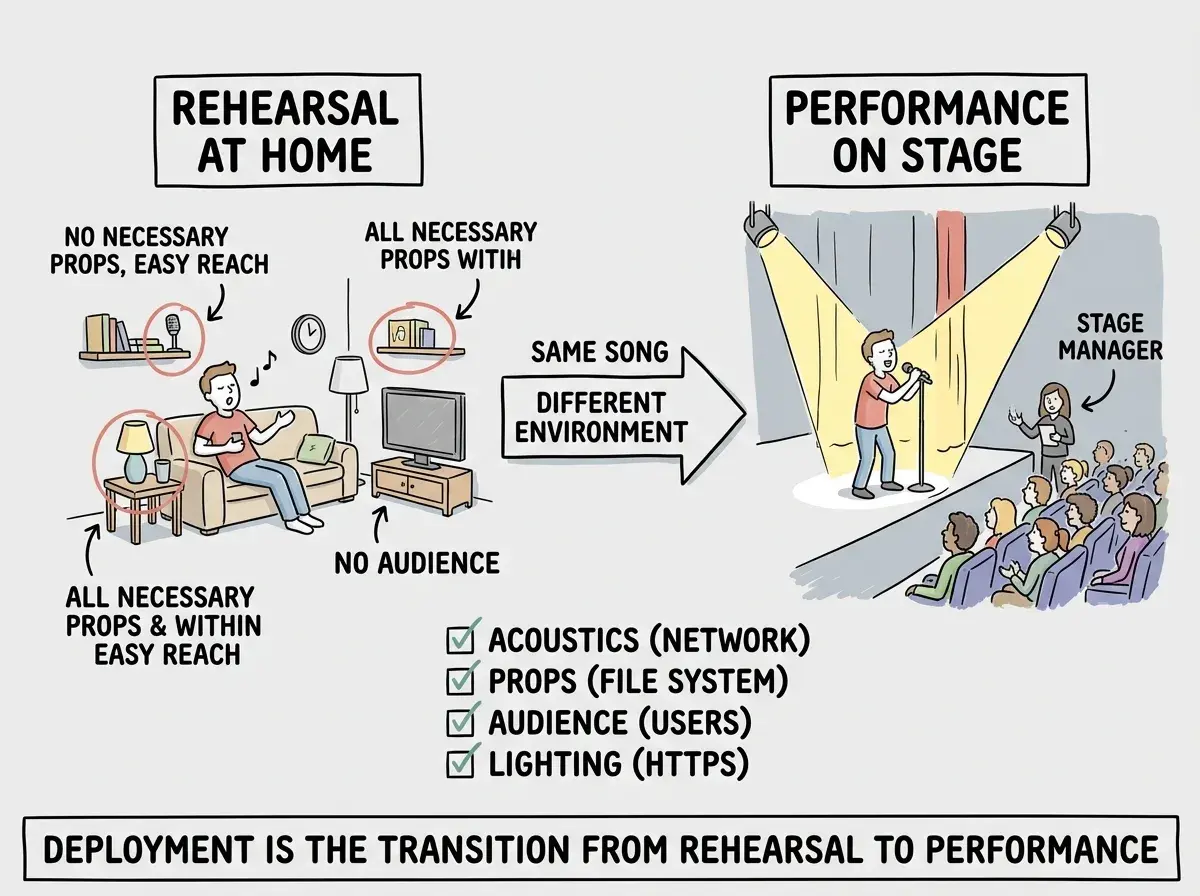
Professional musicians bridge this gap with sound checks and dress rehearsals. Smart builders do the same thing. They test with production-like conditions before deploying, use staging environments, and verify that file storage, API calls, and authentication work outside of localhost.
What This Means For You
The localhost-to-production gap is not a bug in the system. It is a fundamental reality of how software works. Your local machine and a production server are different computers with different rules.
-
If you are a founder: Every time your developer (or your AI tool) says "it works on my machine," ask the follow-up question: "Does it work in production?" Budget time for deployment testing, not just feature building. The features are only half the work. The other half is making them survive the move from localhost to the real world. A staging environment, even a simple one, catches most production failures before your users do.
-
If you are changing careers: Understanding this gap is one of the clearest markers of someone who has moved beyond beginner-level knowledge. When you can diagnose a production failure and say "this is a missing environment variable" or "this needs external storage instead of the local file system," you are thinking like a builder, not just a coder. Practice deploying early and often, even small projects. The more times you cross the localhost-to-production bridge, the less intimidating it becomes.
The more concepts you understand, the fewer surprises you encounter.
Continue learning