Authentication is the process of verifying who a user is before letting them into your app. When someone types in a username and password and clicks "Log In," authentication is the system that checks whether those credentials are real and decides whether to open the door or keep it shut. Every app that has user accounts, from a simple to-do list to a banking platform, depends on authentication to function.
Most people think of authentication as "the login screen," but it is much more than that. It is the entire chain of trust that starts when someone proves their identity and continues for the rest of their session. Get this wrong, and strangers walk into your app wearing someone else's name. Get it right, and your users never think about it at all.
Why Authentication Is the Most Critical Part of Your App
Think of every feature your app will ever have. None of them matter if anyone can pretend to be anyone else. A messaging app where strangers read your private conversations. An e-commerce store where someone else places orders with your saved credit card. A health app that shows your medical records to a random person who guessed your email.
Authentication is not just another feature. It is the foundation that makes every other feature safe to use. And yet, it is one of the areas where AI-generated code fails most often.
A 2024 analysis of AI-generated code found that roughly 45% of it contained vulnerabilities listed in the OWASP Top 10, the standard checklist of the most dangerous web security flaws. Authentication weaknesses showed up again and again. There is a running joke in the vibe coding community: "The S in vibe coding stands for security." It lands because it hits a nerve.
Nearly 45% of AI-generated code contains OWASP Top 10 vulnerabilities, and broken authentication is consistently one of the most common. If you are vibe coding an app with user accounts, authentication is the one area where you should never accept the AI's first draft without scrutiny.
The reason is simple. AI is trained on millions of code examples, and many of those examples take shortcuts with security. Tutorials skip proper password hashing because it is "not the point of the lesson." Demo apps store passwords in plain text because they are demos. AI absorbs all of it and reproduces the shortcuts unless you explicitly tell it not to.
How Authentication Actually Works
Here is the analogy that will stick with you. Authentication works like a bouncer at a club.
You walk up to the door. The bouncer asks for your ID. You hand it over. The bouncer looks at the photo, looks at your face, and decides if you are who you claim to be. If the ID checks out, the bouncer does not hand your ID back and say "show this every time you want to get a drink." Instead, the bouncer stamps your hand or gives you a wristband.
For the rest of the night, you show the wristband. The bartender sees the wristband and serves you. The bouncer at the VIP section sees the wristband and lets you pass. Nobody asks for your ID again. The wristband is proof that you already passed the check.
Authentication works identically. Step one: you present your credentials (username and password). Step two: the server checks them against what it has on file, the same way the bouncer compares your face to your photo. Step three: if the check passes, the server issues a session token, your digital wristband. Step four: every subsequent request you make carries that token, so the server knows it is still you without asking for your password again.
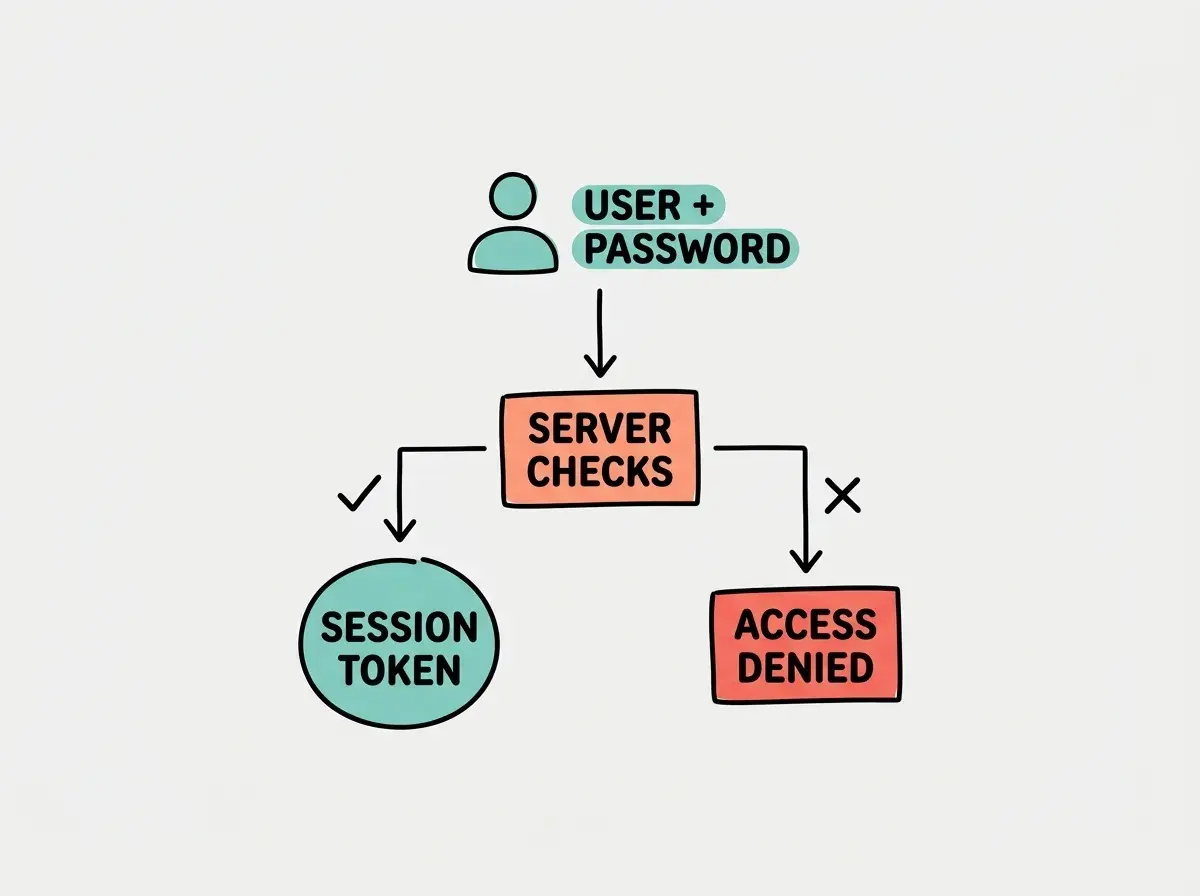
When you log out, the wristband gets destroyed. When the wristband expires (most sessions have a time limit), you have to show your ID to the bouncer again. If someone steals your wristband (a session hijacking attack), they can impersonate you until it expires, which is why secure apps keep session lifetimes short and use encrypted connections.
The bouncer analogy also explains why passwords should never be stored as plain text. Imagine the club keeps a photocopy of every guest's ID in a filing cabinet. If someone breaks in and steals the cabinet, they now have everyone's personal information. Instead, smart clubs (and smart apps) store just enough to verify you. In technical terms, your password gets "hashed," meaning it is transformed into an irreversible string of characters. The server stores the hash, not the password. When you log in, the server hashes what you typed and compares the two hashes. Even if attackers steal the database, they do not get usable passwords.
Authentication vs Authorization
These two words sound similar and get confused constantly, but they do entirely different jobs. Going back to the club analogy: authentication is the bouncer checking your ID at the door. Authorization is the bouncer checking your wristband type to see if you can enter the VIP section.
Authentication answers one question: "Who are you?" Authorization answers a different question: "What are you allowed to do?"
You can be authenticated (proven to be a real user) but not authorized (not allowed to access the admin dashboard). Every time you see a "403 Forbidden" error, that is authorization failing, not authentication. A "401 Unauthorized" error, despite the confusing name, actually means authentication failed.
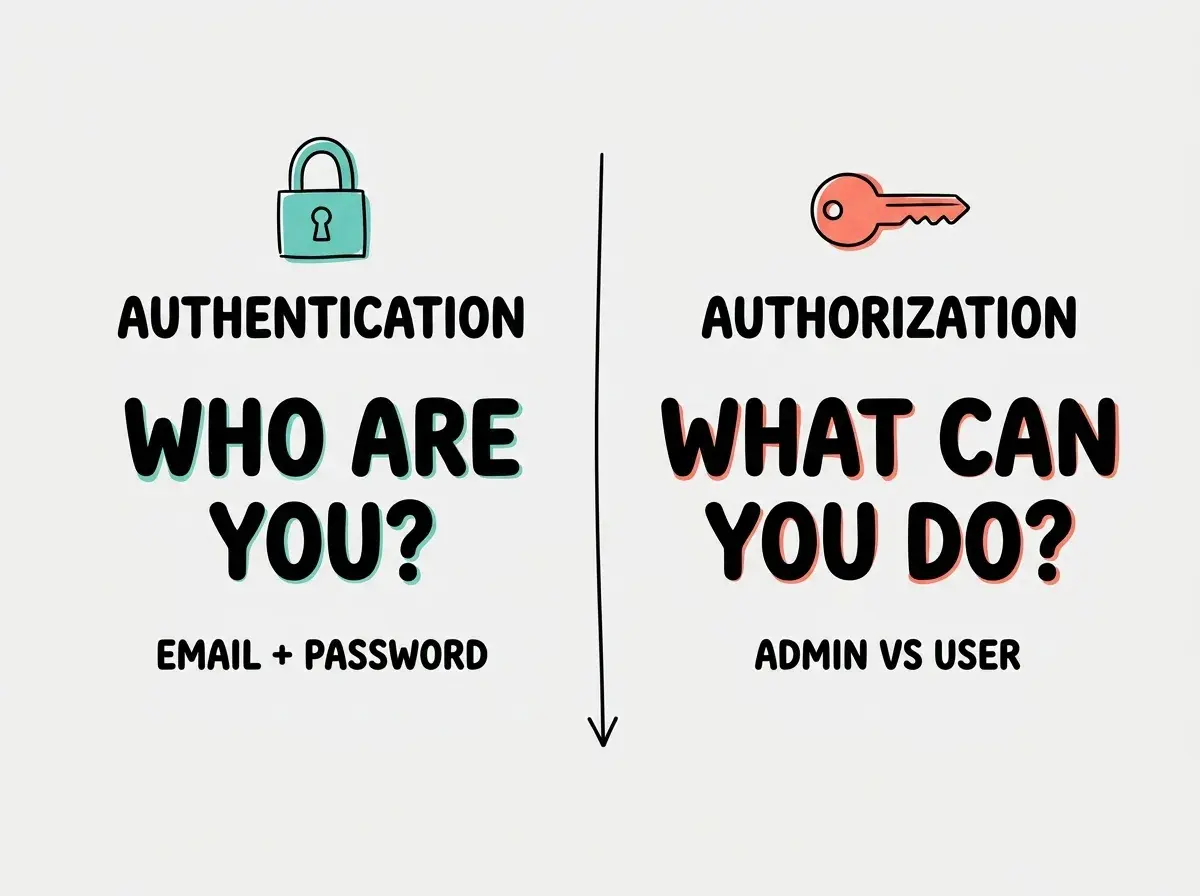
In practice, authentication happens once (at login), and authorization happens on every single request. The server checks your session token (authentication, confirming you are you) and then checks whether "you" have permission to do whatever you are requesting (authorization). AI-generated code frequently handles authentication but forgets authorization entirely, creating apps where any logged-in user can access any other user's data.
Understanding these foundations makes every AI prompt you write more effective.
Start hereWhat AI Gets Wrong About Authentication
When you tell an AI coding tool to "add user login to my app," you will get working code remarkably fast. The problem is what "working" means. The login screen will appear. You can type in credentials and get a response. But the security underneath is often paper-thin.
Here are the patterns AI-generated authentication code commonly gets wrong:
Passwords stored without proper hashing. AI sometimes uses weak hashing algorithms like MD5 or SHA-1 instead of modern ones like bcrypt or argon2. Worse, some generated code stores passwords with simple encoding that is trivially reversible.
Session tokens that never expire. Remember the wristband? AI-generated code often creates wristbands that last forever. If someone intercepts a token, they have permanent access to that account.
No rate limiting on login attempts. Without rate limiting, an attacker can try thousands of passwords per second. This is the digital equivalent of letting someone guess the club's door code all night with no consequences.
Missing CSRF protection. Cross-site request forgery tricks your browser into making authenticated requests to another site. Without CSRF tokens, a malicious website could perform actions on your app while you are logged in elsewhere.
Secrets in the frontend. AI sometimes puts authentication logic, including secret keys, into client-side code where anyone with browser dev tools can read it. The bouncer should never hand out copies of the guest list.
Do not assume AI-generated authentication is secure because it "works." A login form that accepts credentials and returns a token is the easy part. Proper hashing, session management, rate limiting, and CSRF protection are what separate a secure app from a liability. Always prompt AI to include these explicitly.
The fix is not to avoid AI for authentication. The fix is to be specific. Instead of "add login," try "add authentication using bcrypt for password hashing, HTTP-only cookies for session tokens with a 24-hour expiration, rate limiting to 5 login attempts per minute per IP, and CSRF protection on all forms." That level of detail dramatically improves what AI produces.
Better yet, use established authentication libraries instead of rolling your own. Tools like NextAuth.js, Clerk, Supabase Auth, and Firebase Auth have been battle-tested by millions of users. Telling AI to "integrate Clerk for authentication" is almost always safer than telling it to "build authentication from scratch."
What This Means For You
Authentication is where security meets user experience. Every app with user accounts needs it, and it is the single most important system to get right. AI can build login flows fast, but speed without security creates liability, not value.
- If you are a founder: Authentication is the one feature that, if broken, can destroy trust overnight. Do not let it be an afterthought. Use established auth providers (Clerk, Supabase Auth, Firebase Auth) rather than custom-built solutions, especially in your MVP. The cost of a security breach in user trust and potential legal exposure far exceeds the cost of a managed auth service.
- If you are changing careers: Understanding authentication and authorization will set you apart from other vibe coders who treat login as a checkbox. When you can explain why bcrypt matters or what a session token does, you demonstrate a depth of understanding that employers and clients value.
- If you are a student: Build a simple app with authentication, then try to break it. Can you access another user's data by changing the URL? Does the session expire? Are passwords hashed in the database? This exercise teaches more about security than any tutorial.
Authentication is just the first layer. Learn how the full security picture fits together.
Keep learning