A database is an organized system that stores your app's data so it persists between sessions, devices, and restarts. Think of it as the long-term memory of your software. Without a database, every user account, saved post, and setting vanishes the moment someone closes the tab. When you vibe code with AI, almost every meaningful app you build will need one.
That probably sounds obvious, but it trips up more beginners than you would expect. You describe an app to AI, it generates working code, you test it locally, and everything looks great. Then you refresh the page and all the data is gone. That is the moment you realize your app was holding everything in temporary memory instead of writing it to a database. Understanding what a database is (and making sure your app actually uses one) is one of the most important foundations for building anything real.
Why Databases Matter for Vibe Coders
Imagine you run a small business and you keep all your customer information on sticky notes. Every morning, someone sweeps the desk clean. You come in, and you have no idea who your customers are, what they ordered, or how much they owe. That is an app without a database.
Now imagine you have a filing cabinet instead. Every customer gets a folder. Inside that folder are their contact details, order history, and preferences. You can look up any customer instantly, add new records, update existing ones, or remove ones you no longer need. That filing cabinet is your database. It is organized, searchable, and persistent. No matter how many times you leave and come back, the information is still there.
For vibe coders, this matters because AI tools will happily build apps that store data in temporary memory without warning you. The app works perfectly during your demo. Then real users show up, the server restarts, and everything disappears. A database is what separates a toy prototype from software people can actually rely on.
If your app needs to remember anything between sessions (user accounts, saved content, preferences, history), it needs a database. There are no exceptions. Temporary in-memory storage is only appropriate for throwaway prototypes.
The good news is that you don't need to become a database expert. Services like Supabase and Firebase are the most common databases for vibe-coded apps, and they handle the complicated infrastructure for you. Your job is understanding what a database does, why your app needs one, and how to tell AI to use one properly.
How a Database Actually Works
Let's stretch the filing cabinet analogy a bit further, because it maps surprisingly well to how real databases work.
Your filing cabinet has drawers. Each drawer holds a different category of information. One drawer for customers, one for orders, one for products. In database terms, each drawer is called a "table."
Inside each drawer, every folder follows the same structure. Every customer folder has slots for name, email, and password hash (a scrambled version of their password for security). In database terms, these slots are called "columns."
Each individual folder is a "row," one specific record in the table. So the customers table might have three columns (name, email, password hash) and hundreds of rows (one per customer).
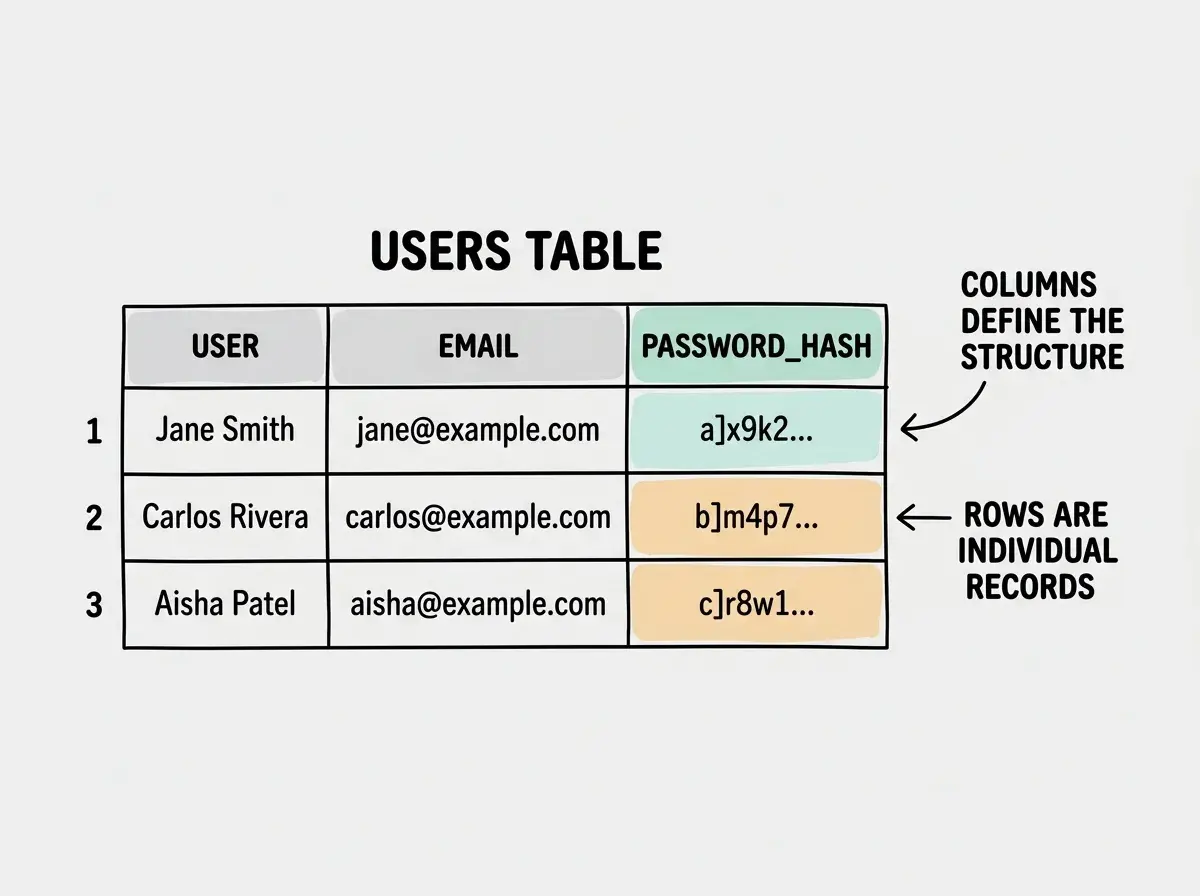
When your app needs information, it asks the database a question. "Give me the user whose email is jane@example.com." The database searches through the rows, finds the match, and sends it back. This happens in milliseconds, even with millions of rows. That is significantly faster than you could ever flip through a physical filing cabinet.
The four basic operations your app performs on a database spell out CRUD: Create (add a new record), Read (look up existing records), Update (change a record), and Delete (remove a record). Every signup form, every profile edit, every "delete my account" button maps to one of these operations. When you describe features to AI, thinking in terms of CRUD helps you be more precise about what the app actually needs to do with data.
It is perfectly okay if this feels abstract right now. You don't need to memorize query syntax or understand indexing. What matters is the mental model: tables with columns and rows, and an app that creates, reads, updates, and deletes records in those tables.
The Types of Databases You Will Encounter
One of the most commonly searched questions about databases is "what are the 4 types of database?" The reality is there are several types, but as a vibe coder, you will mainly encounter two.
Relational databases (SQL) are the filing cabinet model described above. Data lives in structured tables with defined columns, and tables can reference each other. A customer's order points back to their customer record. PostgreSQL, MySQL, and SQLite are popular examples. Supabase, one of the most popular choices for vibe-coded apps, runs on PostgreSQL under the hood.
Document databases (NoSQL) work more like a box of labeled envelopes. Each envelope can contain different things. One customer envelope might have a phone number; another might not. There is no rigid structure. Firebase's Firestore and MongoDB are common examples. Firebase is especially popular with vibe coders because its setup is straightforward and it handles real-time updates automatically.
Key-value stores are the simplest type. Think of them as a dictionary: you look up a word (the key) and get the definition (the value). Redis is the most well-known. These are typically used for caching and session management, not as your primary database.
Vector databases are newer and designed for AI applications. They store data in a way that makes similarity searches fast, which is how AI-powered search and recommendation features work. Pinecone and Weaviate are examples you might encounter if you build AI features into your app.
For most vibe-coded projects, you will use either a relational database (Supabase/PostgreSQL) or a document database (Firebase/Firestore). If you are unsure, Supabase is an excellent default. It gives you a real PostgreSQL database with a clean dashboard, built-in authentication, and generous free tier.
Every great app starts with understanding the building blocks.
Start hereWhat AI Gets Wrong About Databases
Here is where things get honest. AI tools are remarkably good at generating code, but roughly 45% of AI-generated code has security vulnerabilities, and database handling is one of the most common problem areas.
The first issue is that AI often defaults to storing data in memory instead of in a real database. You ask for a todo app, and AI builds one that keeps the todo list in a JavaScript array. It works beautifully during testing. Deploy it, and every user's todos vanish when the server restarts. AI did exactly what you asked for (a todo app), but it took the path of least resistance.
The second issue is security. AI-generated database code frequently skips input validation, which means users could potentially inject malicious commands into your database. It might store passwords in plain text instead of hashing them. It might expose database credentials in frontend code where anyone with browser dev tools can see them.
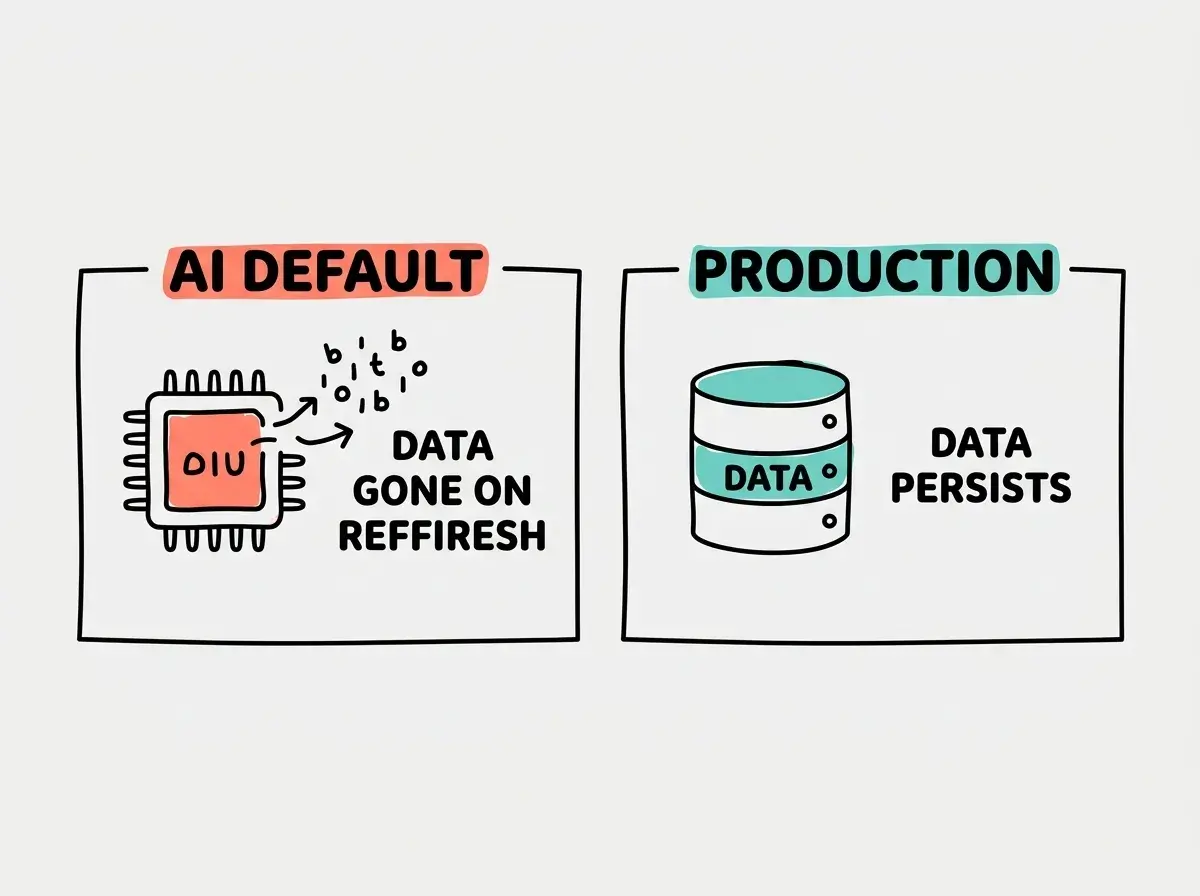
The third issue is that AI rarely sets up proper database backups or migration strategies. When you need to change your table structure later (and you will), AI-generated code often does not account for existing data that needs to be preserved.
Never trust that AI has connected your app to a real database without verifying. After AI generates your code, explicitly ask: "Where is the data being stored? Show me the database connection." If the answer involves arrays, objects, or variables in memory, your data will not survive a restart.
None of this means you should avoid using AI for database work. It means you should verify what AI builds. Ask it to "use Supabase for persistent storage," "hash all passwords with bcrypt," and "validate all database inputs on the server side." Specific prompts produce dramatically better results than vague ones.
What This Means For You
Databases are the memory of your app. They store everything your users create, save, and depend on. Without a proper database, you are building on sand.
- If you are a founder building an MVP, make database choice one of your earliest decisions. Supabase or Firebase will handle your needs through launch and well beyond. When you review what AI builds, check that user data is actually going to the database and not sitting in temporary memory. Your users' trust depends on their data being safe and persistent.
- If you are changing careers into tech, understanding databases is one of the highest-leverage concepts you can learn. Every software company in the world uses them. You don't need to write SQL queries by hand, but knowing what tables, rows, and columns are (and understanding CRUD operations) puts you ahead of most non-technical professionals and gives you a real vocabulary for technical conversations.
- If you are a student exploring vibe coding, try building a simple app with Supabase. Create a table, add some data through your app, then close the browser and reopen it. Watching your data persist for the first time is a genuine "aha" moment that makes the concept click in a way reading about it never will.
Next up, learn how your app talks to the outside world through APIs.
Continue learning