Learning to read error messages is the single most useful skill you can develop as a non-coder building with AI tools. You do not need to understand programming languages. You just need to know where to look, what to copy, and how to ask your AI assistant for help. This guide will show you exactly how.
The Red Text Is a Clue, Not a Punishment
Here is something nobody tells you when you start vibe coding. Those walls of red text that appear in your terminal or browser console are not angry. They are not telling you that you failed. They are doing the opposite. They are trying to help you.
Think about it this way. If something went wrong and you got no message at all, you would have zero idea what happened. The error message is the system raising its hand and saying, "Hey, I found the problem, and here is where it is." That is genuinely useful, even if the formatting makes it look like your computer is screaming at you.
A recent survey found that 63% of people using vibe coding tools like Cursor, Bolt, and Lovable have no formal development background. They are founders, marketers, designers, and career changers who are building real products with AI assistance. If you are one of them, you are not alone, and you absolutely do not need a computer science degree to understand what an error message is telling you.
Why Error Messages Look Scarier Than They Are
The reason error messages feel overwhelming is simple. They are written by developers, for developers. They include file paths, line numbers, stack traces, and technical vocabulary that assume you already know what all of those things mean. But here is the good news: you can ignore most of it.
Roughly 80% of a typical error message is context that only matters to experienced programmers who are debugging deep system issues. The part that matters to you, the part that tells you what actually went wrong, is usually one or two lines. Once you learn to spot those lines, error messages stop being scary and start being incredibly helpful.
You do not need to understand every line of an error message. You only need to find the one sentence that describes what went wrong, then copy the entire error and paste it into your AI tool. The AI understands the technical parts so you do not have to.
This is the mental shift that changes everything. You are not the one who needs to fix the error. You are the one who needs to relay the error to your AI assistant clearly. That is a much simpler job.
The Check Engine Light Analogy
Think of error messages the way you think about the warning lights on your car's dashboard. When the check engine light comes on, you do not pop the hood and start rebuilding the engine yourself. You note the light, maybe check what it means in the manual, and then take the car to a mechanic who knows what to do.
Error messages work the same way. Your app is the car. The error message is the dashboard warning light. Your AI coding tool is the mechanic. Your job is not to fix the engine. Your job is to tell the mechanic what the dashboard is showing.
A check engine light gives you three useful pieces of information: that something is wrong, roughly what system is affected (engine, brakes, oil, battery), and how urgent it is. Error messages give you the same three things, just in a less friendly format. Once you start seeing them as dashboard indicators instead of failure notifications, the anxiety fades fast.
The best part about working with AI tools is that your "mechanic" never gets annoyed when you bring in a problem you do not understand. You can paste the entire error message into Claude, Cursor, or ChatGPT and say, "What does this mean and how do I fix it?" The AI will explain it in plain language and often generate the fix for you automatically.
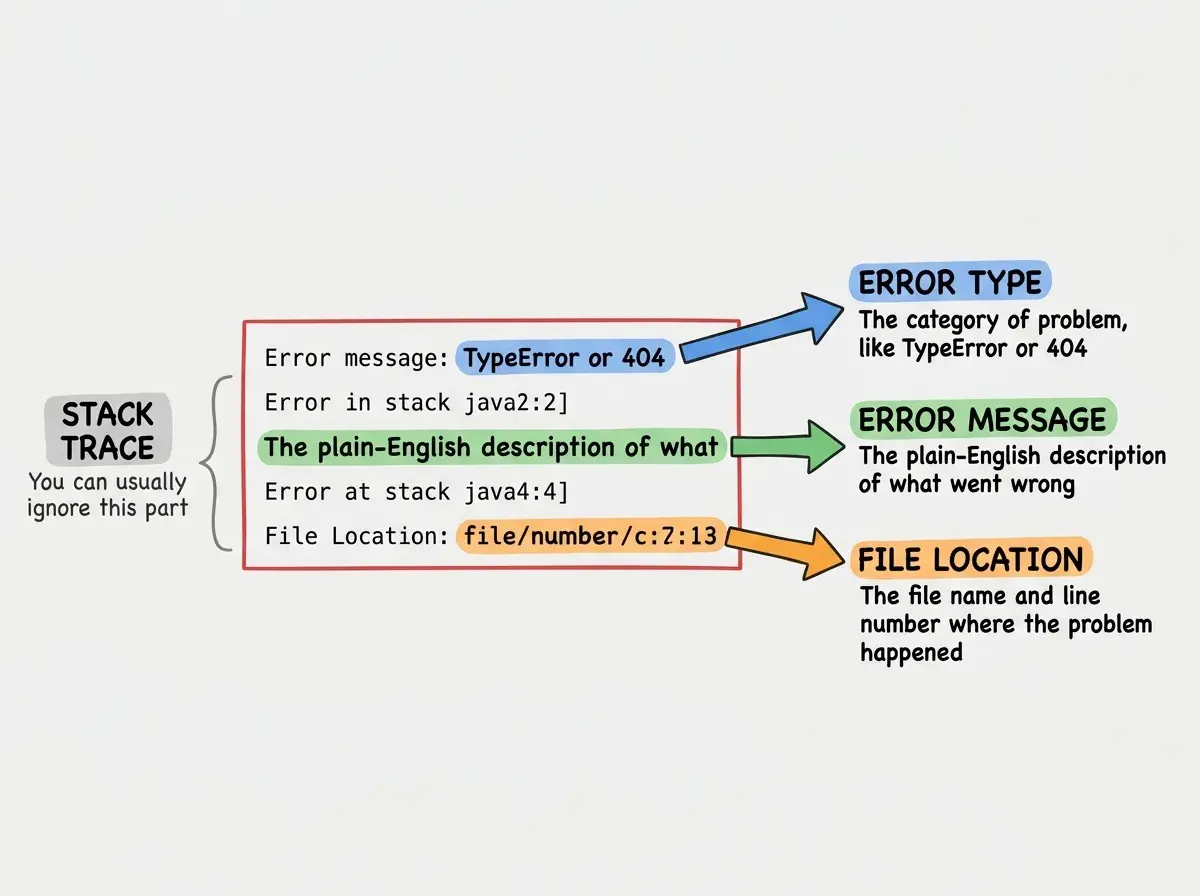
When you see an error for the first time, do not try to read every line top to bottom. Instead, scan for the three pieces we just identified. That is all you need before handing it off to your AI assistant.
The Three Parts of Every Error Message
No matter what language, framework, or tool you are using, every error message contains the same three pieces of useful information. Once you know what they are, you can read any error message in any technology.
Part 1: What happened. This is the error type and description. It is usually the first line or the most prominent line in the message. It says things like "TypeError: Cannot read properties of undefined" or "404 Not Found" or "SyntaxError: Unexpected token." You do not need to know what these mean technically. You just need to copy them accurately.
Part 2: Where it happened. Somewhere in the error message, you will see a file path and a line number. It looks something like src/components/Header.tsx:42 or pages/index.js:15. This tells your AI tool exactly where to look. Even if you have no idea what those files do, your AI assistant does.
Part 3: What to tell your AI. This is the part most beginners miss. The best way to get help is not to describe the error in your own words. It is to copy the entire error message and paste it directly into your AI tool with a simple prompt like, "I got this error. What is wrong and how do I fix it?" The AI reads the technical details so you do not have to.
Here is a template you can use every single time: "I was trying to [what you were doing]. I got this error: [paste full error]. What does it mean and how do I fix it?" That prompt works in Cursor, Claude, ChatGPT, Bolt, and every other AI coding tool available today.
Get weekly tutorials designed for non-coders who build with AI. No jargon, no judgment, just practical guides that help you ship.
Join the NewsletterThe three-part framework works because it maps perfectly to how AI tools process debugging requests. When you give the AI the error type, the file location, and context about what you were doing, it has everything it needs to generate a working fix. You just became an effective debugger without writing a single line of code.
The Five Most Common Errors and What They Mean
Now that you know the framework, let us look at the five errors you will encounter most often. For each one, I will give you the plain-English translation and exactly what to do.
404 Not Found. This is the friendliest error on the list. It simply means, "The page or file you are looking for does not exist at this address." You probably typed a URL wrong, a link is pointing to a page that was deleted, or a file got moved without updating the reference. Tell your AI, "I am getting a 404 error on this page," and it will trace the broken link.
CORS Error. Full name: Cross-Origin Resource Sharing error. In plain English, this means, "Your website tried to fetch data from a different website, and that other website said no." This is extremely common when your frontend and backend are on different URLs during development. It feels intimidating because the browser console explanation is long and technical, but the fix is usually a single configuration line that your AI can add in seconds.
Cannot Read Properties of Undefined. This is the most common JavaScript error in existence. It means, "The code tried to use something that does not exist yet." Imagine trying to open a door in a room that has not been built. The door (the property) cannot be opened because the room (the object) is undefined. Copy the full error with the file path and your AI will find exactly which variable is missing.
SyntaxError. This means, "The code has a typo." A missing comma, an extra bracket, a quotation mark that was opened but never closed. It is the coding equivalent of a grammatical error in a sentence. The error message almost always points to the exact line where the problem is, making it one of the easiest for your AI to fix.
TypeError. This means, "The code tried to do something with the wrong kind of data." It is like trying to multiply the word "hello" by five. The operation itself is fine, but the data type is wrong. These often happen when an API returns something different than what the code expected. Paste the full error into your AI and it will adjust the code to handle the correct data type.
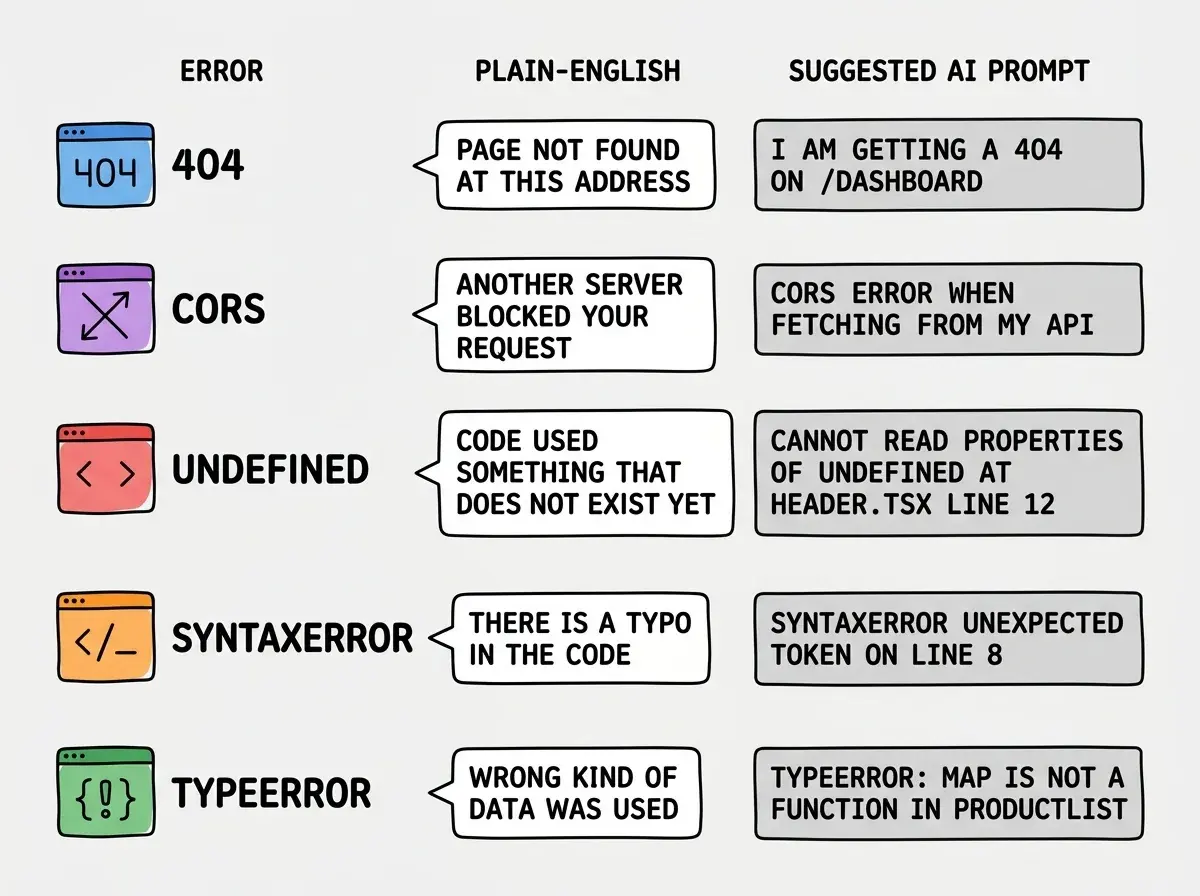
You will notice something interesting about these five errors. None of them require you to understand programming to describe them to an AI tool. The error message itself contains all the technical information. Your job is just to be a good messenger.
Do not rewrite or summarize the error message before pasting it into your AI tool. Beginners often try to describe the error in their own words, which strips out the file paths, line numbers, and technical details the AI needs to generate a fix. Always copy and paste the full, unedited error text.
This is genuinely the most common mistake new vibe coders make. They see a 15-line error, get overwhelmed, and type something like "it says there is an error with my header." That gives the AI almost nothing to work with. Pasting the full error, even if you do not understand a single word of it, gives the AI everything it needs.
What This Means for You
Reading error messages is not a coding skill. It is a communication skill. You are learning to be the bridge between what your app is telling you and what your AI tool needs to hear. That makes you more effective no matter what you are building.
- If you are a founder, this skill cuts your debugging time dramatically. Instead of staring at red text for thirty minutes, you paste it into your AI and get a fix in thirty seconds. That time savings compounds across every feature you build.
- If you are a career changer, understanding error messages is the single biggest confidence booster in your transition. The moment errors stop being terrifying and start being routine, you cross an invisible line from "person who is trying to learn tech" to "person who builds things with tech."
- If you are a student or creative, this framework gives you independence. You no longer need to wait for a developer friend to look at your screen and tell you what went wrong. You have a repeatable process that works every time, with any error, in any tool.
The check engine light does not make you a mechanic. But knowing what it means, and knowing to take it to someone who can help, makes you a much better driver. Error messages work the same way. You do not need to fix them yourself. You just need to read them clearly and pass them along.
Join thousands of non-coders who are building real products with AI tools. Get beginner-friendly guides delivered to your inbox every week.
Subscribe Free