A server is a computer that stays on all the time, connected to the internet, running your app so anyone in the world can use it. When someone types your URL into a browser, they are not connecting to your laptop. They are connecting to a server. It listens for requests, processes them, and sends back the results. Every website, every app, every service you have ever used online runs on a server somewhere.
That probably sounds straightforward, but there is a subtle gap that trips up nearly every new vibe coder. You build something with AI, it works perfectly on your computer, and then you try to share it with someone else and realize it only exists on your machine. The thing running it for you locally is not a server in the way the internet needs. Bridging that gap is what deployment is all about, and understanding servers is the first step.
Why Servers Matter Even When You Don't See Them
You will never see the server running your favorite app. You will never touch it. But it is doing all of the heavy lifting, every second of every day. When you scroll Instagram, a server is fetching your feed. When you send a message on Slack, a server is routing it. When you pay for something with Stripe, a server is processing the transaction.
For vibe coders, servers matter because they are the boundary between "it works on my computer" and "it works for everyone." You can build the most beautiful app in the world with AI, but until it runs on a server, only you can use it. That is not a product. That is a demo.
A server is just a computer that is always on, always connected, and always ready to respond. Your laptop can act like a server temporarily during development, but a real server runs 24/7 without you needing to keep your browser open.
The good news is that modern deployment platforms have made servers dramatically easier to use. You do not need to buy physical hardware or configure operating systems. Services like Cloudflare, Vercel, and Railway handle the server for you. But understanding what is happening underneath still matters, because when something breaks (and it will), the error messages will make a lot more sense if you know what a server actually does.
How a Server Actually Works
Think of a server like the kitchen in a busy restaurant. Your computer, the one you are building on, is the dining room. During development, you are both the customer and the chef, cooking for yourself in your own kitchen. Everything works because you are the only one eating.
But a real restaurant kitchen is different. It serves hundreds of customers at the same time. Orders come in constantly. The kitchen has to process each one, pull the right ingredients, cook the dish, and send it back to the correct table. If someone orders a steak and someone else orders pasta, the kitchen handles both simultaneously without mixing them up.
A server works the same way. When someone visits your app, their browser sends a request, like placing an order. The server receives that request, figures out what is needed (a web page, some data, an image), prepares the response, and sends it back. If a thousand people visit your app at the same time, the server handles a thousand requests, routing each response to the right person.
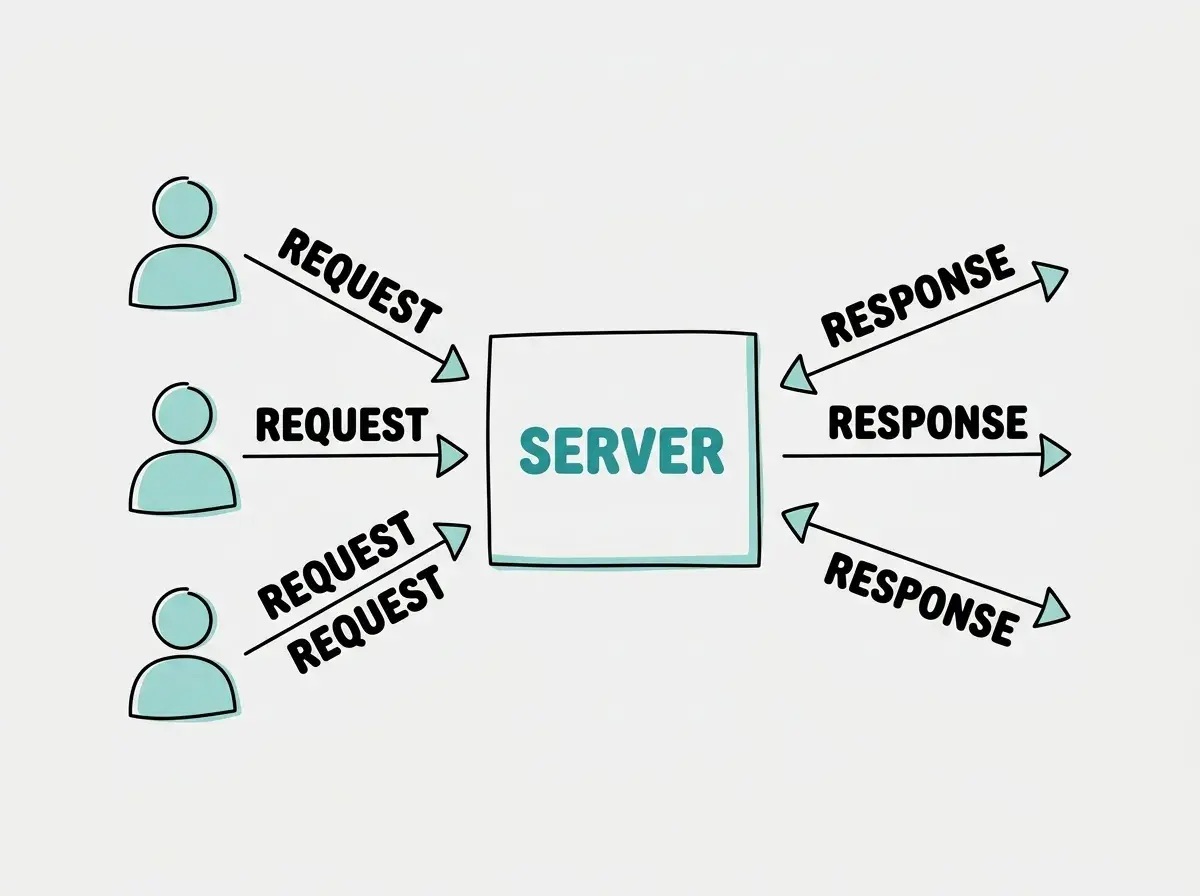
The kitchen analogy goes further. A restaurant kitchen has stations: one for grilling, one for salads, one for desserts. Servers work similarly. One part handles web requests, another manages the database, another processes file uploads. When your app grows and gets busier, you can scale up the kitchen by adding more stations (or more servers), just like a restaurant expands its kitchen when it gets popular.
And here is the part that matters for vibe coders specifically: when you run npm run dev or python manage.py runserver on your laptop, you are spinning up a tiny kitchen that only serves one table, yours. It is great for tasting the food. It is not built to serve the public.
Localhost vs Production and Why Your App Works Here But Not There
This is one of the most confusing moments for new builders. You run your app locally, everything works, you show it to someone by sending them a link, and... nothing. The link does not work. Or you try localhost:3000 on your phone and get an error.
The word "localhost" literally means "this computer." When your app runs on localhost, it is only accessible from the machine it is running on. It is your private kitchen, cooking just for you. The address localhost:3000 is not a real internet address. It is a shortcut that says "talk to myself on port 3000."
Production is the opposite. It means your app is running on a server that has a real internet address (a domain name like yourapp.com) and is accessible to anyone with a browser. The jump from localhost to production is the jump from cooking in your home kitchen to opening a restaurant.
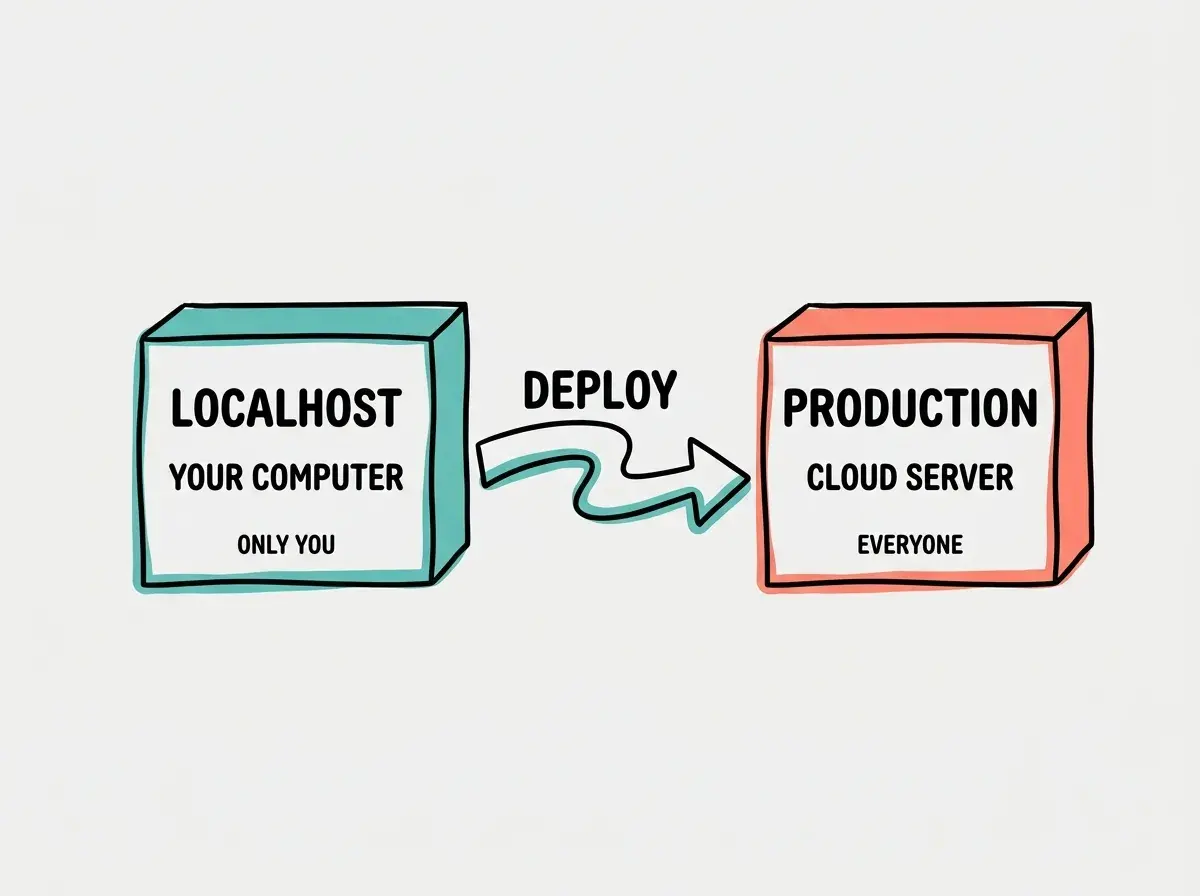
Several things change when you move from localhost to production. Environment variables (like API keys) need to be configured on the server separately. Your database, if you are using one, needs to be hosted somewhere the server can reach. File paths that worked on your Mac might not work on a Linux server. And the URL changes from localhost:3000 to your actual domain.
This is why "it works on my machine" is one of the oldest jokes in software development. Your local environment is comfortable and familiar, with everything configured just right. A production server is a different computer entirely, with different settings, different file systems, and different constraints.
Learn the full path from building on your computer to shipping for everyone.
Start learningThe Server Options Vibe Coders Actually Use
You do not need to rent a physical server in a data center. Cloud platforms handle all of that for you, and many of them have generous free tiers that are perfect for getting started. Here are the options that vibe coders actually use in practice.
Vercel is the most popular choice for Next.js apps and frontend projects. You connect your GitHub repository, push your code, and Vercel automatically builds and deploys it to servers around the world. The free tier handles most hobby projects comfortably. When someone visits your Vercel-hosted app, their request goes to the nearest server, which makes your app feel fast regardless of where the user is located.
Cloudflare Pages works similarly but runs your code on Cloudflare's edge network, which spans over 300 cities globally. It is excellent for static sites and apps built with frameworks like Next.js. Cloudflare also offers Workers, which are small server-side functions that run close to your users. The free tier is generous, and the performance is exceptional.
Railway is the go-to for backend services and full-stack apps that need a database. If your app has a Node.js backend, a Python API, or a PostgreSQL database, Railway lets you deploy all of them with minimal configuration. It feels like having your own private kitchen in the cloud, fully equipped and ready to cook.
Netlify is another strong option for frontend projects and JAMstack sites. Like Vercel, it deploys from your Git repository and handles the server infrastructure automatically.
All of these platforms follow the same basic pattern: you push code to GitHub, the platform detects the change, builds your app, and deploys it to their servers. The server is there, doing its job, but you rarely have to think about it directly.
New vibe coders sometimes deploy their app and assume everything will work exactly like it did on localhost. Always test your deployed app separately. Check that environment variables are set, that database connections work, and that API keys are configured on the server. The most common deployment failures come from missing configuration, not broken code.
For most vibe-coded projects, especially in the early stages, Vercel or Cloudflare Pages are the right starting point. They are free, fast, and require almost zero server knowledge. As your app grows and needs a database, background jobs, or custom backend logic, Railway or a similar platform fills in the gaps.
What This Means For You
A server is the always-on computer that makes your app available to the world. You build locally on your machine, but you deploy to a server so everyone else can use what you built. Modern platforms like Vercel, Cloudflare, and Railway make this process almost automatic, but understanding the underlying concept helps you debug problems, make smarter architecture choices, and speak the language of the tools you are using.
- If you're a founder: Your server is where your product actually lives. Choosing the right hosting platform early saves migration headaches later. For most MVPs, start with Vercel or Cloudflare Pages (free, fast, low maintenance) and only move to more complex setups when your traffic or backend needs demand it.
- If you're changing careers: Understanding servers is one of the clearest signals that you have moved beyond tutorial-level knowledge. When you can explain the difference between localhost and production, you can hold your own in technical conversations and make better decisions about the tools you use.
- If you're a student: Deploy something this week. Take any project you have built locally and put it on Vercel or Cloudflare Pages. The experience of seeing your app live on a real URL, accessible to anyone, is one of the most motivating moments in learning to build. It transforms an exercise into something real.
Understanding how your app connects to the internet is the next piece of the puzzle.
Continue learning