Understanding AI generated code does not require a computer science degree or months of practice. It requires the same skill you already use when you scan a restaurant health inspection report or review a home inspection before buying a house. You look for patterns, check for red flags, and make sure nothing obvious is wrong. That is exactly the skill this guide will teach you.
You clicked "Generate" and your AI tool produced dozens of files full of unfamiliar syntax. Hundreds of lines appeared in seconds, and your first instinct was to close the window. That reaction is completely normal. But here is the good news: you do not need to understand every line. You need to understand enough to stay in control.
You Don't Need to Read Every Line
Think about the last time you bought or rented a home. You probably had an inspection done. The inspector did not build the house. They never laid a brick or wired an outlet. But they knew exactly what to look for.
That is your role with AI-generated code. You are the building inspector, not the builder. The AI is the construction crew. Your job is to walk through what it built and check that everything looks right.
63% of people using AI coding tools today are not professional developers. They are founders building MVPs, marketers creating landing pages, and creatives launching portfolio sites. If you are one of them, you are in the majority. The tools were designed for you, and this inspection skill is the one thing that separates people who ship confidently from people who ship and pray.
63% of vibe coding users are non-developers. You do not need to become a programmer to use AI coding tools effectively. You need to become a building inspector, someone who knows what to look for without knowing how to build it from scratch.
The building inspector analogy will carry us through the rest of this guide. Every section maps to a different part of the inspection. By the end, you will have a mental checklist you can run through every time your AI generates code.
The Building Inspector Analogy
A building inspector walks through a house with a clipboard and a flashlight. They are not redesigning the kitchen or replumbing the bathroom. They are checking that the work meets standards, that nothing is dangerously wrong, and that the house will hold up under normal use.
When you look at AI-generated code, you are doing the same thing. You walk through the files with a few simple questions. Does the structure make sense? Are the pieces labeled clearly? Does anything look broken or missing? You just need to notice when something feels off.
Here is what makes this work: code is surprisingly readable at a high level. File names tell you what each piece does. Function names describe actions. Comments (lines starting with //) are plain English notes the AI leaves for you. The structure of a codebase is like the floor plan of a house. You can see where the rooms are without understanding the wiring inside the walls.
46% of all code written today is AI-generated, according to recent industry surveys. That number is climbing fast. The more code AI writes, the more important it becomes for the people directing that AI to understand what it produced. Not at the level of a programmer, but at the level of an inspector.

The key insight is that you are looking for the same things every time. Once you learn these patterns, checking AI-generated code takes minutes instead of hours. Let's walk through exactly what to look for.
Five Patterns to Recognize in Any AI-Generated Code
You do not need to memorize programming languages. You need to recognize five patterns that show up in virtually every project an AI builds for you. Think of these as the five things a building inspector always checks, regardless of the house.
1. File names tell you the purpose. A file called login.tsx handles login. A file called pricing-page.tsx shows the pricing page. A file called send-email.ts sends emails. If you see a file called asdf.ts or temp-fix.ts, that is a yellow flag. Good code has descriptive file names, just like a well-organized house has labeled rooms.
2. Function names describe actions. Inside those files, you will see words like handleSubmit, fetchUsers, calculateTotal, or validateEmail. These are function names, and they read like verbs. You do not need to understand what happens inside the function. The name tells you what it is supposed to do. If a function called deleteUser appears in code that should never delete anything, that is a red flag.
3. Imports show connections. At the top of most files, you will see lines that start with import. These are like supply lines into a room. They tell you what outside tools or pieces this file depends on. If you see import { sendEmail } from './email', you know this file can send emails. Imports give you a map of how the pieces connect.
4. Comments are plain English notes. Lines starting with // are comments. The AI writes them to explain what the code does. Read every comment. They are written for humans, not machines. If a comment says // TODO: add authentication, that means the AI skipped security and left a note about it. Comments are your best friend during inspection.
5. Error handling blocks show safety nets. Look for the words try and catch in the code. These are like circuit breakers in a house. They catch things that go wrong and prevent the whole app from crashing. If a file that handles payments or user data has no try/catch blocks, that is like a house with no circuit breakers.
Understanding your AI's output is the first step. Start your first project with the patterns you just learned.
Explore Beginner GuidesThese five patterns cover roughly 80% of what you need to check. You are reading labels, following connections, and looking for missing safety nets. A building inspector does not need to understand electrical engineering to notice that an outlet has no cover plate.
Red Flags That Mean Something Is Wrong
Now that you know what to look for, let's talk about what should worry you. These are the code equivalents of water stains on a ceiling or cracks in a foundation. They do not always mean disaster, but they mean you should ask your AI to explain or fix something.
Hardcoded secrets and passwords. If you see something like password = "admin123" or apiKey = "sk-live-abc123" written directly in the code, stop immediately. That is like leaving your house key taped to the front door. Secrets should be stored in environment variables (files called .env), never written directly into the code. This is the single most dangerous pattern in AI-generated code.
No error handling in critical sections. If the code that processes payments, stores user data, or sends emails has no try/catch blocks, the AI skipped a safety net. Ask it to add error handling. In the building inspector analogy, this is like finding a gas line with no shutoff valve.
Repeated blocks of identical code. If you scroll through and see the same chunk of code copied five or ten times with tiny changes, the AI took a shortcut. This makes the codebase fragile. When you need to change something later, you have to change it in five places instead of one. It is like a house where every room has its own water heater instead of one central system.
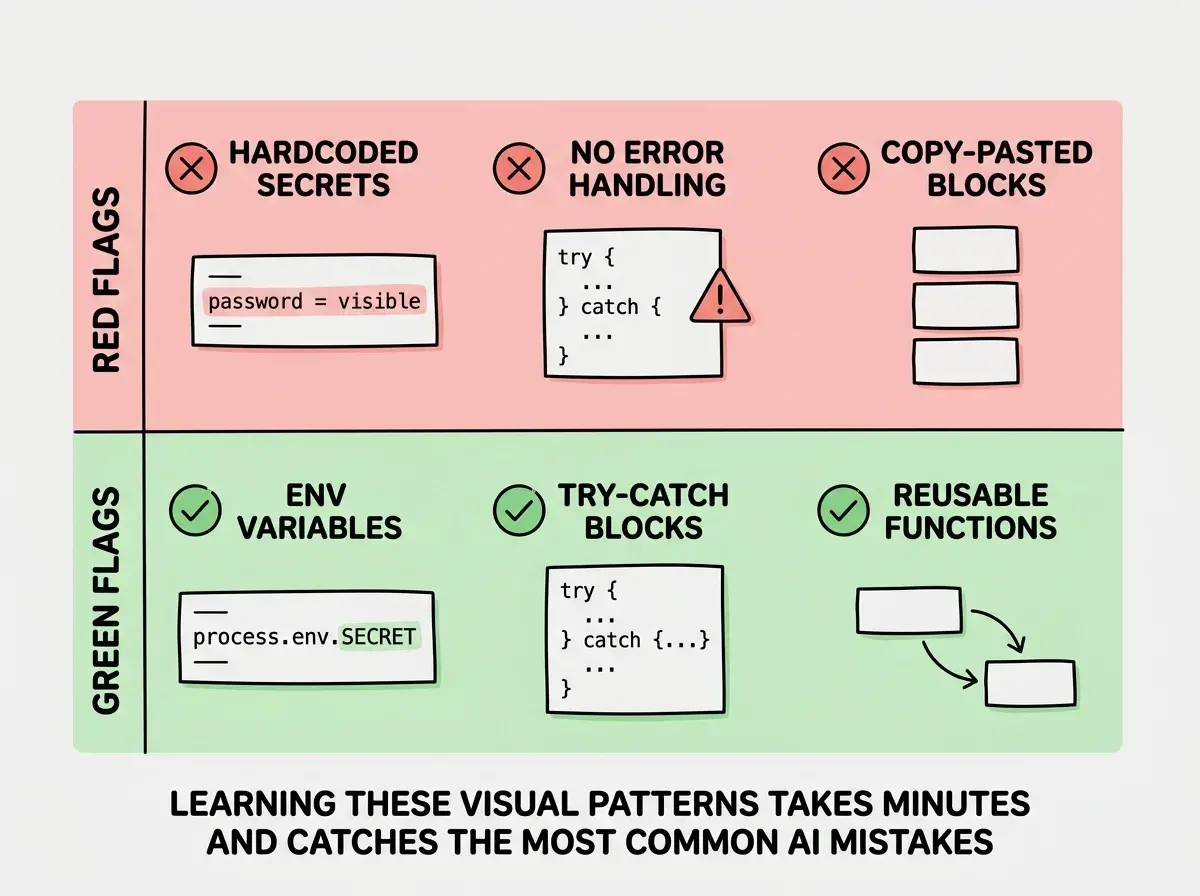
Fixing these issues is straightforward. You do not fix them yourself. You tell the AI what you found and ask it to correct the problem. "I see the API key is hardcoded on line 15. Move it to an environment variable." You are the inspector flagging the issue. The AI is the contractor who fixes it.
Many non-developers assume that if the AI generated it, it must be correct. That assumption is the most dangerous thing you can bring to a vibe coding project. AI tools produce working code roughly 70-80% of the time. The remaining 20-30% contains bugs, security gaps, or shortcuts that only a quick inspection would catch. Always inspect. Never assume.
The inspection mindset matters more than any technical knowledge. You are not trying to become a developer. You are trying to become someone who catches the obvious problems before they reach your users.
Dig deeper
A few hand-picked sources if you want to go further.
What This Means For You
No matter your background, the building inspector approach gives you a concrete way to work with AI coding tools. Here is what it looks like in practice.
- If you are a founder building an MVP, inspecting AI-generated code means you can move fast without moving recklessly. Check file names, read comments, look for hardcoded secrets, and verify error handling on anything that touches payments or user data. That ten-minute inspection protects your business and your users.
- If you are a career changer exploring tech, this pattern recognition skill is your bridge into the industry. Start by reading AI-generated code the way we covered here, and you will develop an intuition for how software is structured that serves you whether you eventually learn to code or keep building with AI tools.
- If you are a student or creative professional, understanding AI-generated code puts you ahead of peers who treat AI tools like black boxes. When you can inspect what the AI built, you can iterate faster, catch problems earlier, and build projects that actually work in production instead of just in demos.
The building inspector skill is small but powerful. Five patterns to recognize, a handful of red flags to watch for, and the confidence to tell your AI tool what to fix. That is enough to ship real projects and stay in control of what you are building.
Put these patterns into practice. Browse beginner-friendly guides and start building something real today.
Get Started