A prompt is the instruction you give to an AI coding tool. It is the text you type into ChatGPT, Claude, Cursor, or any other AI assistant when you want it to build something for you. And the quality of that instruction determines the quality of what you get back.
This sounds obvious. "Just tell the AI what you want." But the gap between knowing you should be specific and actually writing effective prompts is enormous. It is the single most practice-dependent skill in vibe coding, and it is also the one most people underestimate.
The Taxi Driver Who Knows Every Route
Think of an AI coding tool as a taxi driver who has memorized every street in every city on Earth. This driver knows thousands of routes, shortcuts, alternate paths, and scenic detours. There is no destination they cannot reach. But they need you to tell them where to go.
If you climb into the taxi and say "take me somewhere nice," the driver will pick a destination. Maybe it is somewhere you love. More likely, it is somewhere random that matches the driver's best guess at "nice." You might end up at a fancy restaurant when you wanted a quiet park. Or at a park in the wrong city entirely.
Now imagine you say "take me to 42 Oak Street, the blue house with the red door, in the Riverside neighborhood. My friend Sarah lives there and I am dropping off a birthday present, so just pull up to the front and wait."
Same driver. Same knowledge. Completely different result.
AI coding tools work exactly the same way. The AI has vast knowledge of programming patterns, frameworks, and solutions. But it cannot read your mind. The prompt is your only way to communicate where you want to go and why.
Why "Be Specific" Is Not Enough Advice
This confuses everyone at first because the standard advice is "just be specific." But specific about what? Saying "be specific" to someone learning prompts is like saying "cook better food" to someone learning to cook. It is technically correct and practically useless.
Specificity has layers. When you tell the taxi driver your destination, you are actually communicating several distinct things, and each one matters.
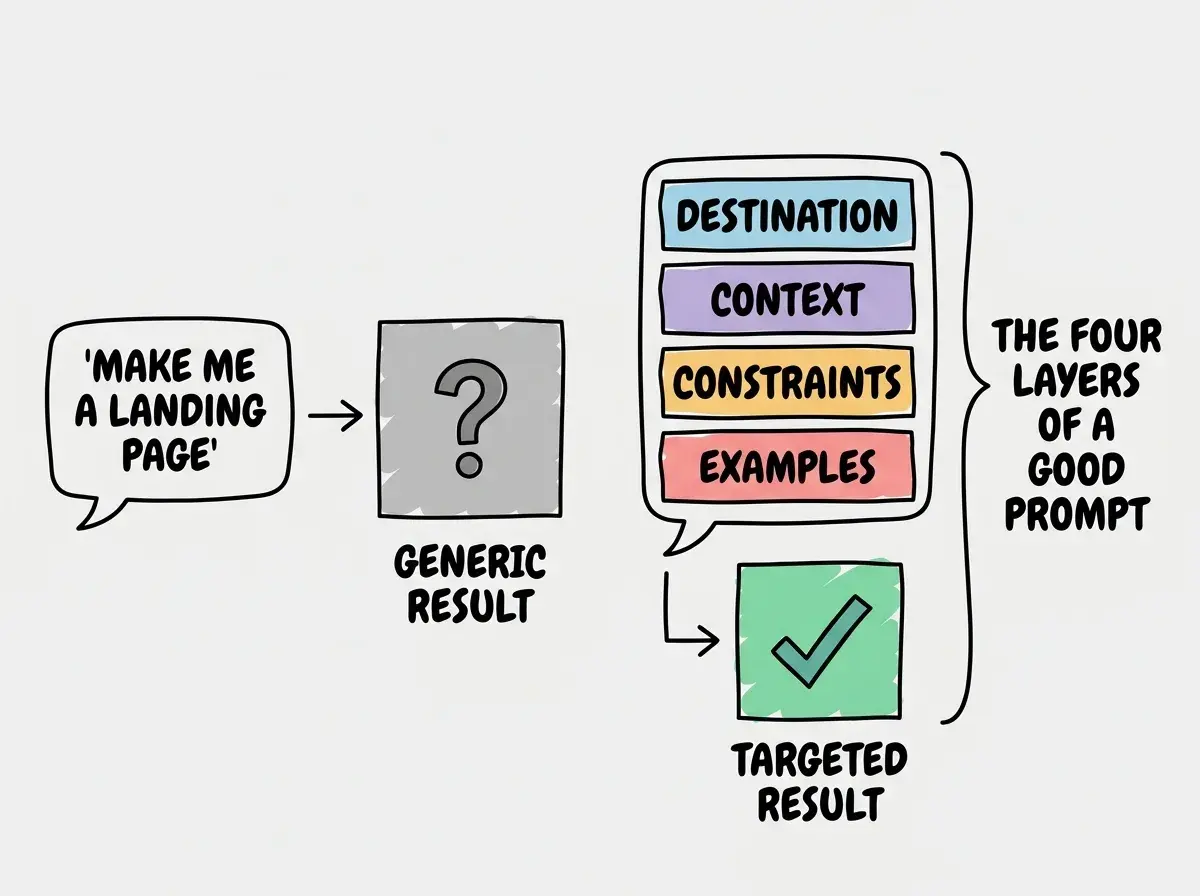
The destination (what you want built). "Build me a signup form" is a destination. But "build me a signup form with email, password, and name fields that validates the email format and shows inline error messages" is a destination with a street address.
The neighborhood (the context). "This signup form is for a React app using Tailwind CSS and it needs to call my Supabase authentication backend." Context tells the AI which tools, patterns, and conventions to use. Without it, the driver picks a route that might not connect to your existing roads.
The driving style (constraints and preferences). "Keep it simple, no external libraries, and make the error messages friendly rather than technical." Constraints prevent the AI from over-engineering or making choices you would not make yourself.
A photo of where you have been (examples). "Here is how the login form on this page looks. The signup form should match that style." Examples are the most powerful prompting technique most people never use. Showing the AI what you want is faster and clearer than describing it.
A good prompt answers four questions: what do you want built, what context should the AI know, what constraints should it follow, and can you show an example of something similar? You do not need all four every time, but the more you provide, the better the result.
The Difference a Good Prompt Makes
Here is a weak prompt: "Make me a landing page."
The AI will produce something. It will have a hero section, maybe some feature cards, a footer. It will look generic because the AI had to guess every single detail about your business, your audience, your brand, and your goals.
Here is a strong prompt: "Build a landing page for a dog walking app called PawPals. The target audience is busy professionals in urban areas. Include a hero section with a headline about saving time, three feature cards (GPS tracking, photo updates, vetted walkers), a pricing section with two tiers (Basic at $15/walk and Premium at $25/walk with photos), and a signup form. Use a warm color palette with oranges and creams. The tone should be friendly and reassuring, like talking to a neighbor you trust with your keys."
Same AI. Same capabilities. The second prompt gives the AI enough information to make good decisions at every level, from layout to copy to color choices.
Prompting Is a Conversation, Not a Command
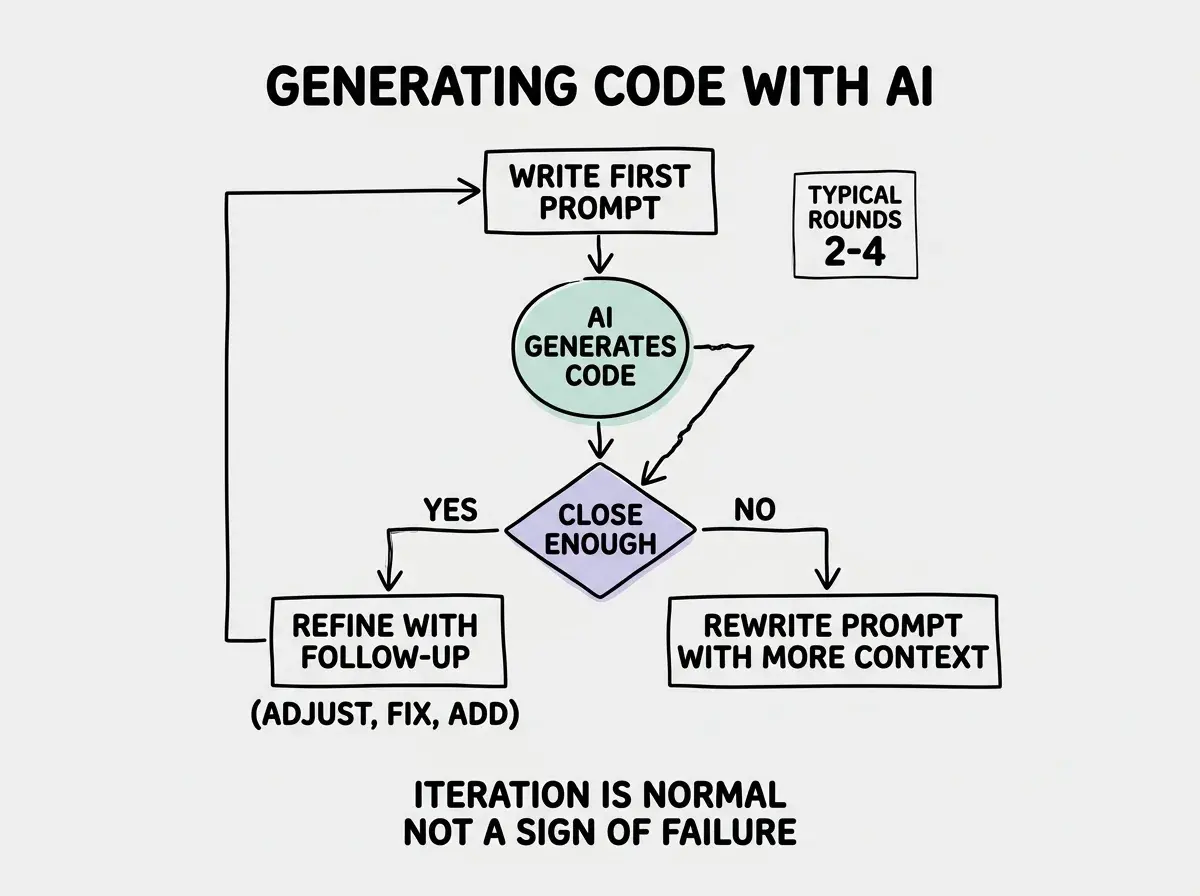
You might think that a perfect prompt gets a perfect result on the first try. But actually, prompting works best as a conversation. Even professional developers iterate on their prompts, refining and adjusting based on what the AI produces.
Think of it as giving directions mid-ride. "Actually, take a left here instead. I want to avoid the highway." This is not a failure of your original directions. It is a natural part of navigating toward what you want.
The best vibe coders treat their first prompt as a starting point. They look at what the AI produces, identify what is close and what is off, and then write a follow-up prompt that adjusts. "The layout looks great, but change the hero section to have the image on the left and the text on the right. Also, the pricing cards need a border and a shadow."
This iterative approach is faster than trying to write one massive, perfect prompt. Three rounds of focused conversation usually produce better results than one enormous instruction.
Start with the fundamentals that make everything else click.
Learn the basicsThe Patterns That Actually Work
After watching thousands of people learn to prompt AI coding tools, a few patterns consistently produce better results.
Start with what, then refine how. First prompt: describe what you want. Second prompt: adjust how it looks, feels, and behaves. This two-step approach is simpler than cramming everything into one message.
Include the "why" when it matters. "Add a loading spinner" produces a spinner. "Add a loading spinner because this API call takes 3-5 seconds and users might think the page is frozen" produces a spinner with appropriate messaging and timing. The why gives the AI context to make better design decisions.
Paste your errors back. When something breaks, copy the error message and paste it directly into the chat. "I got this error: TypeError: Cannot read property 'map' of undefined. Here is the component that is causing it." This is one of the fastest paths to a fix because you are giving the driver exact coordinates of the problem.
Reference what is already built. "Update the dashboard component we built earlier to add a chart section below the stats cards." Context from earlier in the conversation helps the AI maintain consistency.
The Skill That Grows With Practice
Knowing these patterns is helpful. But the gap between reading about prompting and being good at prompting is the same gap between reading about swimming and actually swimming. You have to do it.
The good news is that prompting improves quickly with practice. After a dozen projects, you start to develop intuition about what information the AI needs. You learn which details matter and which ones the AI handles fine on its own. You start to recognize when a result is close enough to refine versus when you need to start over with a different approach.
Writing prompts that are too long and too detailed on the first attempt. New vibe coders often write 500-word prompts trying to specify every single detail upfront. This usually backfires because the AI loses focus and produces muddled results. Start with 2-3 sentences describing what you want, see what comes back, and then refine. Shorter, iterative prompts beat one giant instruction almost every time.
This is the most important skill in vibe coding, and it is not close. You can learn frameworks, pick up deployment workflows, and understand databases. But if you cannot clearly communicate what you want to an AI tool, none of that knowledge produces results. Prompting is the bridge between your idea and the code.
Dig deeper
A few hand-picked sources if you want to go further.
What This Means For You
A prompt is the instruction you give an AI tool, and writing good prompts is a learnable skill with four key components: destination, context, constraints, and examples. It improves with practice faster than almost any other skill in vibe coding.
- If you are a founder building a product: Your ability to prompt effectively directly determines how fast you can prototype. Invest your first few hours in deliberate practice. Try building the same feature three times with increasingly specific prompts and compare the results. That exercise alone will accelerate everything you build afterward.
- If you are a career changer learning to build: Treat prompting as your primary skill, not a secondary one. When you see someone get amazing results from an AI tool and yours feel mediocre, the difference is almost always in the prompt. Save your best prompts in a document and reuse the patterns.
- If you are a student exploring AI tools: Experiment wildly. Try the same prompt in different tools. Try completely different prompts for the same goal. The experimentation builds intuition that no tutorial can teach, and that intuition becomes your competitive advantage.
The best way to learn prompting is to start building. Pick a project and write your first prompt today.
Explore more