Debugging AI-generated code is not the same as debugging code you wrote yourself. It is more like being an editor who receives a manuscript from a writer they have never met. The prose looks polished. The structure seems sound. But somewhere in chapter seven, the author referenced a character who does not exist, used a word that means the opposite of what they intended, and contradicted a plot point from chapter three. The errors are subtle because the surface quality is high.
That editorial challenge is now the daily reality for developers everywhere. 92% of developers use AI coding tools daily, and 41% of the code those tools generate gets reverted within two weeks. AI-generated code ships with 1.7x more major issues than human-written code. The code looks clean, passes a quick visual scan, and then breaks in production because it was built on assumptions that do not hold.
This guide breaks down why AI code breaks differently, the systematic method for tracking down those breaks, and how to turn AI itself into a debugging partner instead of just a code generator.
Why AI Code Breaks Differently
When you write code yourself, your mistakes tend to be typos, logic errors, or misunderstandings of the problem. You know what you intended, so you can retrace your thinking. When AI writes code, the mistakes come from a model that has no intentions, no understanding of your specific project, and no memory of what it told you five prompts ago.
This creates three categories of bugs unique to AI-generated code.
Hallucinated APIs and methods. AI models sometimes reference functions, methods, or API endpoints that do not exist. They look completely real. The naming follows the right conventions, the parameters make sense, and the code reads like it should work. But the method was never part of the library. The model pattern-matched from its training data and invented something plausible. Think of your manuscript author confidently citing a source that was never published.
Stale patterns and deprecated syntax. AI models have training cutoffs, and the JavaScript ecosystem in particular moves fast enough that six months of drift introduces real problems. The code might use a version of a library API that was deprecated two releases ago, or follow a pattern that worked in React 17 but fails silently in React 19. The code is not wrong in the abstract. It is wrong for your specific environment.
Missing edge cases and error handling. AI tends to generate the happy path beautifully and ignore everything else. The code handles the case where the user submits valid data perfectly but crashes when the input is empty, null, or formatted unexpectedly. This is the most dangerous category because the code works during basic testing and only fails when real users interact with it in ways nobody anticipated.
AI bugs are harder to find than human bugs because the code looks more polished than it deserves to. A human writing buggy code often leaves visible signs of confusion, like commented-out attempts or inconsistent naming. AI-generated bugs hide behind clean formatting and confident syntax.
Understanding these categories matters because it changes where you look. When debugging your own code, you trace your logic. When debugging AI code, you question the foundations. Does this API actually exist? Is this the current syntax? What happens when the input is not what the model assumed?
The Systematic Debugging Method
Think of yourself as that manuscript editor again. You would not read the entire book trying to find every error at once. You would work systematically, checking facts, verifying references, and testing whether each claim holds up. Debugging AI code follows the same discipline.
Step one, read the actual error. This sounds obvious but it is the step most people skip. AI-generated error messages are not always intuitive, and the instinct when something breaks is to immediately ask the AI to fix it. Resist that instinct. Read the error message. Read the stack trace. Identify which file and which line the error points to. The error message is the most reliable clue you have, and it costs nothing to read it carefully before doing anything else.
Step two, isolate the AI-generated change. If you are using version control properly (and you should be committing before every AI interaction), you can see exactly what the AI changed. Run a diff. Look at what was added, what was modified, and what was removed. The bug lives somewhere in that diff. This is where the editorial analogy pays off. You are not reading the whole manuscript. You are reading the tracked changes from the latest revision.
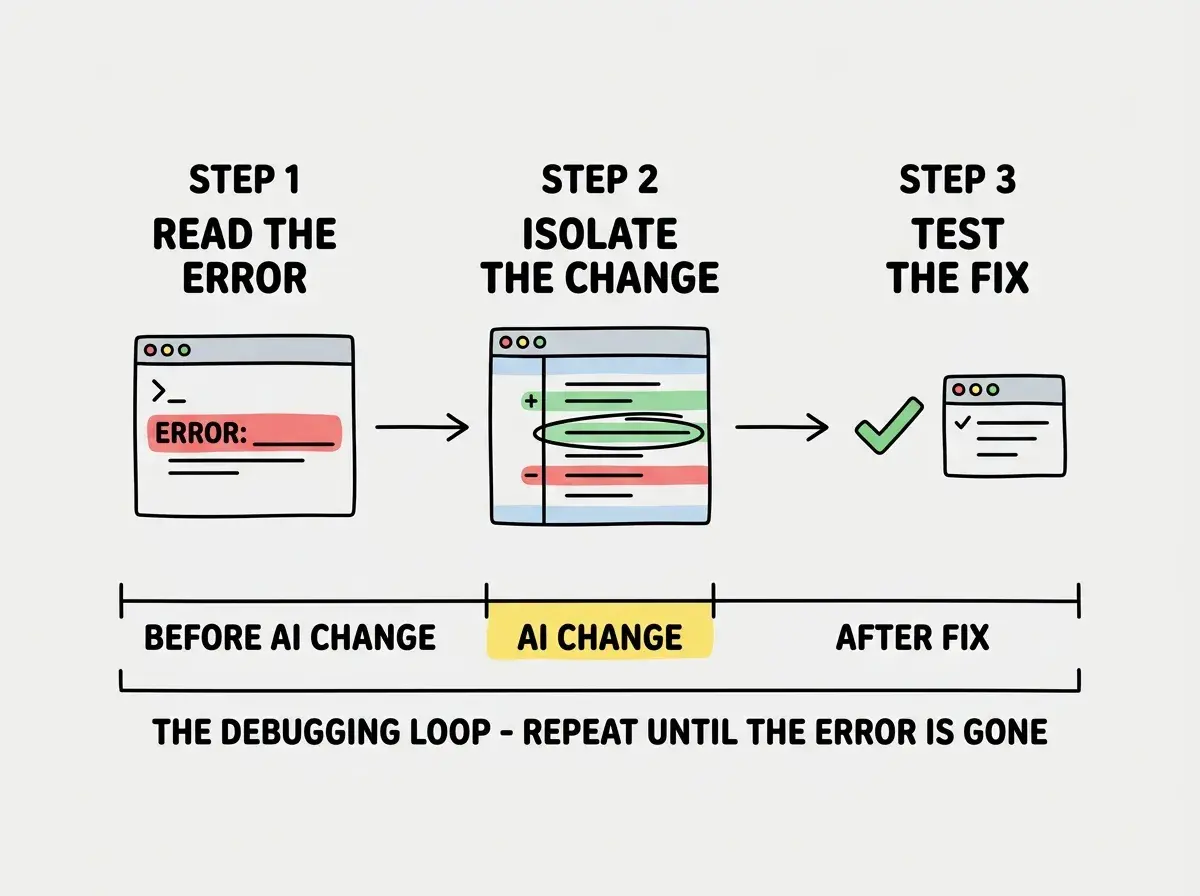
Step three, understand before you fix. Once you have isolated the change that introduced the bug, do not immediately ask the AI to rewrite it. Spend sixty seconds understanding what the code is trying to do and why it fails. Is it calling a method that does not exist? Is it missing a null check? Is it using the wrong version of an API? If you understand the failure, you can write a precise prompt that gets a correct fix. If you do not understand the failure, you will get another plausible-looking fix that introduces a different bug.
Step four, test the fix in isolation. After applying a fix, do not move on. Test the specific thing that was broken. Then test the things adjacent to it. AI fixes have a tendency to solve the immediate problem while breaking something nearby, like an editor who fixes a continuity error in chapter seven by creating a new one in chapter eight. Verify that the fix works and that it did not create collateral damage.
Common AI Bug Patterns and Where to Find Them
After debugging hundreds of AI-generated codebases, certain patterns emerge consistently enough that you can build a checklist.
The phantom import. The AI imports a module or component that does not exist in your project. The import statement looks correct, the naming is consistent with your codebase, but the file was never created. Check every import the AI adds, especially if it references something you do not recognize.
The confident type mismatch. The AI passes a string where a number is expected, or an object where an array is needed. TypeScript catches some of these, but not all. In JavaScript, these mismatches often fail silently until they produce wrong results instead of errors.
The works-on-my-prompt fallacy. The AI tested its code against the example you gave in your prompt, but your prompt described only one scenario. The code handles that scenario perfectly and fails on every other. This is especially common with form validation, data parsing, and anything involving user input.
The over-engineered abstraction. Sometimes the bug is not a bug at all. The AI generated an unnecessarily complex solution that is harder to debug and introduces more surface area for future problems. If you cannot understand what the code does in under two minutes, the code is too complex regardless of whether it currently works.
The difference between AI-assisted development and AI-dependent development is knowing how to verify the output.
Explore more guidesThe silent dependency conflict. The AI adds a new package or upgrades an existing one without checking whether it conflicts with your current dependencies. The code works in the AI's hypothetical environment but throws version conflicts in yours. Always check package.json changes carefully and run your full test suite after any dependency modification.
Using AI to Debug Its Own Code
Here is where the editorial analogy gets interesting. A good editor can ask the author to explain their own choices, and the explanation often reveals the problem. You can do the same thing with AI.
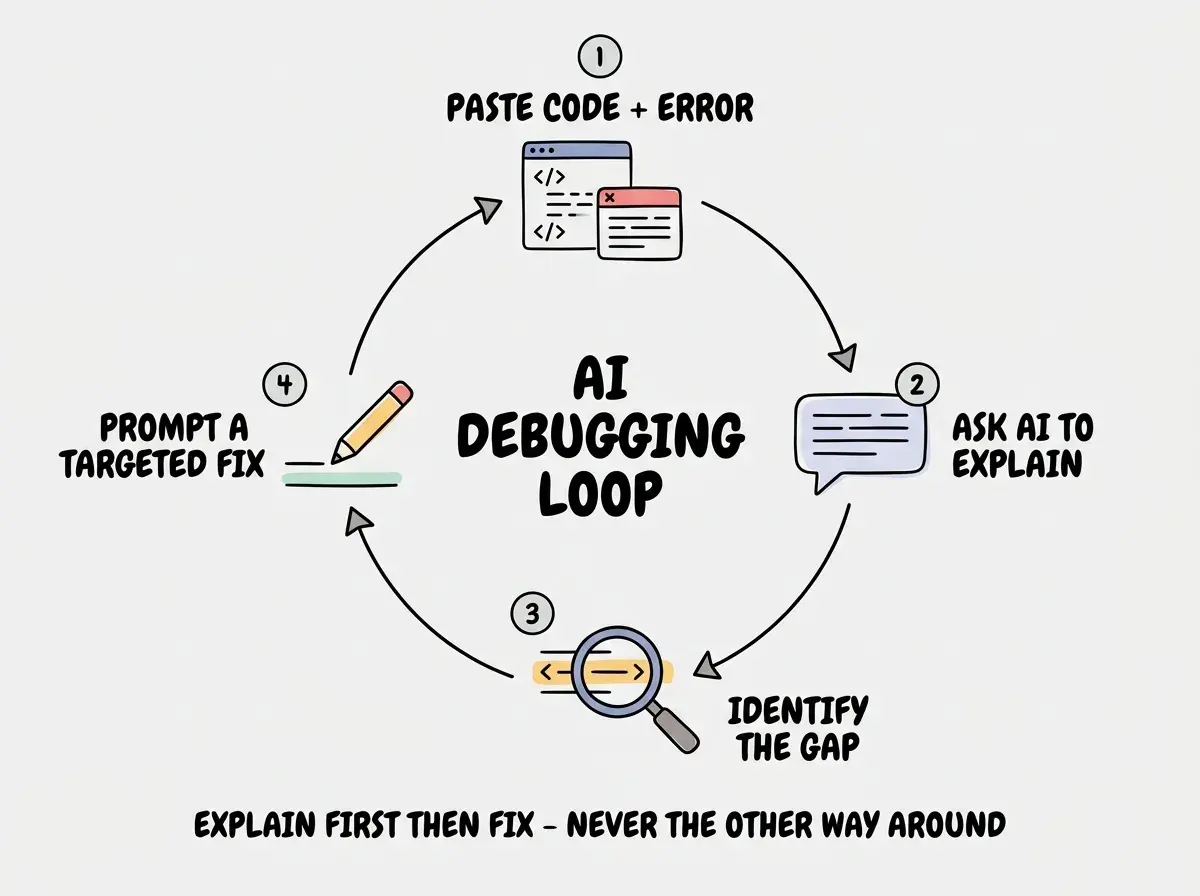
When you hit a bug in AI-generated code, paste the broken code back into the AI along with the error message and ask it to explain what the code does line by line. Do not ask it to fix the code yet. Ask it to explain it. This forces the model to reason through the logic, and it will often identify its own mistakes during the explanation. "On line 14, this calls the fetchUserProfile method..." and you can immediately say, "That method does not exist in this codebase."
Asking the AI to "fix this error" without providing the error message, the relevant code, and context about your environment. The AI will generate a plausible fix based on assumptions, and those assumptions will likely be wrong. Give the AI the same information you would give a human colleague, the full error output, the code that triggered it, and what you expected to happen instead.
You can also use AI as a rubber duck debugging partner. Describe the problem in plain language, explain what you have already checked, and ask it what you might be missing. The model is good at suggesting debugging angles you have not considered, even when it wrote the buggy code in the first place.
One more technique that works well is asking the AI to generate test cases for the code it wrote. Ask it to write five test cases including edge cases. Run those tests. If they fail, you have found your bugs before they reach production. If the AI cannot generate tests that pass, that is a strong signal the original code is flawed.
Building the Debugging Muscle
Debugging AI-generated code is a skill, and like all skills it improves with deliberate practice. The developers who are most effective with AI tools are not the ones who accept everything and hope for the best. They are the ones who treat every AI output like a manuscript from an author they respect but do not fully trust. They read it carefully. They check the references. They test the claims.
The systematic approach outlined here, read the error, isolate the change, understand before fixing, test the fix, works every time because it removes the guesswork. You are not hoping the AI gets it right on the second try. You are diagnosing the specific problem and applying a targeted solution.
Start with one habit. The next time AI-generated code breaks, resist the urge to immediately regenerate. Read the error message first. That single habit, reading before reacting, will change your debugging effectiveness more than any tool or technique.
Dig deeper
A few hand-picked sources if you want to go further.
Debugging is just one part of shipping reliable AI-assisted code. Learn the full workflow.
Read more