WebSocket security is the thing most teams skip until something breaks in production. With 92% of developers using AI tools daily, generated WebSocket code ships faster than ever, but AI-generated real-time code ships 1.7x more major issues than manually written equivalents. The reason is simple. AI tools are great at getting a connection open. They are terrible at locking it down.
Think of a WebSocket connection as an open phone line. HTTP is a series of quick calls where you hang up after every exchange. WebSockets keep the line open indefinitely. That is powerful for real-time features, but it also means anyone who gets on the line can listen, talk, or inject garbage into the conversation unless you verify every caller and validate every word they say.
This tutorial walks through the five layers of WebSocket security that production systems need. Connection authentication, message validation, rate limiting, origin checking, and heartbeat patterns. If you ship real-time features, these are not optional.
Why AI-Generated WebSocket Code Is Dangerous
Ask any AI coding tool to "add WebSocket support" and you will get a working connection in seconds. The server listens, the client connects, messages flow back and forth. It looks complete. It is not.
What AI tools consistently leave out is everything that happens before and during the connection. There is no token verification on the upgrade request. There is no schema validation on incoming messages. There is no rate limiting to prevent a single client from flooding the server. The connection works, but it is the equivalent of leaving your front door open and hoping only friends walk in.
The open phone line analogy holds here. AI gives you a phone that rings and connects calls. It does not give you caller ID, call screening, or the ability to hang up on bad actors. You have to build that yourself.
// What AI typically generates (insecure)
const wss = new WebSocketServer({ port: 8080 });

wss.on("connection", (ws) => {
  ws.on("message", (data) => {
    // No auth check, no validation, no rate limiting
    const message = JSON.parse(data.toString());
    broadcast(message);
  });
});
This code will pass a demo. It will fail a security review. Let us fix it layer by layer.
Authenticating the Connection Upgrade
WebSocket connections start as HTTP requests that "upgrade" to the WebSocket protocol. This upgrade request is your only chance to verify the caller's identity using standard HTTP mechanisms like cookies and headers. Once the connection upgrades, you are on the open phone line with no built-in way to check credentials.
The strongest pattern is to validate a short-lived token during the upgrade handshake. The client obtains a token through your normal authentication flow, then passes it as a query parameter or in a protocol header when opening the WebSocket.
import { WebSocketServer } from "ws";
import { verifyToken } from "./auth";

const wss = new WebSocketServer({ noServer: true });

server.on("upgrade", async (request, socket, head) => {
  try {
    const url = new URL(request.url, `http://${request.headers.host}`);
    const token = url.searchParams.get("token");

    if (!token) {
      socket.write("HTTP/1.1 401 Unauthorized\r\n\r\n");
      socket.destroy();
      return;
    }

    const user = await verifyToken(token);
    if (!user) {
      socket.write("HTTP/1.1 403 Forbidden\r\n\r\n");
      socket.destroy();
      return;
    }

    wss.handleUpgrade(request, socket, head, (ws) => {
      (ws as any).user = user;
      wss.emit("connection", ws, request);
    });
  } catch {
    socket.write("HTTP/1.1 500 Internal Server Error\r\n\r\n");
    socket.destroy();
  }
});
Use short-lived tokens (under 60 seconds) specifically for WebSocket upgrades. Do not reuse long-lived session tokens in query parameters, because URLs end up in server logs, proxy logs, and browser history. Generate a one-time WebSocket token from your existing session, pass it in the upgrade URL, and invalidate it immediately after use.
The HTTP upgrade request is your only chance to authenticate a WebSocket connection using standard mechanisms. Once the protocol switches, you are on an open phone line with no built-in identity verification. Always validate a short-lived token during the upgrade handshake, and reject unauthenticated connections before they ever reach your WebSocket handler. Everything else in this tutorial depends on getting this step right.
Validating Every Incoming Message
Authentication tells you who is on the line. Message validation tells you whether what they are saying makes sense. These are separate concerns, and skipping either one creates serious vulnerabilities.
Every message your server receives over a WebSocket should pass through a strict schema validator before any processing happens. Use a library like Zod to define exactly what shapes of messages your server accepts, and reject everything else.
import { z } from "zod";

const messageSchema = z.discriminatedUnion("type", [
  z.object({
    type: z.literal("chat"),
    content: z.string().min(1).max(2000),
    channelId: z.string().uuid(),
  }),
  z.object({
    type: z.literal("typing"),
    channelId: z.string().uuid(),
  }),
  z.object({
    type: z.literal("ping"),
  }),
]);

type WSMessage = z.infer<typeof messageSchema>;

function handleMessage(ws: WebSocket, raw: string) {
  let parsed: unknown;
  try {
    parsed = JSON.parse(raw);
  } catch {
    ws.close(1003, "Invalid JSON");
    return;
  }

  const result = messageSchema.safeParse(parsed);
  if (!result.success) {
    ws.send(JSON.stringify({
      type: "error",
      message: "Invalid message format",
    }));
    return;
  }

  // Only valid, typed messages reach your handlers
  processValidMessage(ws, result.data);
}
The discriminated union pattern is critical here. Instead of accepting any object and checking fields manually, you define every valid message type upfront. Anything that does not match gets rejected before it touches your business logic. This prevents injection attacks where a malicious client sends unexpected fields, oversized payloads, or messages with types your server never intended to handle.

Rate Limiting on the Open Line
HTTP rate limiting is well understood. You count requests per IP or per user and return 429 when the limit is hit. WebSocket rate limiting is trickier because a single connection can send thousands of messages without ever making a new HTTP request. Your HTTP rate limiter will never see them.
You need per-connection rate limiting that tracks message frequency on the open socket itself. Here is a sliding window approach that limits clients to a configurable number of messages per time window.
class ConnectionRateLimiter {
  private timestamps: number[] = [];

  constructor(
    private maxMessages: number = 50,
    private windowMs: number = 10_000
  ) {}

  check(): boolean {
    const now = Date.now();
    this.timestamps = this.timestamps.filter(
      (t) => now - t < this.windowMs
    );
    if (this.timestamps.length >= this.maxMessages) {
      return false;
    }
    this.timestamps.push(now);
    return true;
  }
}

// Attach to each connection
wss.on("connection", (ws) => {
  const limiter = new ConnectionRateLimiter(50, 10_000);

  ws.on("message", (raw) => {
    if (!limiter.check()) {
      ws.send(JSON.stringify({
        type: "error",
        message: "Rate limit exceeded",
      }));
      return;
    }
    handleMessage(ws, raw.toString());
  });
});
Fifty messages per ten seconds is a reasonable default for most chat or collaboration apps. Adjust based on your use case. A real-time game might need 200 per second. A notification feed might need only 5 per minute. The key is having any limit at all, because without one, a single malicious client can exhaust your server's CPU by flooding it with valid-looking messages.
Relying on your HTTP rate limiter (like express-rate-limit or a Cloudflare WAF rule) to protect WebSocket connections. Those tools count HTTP requests, and a WebSocket upgrade is a single HTTP request. After the upgrade, a client can send unlimited messages over the persistent connection without triggering any HTTP-level protection. You must implement rate limiting inside the WebSocket handler itself, per connection, or a single bad actor can bring down your entire real-time system.
Origin Checking and Connection Hygiene
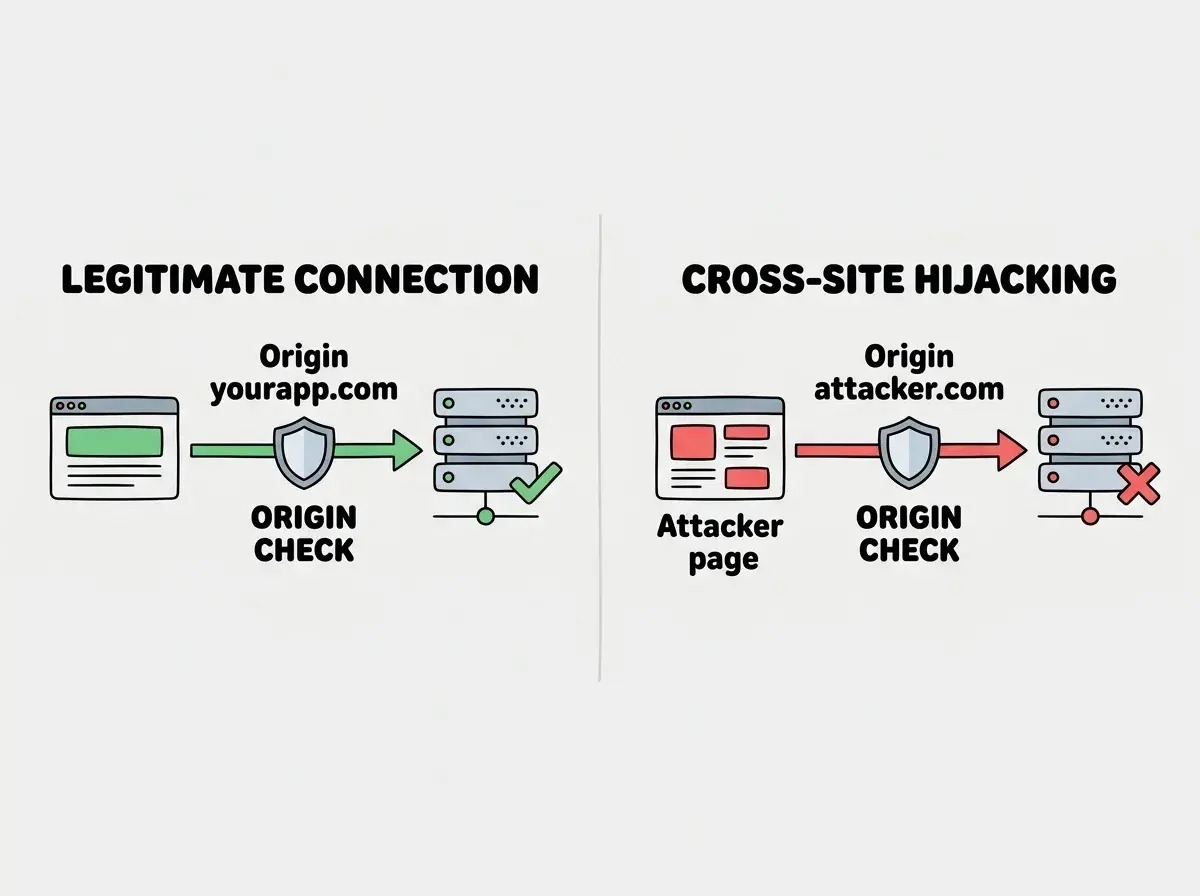
Before we talk about heartbeats, there is a simpler check that blocks an entire class of attacks. Origin validation ensures that WebSocket connections only come from your own application, not from malicious sites trying to hijack your users' sessions.
When a browser opens a WebSocket, it sends an Origin header. Your server should check this header during the upgrade and reject connections from unexpected origins.
const ALLOWED_ORIGINS = new Set([
  "https://yourapp.com",
  "https://www.yourapp.com",
]);

server.on("upgrade", (request, socket, head) => {
  const origin = request.headers.origin;

  if (!origin || !ALLOWED_ORIGINS.has(origin)) {
    socket.write("HTTP/1.1 403 Forbidden\r\n\r\n");
    socket.destroy();
    return;
  }

  // Continue with token authentication...
});
This stops cross-site WebSocket hijacking (CSWSH), where an attacker's website opens a WebSocket to your server using a victim's cookies. The browser will send the cookies automatically, but the Origin header will reveal that the request came from attacker.com, not your domain.
Keep in mind that Origin checking only works for browser clients. Server-to-server WebSocket connections can set any Origin header they want. Treat origin checking as one layer, not a complete solution. It pairs with token authentication to cover both browser and non-browser attack vectors.
Heartbeat Patterns for Dead Connection Cleanup
The last piece of WebSocket security is knowing when someone has silently left the phone line. TCP connections can go dead without either side knowing, especially on mobile networks or behind corporate proxies. Without heartbeats, your server accumulates zombie connections that consume memory and file descriptors until something crashes.
A ping/pong heartbeat pattern sends periodic checks from the server. If a client does not respond within a timeout, the server closes the connection and frees the resources.
const HEARTBEAT_INTERVAL = 30_000;
const HEARTBEAT_TIMEOUT = 10_000;

wss.on("connection", (ws) => {
  let isAlive = true;

  ws.on("pong", () => {
    isAlive = true;
  });

  const heartbeat = setInterval(() => {
    if (!isAlive) {
      clearInterval(heartbeat);
      ws.terminate();
      return;
    }
    isAlive = false;
    ws.ping();
  }, HEARTBEAT_INTERVAL);

  ws.on("close", () => {
    clearInterval(heartbeat);
  });
});
The WebSocket protocol has built-in ping and pong frames that most libraries support natively. You do not need to implement this at the application message level. The ws.ping() method sends a protocol-level ping, and the client's WebSocket implementation responds with a pong automatically. No client-side code required.
Thirty seconds between pings with a ten-second timeout is a solid default. Shorter intervals catch dead connections faster but add more network overhead. Longer intervals save bandwidth but let zombie connections linger. For most applications, 30 seconds strikes the right balance.
Learn the fundamentals that keep your WebSocket connections secure and reliable.
Explore more tutorialsPutting All Five Layers Together
Each layer we covered solves a different problem, and none of them replaces the others. Going back to the open phone line analogy, think of it this way. Origin checking is caller ID, verifying the call is coming from a number you recognize. Token authentication is the security question, confirming the caller is who they claim to be. Message validation is a conversation filter, making sure every statement follows the expected format. Rate limiting is a circuit breaker, preventing anyone from talking so fast they drown out everyone else. Heartbeats are the "are you still there?" check, detecting when someone has silently hung up.
Here is the order you should implement them in your own projects.
- Origin checking in the upgrade handler (five minutes of work, blocks an entire attack class)
- Token authentication during the upgrade (requires integration with your existing auth system)
- Message validation with Zod schemas for every message type (matches your existing API validation patterns)
- Per-connection rate limiting inside the message handler (simple sliding window, big impact)
- Heartbeat pings to clean up dead connections (prevents resource leaks over time)
If you are reviewing AI-generated WebSocket code, check for these five things specifically. If any of them are missing, the code is not production-ready, no matter how cleanly the connection opens or how smoothly messages flow during a demo.
What This Means For You
WebSocket security is not a separate discipline from regular API security. It is the same principles applied to a different transport. The difference is that the persistent connection amplifies every mistake. An unvalidated HTTP endpoint handles one bad request and moves on. An unvalidated WebSocket connection handles thousands of bad messages per second, indefinitely, on a single open line.
- If you are shipping real-time features today: Audit your existing WebSocket handlers against these five layers. Most production systems are missing at least two of them. Rate limiting and heartbeats are the most commonly skipped, and they are the ones that cause outages at scale when a few hundred zombie connections or one aggressive client tip your server over the edge.
- If you are reviewing AI-generated code: Add WebSocket security to your review checklist. AI tools will keep generating insecure WebSocket code because their training data is full of tutorials that skip security for brevity. Your job is to catch what the AI misses, verify every caller, validate every message, and never trust the open line.
Get tutorials on authentication, validation, and production-grade patterns delivered to your inbox.
Stay in the loop