Think of webhooks like delivery notifications showing up at your front door. Every time Stripe processes a payment, GitHub merges a pull request, or Resend delivers an email, a little package arrives at your endpoint. The question is not whether the packages will come. The question is whether your house has a system to receive them, verify they are real, and handle the occasional duplicate or missed delivery. 92% of developers now use AI tools daily, and webhook endpoints are one of the areas where AI-generated code looks correct but falls apart in production.
This tutorial walks through the webhook handling patterns that actually hold up under real traffic. We will cover signature verification, idempotency, retry logic, queuing, error handling, and local testing. Each section builds on the package delivery analogy because the mental model maps surprisingly well to every decision you need to make.
Why AI-Generated Webhook Code Breaks in Production
AI coding tools are excellent at generating the happy path for a webhook endpoint. They will scaffold a route, parse the JSON body, and call your business logic. The code will work perfectly in development. Then production traffic arrives with retries, duplicate events, out-of-order delivery, and malformed payloads, and the whole thing collapses.
The core problem is that AI models optimize for the obvious case. They generate code that handles the first delivery of a well-formed event. But webhooks are fundamentally unreliable by design. The sending service assumes your endpoint might be down, might be slow, or might return an error. So it retries. Sometimes it retries the same event three or four times. Sometimes events arrive out of order. Your endpoint needs to handle all of this gracefully, and that is where most AI-generated code falls short.
Going back to our package delivery analogy: AI tools build you a front door. But they forget the peephole (signature verification), the "already received" tracking (idempotency), the instructions for what to do when you are not home (retry handling), and the sorting room for when ten packages arrive at once (queuing).
Signature Verification, Check Who Is Knocking
Every legitimate webhook provider signs its payloads so you can verify they actually came from the expected source. Skipping this verification is like opening your front door for anyone who knocks without checking who they are. It is the single most dangerous mistake in webhook handling.
Stripe uses HMAC-SHA256 signatures sent in the Stripe-Signature header. GitHub uses HMAC-SHA256 with the X-Hub-Signature-256 header. The pattern is the same across providers, but the implementation details differ just enough to trip people up.
Here is what verification looks like for Stripe in a Next.js API route:
import Stripe from 'stripe';

const stripe = new Stripe(process.env.STRIPE_SECRET_KEY!);

export async function POST(request: Request) {
  const body = await request.text(); // raw body, not parsed JSON
  const signature = request.headers.get('stripe-signature');

  if (!signature) {
    return new Response('Missing signature', { status: 400 });
  }

  let event: Stripe.Event;

  try {
    event = stripe.webhooks.constructEvent(
      body,
      signature,
      process.env.STRIPE_WEBHOOK_SECRET!
    );
  } catch (err) {
    return new Response('Invalid signature', { status: 400 });
  }

  // signature verified, safe to process
  await handleEvent(event);
  return new Response('OK', { status: 200 });
}
The critical detail that AI tools often miss: you must use the raw request body for verification, not a parsed JSON object. If your framework parses the body before you verify the signature, the hash will not match because JSON serialization can change whitespace and key ordering. This is the equivalent of the delivery service writing a tracking number on the package, and your verification system reading a photocopy instead of the original.
For GitHub webhooks, the pattern is similar but uses a different header and a manual HMAC computation:
import { createHmac, timingSafeEqual } from 'crypto';

function verifyGitHubSignature(
  payload: string,
  signature: string,
  secret: string
): boolean {
  const expected = 'sha256=' +
    createHmac('sha256', secret).update(payload).digest('hex');

  return timingSafeEqual(
    Buffer.from(signature),
    Buffer.from(expected)
  );
}
Notice the use of timingSafeEqual instead of a simple string comparison. A regular === check is vulnerable to timing attacks where an attacker can guess the signature byte by byte based on how long the comparison takes. This is another detail that AI-generated code frequently omits.
Always verify webhook signatures using the raw request body, never a parsed JSON object. Use timing-safe comparison functions to prevent signature guessing attacks. Every major provider (Stripe, GitHub, Twilio, Resend) documents their signature scheme. If your AI tool generates a webhook handler without signature verification, that code is not production-ready.
Idempotency, Handling the Same Package Twice
Webhook providers retry failed deliveries. Stripe retries up to 16 times over three days. GitHub retries up to 10 times. This means your endpoint will receive the same event multiple times, and it needs to handle duplicates without processing them twice.
Imagine a delivery driver who drops off the same package three times because their system did not register that you already signed for it. Without idempotency handling, your system processes each delivery as if it were new. That means charging a customer twice, sending three welcome emails, or creating duplicate records in your database.
The fix is straightforward. Store the event ID and check for it before processing:
async function handleEvent(event: WebhookEvent) {
  // check if already processed
  const existing = await db
    .select()
    .from(processedEvents)
    .where(eq(processedEvents.eventId, event.id))
    .limit(1);

  if (existing.length > 0) {
    return; // already handled, skip
  }

  // process the event
  await processBusinessLogic(event);

  // mark as processed
  await db.insert(processedEvents).values({
    eventId: event.id,
    processedAt: new Date(),
  });
}
The processedEvents table is simple: an eventId string column with a unique index and a processedAt timestamp. You can add a TTL cleanup job that removes entries older than 7 days to keep the table small.
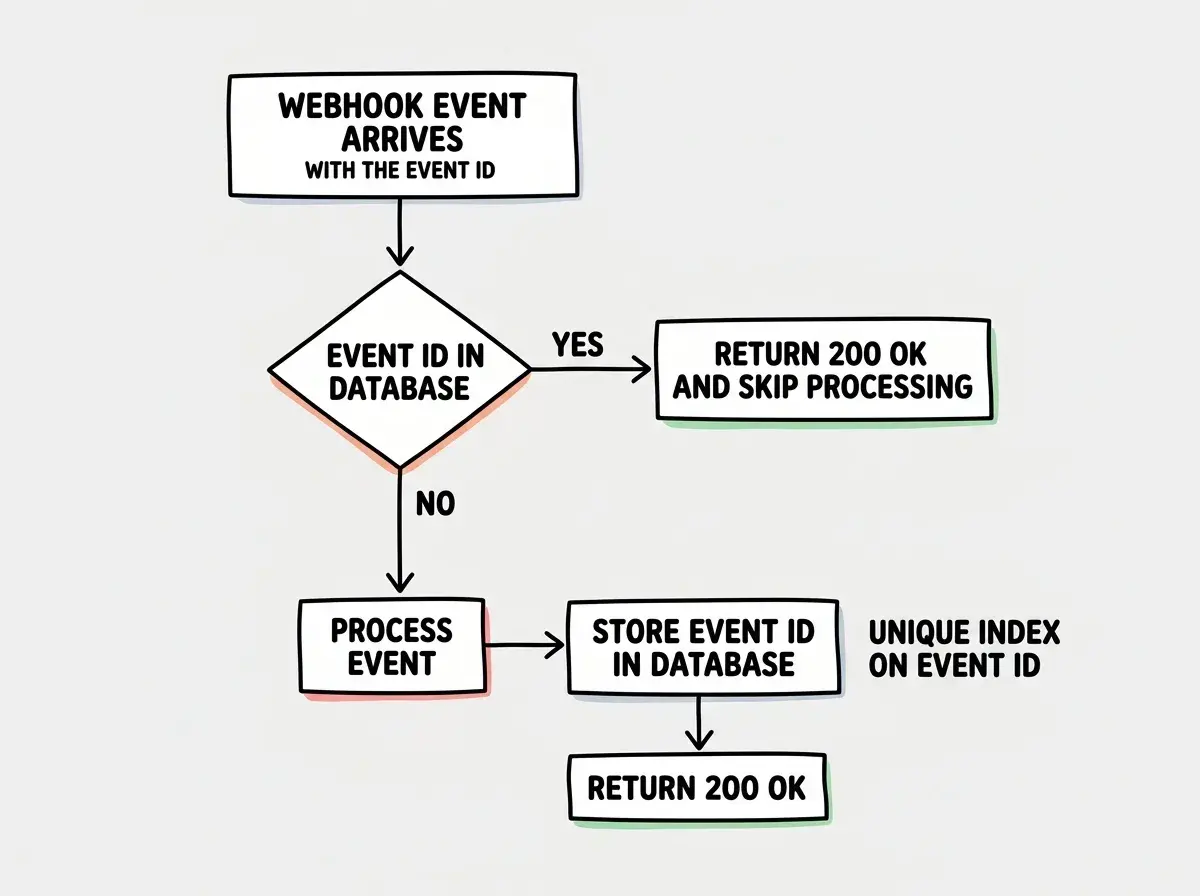
One subtle point: wrap the check-and-insert in a database transaction or use an upsert with a unique constraint. Without this, two concurrent retries of the same event could both pass the existence check before either inserts the record, and you are back to processing duplicates.
Retry Handling and Response Codes
When a package delivery fails, the driver comes back later. Webhook providers work the same way. They use your HTTP response code to decide what to do next.
Return 200 and the provider marks the delivery as successful. Return 4xx and most providers will not retry (the event is considered rejected). Return 5xx or time out and the provider will retry with exponential backoff.
This creates an important design decision. You want to return 200 as quickly as possible, even if you have not finished processing the event. If your webhook handler takes 30 seconds to complete because it is running complex business logic, the provider might time out and retry, leading to duplicate processing.
The pattern is: acknowledge first, process later.
export async function POST(request: Request) {
  const event = await verifyAndParse(request);

  // enqueue for async processing
  await queue.send({
    eventId: event.id,
    type: event.type,
    payload: event.data,
  });

  // return immediately
  return new Response('OK', { status: 200 });
}
This brings us to queuing, which is the sorting room in our package delivery analogy.
Queuing for Reliability
When ten packages arrive at your door simultaneously, you do not try to open and organize all of them at once in the doorway. You bring them inside, put them in a staging area, and process them one at a time. Webhook queuing works the same way.
A message queue (like Cloudflare Queues, AWS SQS, or even a simple database-backed queue) decouples receiving the webhook from processing it. Your endpoint becomes a thin receiver that validates the signature, stores the event, and returns 200. A separate worker picks events off the queue and processes them at a sustainable pace.
// Worker that processes queued events
async function processQueue(batch: MessageBatch) {
  for (const message of batch.messages) {
    try {
      const event = message.body as WebhookEvent;

      // idempotency check
      if (await alreadyProcessed(event.id)) {
        message.ack();
        continue;
      }

      await processBusinessLogic(event);
      await markProcessed(event.id);
      message.ack();
    } catch (error) {
      // retry later
      message.retry();
    }
  }
}
This architecture gives you several advantages. Your webhook endpoint never times out because it does almost no work. Failed processing does not cause the webhook provider to retry (since you already returned 200). And you can scale your processing workers independently from your webhook receiver.
Processing webhook events synchronously inside the HTTP handler. When your handler takes longer than the provider's timeout (usually 5-30 seconds), the provider retries, and you end up processing the same event multiple times while burning server resources. Always acknowledge the webhook immediately and process the event asynchronously through a queue or background job. This single architectural decision eliminates the majority of webhook reliability problems.
For most applications, you do not need a dedicated message queue service on day one. A database table with a status column (pending, processing, completed, failed) works as a lightweight queue. Poll it with a cron job or a background worker. Graduate to a proper queue when your event volume outgrows the polling approach.
Learn how to choose the right stack for your AI-powered project.
Explore the fundamentalsError Handling That Does Not Lose Events
Even with a queue, things can go wrong. Database connections drop, external APIs return errors, business logic throws unexpected exceptions. Your error handling strategy determines whether a failed event gets retried or silently disappears.
The most important rule: never swallow errors without a recovery path. If an event fails processing, it should either go back on the queue with a retry counter or land in a dead letter queue for manual investigation.
async function processWithRetry(event: WebhookEvent, attempt: number) {
  const MAX_RETRIES = 5;

  try {
    await processBusinessLogic(event);
  } catch (error) {
    if (attempt < MAX_RETRIES) {
      // exponential backoff: 1s, 2s, 4s, 8s, 16s
      const delay = Math.pow(2, attempt) * 1000;
      await queue.send(
        { ...event, _attempt: attempt + 1 },
        { delaySeconds: delay / 1000 }
      );
    } else {
      // send to dead letter queue for manual review
      await deadLetterQueue.send({
        event,
        error: error.message,
        failedAt: new Date().toISOString(),
      });
      await alertOps(`Webhook event ${event.id} failed after ${MAX_RETRIES} retries`);
    }
  }
}
Log every failure with enough context to debug it later: the event ID, the event type, the error message, and the attempt number. When you get paged at 2 AM because Stripe events are piling up in the dead letter queue, these logs are the difference between a 10-minute fix and a two-hour investigation.
Testing Webhooks Locally
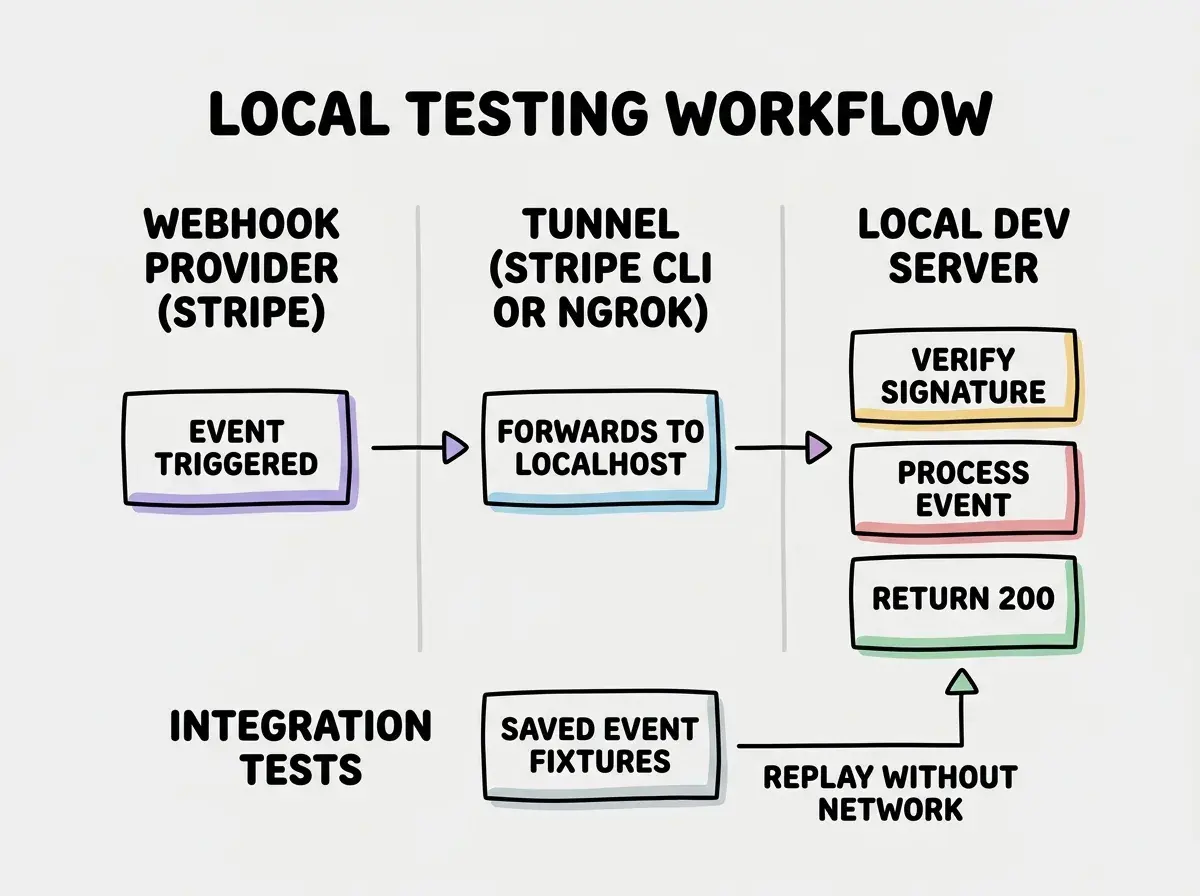
You cannot test package delivery without actually sending packages. Webhook testing has the same problem. The sending service needs a public URL to deliver events to, and localhost:3000 is not publicly accessible.
The standard tools for local webhook testing are the Stripe CLI and ngrok. The Stripe CLI has a built-in forwarding mode:
stripe listen --forward-to localhost:3000/api/webhooks/stripe
This creates a tunnel and automatically signs events with a test webhook secret. For non-Stripe webhooks, ngrok gives you a public URL that tunnels to your local machine:
ngrok http 3000
Then configure the webhook provider to send events to the ngrok URL.
Beyond tunneling, write integration tests that replay recorded webhook payloads. Capture real events from your provider's dashboard or logs, sanitize any sensitive data, and store them as test fixtures. Then your test suite can verify signature checking, idempotency, and business logic without needing a network connection.
What This Means For You
Webhook handling patterns are not complicated individually. Signature verification, idempotency, async processing, error recovery, and local testing are all straightforward concepts. The difficulty is that AI tools tend to generate code that handles each one in isolation (or skips them entirely), leaving you with an endpoint that works in development and fails under real traffic.
- If you are building a SaaS that integrates with Stripe or GitHub: Implement all five patterns from this tutorial before you process your first production event. The upfront investment is a few hours. The alternative is debugging lost payments or duplicate charges under pressure when a customer reports the problem. Build the sorting room before the packages start arriving.
- If you are using AI tools to scaffold your backend: Treat every AI-generated webhook handler as a starting point, not a finished product. Check for raw body parsing, signature verification with timing-safe comparison, idempotency tracking, and async processing. These are the four areas where generated code most frequently cuts corners.
- If you are an experienced developer mentoring a team: Use webhook handling as a teaching tool for production resilience patterns. The package delivery analogy makes retries, idempotency, and dead letter queues intuitive even for developers who have not encountered distributed systems problems before. The patterns transfer directly to message queue consumers, event-driven architectures, and any system that processes external inputs.
Explore tutorials that go beyond the happy path.
Browse build tutorials