Caching is speed dial for your application. Instead of looking up the same phone number in a massive phone book every time someone calls, you keep your most-dialed numbers right on the home screen. One tap, instant connection. That is exactly what caching does for your app's data, and if you are among the 92% of developers using AI tools daily to build and ship faster, understanding caching strategies is what separates apps that feel instant from apps that feel sluggish.
AI tools generate functional code quickly, but the code they produce almost never includes a caching layer. Every request hits the database. Every page render fetches fresh data. For a prototype, that is fine. For production with real users, it is a performance disaster waiting to happen.
This article walks through the full caching stack with practical patterns you can apply to any AI-built app today.
Browser Cache and the First Layer of Speed Dial
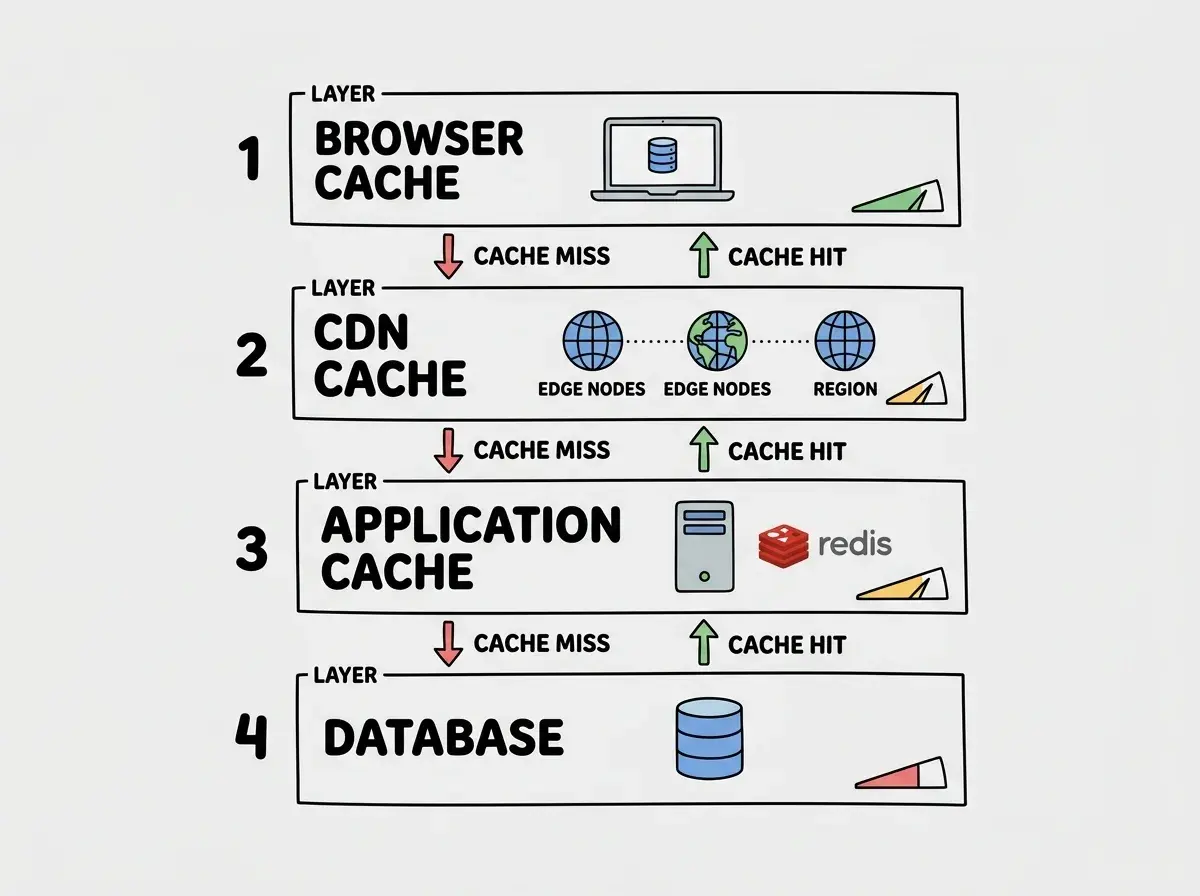
The browser cache is the speed dial that lives on the user's own phone. When your app serves a CSS file, a JavaScript bundle, or an image, the browser can store that file locally so it never asks for it again (until the cache expires). This is the fastest cache layer because the data never leaves the user's device.
You control browser caching through HTTP headers. The two that matter most are Cache-Control and ETag.
Cache-Control: public, max-age=31536000, immutable
This header tells the browser: "This file will not change for a year. Do not even bother checking." Use it for versioned static assets like app.a1b2c3.js where the filename changes on every build. Next.js and most modern frameworks handle this automatically for files under /_next/static/.
For HTML pages and API responses that do change, use a shorter duration with revalidation:
Cache-Control: public, max-age=0, must-revalidate
ETag: "v1-abc123"
The browser will still cache the response, but it will check with the server on each request. If the ETag matches, the server responds with a 304 Not Modified (no body, just headers), and the browser uses its cached copy. Think of it as calling someone on speed dial but quickly confirming "still the same number?" before connecting.
Most AI-generated code skips cache headers entirely, which means the browser re-downloads the same assets on every page load. Adding proper Cache-Control headers is one of the highest-impact, lowest-effort performance wins you can make.
CDN Cache and Putting Speed Dial Closer to Everyone
A CDN cache is like distributing copies of your speed dial list to phone booths all over the world. Instead of every user calling back to your origin server in Virginia, they hit a CDN edge node in their own city.
Cloudflare, Vercel, and AWS CloudFront all cache responses at edge nodes based on the same Cache-Control headers your origin sends. But CDN caching introduces one critical difference: you need a way to purge stale content when something changes.
// Vercel on-demand revalidation example
import { revalidatePath } from 'next/cache';

export async function publishPost(slug: string) {
  await db.posts.update({ slug, status: 'published' });
  revalidatePath(`/${slug}`);  // purge CDN cache for this page
  revalidatePath('/');          // purge the homepage listing too
}
Serve pages with aggressive caching at the CDN level, then surgically invalidate specific paths when the underlying data changes. Near-instant page loads for 99% of requests, and fresh data within seconds of a publish or update.
Application Cache With Redis and Upstash
Browser and CDN caching handle static content well, but what about dynamic data that changes frequently and varies per user? Dashboard stats, personalized feeds, computed aggregations. This is where application-level caching with Redis (or its serverless cousin, Upstash) becomes essential.
Redis is an in-memory key-value store that responds in under a millisecond, acting as speed dial for expensive computations and frequent queries.
import { Redis } from '@upstash/redis';

const redis = new Redis({
  url: process.env.UPSTASH_REDIS_URL!,
  token: process.env.UPSTASH_REDIS_TOKEN!,
});

async function getDashboardStats(userId: string) {
  const cacheKey = `dashboard:${userId}`;
  const cached = await redis.get(cacheKey);

  if (cached) return cached;

  // Expensive query that joins multiple tables
  const stats = await computeExpensiveStats(userId);
  await redis.set(cacheKey, stats, { ex: 300 }); // 5 min TTL
  return stats;
}
The ex: 300 sets a time-to-live of five minutes. After that, the next request will recompute and re-cache. This is a simple but effective pattern that works for most AI-built apps.
For serverless and edge deployments, Upstash provides a Redis-compatible API over HTTP. It works from Cloudflare Workers, Vercel Edge Functions, and anywhere you can make a fetch call.
Application caching with Redis or Upstash is the biggest performance lever for dynamic, personalized data. A 200ms database query that runs on every page load becomes a 1ms cache hit for 99% of requests. Start with a simple TTL-based cache for your heaviest queries, then add invalidation logic as your app matures. You do not need a complex caching framework to see massive improvements.
Database Query Cache and the Last Line of Defense
Even with Redis in front, some queries will still reach the database. Database query caching is the last speed dial entry before you hit the phone book itself.
The most practical database caching strategy for AI-built apps is prepared statement caching combined with connection pooling.
// Drizzle ORM with prepared statements
const getPostBySlug = db
  .select()
  .from(posts)
  .where(eq(posts.slug, sql.placeholder('slug')))
  .prepare('get_post_by_slug');

// Every call reuses the prepared plan
const post = await getPostBySlug.execute({ slug: 'my-post' });
Prepared statements tell the database: "I am going to run this exact query shape many times, just with different parameters." The database parses and plans the query once, then reuses that plan for every execution. For apps that run the same handful of queries thousands of times (which describes most AI-built apps), this eliminates a meaningful chunk of per-query overhead.
Connection pooling through PgBouncer or Neon's built-in pooler solves the other database performance killer: connection overhead. Serverless functions spin up and down constantly, and each new instance would normally open a fresh connection (50-100ms). A connection pool maintains warm connections that functions borrow and return, turning that handshake into essentially zero.
Cache Invalidation Strategies That Do Not Break Everything
Phil Karlton famously said there are only two hard things in computer science: cache invalidation and naming things. The speed dial analogy helps here too. If someone changes their phone number but you still have the old one on speed dial, you are calling the wrong person. Cache invalidation is the process of updating your speed dial when the underlying data changes.
Time-based expiration (TTL) is the simplest. Set a cache duration, and the data expires automatically. Good for data where being slightly stale is acceptable, like analytics dashboards, leaderboards, or product listings.
Event-based invalidation is more precise. When a specific action happens (user updates profile, post gets published, order gets placed), you explicitly delete or update the relevant cache entries. This keeps caches fresh without waiting for TTL expiration.
async function updateUserProfile(userId: string, data: ProfileData) {
  await db.users.update({ id: userId, ...data });

  // Invalidate all caches that depend on this user's data
  await redis.del(`user:${userId}`);
  await redis.del(`dashboard:${userId}`);
  await redis.del(`profile:${userId}:public`);
}
Tag-based invalidation groups related cache entries under a shared tag so you can purge them all at once. Next.js supports this natively with revalidateTag(). If you tag all product-related cache entries with "products", a single revalidateTag('products') call clears them all, regardless of how many individual pages or API responses were cached.
AI-generated code almost never includes cache invalidation logic. The AI will add Redis caching when you ask for it, but it will not think about what happens when the underlying data changes. You end up serving stale data for the full TTL duration, which causes bugs that are incredibly hard to track down because they fix themselves after a few minutes. Always pair your caching code with explicit invalidation in every write path.
Stale-While-Revalidate and the Best of Both Worlds
Stale-while-revalidate (SWR) is the most elegant caching pattern for user-facing applications. It returns the cached (potentially stale) response immediately, then fetches fresh data in the background to update the cache for the next request.
Back to the speed dial analogy: you call the number you have on speed dial immediately, but simultaneously send a text asking "is this still your number?" If they respond with a new number, you update your speed dial for next time. The current call still goes through instantly.
Cache-Control: public, s-maxage=60, stale-while-revalidate=300
This header says: "This response is fresh for 60 seconds. After that, serve the stale version while fetching a fresh one in the background. Stop serving stale after 300 seconds total." The user always gets an instant response. The data is never more than 60 seconds old in the best case, and never more than 300 seconds old in the worst case.
Next.js implements SWR at the framework level through its fetch caching and revalidate options:
// Revalidate this data every 60 seconds using SWR
const posts = await fetch('https://api.example.com/posts', {
  next: { revalidate: 60 }
});
The React libraries swr and @tanstack/react-query implement the same pattern on the client side, returning cached data instantly and refetching in the background. For dashboards and feeds where perceived speed matters more than millisecond freshness, SWR is the right default.
Explore more deep dives on backend patterns, infrastructure, and making your AI-built apps production-ready.
Read More GuidesPutting It All Together
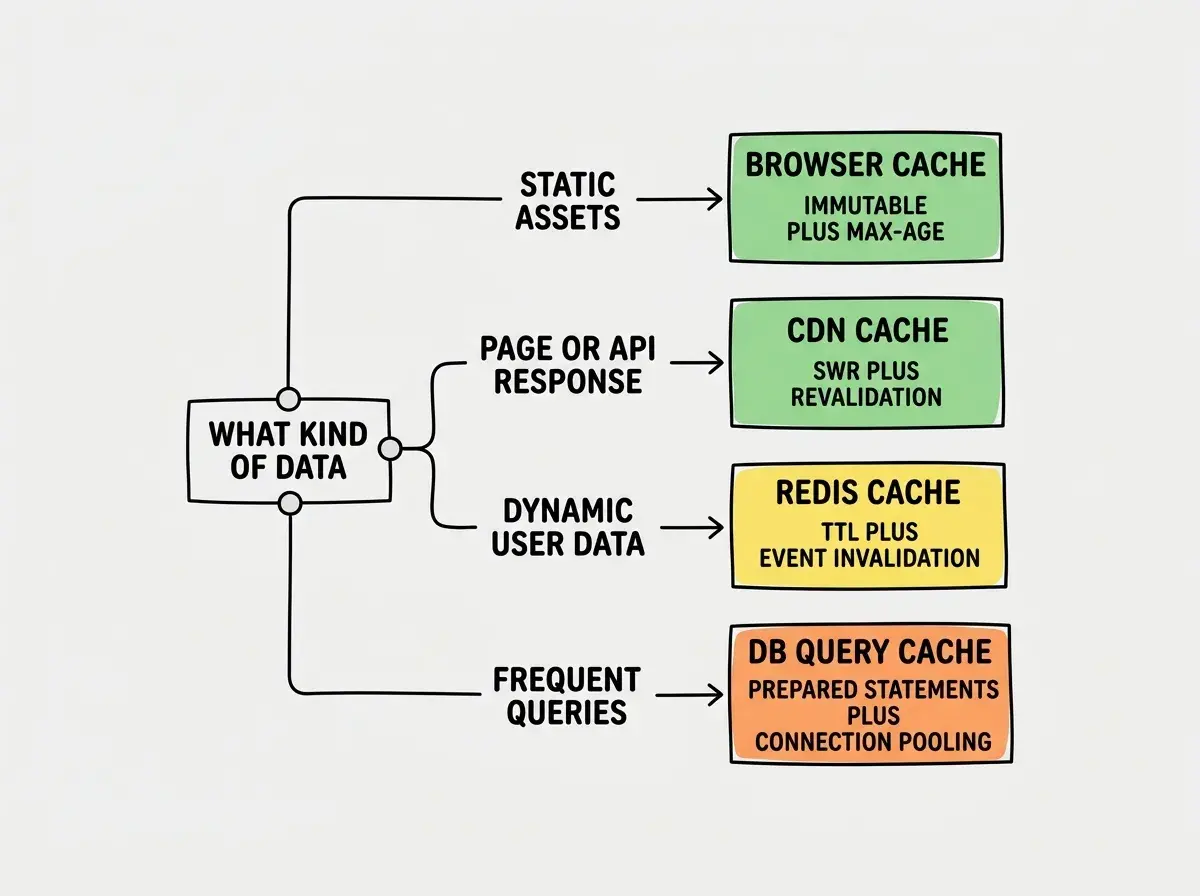
A well-cached AI-built app uses all four layers working in concert. Static assets get immutable browser caching. Pages and API responses get CDN caching with surgical invalidation. Expensive computations and frequent queries get Redis caching with TTL and event-based invalidation. The database gets prepared statements and connection pooling.
You do not need all four layers on day one. Start with CDN caching and proper Cache-Control headers (15 minutes of work, massive impact). Then add Redis for your heaviest queries. Then tune your database layer.
The speed dial principle applies at every level. Keep the most-accessed data in the fastest, closest layer available. Only reach for the phone book when you genuinely need the freshest possible answer. Your users will feel the difference on every page load.
Pick your biggest bottleneck, add the right cache layer, and watch your response times drop.
Dig deeper
A few hand-picked sources if you want to go further.
Dive into more guides on shipping fast, reliable, production-ready applications with AI tools.
Explore All Articles