Background jobs and task queues are the difference between an application that feels instant and one where users stare at a spinner for thirty seconds while you resize an image. 92% of US developers now use AI coding tools daily, and those tools happily generate route handlers that send emails, process webhooks, and generate PDFs all inside a single request. The user waits for every step. The request times out.
Think of your application as a restaurant kitchen. The line cook handles orders in real time, plating dishes as fast as customers order them. But nobody expects the line cook to also brine the chicken, chop every vegetable, and bake the bread from scratch while a hungry customer watches through the kitchen window. That is what a prep cook does, working behind the scenes so the line cook can stay fast. Background jobs are your prep cook. They handle the slow, heavy work off the main request path so your users never wait for tasks they do not need to wait for.
AI-generated code almost never introduces this separation. You ask for "send a welcome email after signup," and the AI puts the email send directly in the signup handler. In production, your email provider takes 800 milliseconds to respond, and every signup feels sluggish. Multiply that by image processing, webhook delivery, and report generation, and you have a kitchen where the line cook is doing prep work while customers walk out.
When to Move Work to the Background
Not every task belongs in a background job. The rule is simple. If the user needs the result immediately to continue their workflow, keep it in the request. If the user just needs confirmation that something will happen, move it to the background.
Background job candidates include email sending, image processing, webhook delivery, report generation, data aggregation, and bulk operations like CSV imports. Tasks that should stay synchronous include auth checks, reading data the user is waiting to see, and form validation.
The prep cook analogy holds. If a customer orders a salad and needs the dressing right now, the line cook handles it. But if the kitchen needs to marinate chicken for tomorrow's special, the prep cook handles that during a quiet moment.
The Modern Background Jobs Landscape
The old approach of running a Redis-backed queue on a long-lived server still works, but serverless-native options now handle the infrastructure for you.
BullMQ (Self-Hosted Redis Queues)
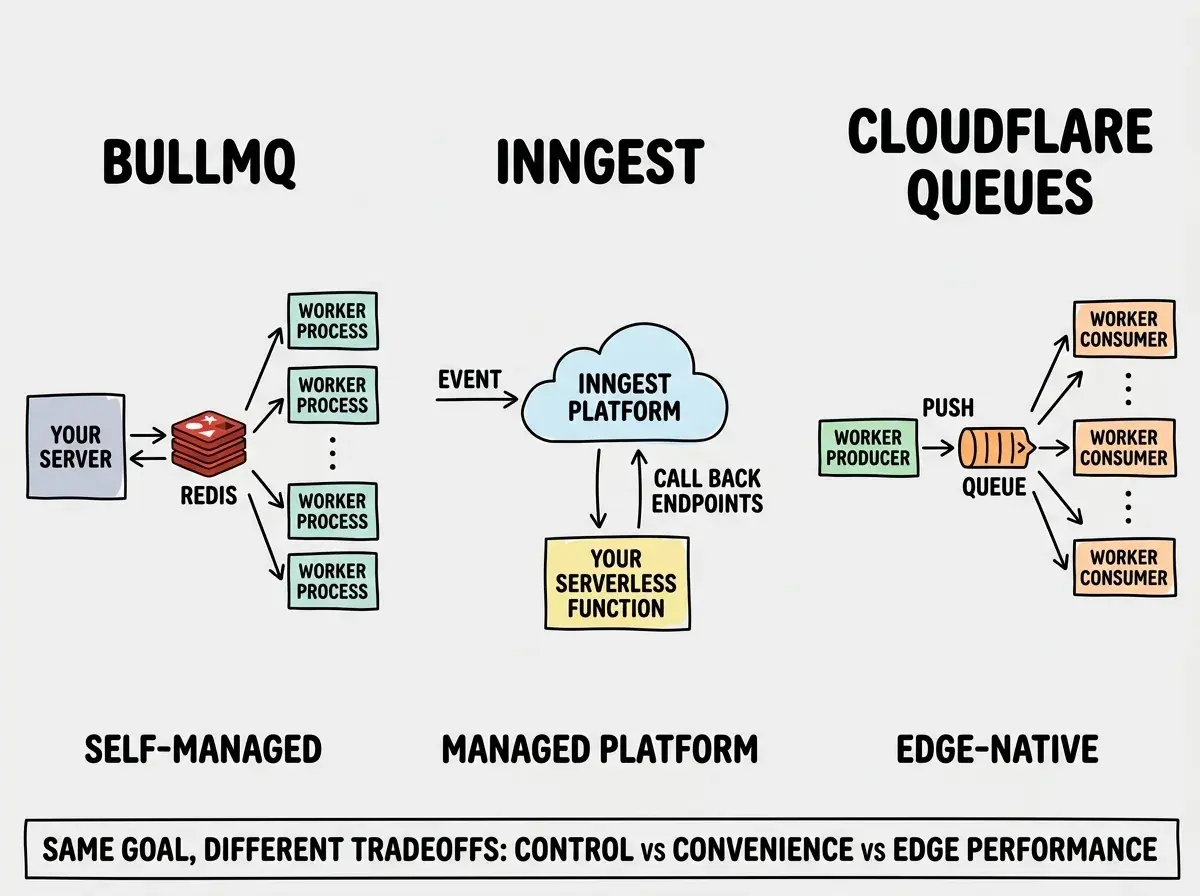
BullMQ is the battle-tested Node.js queue library backed by Redis. It gives you the most control and the most responsibility. You manage the Redis instance, the worker processes, and the retry logic yourself. For teams that already run Redis and want full visibility into their queue, BullMQ is excellent.
import { Queue, Worker } from "bullmq";
import Redis from "ioredis";

const connection = new Redis(process.env.REDIS_URL);

const emailQueue = new Queue("emails", { connection });

// Enqueue a job from your API route
await emailQueue.add("welcome-email", {
  userId: "usr_123",
  email: "user@example.com",
  template: "welcome",
});

// Worker process (runs separately from your web server)
const worker = new Worker(
  "emails",
  async (job) => {
    await sendEmail(job.data.email, job.data.template);
  },
  {
    connection,
    concurrency: 5,
    limiter: { max: 10, duration: 1000 },
  }
);
BullMQ requires a persistent server to run workers, so it does not work in serverless environments. If your stack is already containerized, this is the most mature option.
Inngest (Event-Driven, Serverless-Native)
Inngest flips the model. Instead of managing queues and workers, you define functions that respond to events. Inngest handles scheduling, retries, concurrency, and observability. Your functions run as serverless endpoints on Vercel, Netlify, or Cloudflare.
import { inngest } from "@/lib/inngest";

export const processImage = inngest.createFunction(
  {
    id: "process-uploaded-image",
    retries: 3,
    concurrency: { limit: 10 },
  },
  { event: "app/image.uploaded" },
  async ({ event, step }) => {
    const resized = await step.run("resize", async () => {
      return await resizeImage(event.data.imageUrl, 1200, 800);
    });

    await step.run("convert-to-webp", async () => {
      return await convertToWebP(resized.path);
    });

    await step.run("upload-to-r2", async () => {
      return await uploadToR2(resized.webpPath);
    });
  }
);
The step.run pattern is what makes Inngest powerful. Each step is individually retriable. If the WebP conversion fails, Inngest retries from that step, not from the beginning. This is like having a prep cook who tracks exactly where they left off when interrupted, instead of starting the whole recipe over.
Trigger.dev (Code-First Background Jobs)
Trigger.dev shares Inngest's philosophy but emphasizes long-running tasks. It runs your jobs on managed infrastructure while you write them as regular TypeScript. Tasks can run for minutes or hours, making it well suited for AI pipelines and large data imports.
import { task } from "@trigger.dev/sdk/v3";

export const generateReport = task({
  id: "generate-monthly-report",
  retry: { maxAttempts: 3, factor: 2 },
  run: async (payload: { orgId: string; month: string }) => {
    const data = await fetchAnalytics(payload.orgId, payload.month);
    const pdf = await generatePDF(data);
    const url = await uploadToStorage(pdf);
    await notifyUser(payload.orgId, url);
    return { reportUrl: url };
  },
});
Cloudflare Queues (Edge-Native)
If you are on Cloudflare Workers, Queues is the native option. It integrates directly with the Workers runtime, requires zero external infrastructure, and processes messages at the edge.
// Producer: enqueue from any Worker
export default {
  async fetch(request: Request, env: Env) {
    await env.IMAGE_QUEUE.send({
      imageId: "img_456",
      operations: ["resize", "compress", "watermark"],
    });
    return new Response("Queued for processing");
  },
};

// Consumer: process messages in batches
export default {
  async queue(batch: MessageBatch<ImageJob>, env: Env) {
    for (const message of batch.messages) {
      try {
        await processImage(message.body, env);
        message.ack();
      } catch (error) {
        message.retry();
      }
    }
  },
};
Cloudflare Queues supports batching, automatic retries, and dead letter queues. Think of it as the prep station built directly into the kitchen counter, not a separate prep kitchen down the hall.
Choose your background jobs tool based on your deployment target. BullMQ for containerized apps with Redis. Inngest or Trigger.dev for serverless platforms with managed infrastructure and step-level retries. Cloudflare Queues if you are all-in on Workers. Pick the one that fits where your code runs.
Retry Patterns That Actually Work
Every background job will fail eventually. Network timeouts, API outages, rate limits, transient database errors. The difference between a reliable system and a fragile one is what happens after failure.
The essential retry pattern is exponential backoff with jitter. Instead of retrying immediately (which hammers a struggling service), you wait progressively longer between attempts and add randomness to prevent thundering herd problems.
function calculateBackoff(attempt: number, baseDelay = 1000): number {
  const exponentialDelay = baseDelay * Math.pow(2, attempt);
  const jitter = Math.random() * exponentialDelay * 0.5;
  return Math.min(exponentialDelay + jitter, 30000); // cap at 30s
}

// Attempt 1: ~1s, Attempt 2: ~2-3s, Attempt 3: ~4-6s, Attempt 4: ~8-12s
In the kitchen, this is like the prep cook finding the walk-in freezer locked. They do not pull the handle every second. They wait a minute, try again, wait five minutes, try again. If it is still locked after several attempts, they tell the head chef (your dead letter queue).
Get tutorials on background jobs, database patterns, and production-grade architecture delivered to your inbox.
Subscribe for FreeDead Letter Queues and Failure Handling
A dead letter queue (DLQ) is where messages go after exhausting all retry attempts. Without one, failed messages disappear silently. With one, you have a record of every failure, the original payload, and error details. You can fix the issue and replay them.
Every queue system above supports DLQs. BullMQ moves failed jobs to a "failed" state. Inngest and Trigger.dev show failed runs in their dashboards with step-by-step logs. Cloudflare Queues lets you configure a separate queue as a DLQ.
// Cloudflare Queues DLQ configuration in wrangler.toml
// [[queues.consumers]]
// queue = "image-processing"
// max_retries = 3
// dead_letter_queue = "image-processing-dlq"
Set up alerting so your team knows when messages land in the DLQ, and build a simple script that replays messages back into the main queue after you fix the underlying issue.
Do not retry every failure. Some errors are permanent. A malformed email address will never become valid no matter how many times you retry. Check for non-retriable errors (validation failures, 400-level HTTP responses, missing required data) and send those directly to the DLQ instead of wasting retry attempts. Only retry on transient errors like network timeouts, 429 rate limits, and 500-level responses.
Making Background Jobs Idempotent
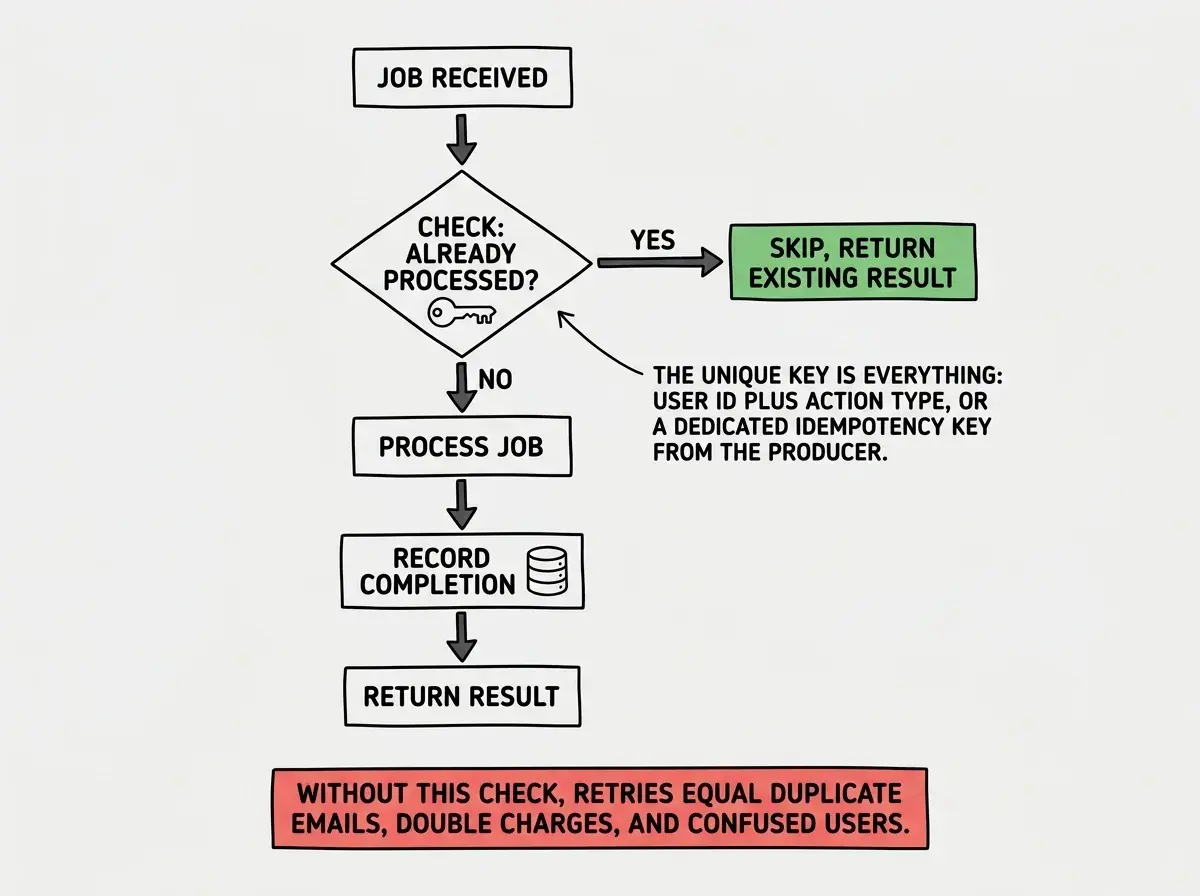
Idempotency means running the same job twice produces the same result as running it once. Retries and at-least-once delivery guarantees mean your job will sometimes execute more than once.
Back in the kitchen, if the prep cook gets interrupted slicing onions and starts over, you end up with double the onions. An idempotent prep cook checks what is already sliced before cutting more.
async function sendWelcomeEmail(userId: string) {
  // Check if we already sent this email
  const existing = await db.emailLog.findFirst({
    where: { userId, template: "welcome" },
  });

  if (existing) {
    return { status: "already_sent", sentAt: existing.sentAt };
  }

  await emailService.send({ to: userId, template: "welcome" });
  await db.emailLog.create({
    data: { userId, template: "welcome", sentAt: new Date() },
  });
}
Putting It All Together
A production-ready background job system needs four things. A queue to buffer work. Retry logic with exponential backoff. A dead letter queue for permanent failures. And idempotent handlers safe to run more than once.
Start simple. Inngest or Trigger.dev for serverless platforms. Cloudflare Queues if you are all-in on Workers. BullMQ if you already have Redis and containers. The worst thing you can do is leave slow tasks in your request handlers because the AI tool put them there and they "work." Move the prep work out of the line cook's hands, and your kitchen runs faster for everyone.
Learn to build production-grade backends with background jobs, caching, and async patterns. New tutorials every week.
Join the Newsletter