Webflow vs vibe coding is a question more designers and marketers are asking in 2026, and the answer depends on what kind of builder you are. With 92% of developers now using AI tools daily and 63% of vibe coding users identifying as non-developers, both approaches have become genuinely viable for people without traditional programming backgrounds.
Here is the simplest way to think about it. Webflow is a fully equipped art studio where you control every brushstroke. Vibe coding is an AI art generator that creates from your description. Both produce real, usable work. But the process, the feeling, and the tradeoffs are fundamentally different.
This comparison will help you pick the right approach for your situation, instead of discovering the limitations six months into a project.
Two Philosophies of Building
The Webflow vs vibe coding distinction runs deeper than features. It reflects two different philosophies about how non-technical people should create on the web.
Webflow believes you should have direct, visual control over every element. You see a canvas, you drag elements onto it, you style them with precision. The layout, the spacing, the animation timing, every pixel is your decision. Think about standing at an easel in that art studio with every brush, every pigment, every canvas size available to you. The studio does not paint for you. It gives you professional-grade tools and trusts you to use them.
Vibe coding takes the opposite approach. You describe what you want in natural language, and AI generates the code. Instead of placing a hero section pixel by pixel, you say "create a hero section with a gradient background, centered headline, subtitle, and a call-to-action button with hover animation." The AI art generator interprets your description and produces something complete. You review it, give feedback, and iterate until it matches your vision.
Neither philosophy is wrong. They attract different temperaments and serve different workflows. The question is which matches how your brain works and what your project actually requires.
Visual Control vs Speed
Let me get specific about the art studio vs AI art generator tradeoff, because this is where Webflow vs vibe coding gets practical.
In the Webflow studio, designing a responsive navigation bar might take 30-45 minutes. You place the logo, add navigation links, set breakpoints for tablet and mobile, add a hamburger menu trigger, style the dropdown, and test every state. The result is exactly what you envisioned, down to the pixel.
With vibe coding, you describe that same navigation bar in a prompt and get working code in under two minutes. The AI handles responsiveness, accessibility attributes, and animation. But the output might not match your mental image perfectly. The spacing might be off. The hamburger icon might not be the style you wanted. You iterate with follow-up prompts until it feels right.
The art studio gives you precision at the cost of time. The AI art generator gives you speed at the cost of direct control. For a brand-focused agency site where every visual detail matters, the studio wins. For a startup landing page that needs to be live by Friday, the AI art generator wins.
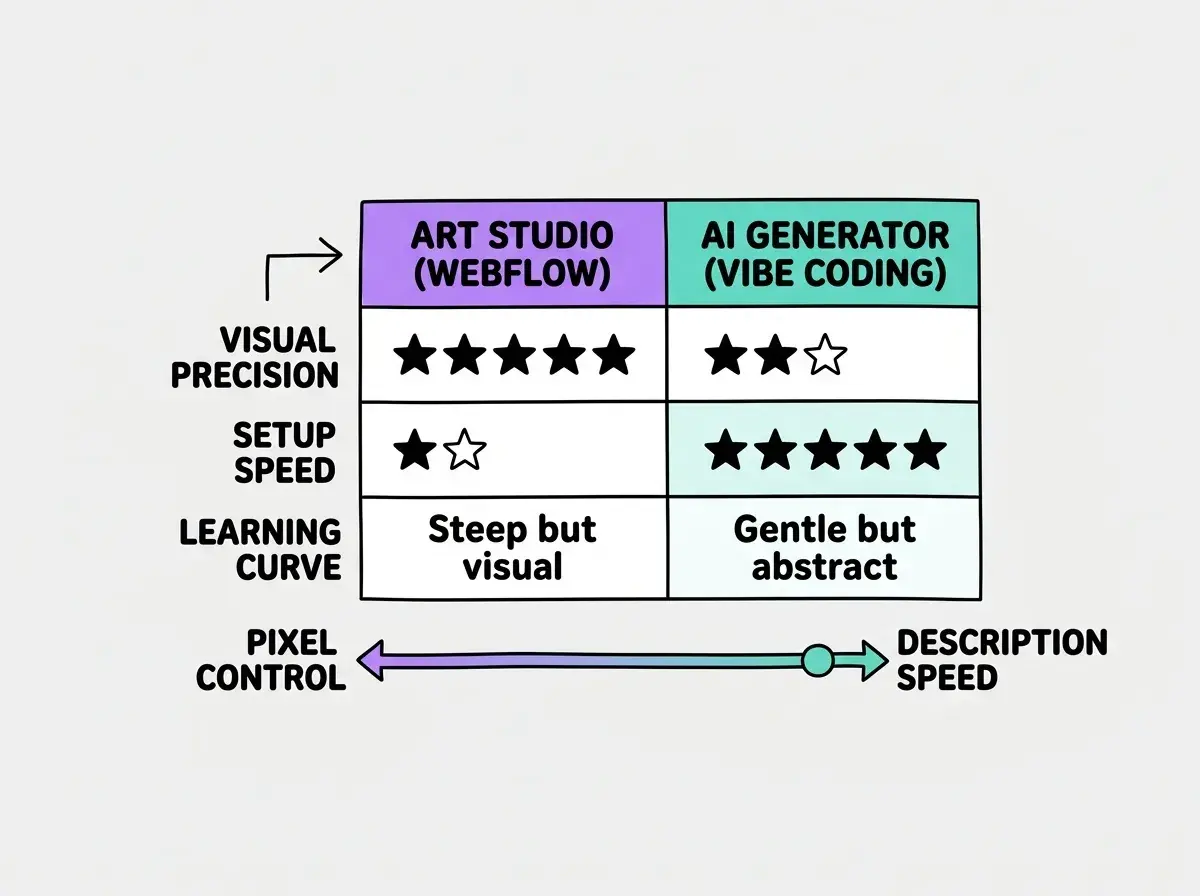
Where this gets interesting is iteration speed. In the art studio, changing your navigation from horizontal to vertical means redesigning it. With the AI art generator, you update your description and regenerate. The more experimental your process, the more vibe coding rewards you. The more precise your vision, the more Webflow rewards you.
Hosting, CMS, and the Boring Stuff That Matters
Beyond the building experience, Webflow vs vibe coding diverge sharply on infrastructure, and this is where many people get surprised.
Webflow bundles everything. Hosting, CMS, forms, SEO settings, and analytics all live inside the platform. You pay one subscription and everything works together. For a designer managing client sites, this is genuinely convenient. You log into one dashboard, update content, check performance, and manage hosting. The art studio has its own gallery space built in.
Vibe coding generates code, but that code needs to live somewhere. You choose your own hosting (Vercel, Netlify, Cloudflare Pages), your own CMS (if you need one), and your own analytics. This means more decisions upfront, but also more flexibility. You are not locked into any single platform's pricing or limitations. The AI art generator creates the work, but you decide where and how to display it.
For content-heavy sites, Webflow's built-in CMS is a genuine advantage. It handles collections, dynamic pages, and content relationships without additional setup. With vibe coding, you would set up a headless CMS like Sanity or Keystatic, which adds complexity but removes the content ceiling that Webflow's CMS eventually imposes on larger sites.
Webflow's bundled hosting and CMS make it faster to launch, but vibe coding's flexibility means you are never locked into a single platform's pricing changes or feature limitations. The right choice depends on whether you value convenience or independence.
The cost structures also differ. Webflow's plans range from $14 to $39 per month per site, with CMS and e-commerce plans running higher. Vibe coding tools have their own subscriptions ($20-50/month), but hosting a generated site can be free on platforms like Vercel and Cloudflare. For someone managing multiple sites, the math shifts significantly.
The E-Commerce Question
E-commerce is where the Webflow vs vibe coding comparison gets the most nuanced, so it deserves its own section.
Webflow E-commerce provides a visual, integrated online store experience. You design product pages, manage inventory, handle checkout, and process payments all within Webflow. For small stores with straightforward needs (under a few hundred products, standard shipping, basic variants), it works well. The art studio has a built-in frame shop where customers can browse and buy.
Vibe coding takes a different approach to e-commerce. Instead of an integrated system, you typically connect to Stripe, Shopify's API, or similar services. More setup work, but you can build exactly the checkout flow and customer journey you want. The AI art generator can create any storefront, but you wire up payment and fulfillment yourself.
For a designer selling digital products or a small collection of physical goods, Webflow E-commerce is probably the faster path. For a marketer building a complex funnel with upsells, abandoned cart sequences, and custom product recommendations, vibe coding gives you the flexibility that Webflow's commerce system cannot match.
When Designers Should Choose Webflow
If you are a designer, your instinct probably already points toward Webflow, and in many cases that instinct is right. Here is when to trust it.
Choose Webflow when visual fidelity is non-negotiable. If you have a Figma mockup with specific spacing, typography, and animation that must translate exactly to the browser, Webflow's visual editor lets you achieve that precision. You would not describe a Monet to an AI and expect it to match the original brushwork.
Choose Webflow when you are managing client sites. The combination of visual editing, built-in hosting, and client content editing (via Webflow's Editor role) makes it excellent for agency workflows.
Choose Webflow when the design itself is the product. Webflow's interactions and animations system lets you create scroll-triggered effects and micro-interactions that demonstrate your design capabilities.
Our beginner guides cover every approach, from visual builders to AI-powered tools.
Start hereChoose Webflow when you do not want to think about deployment, servers, or infrastructure. The art studio handles the gallery for you. You focus on the art.
When Marketers Should Try Vibe Coding
Marketers have different needs than designers, and those needs often align better with vibe coding's strengths. Here is when to consider it.
Try vibe coding when you need custom functionality that no-code tools do not support. A/B testing with custom logic, dynamic content personalization, API integrations with your marketing stack, interactive calculators. You describe the tool you need, and AI builds it, even if nothing like it exists as a template or plugin.
Try vibe coding when you are building internal marketing tools. Campaign dashboards, content performance trackers, lead scoring calculators. These projects do not need pixel-perfect design. They need to work well and be built fast.
Try vibe coding when you want to prototype rapidly. Need to test five different landing page approaches this week? Describing each one to an AI is significantly faster than designing each from scratch in Webflow.
Marketers often default to Webflow for everything because it feels safer and more familiar. But for custom tools, integrations, and rapid prototyping, they end up spending weeks building workarounds in Webflow that vibe coding could handle in an afternoon. Match the tool to the task, not the other way around.
Try vibe coding when ownership matters. If your marketing team has been burned by platform changes (pricing increases, feature removals, forced migrations), generating and owning the actual code means you can host it anywhere and are never at the mercy of a single vendor's decisions.
Using Both Together
Here is something that gets lost in most Webflow vs vibe coding comparisons. You do not have to pick just one.
A practical setup for a growing business might look like this. Use Webflow for your primary marketing site where brand presentation matters most. Use vibe coding for custom interactive tools, calculators, and microsites that need functionality Webflow cannot provide. Use vibe coding for internal tools your marketing and sales teams need.
The tools complement rather than compete, just as a professional artist might paint portraits by hand but use AI to rapidly generate concept variations for client pitches.
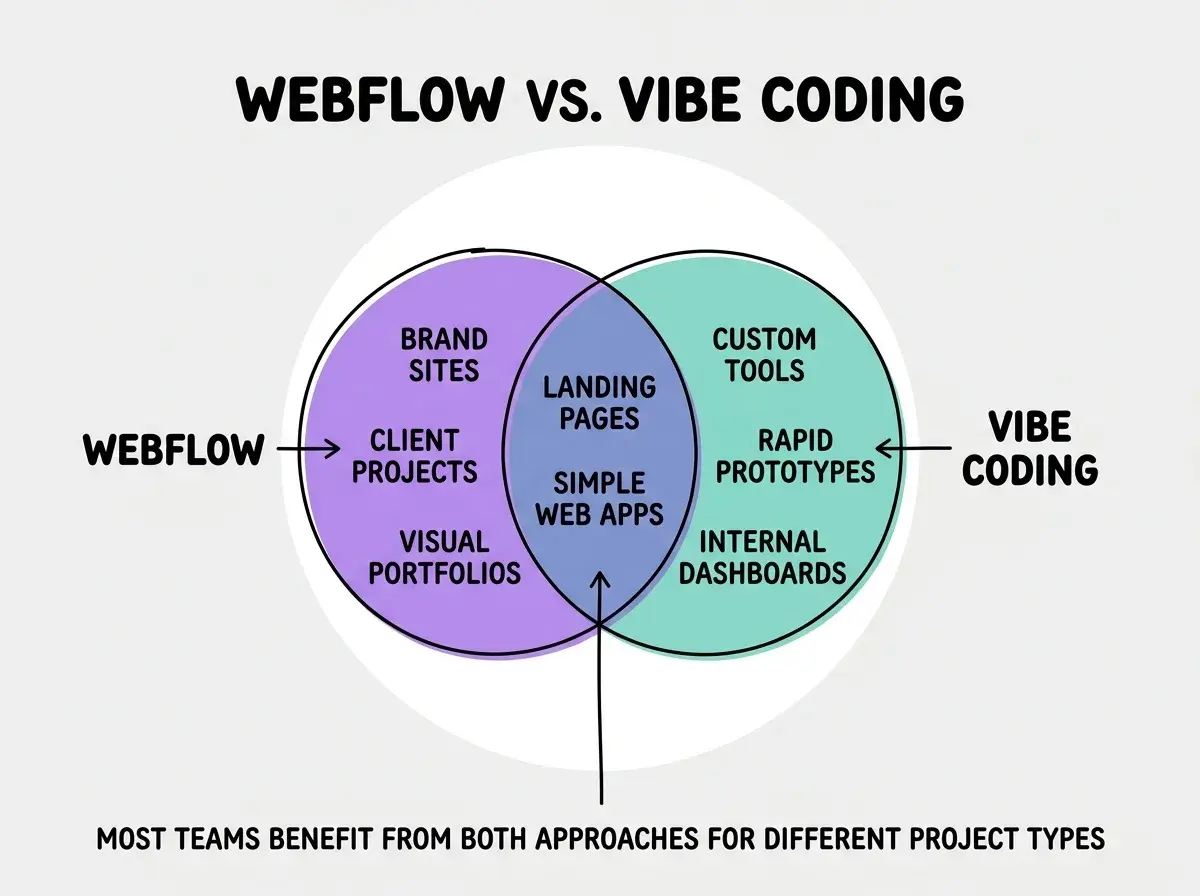
The key insight is that choosing an approach is not a permanent identity decision. It is a project-level decision. Every new project deserves a fresh evaluation of which tool fits best.
Making Your Decision
The Webflow vs vibe coding choice comes down to three questions.
First, how important is pixel-level visual control? If your project lives or dies by design precision, lean toward Webflow. If functionality and speed matter more than exact visual fidelity, lean toward vibe coding.
Second, how custom does the functionality need to be? Standard websites with standard features favor Webflow. Custom logic, integrations, and interactive tools favor vibe coding.
Third, how many different projects will you build? If you are managing many client sites with similar structures, Webflow's templates and cloning make that efficient. If every project is different and experimental, vibe coding's flexibility pays off.
Both are getting better fast. Webflow is adding AI features. Vibe coding tools are adding visual editors. The gap is narrowing, but in 2026 they still serve meaningfully different needs. Pick the one that matches your current project, not the one that sounds more impressive.
Compare all the major approaches to building without code in our full comparison guide.
See the full comparison