Comparing Lovable to Cursor is like comparing a restaurant meal to a professional kitchen. At the restaurant, you describe what you want, someone else prepares it, and a finished plate arrives at your table. In the professional kitchen, you have every ingredient and tool available, but you need to know how to cook. Both produce food. The experience of getting there could not be more different.
This distinction matters because people searching for "Lovable vs Cursor" often assume these tools compete directly. They do not. They serve different people solving different problems at different skill levels. Understanding which category you fall into saves you from weeks of frustration with the wrong tool.
What Lovable Actually Does
Lovable is an app builder. You describe what you want in plain English, and it generates a complete, working application. Frontend, backend, database, authentication, deployment. The entire stack arrives as a functioning product you can share with users immediately.
The workflow is conversational. Type "build a project tracker where teams can create tasks, assign them, and track deadlines." Lovable generates a React frontend, connects a Supabase backend, sets up auth, creates database tables, and gives you a live preview. Want changes? Type "add a calendar view" and it modifies the existing app.
You never see code unless you choose to. Lovable handles everything, which is exactly why non-technical founders love it. With over 8 million users, it has become the default way many people build their first product.
What Cursor Actually Does
Cursor is an AI-powered code editor. It is a fork of VS Code with deep AI integration that helps you write, edit, and understand code faster. You still write code. The AI assists by suggesting completions, answering questions about your codebase, and making multi-file edits when you describe what you want.
The workflow is collaborative. You open your project, start coding, and Cursor suggests the next line as you type. It answers questions about your codebase in a chat panel. When you need larger changes, Composer mode edits multiple files at once. But you are always in the code, seeing every change, understanding the structure.
Cursor requires that you know how to code, or at least that you are actively learning. It does not hide complexity. It makes complexity more manageable.
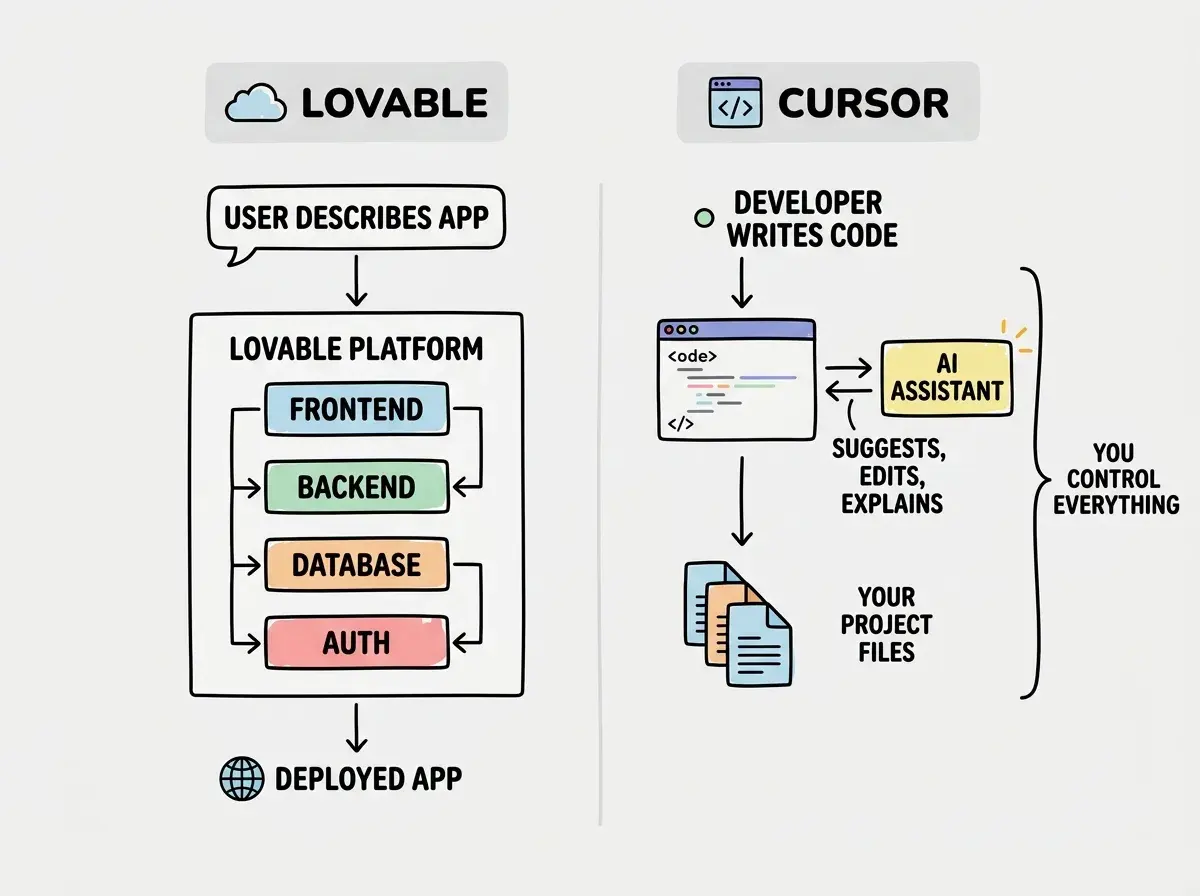
The professional kitchen analogy sharpens here. Cursor gives you a sous chef who handles prep work, suggests recipes, and can execute complex techniques on your behalf. But you are still the chef deciding what goes on the plate.
The Real Comparison
These tools solve different problems, but comparing them directly reveals what matters for your specific situation.
| Feature | Lovable | Cursor |
|---|---|---|
| Skill Required | None (natural language) | Coding knowledge needed |
| Output | Complete application | Code files you manage |
| Backend Included | ||
| Database Setup | ||
| Deployment | Built-in | You handle it |
| Code Control | Limited | Full |
| Customization Depth | Moderate | Unlimited |
| Pricing | Free / $20-50/mo | $20/mo |
| Best For | MVPs, prototypes | Production software |
| Long-term Scalability | Limited | Full |
The table shows the structural differences, but numbers do not capture the feel of each tool. Lovable feels like magic when it works. You describe an app, and it appears. That first experience converts people. Cursor feels like power. You write code faster, understand your project deeper, and build things you fully control. That sustained experience retains people.
Is There Anything Better Than Lovable
For non-technical builders who want complete applications, Lovable is the leading option, but it is not the only one. Bolt (by StackBlitz) generates full-stack apps with a similar conversational workflow and has strong deployment options. Replit Agent builds apps from descriptions and keeps everything in a cloud IDE. Firebase Studio from Google combines AI generation with Google Cloud infrastructure.
Each has trade-offs. Bolt tends to produce slightly cleaner code but has a smaller community. Replit Agent keeps everything in the browser, which is convenient but limiting for complex projects. Firebase Studio integrates well with Google services but has a steeper learning curve.
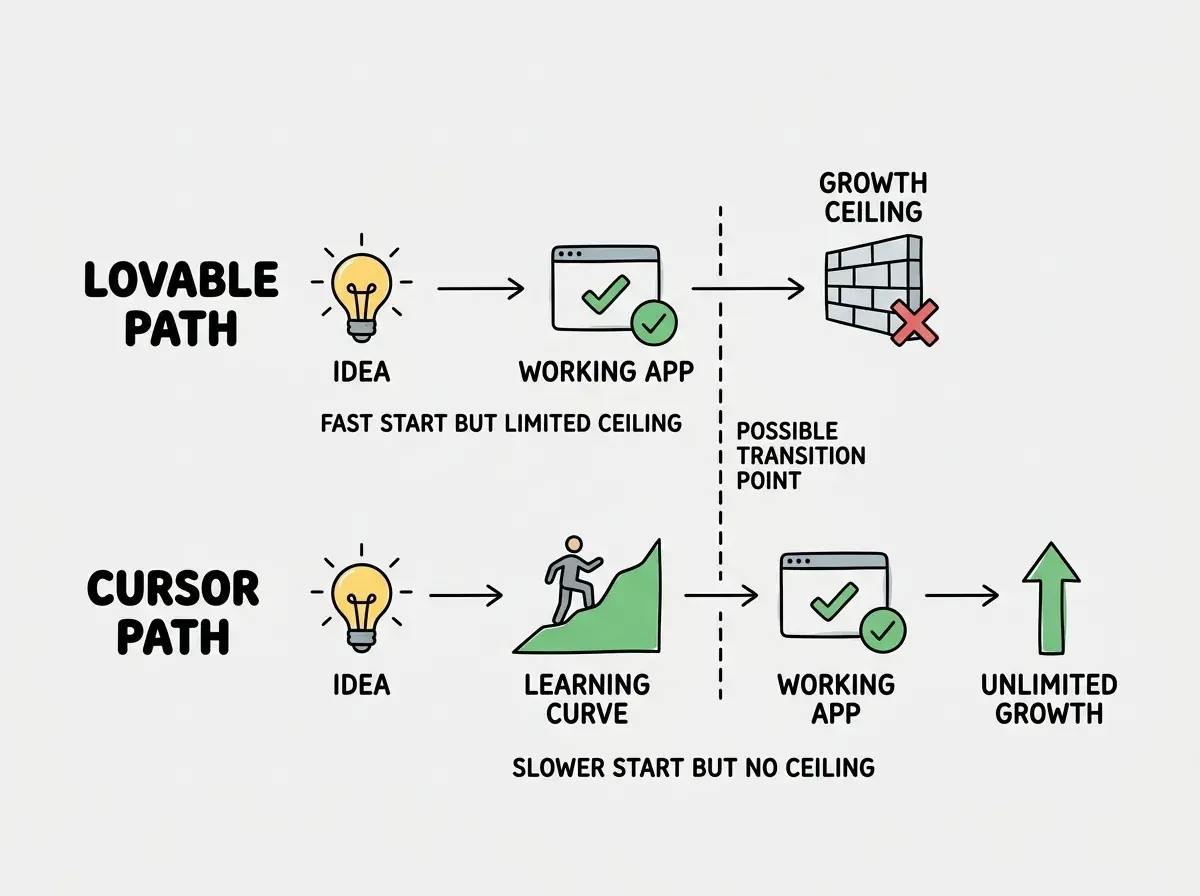
The more important question is whether any app builder can take you past the MVP stage. Currently, most builders hit a wall when projects grow beyond basic CRUD operations. Complex business logic, custom integrations, performance optimization, and production security all require the kind of control that app builders deliberately abstract away.
Lovable is excellent for getting a working prototype in front of users quickly. But if the prototype succeeds and needs to become a real product, you will almost certainly need to transition to a code-based workflow with a tool like Cursor. Plan for that transition from the start rather than being surprised by it later. The restaurant meal gets you fed tonight. The kitchen skills feed you for life.
Does Lovable Use Cursor
No. Lovable and Cursor are independent products from different companies. Lovable uses its own AI models to generate code within its platform. Cursor uses Claude, GPT-4o, and other models as AI assistants within its VS Code-based editor. They do not share technology, infrastructure, or code generation approaches.
You can, however, export code from Lovable to GitHub and then open that code in Cursor to continue development. This is a solid workflow for founders who prototype in Lovable and then hire a developer who uses Cursor to build the production version.
Is Lovable Good for Coding
Lovable is good for building, but it is not good for learning to code. If your goal is a working app and you do not care about understanding the underlying code, Lovable delivers. If your goal is to develop coding skills, Lovable actively works against you by hiding the very thing you need to learn.
The restaurant analogy nails this. Eating at restaurants every night does not teach you to cook. You develop a palate but not knife skills. Lovable develops your product sense but not your technical skills.
For career changers and designers, this matters. A Lovable-built portfolio proves you can direct AI effectively. But if you want to show employers you can write code, you need time in Cursor where the code is visible and you are responsible for understanding it.
Using Lovable to avoid learning code works until it does not. The moment your app needs something Lovable cannot generate, such as a custom integration, a complex algorithm, or a performance fix, you are stuck. You cannot debug what you do not understand. Build your first project in Lovable to experience the thrill of creation, then rebuild a simpler version in Cursor to understand how it actually works.
This tension between convenience and growth shows up clearly when you map the two paths side by side.
When to Choose Each Tool
Choose Lovable when you need a working prototype this week, you do not know how to code and do not need to learn right now, you are validating a business idea before investing in development, or you are building an internal tool for a small team.
Choose Cursor when you are building something that needs to scale, you want to learn how software works, you need custom features beyond standard templates, you are a developer looking to work faster, or you plan to hire developers who will maintain the code.
Choose both, sequentially, when you want to validate an idea quickly with Lovable, then rebuild the validated concept properly in Cursor. This is the restaurant-to-kitchen pipeline. Eat out to discover what you like, then learn to cook the dishes that matter most.
Find the right tool and learning path based on your background and goals.
Take the quizThe restaurant-to-kitchen pipeline works for millions of builders. Start where you are comfortable and grow from there.
Step-by-step guides for both app builders and code editors.
Browse the guides