Bubble vs vibe coding represents the defining choice for non-technical founders in 2026. One gives you a visual canvas where you drag elements into place. The other gives you an AI partner that writes real code from plain English. Both promise the same outcome, an app you can ship without hiring a developer, but they get there through completely different philosophies.
Why This Comparison Matters Now
Two years ago, this comparison would not have made sense. Bubble was the clear answer for founders who wanted to build without code. Visual builders had the market to themselves, and the only real debate was Bubble vs Webflow vs Adalo.
Then vibe coding tools arrived. Lovable, Bolt, Cursor, Replit Agent, and others made it possible to describe what you want and get working code back in minutes. The numbers tell the story of how fast the shift happened. 63% of vibe coding users are non-developers, people who would have been Bubble's core audience just eighteen months ago. Lovable reports that 60% of its users have no development background at all. These are founders, designers, and operators who skipped the visual builder entirely and went straight to AI-generated code.
Bubble has not stood still either. It launched an AI-powered app builder in late 2025 and continues to grow its marketplace of templates and plugins. The platform now hosts over 3 million apps. But the competitive landscape has fundamentally changed, and founders now face a real choice between two viable paths.
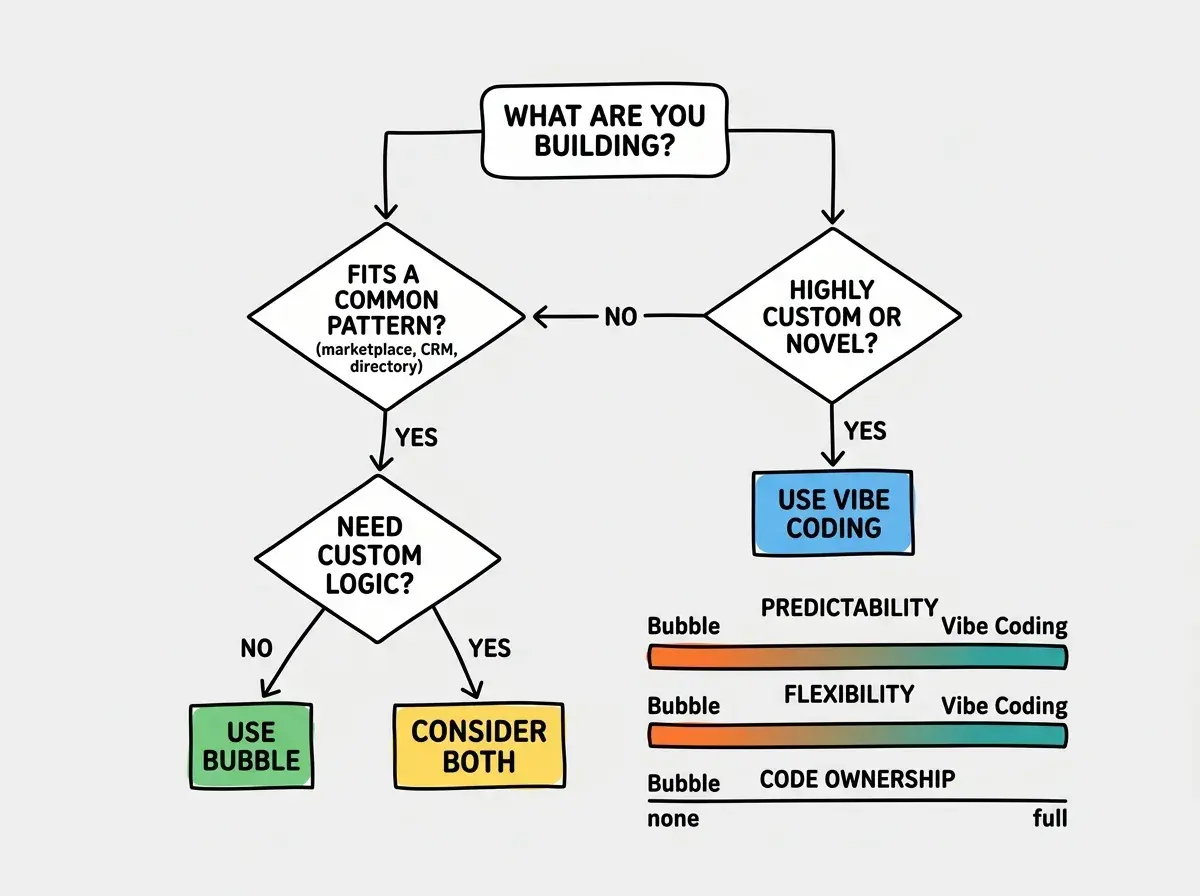
Neither Bubble nor vibe coding is universally better. Bubble gives you more predictability and guardrails. Vibe coding gives you more speed and flexibility. The right choice depends on what you are building, how custom it needs to be, and whether you care about owning the underlying code.
The honest answer that most comparison articles avoid is that both approaches have serious tradeoffs. Understanding those tradeoffs before you commit forty hours to either path is worth the twenty minutes it takes to read this.
The IKEA vs Custom Furniture Analogy
Think of Bubble as an IKEA furniture kit. You open the box, follow the instructions, and assemble something that looks great using pre-made parts. The bookshelf comes out exactly like the picture on the website. You cannot make it six inches taller or swap the material from particleboard to walnut, but you know what you are getting before you start. The instructions are visual, the pieces are labeled, and thousands of people have assembled the same kit before you.
Vibe coding tools are more like hiring an AI carpenter. You describe the bookshelf you want in plain language. "I need a six-shelf unit in dark walnut, 72 inches tall, with adjustable shelves and a hidden compartment behind the third shelf." The AI carpenter builds it from raw lumber based on your description. The result can be exactly what you imagined, or it can be slightly off in ways you did not anticipate because you did not specify every detail.
The IKEA kit has a ceiling. You cannot build something that does not exist in the catalog, and customization is limited to what the instruction manual supports. But the floor is high too. Even someone who has never touched a screwdriver can follow the steps and end up with a functional piece of furniture. The failure rate is low because the pieces are designed to fit together in exactly one way.
The AI carpenter has no ceiling. It can build anything you can describe clearly enough. But the floor is lower than IKEA because the outcome depends heavily on how well you communicate what you want. A vague description produces a vague result. A precise description, with measurements and materials and context, produces something beautiful and custom.
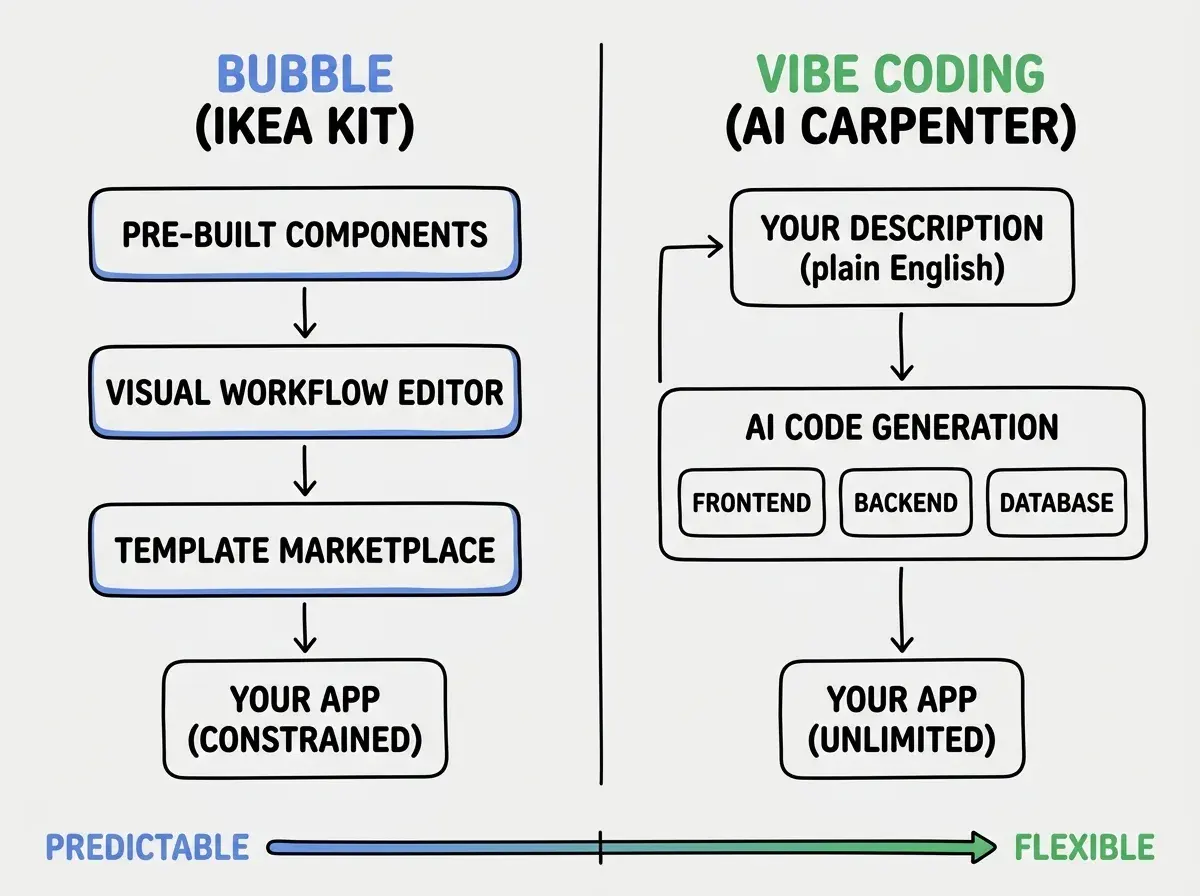
This analogy holds up across nearly every decision point in the comparison. Bubble's visual workflow editor is the instruction manual. Vibe coding's prompt interface is the conversation with your carpenter. Both get you a finished product, but the experience of building and the range of possible outcomes are fundamentally different.
Where Bubble Wins
Predictability is Bubble's greatest strength. When you drag a button onto the canvas, you see exactly what your users will see. When you create a workflow that says "when button is clicked, create a new thing in the database," that workflow will behave identically every time. There is no ambiguity, no variation between runs, and no wondering whether the AI interpreted your intent correctly. For founders who need confidence that what they built yesterday still works today, this determinism is genuinely valuable.
The visual builder eliminates an entire category of confusion. You never stare at a terminal wondering why your code will not compile. You never debug a mysterious error message. Bubble's constraint system prevents you from connecting incompatible elements in most cases, which means fewer opportunities to break things in ways you cannot understand. For a first-time builder, the visual feedback loop of "drag, configure, preview" is far less intimidating than "type prompt, read code, hope it works."
Community and templates accelerate common use cases. Bubble's marketplace has thousands of templates for SaaS dashboards, marketplaces, directories, CRMs, and booking systems. If your idea fits a common pattern, you can start from a template that is 60-70% of the way to your vision and customize the rest. The Bubble forum has over a decade of questions and answers, which means your specific problem has probably been solved before.
Plugin ecosystem extends the platform. Need Stripe payments? There is a plugin. Need Google Maps? Plugin. Need PDF generation, email sending, SMS notifications, or social login? Plugins for all of them. You configure these through the visual interface rather than writing integration code, and they are maintained by the Bubble community.
Understanding the tradeoffs between different tools is the first step to building something real.
Explore tool comparisonsThe real limitation is not what Bubble can do today. It is what happens when your needs evolve beyond what the platform supports. Migrating off Bubble means rebuilding from scratch because there is no code to take with you. Everything lives inside Bubble's proprietary system.
Where Vibe Coding Tools Win
Speed of initial creation is unmatched. A founder can describe a complete application to Lovable or Bolt and have a working prototype in fifteen to thirty minutes. Not a wireframe, not a mockup, but a functional app with a database, authentication, and a UI that responds to user input. Bubble can be fast too, but vibe coding tools compress the time between "idea" and "clickable thing" to almost nothing.
You own real code. This is the difference that matters most at scale. When a vibe coding tool generates your app, the output is standard React, Next.js, Python, or whatever stack you chose. You can read it, modify it, hand it to a developer, host it anywhere, and maintain it independently of the tool that created it. If Lovable shuts down tomorrow, your code still works. If Bubble shuts down, your app disappears.
Customization has no ceiling. Because vibe coding generates actual code, any feature that can be built with code can be built with vibe coding. Complex algorithms, custom data visualizations, unusual API integrations, novel interaction patterns, none of these are limited by a platform's plugin ecosystem or visual workflow constraints. You describe what you need, and the AI writes it. The quality depends on your prompting skill, not on whether someone has built a plugin for your use case.
AI tools keep improving at a compounding rate. Vibe coding in April 2026 is dramatically better than it was in October 2025. Models understand more complex instructions, generate fewer bugs, and handle multi-file projects with increasing reliability. Bubble improves too, but it improves at the pace of a platform team shipping features. AI coding tools improve at the pace of foundation model advances, which is faster.
The honest downside of vibe coding is inconsistency. The same prompt can produce slightly different results on different days. AI-generated code sometimes has subtle bugs that are hard to find without development experience. And when something breaks, debugging AI-written code you do not fully understand can be more frustrating than debugging a Bubble workflow you built visually.
Choosing vibe coding because it sounds more impressive, then abandoning the project when the AI generates something you cannot debug. If you have never read a line of code and do not plan to learn, Bubble's visual guardrails may actually get you to launch faster than a vibe coding tool that produces code you cannot troubleshoot. Pick the tool that matches your current skill level, not the one that sounds more cutting-edge.
The founders who succeed with vibe coding tend to be the ones willing to learn just enough about the generated code to understand what went wrong when it does. You do not need to become a developer, but you do need to develop a basic literacy around error messages, file structure, and how your app's pieces connect.
What This Means For You
The right tool depends less on the technology and more on who you are and what you are building.
-
If you are a founder validating a business idea, and your app resembles something that already exists (a marketplace, a booking platform, a membership site), start with Bubble. The predictability and template ecosystem will get you to your first paying customers faster, and you can always rebuild in code later if the business justifies it. Vibe coding makes more sense when your idea is genuinely novel or when you need features that Bubble's plugin ecosystem does not cover.
-
If you are a career changer moving into tech, learning both approaches has value, but vibe coding teaches transferable skills. The code it generates teaches you real programming patterns by example, and the prompting skills transfer to every AI tool you will use in your career. Bubble skills are valuable but specific to the Bubble platform. The market is moving toward AI-assisted development, and getting comfortable with that workflow now puts you ahead.
-
If you are a student or early-stage experimenter, vibe coding gives you more room to explore. You can build anything from a simple landing page to a complex data pipeline without hitting platform limits. The learning curve is steeper in the first week but shallower over the following months because you are building transferable knowledge about how software actually works.
Whether you choose Bubble or vibe coding, the best time to start is before you feel ready.
See the beginner's guideThe Bubble vs vibe coding debate will likely become irrelevant within two years as both approaches converge. Bubble is adding AI features. Vibe coding tools are adding visual interfaces. But right now, in April 2026, they are different enough that choosing intentionally matters. Pick the one that matches where you are today, build something real, and switch later if you outgrow it. The worst choice is spending three months comparing tools instead of three months building your product.