Choosing an AI coding tool in 2026 is like choosing a vehicle for a road trip. Claude Code is the self-driving car. You tell it the destination, it plans the route, handles the driving, and you step in only when the road gets weird. Cursor is the sports car with a great GPS. You are driving, but the navigation is so good that you rarely take a wrong turn. Windsurf is the reliable sedan with cruise control. It does not turn heads, but it gets you there at a price that does not hurt.
Most comparisons list features in a table and call it a day. This one focuses on how each tool changes the way you build.
Why Is Claude Code Better Than Windsurf
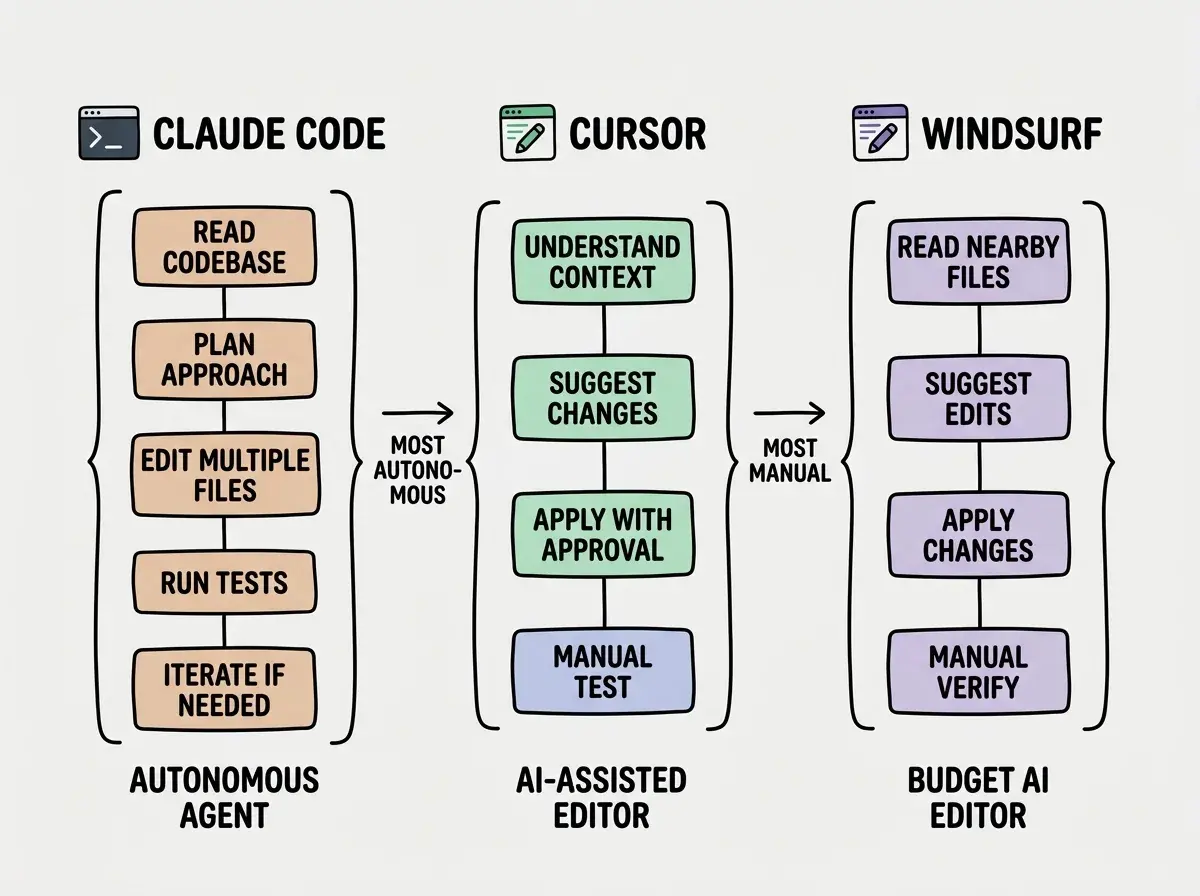
Claude Code operates in your terminal as an autonomous agent. You describe a task, and it reads your codebase, plans an approach, edits files across your project, runs commands, executes tests, and iterates until the work is done. The self-driving car analogy is not an exaggeration. For complex, multi-file tasks, Claude Code does things that would take a human developer an afternoon in about fifteen minutes.
Windsurf, built by Codeium, takes a more conservative approach. It runs inside a VS Code-based editor with an AI assistant called Cascade that can make multi-file edits. It is capable, and at $15/month it is the most affordable option in this comparison. But the reasoning depth is noticeably shallower. Where Claude Code will plan a four-step refactoring strategy and execute each step while verifying nothing broke, Windsurf tends to make changes more sequentially and with less context awareness.
The gap shows up most in debugging. Claude Code reads error logs, traces root causes, applies fixes, runs tests, and verifies results autonomously. Windsurf handles straightforward bugs but struggles with problems spanning many files.
That said, Windsurf is not trying to be Claude Code. It targets developers who want a solid AI-assisted editor at a lower price point, and it delivers on that promise.
Alternatives like Roo Code and Cline offer open-source terminal-based experiences similar to Claude Code, though with less polish and smaller communities. Copilot remains strong for inline autocomplete but operates at a fundamentally different level than any of these three tools.
Is Claude Code Actually Better Than Cursor
This is the question that starts arguments in developer communities, and the honest answer is "it depends on what better means to you." They are genuinely different vehicles for different driving styles.
Claude Code's advantage is depth of reasoning. It uses Claude Sonnet (and optionally Opus) under the hood, and its ability to understand complex codebases and make coordinated changes across many files is the best available.
Cursor's advantage is breadth of integration. It is a full IDE based on VS Code with file management, extensions, debugging tools, and terminal access alongside the AI. Cursor supports multiple models including Claude and GPT-4o, and its Tab completion saves keystrokes on routine coding that Claude Code does not even try to optimize.
A generalized harness that lets you switch any underlying model for a different one is a losing strategy.
The daily workflow difference matters. With Cursor, you start coding and the AI helps as you go. With Claude Code, you describe a task, the agent works, and you review the result. Higher friction per interaction, dramatically more productive per complex task.
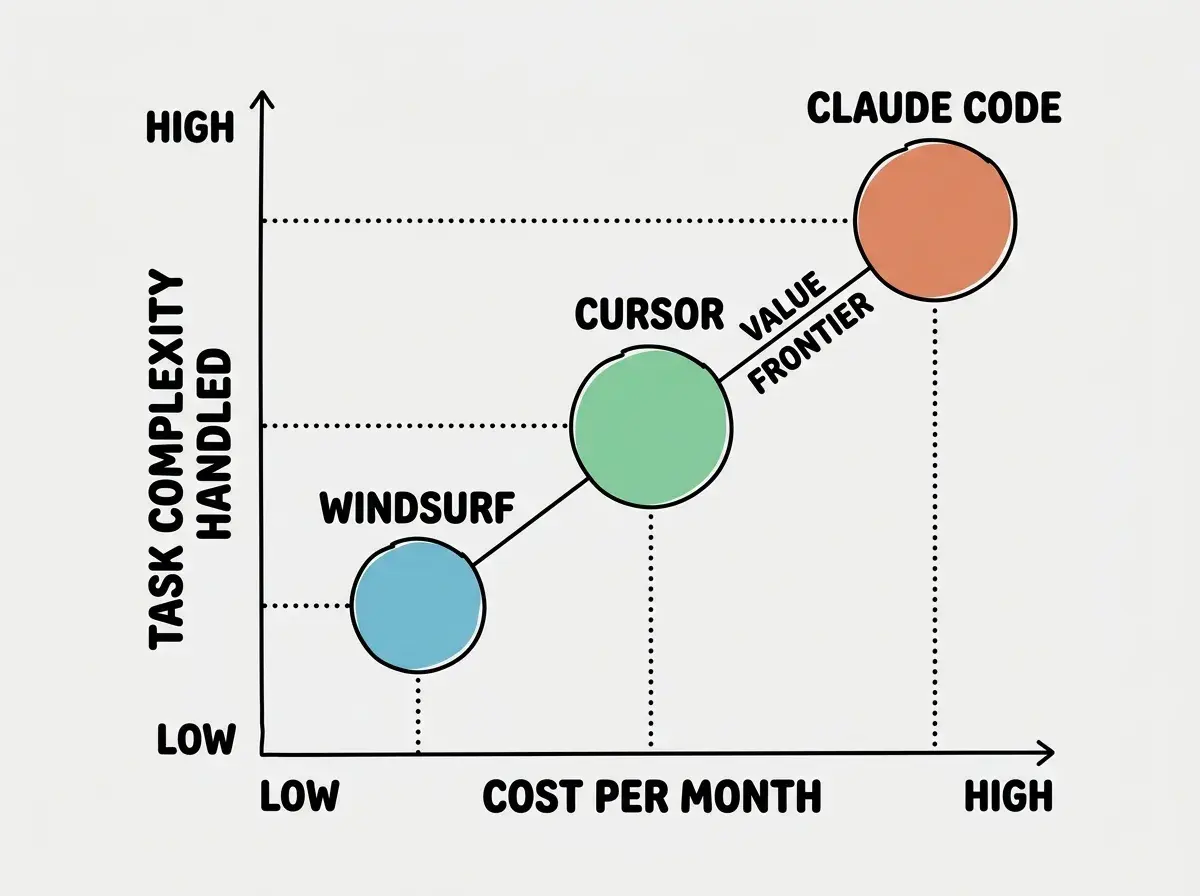
Claude Code wins on autonomous task completion and deep reasoning. Cursor wins on daily coding flow and editor integration. Windsurf wins on price. The right choice depends on whether your biggest bottleneck is complex multi-file tasks (Claude Code), routine coding speed (Cursor), or budget (Windsurf). Many productive developers use Claude Code for big tasks and Cursor for daily coding.
Why Use Claude Code Over Cursor
The specific scenarios where Claude Code pulls ahead determine project velocity.
Large refactors. Renaming an abstraction across 40 files, migrating libraries, changing error handling patterns. Claude Code handles these as a single task. In Cursor, you guide the process more actively.
Complex debugging. When a bug spans three services, a database query, and a race condition, Claude Code reads broadly, forms hypotheses, and tests fixes autonomously. Cursor's chat helps you think, but the loop is more manual.
Greenfield architecture. Claude Code reads your existing conventions (especially from a CLAUDE.md file) and generates feature scaffolds matching your codebase's style. Cursor does this per file but does not orchestrate the same way.
CI/CD and infrastructure. Claude Code runs in any terminal, including SSH sessions, Docker containers, and CI runners. Cursor requires its desktop application.
Claude Code's team is like a compiler. They have 40-50 engineers constantly optimizing the harness. You should only beat the compiler when you have domain knowledge so specific that the general-purpose solution can't touch it. For 90% of your prompts, the compiler wins.
You do not want a self-driving car for a grocery run. You want it for the six-hour highway drive. Claude Code handles the long, complex tasks. Cursor handles the daily commute.
Picking one tool and forcing all your work through it wastes the strengths of each. Developers who use Claude Code for everything spend too much time on tasks that a quick Cursor Tab completion would handle instantly. Developers who use only Cursor spend entire afternoons on refactors that Claude Code would finish in minutes. Match the tool to the task, not the other way around.
The Pricing Breakdown
Pricing is where the comparison gets practical. Each tool uses a different model, and understanding the real cost requires looking beyond the sticker price.
| Feature | Claude Code | Cursor | Windsurf |
|---|---|---|---|
| Base Price | $20/mo or API | $20/mo | $15/mo |
| Pro/Max Tier | $100-200/mo | $40/mo (Business) | $30/mo (Pro Ultimate) |
| AI Model | Claude Sonnet/Opus | Multi-model | Cascade (proprietary) |
| Interface | Terminal | VS Code fork | VS Code fork |
| Autonomy Level | High (agent) | Medium (assistant) | Medium (assistant) |
| Multi-file Edits | |||
| Runs Commands | |||
| Works via SSH | |||
| Inline Autocomplete | |||
| Custom Model Selection |
Claude Code on the Max plan gives you substantial usage with predictable billing. On API pricing, light use runs $30-50/month and heavy refactoring sprints can push past $200. The cost-per-hour-saved often favors it despite the higher price.
Cursor at $20/month gives you generous AI usage with fast and slow model access. Windsurf at $15/month is genuinely capable at that price for moderate AI coding needs.
The Verdict for Different Builders
For solo developers building side projects: Start with Cursor. The editor integration makes daily coding faster, the price is reasonable, and you can always add Claude Code for specific complex tasks. If budget is tight, Windsurf at $15/month is a solid starting point.
For startup founders building MVPs: Claude Code gives you the most leverage. When you are the only developer and need to move fast on complex features, the autonomous agent model lets you accomplish in a day what would take a week of manual coding. Pair it with Cursor for the routine work.
For teams: Cursor's Business plan makes the most sense as a baseline. Everyone gets a familiar VS Code experience with strong AI assistance. Add Claude Code access for senior developers who handle complex refactors and architectural work.
For students learning to code: Cursor or Windsurf, because you want to be in the code and learning, not delegating to an autonomous agent. The editor-based experience keeps you close to what the AI is doing, which builds understanding. Use Claude Code later once you have enough knowledge to evaluate its output.
The road trip analogy comes full circle. The best drivers know when to let the car handle the highway and when to take the wheel on a mountain road. The best developers know when to let Claude Code handle a complex refactor and when to stay in Cursor for the everyday work.
Hands-on guides for getting started with the AI coding tool that fits your workflow.
Explore tool guidesThe right tool is the one that matches how you work, not the one with the longest feature list.
Dig deeper
A few hand-picked sources if you want to go further.
Start with the right tool and the right approach for your experience level.
Find your starting point