Vite vs Next.js is not really a framework war. It is a question about how much vehicle you actually need for the trip you are taking. With 92% of developers using AI tools daily, most of us are generating project scaffolds faster than we can evaluate whether the generated architecture fits the problem. The AI picks Next.js by default. You deploy a 200MB build for what could have been a 12MB Vite app. And then you spend the next six months working around features you never needed.
Think of it this way. Next.js is a pickup truck. It hauls server-side rendering, API routes, incremental static regeneration, middleware, image optimization, and a dozen other capabilities. Impressive vehicle. But if you are driving to the grocery store, that truck burns more gas, takes longer to park, and costs more to maintain than a sedan that gets you there just as well. Vite is that sedan. Lighter, faster for most trips, and perfectly capable of handling what 60-70% of web projects actually require.
This comparison is not about which tool is "better." It is about matching the tool to the job.
What Vite Actually Does
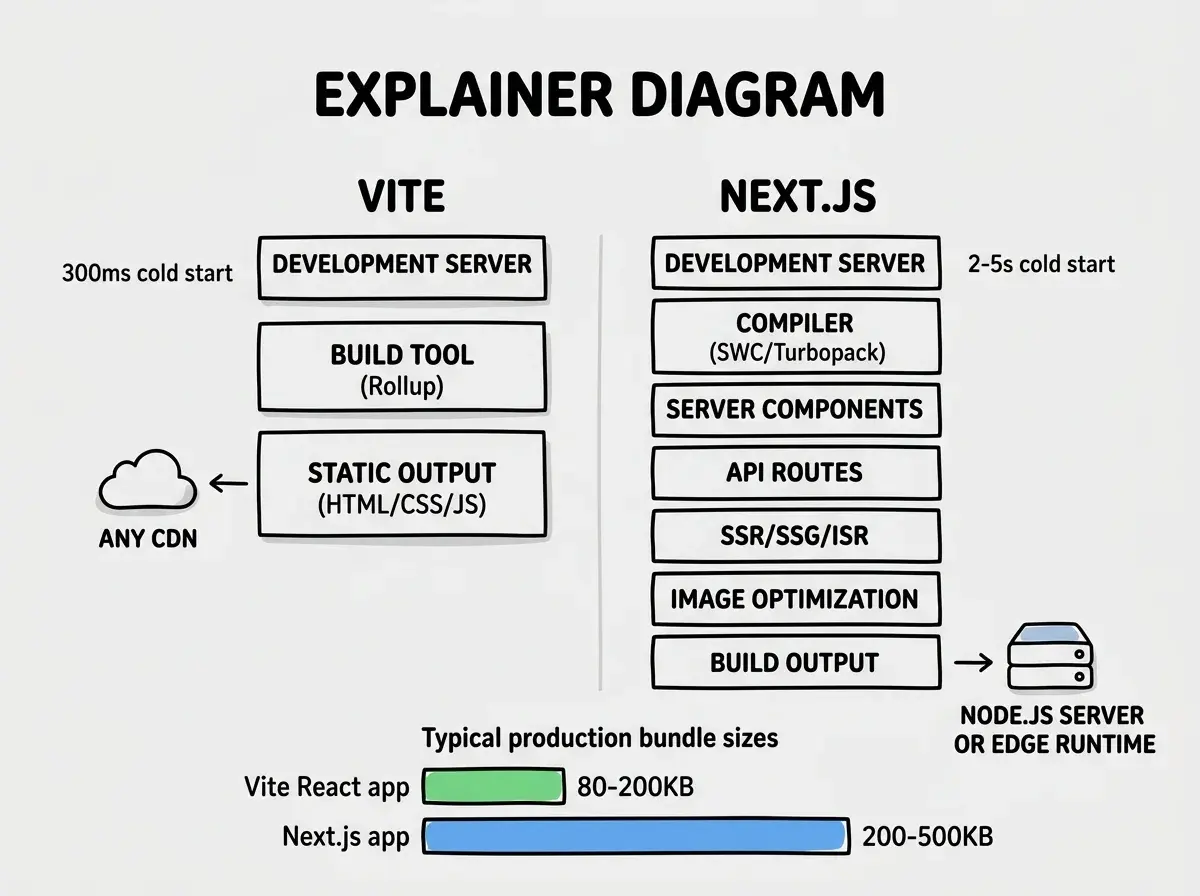
Vite is a build tool and development server, not a framework. It uses native ES modules during development, which means your browser loads code directly without bundling. The result is a dev server that starts in under 300 milliseconds regardless of project size. Hot module replacement is nearly instant because Vite only processes the single file you changed, not the entire dependency graph.
For production, Vite uses Rollup under the hood to create optimized bundles with code splitting, tree shaking, and asset hashing. The output is static HTML, CSS, and JavaScript files that you can deploy to any CDN, any static host, or any object storage bucket with zero server infrastructure.
Vite supports React, Vue, Svelte, and Solid out of the box through official plugins. You get TypeScript, JSX, CSS modules, and PostCSS without configuration. Add TanStack Router for client-side routing, TanStack Query for data fetching, and you have a production-ready SPA in minutes.
The key point is that Vite gives you exactly what you ask for and nothing more. There is no server runtime, no API layer, no rendering strategy to configure. Your application is a client-side app that talks to APIs you build and host separately.
What Next.js Brings to the Table
Next.js is a full-stack React framework. It includes everything Vite offers for the client side, plus server-side rendering (SSR), static site generation (SSG), incremental static regeneration (ISR), API routes, middleware, server components, server actions, image optimization, and built-in font handling.
That feature list is genuinely valuable when you need it. A marketing site with 500 pages that must rank well on Google benefits enormously from SSR and ISR. A SaaS product with authenticated API endpoints benefits from collocating those endpoints with the frontend. An e-commerce store with dynamic pricing and SEO requirements needs the rendering flexibility that Next.js provides.
But every one of those features adds weight. A fresh Next.js project with zero custom code produces a larger build output, requires a Node.js server (or edge runtime) for SSR features, and introduces configuration complexity around rendering modes, caching behavior, and deployment targets. The pickup truck comes with a bigger engine, a heavier frame, and higher fuel costs whether you use the towing capacity or not.
Build Speed and Developer Experience
This is where Vite's philosophy pays off most visibly. Because Vite uses native ES modules during development, adding dependencies or growing your codebase does not meaningfully slow down the dev server. A 200-file Vite project starts in roughly the same time as a 20-file project. The feedback loop stays tight.
Next.js has invested heavily in Turbopack to close this gap, and it has improved substantially. But the architecture is fundamentally different. Next.js must analyze your rendering strategy, compile server components, process API routes, and build the module graph before the dev server is ready. For large projects, the cold start can be 3-10 seconds compared to Vite's sub-second startup.
Hot module replacement tells a similar story. Vite updates a changed file in 20-50 milliseconds. Next.js, depending on whether the change touches a server component, a client component, or a shared module, can take 200-800 milliseconds. That difference feels small in isolation but compounds across hundreds of saves in a day.
For AI-assisted development where you are rapidly iterating on generated code, testing changes, and regenerating sections, that feedback loop speed matters. Faster iteration means more experiments per hour, which means better outcomes from your AI collaboration.
When Vite Is the Right Choice
Single-page applications. Dashboards, admin panels, internal tools, and any app behind a login screen. These apps do not need SEO because they are not indexed. Client-side rendering is perfectly fine, and the deployment is as simple as uploading static files.
AI-generated prototypes and MVPs. When you are vibe-coding a new idea, Vite's speed lets you iterate faster. You can scaffold a React + Vite project, wire up TanStack Router, connect to a Supabase or Firebase backend, and have a working prototype in an afternoon. No rendering strategy decisions required.
Projects with a separate backend. If your API already exists as a standalone service (a Python FastAPI, a Go server, a serverless function stack), you do not need Next.js's API routes. Adding them creates two places where API logic lives, which is worse than having one.
Static marketing sites. For a landing page, a portfolio, or a documentation site, Vite with a static site plugin produces fast, cacheable output without a server runtime. If you need light dynamic content, a few API calls from the client handle it fine.
If your app lives behind a login screen or does not need search engine visibility, you almost certainly do not need server-side rendering. Vite plus a client-side React setup handles these cases with less complexity, faster builds, and simpler deployments. Save the framework weight for projects that genuinely benefit from it.
When Next.js Is Worth the Weight
SEO-critical content sites. If your pages need to appear in Google search results with full content visible to crawlers, SSR or SSG gives you a meaningful advantage. Google can render JavaScript, but pre-rendered HTML loads faster, indexes more reliably, and performs better in Core Web Vitals.
Full-stack applications where colocation matters. When your frontend and backend are tightly coupled and maintained by the same team, Next.js's API routes and server actions reduce the friction of context-switching between codebases. Server components let you fetch data without exposing API endpoints at all.
Apps that need ISR. Incremental static regeneration lets you serve pages as static HTML while revalidating them in the background. For a blog with 10,000 posts, an e-commerce site with changing prices, or a directory with user-submitted listings, ISR provides the performance of static sites with the freshness of dynamic rendering.
Middleware and edge computing. If you need to run logic at the edge before a request reaches your app (authentication checks, A/B testing, geolocation-based routing), Next.js middleware handles this natively. Building equivalent functionality with Vite requires a separate edge function layer.
The pickup truck earns its fuel cost when you are actually hauling something heavy. The mistake is assuming every project needs that hauling capacity.
What AI Tools Generate by Default
Most AI coding tools default to Next.js when you ask them to build a React application. Claude Code, Cursor, Bolt, and Lovable all lean toward Next.js because it dominates the training data. The App Router, server components, and the create-next-app scaffold appear in thousands of tutorials, courses, and open-source projects.
This creates a bias that you should actively push back against. When you prompt "build me a dashboard for managing inventory," the AI will likely generate a Next.js project with server components, a database connection in server actions, and API routes. That works, but a Vite + React project with TanStack Query calling a separate API would be simpler to deploy, faster to develop against, and easier to maintain.
The fix is straightforward. Be explicit in your prompts. "Build this as a Vite + React SPA" or "use Vite, not Next.js" steers the AI correctly. Most tools respect that instruction and produce clean Vite scaffolds when asked.
Accepting your AI tool's default framework choice without evaluating whether you need server-side features. About 80% of AI-generated Next.js projects use zero SSR, zero API routes, and zero ISR in production. They are client-side apps wearing a framework costume, paying the complexity tax for features that sit unused.
Deployment Simplicity
Vite projects deploy to literally any static hosting service. Netlify, Vercel, Cloudflare Pages, AWS S3 + CloudFront, GitHub Pages, or a $5 VPS running Nginx. The output is HTML, CSS, and JavaScript. There is no server to configure, no runtime to manage, no cold start to worry about. You run vite build, upload the dist folder, and you are done.
Next.js deployment depends on which features you use. A fully static Next.js export (using output: 'export') deploys like a Vite app, but at that point you have given up the features that justified choosing Next.js. If you use SSR, ISR, or API routes, you need a Node.js server or a compatible edge platform. Vercel handles this seamlessly, but deploying to other platforms (Cloudflare, AWS, self-hosted) requires adapters, configuration, and ongoing maintenance of the server runtime.
The sedan parks anywhere. The truck needs a bigger spot.
Framework selection is one of many architecture decisions that shape your project.
Explore more comparisonsA Simple Decision Framework
Ask yourself three questions before accepting the AI-generated Next.js scaffold.
Does this app need to rank in search engines? If the answer is no (dashboards, internal tools, authenticated apps), Vite handles the job with less overhead.
Am I building API routes in the same codebase? If your backend already exists separately, Next.js's API routes add complexity without value. If you want a unified codebase for frontend and backend, Next.js makes that genuinely easier.
Do I need ISR or streaming SSR? If the answer is yes, Next.js is the right tool and the framework overhead is justified. If you are not sure what ISR is, you probably do not need it.
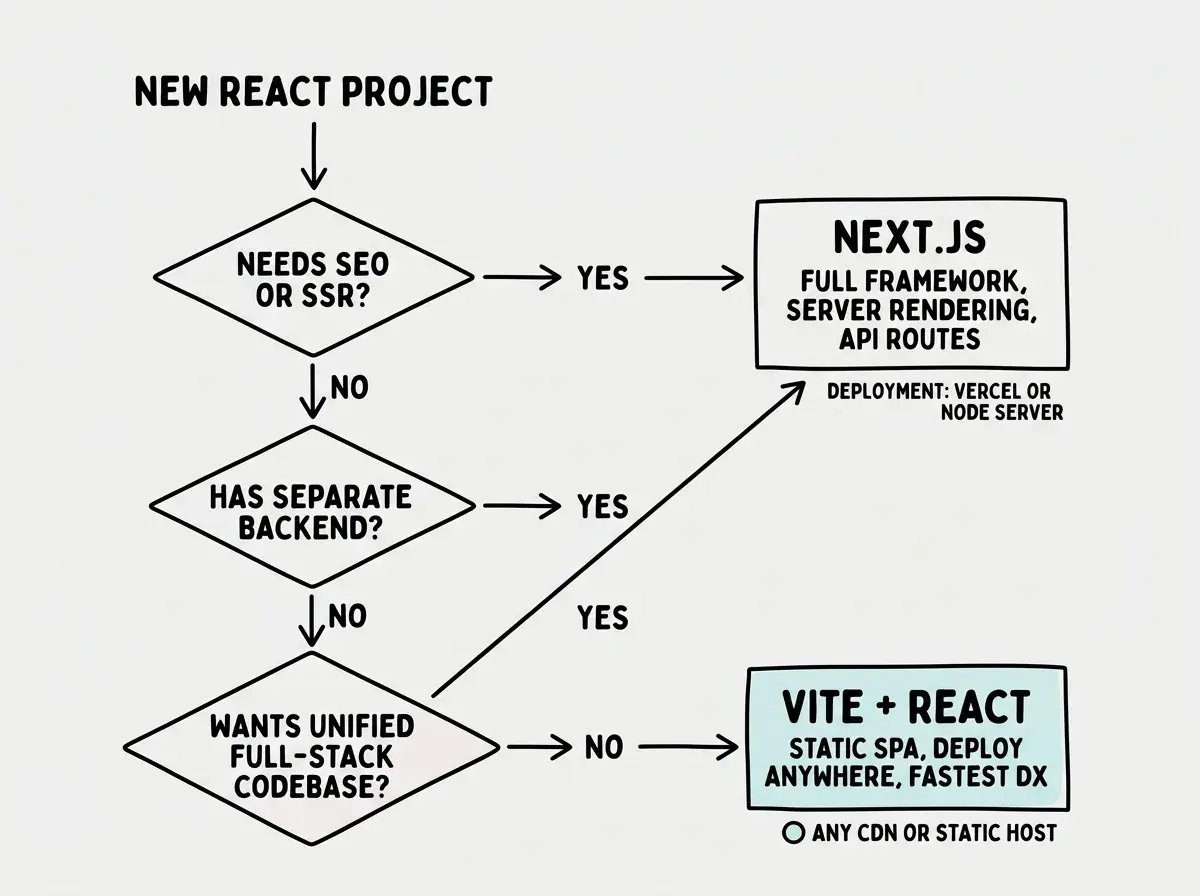
Most projects land on the left side of this flowchart. And that is fine. Choosing Vite is not choosing less. It is choosing precisely enough.
Get framework-agnostic advice on architecting your next project.
Browse all guidesWhat This Means For You
The real lesson here is not about Vite or Next.js specifically. It is about questioning defaults, especially defaults that AI tools set for you.
Next.js is an excellent framework when your project needs what it offers. Server rendering, API colocation, incremental regeneration, and edge middleware are powerful capabilities. But capability you do not use is not free. It costs you in build times, deployment complexity, configuration surface area, and cognitive load when debugging.
Vite gives you a fast, simple foundation that handles the majority of web projects. When you need server-side features, you will know, because a real requirement will force the question. Until then, the sedan gets you there faster, cheaper, and with less hassle.
Next time your AI tool scaffolds a Next.js project, pause for ten seconds and ask whether this trip actually requires a pickup truck. Most of the time, it does not.