There is a joke in the vibe coding community that sums up the current situation perfectly: "The S in vibe coding stands for security." It is funny because there is no S in vibe coding. And it is painfully accurate because security is exactly what most AI-built applications are missing.
This is not hypothetical. Veracode's 2025 research found that 45% of AI-generated code introduced security flaws. Not "could theoretically introduce" or "in certain edge cases." Forty-five percent. Nearly half of all AI-written code has vulnerabilities that attackers can exploit. If your AI tool built your app, the odds are roughly a coin flip that something in your codebase is exploitable right now.
I am not saying this to scare you away from shipping. I am saying it because the fix is not hard. It is a checklist. You run through it before you launch, you fix what it catches, and you ship with confidence instead of anxiety. This is that checklist.
Why AI Code Is Especially Vulnerable
AI coding tools are trained on millions of lines of existing code, including millions of lines of insecure code. When an AI generates a login form, it draws on patterns from thousands of login forms it has seen, and many of those patterns include the same vulnerabilities that have plagued web development for decades.
The problem is compounded by the fact that 63% of active vibe coding users are non-developers. They do not recognize insecure patterns because they have never been trained to spot them. A developer might see eval(userInput) in generated code and immediately know it is dangerous. A non-developer sees code that works and moves on.
The real-world consequences are already here. In 2025, the vibe coding platform Lovable had CVE-2025-48757, a vulnerability caused by missing Row Level Security on Supabase databases. Over 170 production applications built with Lovable were exposed, meaning anyone could read, modify, or delete data from those apps. The builders of those apps had no idea their data was accessible to the public.
Lovable was not an isolated case. Moltbook, another AI-built application, leaked 1.5 million authentication tokens and 35,000 email addresses. The Tea App exposed 72,000 images and 1.1 million private messages. These are not theoretical risks. These are real applications built by real people whose users had their data exposed because security was not part of the build process.
You do not need to become a security expert. You need to run through a checklist before shipping. The vulnerabilities in AI-generated code are well-known and predictable, which means they are also preventable. This checklist covers the ones that matter most for vibe-coded applications.
The good news is that AI-introduced vulnerabilities are not exotic. They are the same vulnerabilities that have existed for twenty years: injection attacks, missing authentication, exposed secrets, insecure data storage. You do not need to learn advanced security concepts. You need to check specific, concrete things.
The Pre-Launch Security Checklist
Work through this list in order. Each item includes what to check, why it matters, and what to do if you find a problem. You can ask your AI tool to help fix any issue you discover, just describe the problem and ask for a secure solution.
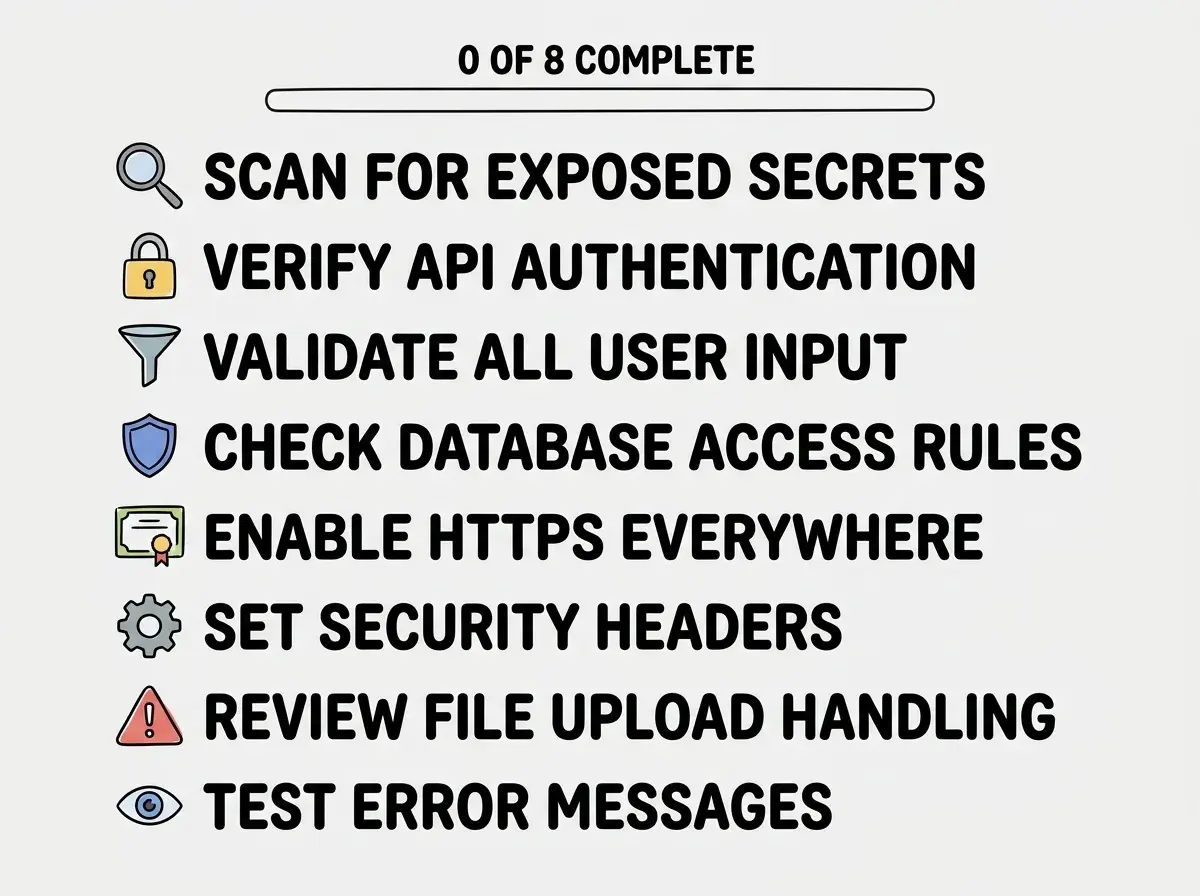
1. Scan Your Code for Exposed Secrets
Search your codebase for API keys, database passwords, and tokens hardcoded in source files instead of stored in environment variables. Run git log -p | grep -i "password\|secret\|api_key\|token" to check your Git history, since even deleted secrets persist in previous commits. Use gitleaks or GitHub's built-in secret scanning for a thorough check.
If you find a hardcoded secret, remove it, replace it with an environment variable, and rotate the credential immediately. It still exists in your Git history, so assume it has been compromised.
2. Verify Authentication on Every API Route
Open every API route in your codebase and verify that each one checks for a valid user session or API key before doing anything. A Tenzai security study found that every AI-built application they tested lacked CSRF protection. Every one.
For each API route, ask yourself: "If I call this endpoint without being logged in, what happens?" If the answer is "it works anyway," that endpoint needs authentication.
3. Validate All User Input
Every form field, URL parameter, and API request body should be validated before your code processes it. AI-generated code is 2.74 times more likely to contain XSS vulnerabilities than human-written code. XSS happens when user input is rendered as HTML without being sanitized, letting attackers inject malicious scripts.
Find every place where user input is displayed on the page. If you see dangerouslySetInnerHTML in React code, that is a red flag. Also check for user input used in database queries without parameterization, which enables SQL injection.
4. Check Database Access Rules
If your app uses Supabase, Firebase, or any database with client-side access, verify that Row Level Security (RLS) or security rules are enabled. This is exactly what took down 170 Lovable apps. Without RLS, anyone who knows your database URL can read, modify, or delete any data.
For Supabase, go to your dashboard, click "Authentication," then "Policies." Every table should have RLS enabled with specific policies defining who can read, insert, update, and delete rows.
5. Enable HTTPS Everywhere
Verify your app is served over HTTPS and that all external API calls also use HTTPS. HTTP traffic is unencrypted, meaning anyone on the same network can intercept passwords and session tokens.
Most hosting platforms enable HTTPS automatically, but check your code for hardcoded http:// URLs in API calls and image sources. Replace them with https://.
6. Set Security Headers
Your app should return security headers like Content-Security-Policy, X-Content-Type-Options, X-Frame-Options, and Strict-Transport-Security. These tell browsers how to handle your content safely and act as a second line of defense even if your code has vulnerabilities.
Visit securityheaders.com and enter your deployed URL. It grades your headers from A to F. Most AI-built apps score D or F because AI tools rarely add security headers.
Assuming that using a well-known framework like Next.js or a platform like Supabase means your app is secure by default. These tools provide security features, but they do not enable them automatically. Next.js does not add security headers for you. Supabase does not enable Row Level Security by default. You must explicitly configure security in every layer of your stack. The AI tool that built your app almost certainly did not do this.
7. Review File Upload Handling
If your app allows file uploads, verify that uploads are validated for file type, size, and content. An attacker can upload a malicious script disguised as an image. Check that your code verifies MIME types (not just extensions), enforces size limits, and stores uploads separately from application code.
8. Test Error Messages
Trigger errors in your app and review what information they reveal. Stack traces, database details, and file paths give attackers a roadmap. Put your app in production mode and try to break things. Error messages should be generic ("Something went wrong"), not specific ("PostgreSQL query failed at users.email column").
Learn the specific vulnerabilities that AI tools introduce most often.
Read the OWASP guideAfter Launch, Keep Watching
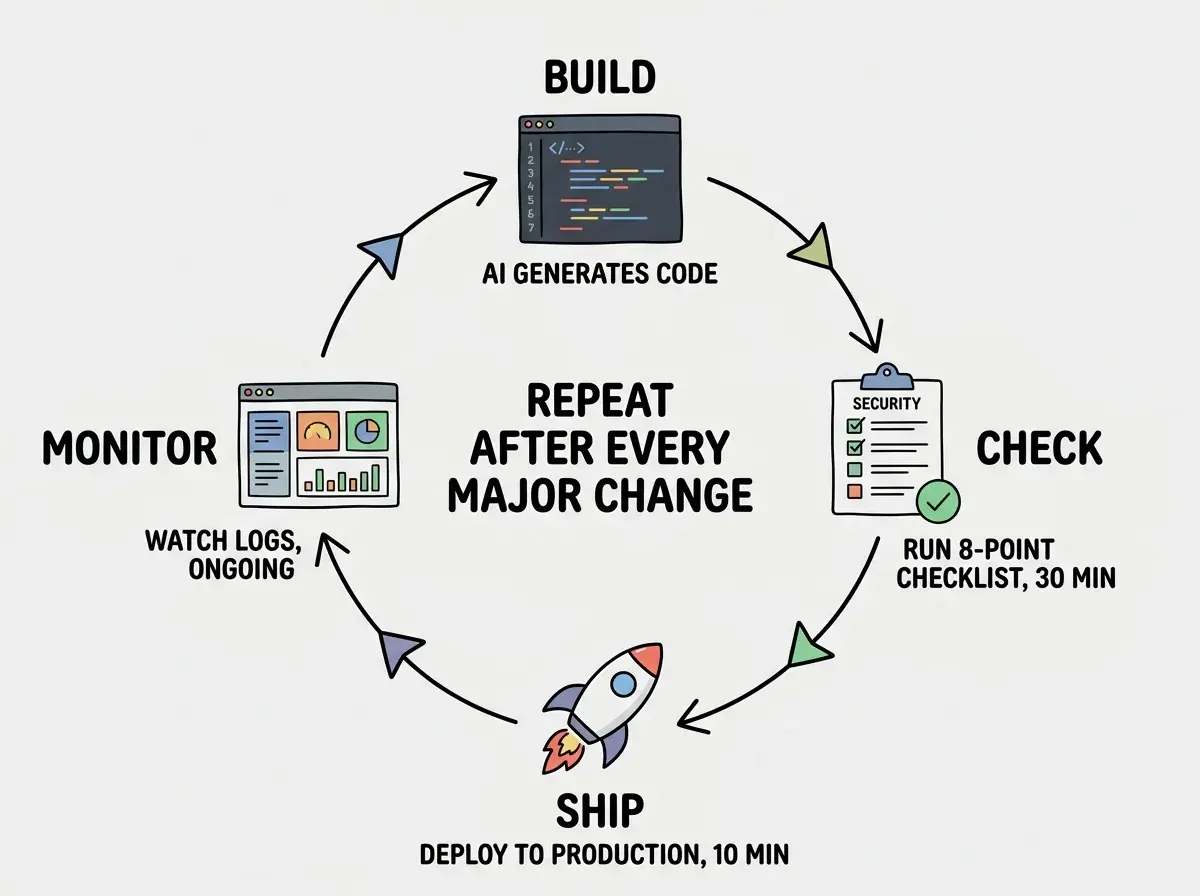
Security is not a one-time checklist. It is an ongoing practice. After you launch, there are three things you should do regularly.
Update your dependencies. Run npm audit periodically. It checks your installed packages against a database of known vulnerabilities and tells you which packages need updating. Most vulnerabilities in production applications come from outdated dependencies, not from your own code.
Monitor for unusual activity. Watch your application logs for patterns that suggest someone is probing for vulnerabilities: repeated failed login attempts, requests to URLs that do not exist (especially common paths like /admin, /wp-admin, or /.env), and unusually large request volumes from single IP addresses.
Re-run this checklist after major changes. Every time you add a significant feature, especially one that handles user data or adds new API endpoints, go through this checklist again. New code means new potential vulnerabilities.
What This Means For You
The 45% statistic is not a reason to stop building. It is a reason to add one more step to your workflow. Run this checklist before you ship, fix what it finds, and you will be ahead of the vast majority of AI-built applications that never get any security review at all.
- If you are a founder: Your users are trusting you with their data. A security breach in your MVP does not just lose you users. It can expose you to legal liability, especially if you operate in regions covered by GDPR or CCPA. Running this checklist takes less than an hour. Recovering from a data breach takes months or years, if your company survives it at all. Treat security as a prerequisite for launch, not a post-launch improvement.
- If you are a career changer: Security awareness is one of the fastest ways to differentiate yourself from other vibe coders. Being able to say "I run a security checklist before every deployment" signals professionalism that employers recognize and value. Most junior developers do not think about security until they are told to. Being proactive about it puts you ahead of the curve.
- If you are a student: Start running
npm auditon every project, even school projects. Build the habit of checking for vulnerabilities before it matters. When you eventually build something that handles real user data, the security mindset will already be part of your workflow. This is a skill that compounds over time, and the earlier you start, the more natural it becomes.
Learn the deployment fundamentals that get your app online safely.
Read the deployment guide