OWASP stands for the Open Worldwide Application Security Project, and their Top 10 list is the industry standard for web application security risks. If you have never heard of OWASP, that is fine. You do not need to memorize acronyms. You need to understand the ten specific ways your AI-generated code is most likely to be attacked, and how to check for each one.
This matters more for vibe coders than for traditional developers because the numbers are stark. Veracode's 2025 research found that 45% of AI-generated code introduced security flaws. AI-generated code is 2.74 times more likely to contain cross-site scripting vulnerabilities than human-written code. A Tenzai security study tested multiple AI-built applications and found that every single app lacked CSRF protection. These are not edge cases. These are the baseline.
I have mapped each OWASP category to the specific ways it shows up in AI-generated code, with real examples from real breaches. Some of these will feel technical, but I have kept the explanations practical. For each vulnerability, you get what it is, how AI tools introduce it, and how to check your code.
1. Broken Access Control
This is the number one vulnerability on the OWASP list, and it is the one that hit the Lovable platform hardest. Broken access control means users can act outside their intended permissions. They can view other users' data, modify records they should not have access to, or access admin features without being an admin.
AI tools introduce this constantly because they tend to build features without considering who should be allowed to use them. Your AI might create a beautiful admin dashboard with all the right UI components, but forget to verify that the person accessing it is actually an admin. The page looks correct, the functionality works, and the door is wide open.
The Lovable CVE-2025-48757 was exactly this. Over 170 production apps had Supabase databases without Row Level Security enabled. Any user (or attacker) could query any table and get any data. The AI tool built the app. It connected the database. It did not configure access control.
How to check: For every page and API route in your app, ask: "What happens if someone who is not logged in accesses this?" and "What happens if a regular user tries to access admin functionality?" If the answer to either question is "it works," you have broken access control.
2. Cryptographic Failures
This covers any failure to protect sensitive data: transmitting over HTTP, storing passwords in plain text, using weak encryption, exposing sensitive data in URLs. I have seen AI-generated code that stores passwords as plain text, uses MD5 for hashing (broken for over a decade), and includes secret keys in client-side JavaScript.
The Moltbook breach exposed 1.5 million authentication tokens and 35,000 email addresses because tokens were not properly secured.
How to check: Verify passwords are hashed with bcrypt, scrypt, or Argon2 (never MD5 or SHA-1). Verify tokens use cryptographically secure random functions, not Math.random(). Check that no sensitive data appears in URLs.
The OWASP Top 10 is not a theoretical framework. Each category maps directly to real breaches in AI-built applications that happened in 2025. Lovable, Moltbook, and Tea App are examples of what happens when these vulnerabilities go unchecked. The patterns are predictable, which means they are also preventable if you know what to look for.
3. Injection
Injection happens when user-supplied data gets sent to an interpreter as part of a command or query. AI tools often build database queries by concatenating strings instead of using parameterized queries. The code works for normal input, but when an attacker enters '; DROP TABLE users; -- into a form field, the database executes it.
How to check: If you see string concatenation building queries (like `SELECT * FROM users WHERE id = ${userId}`), that code is vulnerable. Use parameterized queries or an ORM like Prisma or Drizzle that handles parameterization automatically.
4. Insecure Design
This is different from implementation bugs. Insecure design means the architecture of your application is fundamentally flawed. No amount of perfect code can fix a bad design.
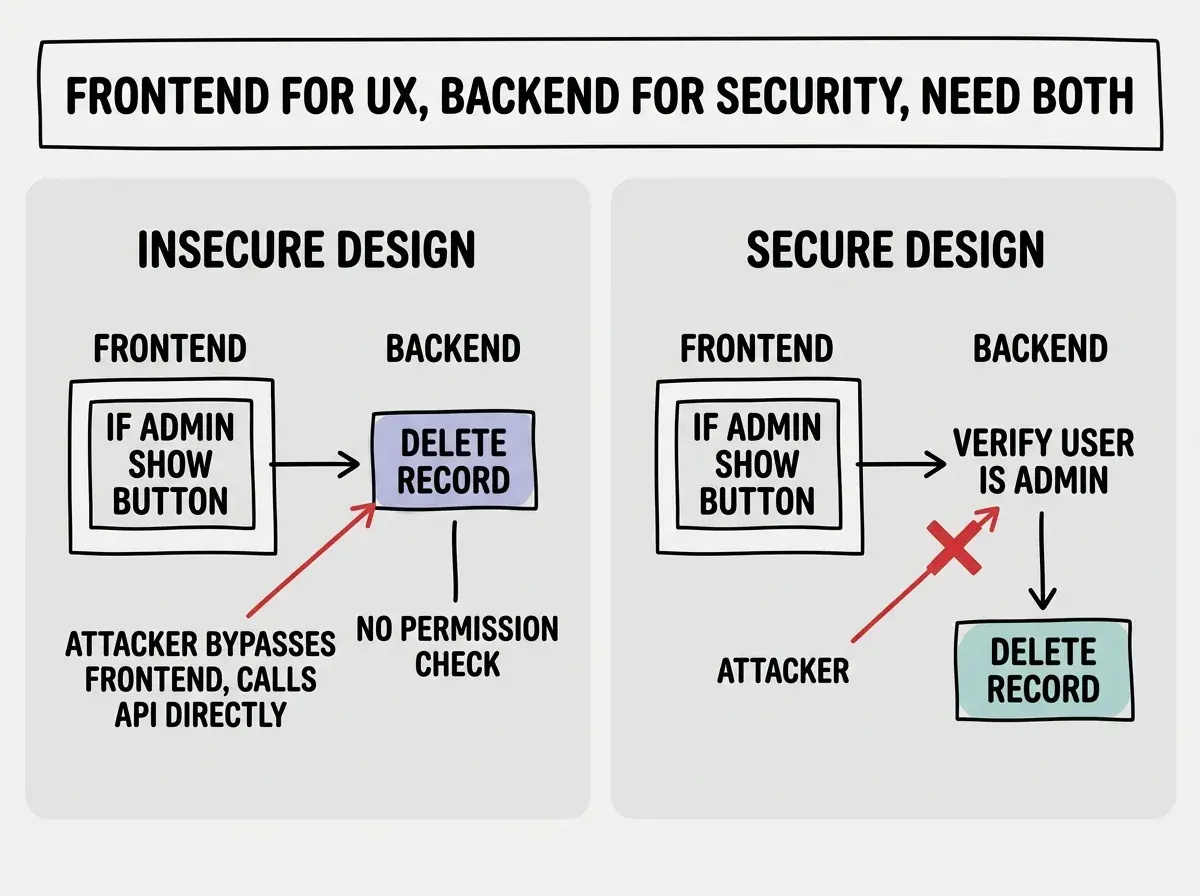
A common example in vibe-coded apps: performing authorization checks only on the frontend. The AI builds a React component that hides the "Delete" button for non-admin users, but the API endpoint that deletes records does not check permissions at all. An attacker does not use your UI. They call your API directly. Frontend-only security is not security. It is decoration.
Another common insecure design pattern: relying on obscurity for protection. "Nobody will guess this URL" is not a security strategy. The Tea App leaked 72,000 images and 1.1 million private messages, partly because the application assumed that private content was safe if it was not linked from the UI.
How to check: For every security check in your frontend code, verify that the same check exists in the corresponding backend code. The frontend check improves user experience (hiding buttons users cannot use). The backend check provides actual security (rejecting requests from users who should not make them). You need both.
5. Security Misconfiguration
This covers default configurations, open cloud storage, unnecessary features enabled, and verbose error messages. AI tools rarely configure security settings. They get features working and stop there.
How to check: Review every service your app connects to and verify that default credentials have been changed, unnecessary features are disabled, and access is restricted to what your app needs. Check that your app does not return stack traces in production.
6. Vulnerable and Outdated Components
Your app includes every npm package you depend on, and each has its own dependencies. AI tools do not always use the latest versions and sometimes pull in packages with known vulnerabilities.
How to check: Run npm audit in your project directory. It checks your dependency tree against a database of known vulnerabilities. Run this regularly, not just once.
7. Identification and Authentication Failures
This covers weak passwords, missing multi-factor authentication, non-expiring session tokens, and credential stuffing. AI tools often implement authentication from scratch instead of using established libraries, and the implementations are frequently incomplete. Missing rate limiting on login attempts is the most common issue.
How to check: Verify your login endpoint has rate limiting. Check that session tokens expire. Use an authentication library (NextAuth, Clerk, Supabase Auth) instead of custom code whenever possible.
Letting your AI tool build authentication from scratch instead of using an established library. Authentication is one of the most security-critical parts of any application, and getting it right requires handling dozens of edge cases: session management, token rotation, CSRF protection, rate limiting, secure cookie configuration, and more. Libraries like NextAuth, Clerk, and Supabase Auth handle all of these. Custom authentication code from an AI tool almost never does.
8. Software and Data Integrity Failures
This covers code or data that is not verified for integrity. If your AI tool added a <script> tag loading JavaScript from a CDN, and that CDN gets compromised, your app serves malicious code to every user.
How to check: Search for external <script> and <link> tags and ensure they include integrity attributes. Review package.json for loose version ranges (like *) that could pull in compromised versions.
9. Security Logging and Monitoring Failures
You cannot detect an attack if you are not watching for one. Most AI-built apps have zero logging of security events. No record of failed logins, no alerts for unauthorized access attempts.
How to check: At minimum, use your hosting platform's built-in logging. For more comprehensive monitoring, add a service like Sentry or LogRocket that captures failed authentication attempts and authorization failures.
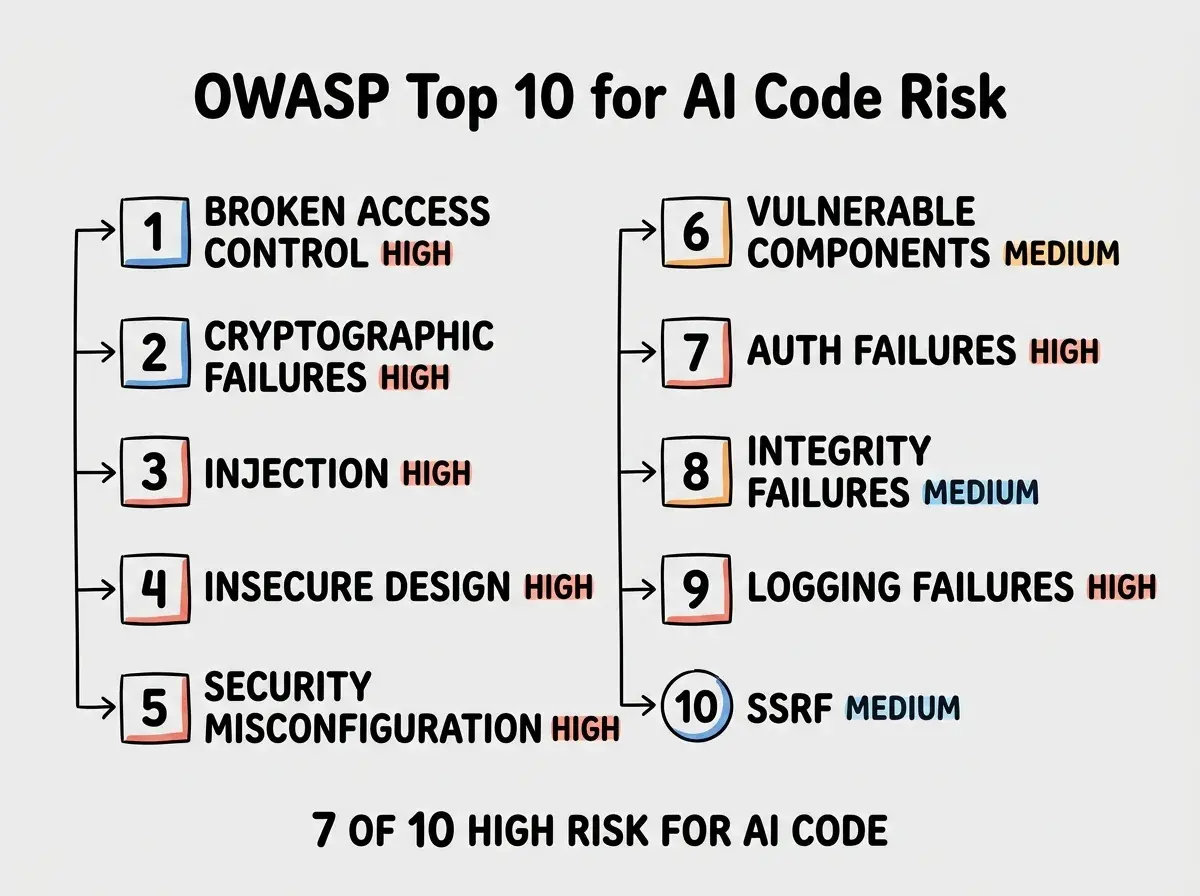
10. Server-Side Request Forgery (SSRF)
SSRF happens when an attacker makes your server send requests to unintended destinations. If your app fetches user-provided URLs (link previews, image proxies, webhooks), an attacker can provide internal URLs like http://169.254.169.254/latest/meta-data/ to access sensitive infrastructure details.
How to check: Search for any place where a user-supplied URL is fetched by your server. Validate that URLs use HTTPS and do not point to internal IP ranges (10.x.x.x, 172.16-31.x.x, 192.168.x.x, 169.254.x.x) or localhost.
Get the essential security checklist without the deep technical details.
Read the survival guideHow to Use This List
You do not need to fix all ten categories in one sitting. Prioritize based on your app's risk profile. If your app handles user data, broken access control and authentication failures are your top priorities. If your app processes payments, cryptographic failures and injection are critical. If your app fetches external content, SSRF should be high on your list.
The most efficient approach is to ask your AI tool to help. Paste each vulnerability description into your AI coding tool and ask it to check your codebase for that specific issue. AI tools are good at finding patterns in code, and security vulnerabilities are patterns. The irony is real: the same AI that introduced the vulnerabilities can help you find and fix them.
Dig deeper
A few hand-picked sources if you want to go further.
What This Means For You
The OWASP Top 10 exists because the same vulnerabilities appear in application after application, year after year. AI-generated code has not introduced new vulnerability categories. It has amplified existing ones by producing insecure patterns at a much faster rate than human developers ever could. Understanding these ten categories gives you a systematic way to check any AI-generated code before it reaches production.
- If you are a founder: Focus on the top four categories first. Broken access control, cryptographic failures, injection, and insecure design account for the vast majority of real-world breaches in AI-built applications. Getting these four right puts you ahead of nearly every other vibe-coded app in production. You can address the remaining six as your application grows and the stakes increase.
- If you are a career changer: Use this mapping to create security review checklists specific to your AI coding workflow. The 2.74x XSS multiplier and universal CSRF absence in the Tenzai study suggest that security awareness is a differentiator. Treat AI output with the same scrutiny a senior developer would apply to a junior developer's first pull request, because statistically, that is the security quality level you are working with.
- If you are a student: Study one OWASP category per week. Build a small vulnerable application intentionally (there are practice platforms like OWASP Juice Shop for this), exploit the vulnerability yourself, then fix it. Understanding how attacks work from the attacker's perspective is the fastest way to develop security intuition. This skill is rare among new developers and extremely valued by employers.
Now that you understand the risks, learn how to ship your app safely.
Read the deployment guide