A production readiness checklist for vibe coding is the difference between a smooth launch and a 3am scramble. Before your AI-built app goes live, you need to verify security, performance, error handling, monitoring, and backups. This checklist covers every item, organized by priority so you know what to tackle first.
Most vibe coders get the core features working, push to production, and call it done. The app loads, users can sign up, the main workflow functions. It feels ready. But "it works on my machine" is not the same as "it works reliably for thousands of strangers on unpredictable connections with varying intentions." The gap between a working demo and a production-grade application is where most vibe-coded projects quietly fail. Not with a dramatic crash, but with slow page loads that drive users away, unhandled errors that silently eat data, and security holes that invite exploitation.
Why Production Readiness Gets Skipped
The honest answer is that it feels boring. You just spent days or weeks prompting your AI to build something genuinely useful. The dopamine hit comes from seeing features work, not from configuring rate limiting. Add to that the pressure to ship fast (which is the entire promise of vibe coding) and you get a predictable pattern. Builders skip the boring stuff because they are excited about the interesting stuff.
Production readiness is not a separate phase you do after building. It is a set of specific, checkable items that protect the work you already did. Skipping them does not save time. It borrows time from your future self at a terrible interest rate.
There is also a knowledge gap. Traditional developers learn about error boundaries, CORS configuration, and database indexing over years of painful experience. Vibe coders skip that curriculum entirely, which is the whole point, but it means the checklist items that seem obvious to a senior engineer are genuinely invisible to someone shipping their first app. That is not a character flaw. It is just a gap that a good checklist fills.
The Complete Checklist, Organized Like a Pre-Flight Inspection
Pilots do not skip checklist items because the weather looks good. They run every item, every time, regardless of how many flights they have completed. A pilot with 10,000 hours still checks the fuel gauge. The reason is simple. The consequences of missing something are severe, and the cost of checking is trivial. Your production launch is no different.
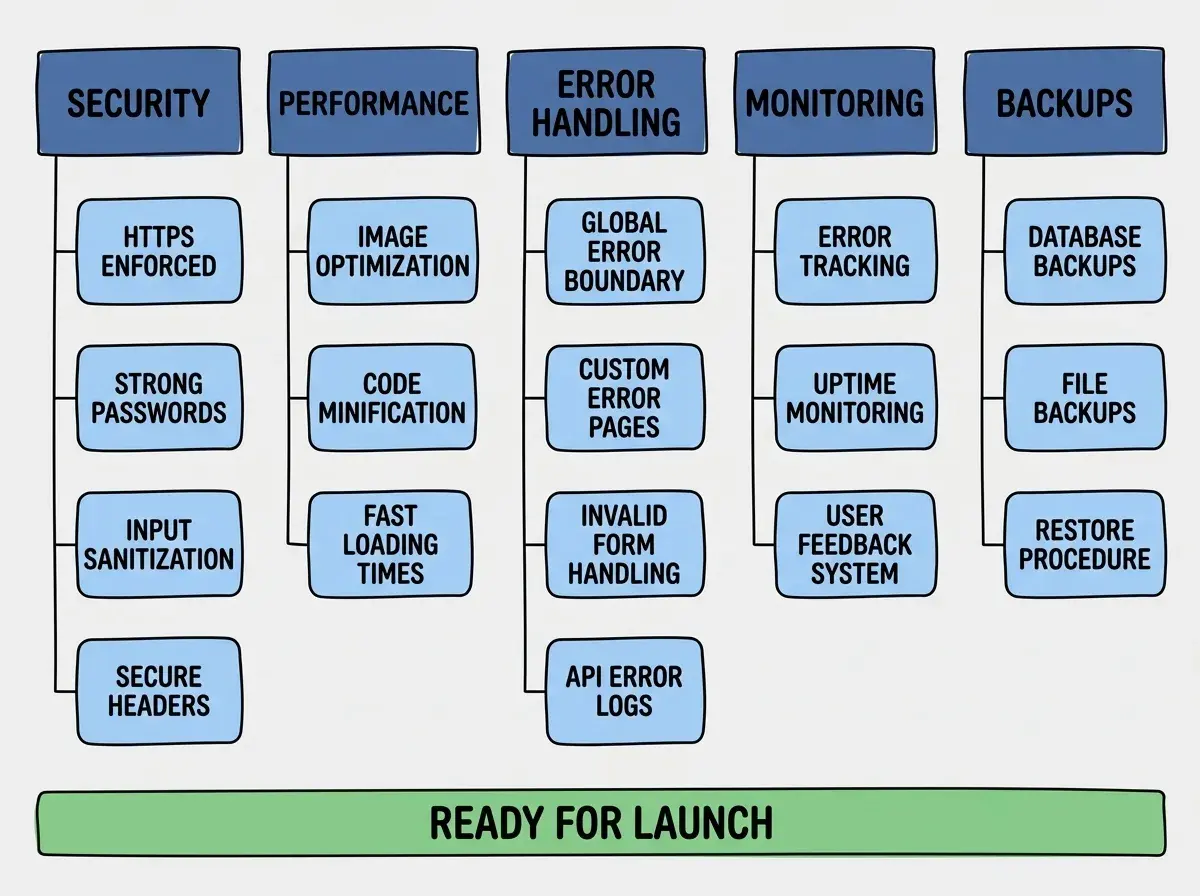
Here is the full list, broken into the five categories. I have marked each item as Must-Have (before launch), Should-Have (first week), or Nice-to-Have (first month).
Security
HTTPS everywhere (Must-Have). Every page, every API call, every asset should be served over HTTPS. Most hosting platforms like Vercel, Netlify, and Cloudflare Pages handle this automatically, but verify it. Visit your site with http:// and confirm it redirects to https://. If you have a custom domain, make sure the SSL certificate covers it.
Authentication works correctly (Must-Have). If your app has user accounts, test the full flow. Sign up, log in, log out, password reset. Then test what happens when someone tries to access a protected page without being logged in. AI tools are notorious for building beautiful login pages that do not actually protect anything behind them.
Input validation on every form (Must-Have). Every text field, dropdown, and file upload needs validation on both the client and the server. Client-side validation improves user experience. Server-side validation prevents attacks. If you only have one, make it server-side. AI-generated forms often validate on the client and trust whatever hits the API.
Environment variables not exposed (Must-Have). Check your browser's network tab and page source. If you can see API keys, database connection strings, or secret tokens in the client-side JavaScript, those secrets are compromised. In Next.js, only variables prefixed with NEXT_PUBLIC_ are safe to expose. Everything else should stay server-side.
CORS configured properly (Should-Have). Cross-Origin Resource Sharing controls which domains can call your API. If CORS is set to allow all origins (*), anyone can make requests to your API from any website. Restrict it to your actual domain.
Rate limiting on API routes (Should-Have). Without rate limiting, a single user (or bot) can hammer your API with thousands of requests per second. This can run up your hosting bill, overwhelm your database, or be used to brute-force passwords. Tools like Upstash offer rate limiting that works in serverless environments.
Performance
Image optimization (Must-Have). Unoptimized images are the single biggest performance killer on most websites. Use Next.js <Image> or a CDN with automatic resizing. Serve WebP format. A 4MB hero image that loads on every page view will tank your Core Web Vitals score and your bounce rate simultaneously.
Lazy loading for below-the-fold content (Should-Have). Images, heavy components, and third-party scripts that appear below the initial viewport should load only when the user scrolls near them. This dramatically improves perceived load time. The loading="lazy" attribute on images is the simplest version of this.
CDN for static assets (Must-Have). If you are on Vercel, Netlify, or Cloudflare Pages, your static assets are already on a CDN. If you are self-hosting or using Railway/Fly.io, verify that your CSS, JavaScript, and images are being cached and served from edge locations near your users.
Database indexes on queried columns (Should-Have). If your app has a database and users search, filter, or sort by specific fields, those fields need indexes. Without them, every query scans the entire table. This is invisible with 100 rows and devastating with 100,000 rows.
Caching strategy (Nice-to-Have). Decide what can be cached and for how long. Static pages can be cached aggressively. API responses with user-specific data cannot. A simple Cache-Control header on your static assets saves bandwidth and improves speed.
The Items Most Vibe Coders Miss
The security and performance items get talked about frequently enough that most builders at least consider them. The next three categories are where vibe-coded apps silently fall apart in production.
Learn the fundamentals of building production-ready apps with AI assistance.
Explore the BlogError Handling
Global error boundary (Must-Have). When something crashes in your React app, what does the user see? Without an error boundary, they see a blank white page or a cryptic stack trace. A global error boundary catches unhandled errors and shows a friendly "Something went wrong" message. It takes five minutes to add and saves every user who would otherwise see a broken page.
Custom 404 and 500 pages (Must-Have). The default Next.js error pages are functional but generic. A custom 404 page that matches your design and guides users back to useful content is a small touch that signals professionalism. A custom 500 page that apologizes and provides a way to report the issue is even better.
Form validation with clear error messages (Must-Have). When a user submits a form incorrectly, they should see exactly what went wrong and how to fix it. "Invalid input" is useless. "Email address must include an @ symbol" is helpful. AI tools often generate generic validation messages that frustrate users.
API error responses with proper status codes (Should-Have). Your API should return 400 for bad input, 401 for unauthenticated requests, 403 for unauthorized access, 404 for missing resources, and 500 for server errors. AI-generated APIs frequently return 200 with an error message in the body, which breaks client-side error handling.
Monitoring
Error tracking (Must-Have). Install Sentry, LogRocket, or a similar tool. When your app throws an error in production, you need to know about it before your users tell you (or before they silently leave). Free tiers are generous enough for early-stage apps. The setup takes about fifteen minutes.
Uptime monitoring (Should-Have). Services like BetterUptime, UptimeRobot, or even a free Cloudflare health check will ping your site every few minutes and alert you when it goes down. You should not learn about downtime from a Twitter DM.
Basic analytics (Should-Have). You need to know if anyone is actually using your app, which pages they visit, and where they drop off. Plausible, Fathom, or PostHog give you privacy-friendly analytics without the complexity of Google Analytics.
Structured logging for debugging (Nice-to-Have). When something goes wrong, console.log scattered through your codebase is not a logging strategy. Structured logging with timestamps, request IDs, and severity levels makes debugging production issues possible instead of painful.
Backups and Recovery
Database backups on a schedule (Must-Have). If your database disappears tomorrow, can you restore it? Most managed database providers (Supabase, PlanetScale, Neon, Turso) offer automatic daily backups. Verify that yours does, and test restoring from a backup at least once. An untested backup is not a backup.
Deployment rollback plan (Must-Have). If a deploy breaks production, how fast can you get back to the previous working version? On Vercel, you can redeploy a previous build in two clicks. On Cloudflare Pages, you can roll back to any previous deployment. Know the process before you need it.
DNS records documented (Nice-to-Have). Write down your DNS configuration somewhere outside your DNS provider. If your domain registrar has an outage or you need to transfer domains, having a record of your A records, CNAME entries, and MX records saves hours of reconstruction.
How to Work Through the List Without Getting Overwhelmed
Twenty-five checklist items look intimidating. But here is the thing: you do not need to tackle them all at once. The priority labels exist for a reason.
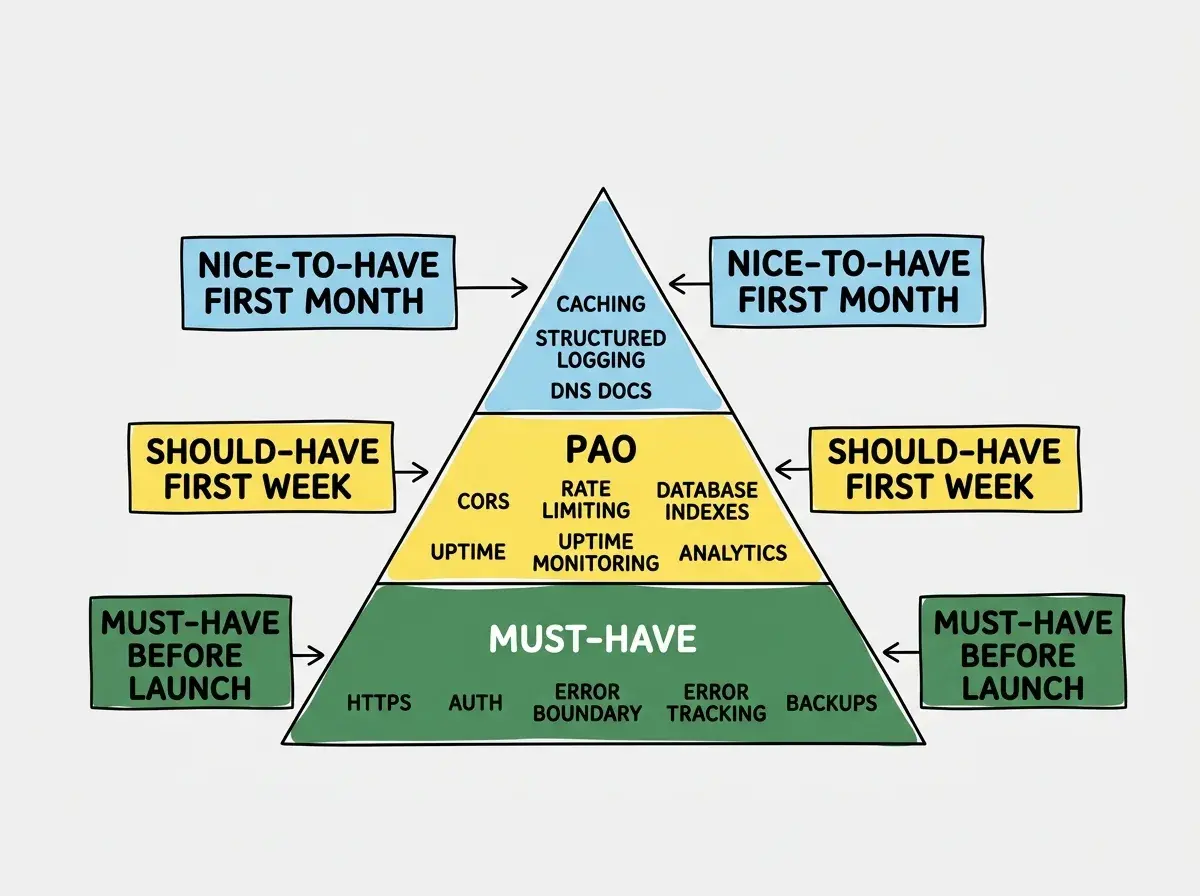
Start with the Must-Have items. There are roughly a dozen of them, and most take between five and thirty minutes each. You can realistically knock out every Must-Have item in a single focused afternoon. Block four hours on your calendar, put on some music, and work through them one by one. Check each item off as you go. The satisfaction of completing a checklist is an underrated motivator.
Then, during your first week in production, layer on the Should-Have items. These are the ones that will not cause an immediate crisis if they are missing, but will gradually degrade the experience for your users. Rate limiting, database indexes, analytics. Each one is a small improvement that compounds.
Do not try to make every item perfect before launch. A rate limiter set to 100 requests per minute is better than no rate limiter while you debate whether the threshold should be 60 or 120. Ship the good-enough version and refine it after launch when you have real usage data.
The Nice-to-Have items are for your first month. By then, you will have real production data telling you where to focus. Maybe your caching strategy matters more than you expected because your hosting bill is climbing. Maybe structured logging is urgent because you keep getting bug reports you cannot reproduce. Let production teach you what to prioritize.
The pilot analogy holds all the way through. A pre-flight checklist does not make flying less exciting. It makes it possible. The checklist is not bureaucracy. It is what lets you fly with confidence instead of anxiety. Your production launch deserves the same discipline.
Dig deeper
A few hand-picked sources if you want to go further.
What This Means For You
Every item on this checklist exists because someone, somewhere, shipped without it and paid the price. The Lovable platform shipped without proper access control and exposed 170+ production databases. The Tea App shipped without image security and leaked 72,000 user photos. These were not amateur projects. They were well-funded platforms that skipped checklist items because shipping fast felt more important than shipping safely.
You do not need to be paranoid. You need to be methodical. Print this checklist (or save it as a bookmark). Run through it before every major launch. Over time, many of these items will become habits that you build into your development process from the start. But until then, the checklist is your safety net.
The gap between a demo and a production app is not talent or experience. It is discipline. And a good checklist makes discipline easy.
Explore guides on deployment, security, and scaling for vibe-coded applications.
Browse All Articles