Airline pilots use a pre-flight checklist before every single takeoff. Not just student pilots. Not just on complicated routes. Every pilot, every flight, even after 10,000 flights. The checklist exists because the consequences of forgetting one small thing (fuel levels, flap positions, communication frequencies) can be catastrophic. And human memory, no matter how experienced, is unreliable under pressure.
Vibe coding has the same problem. The consequences are not life-threatening, but they are project-threatening. 92% of developers now use AI daily in their workflow, and most of them jump straight into prompting without any preparation. The result is predictable. They build the wrong thing, choose the wrong tools, skip critical setup, and hit a wall at 70% completion that could have been avoided entirely.
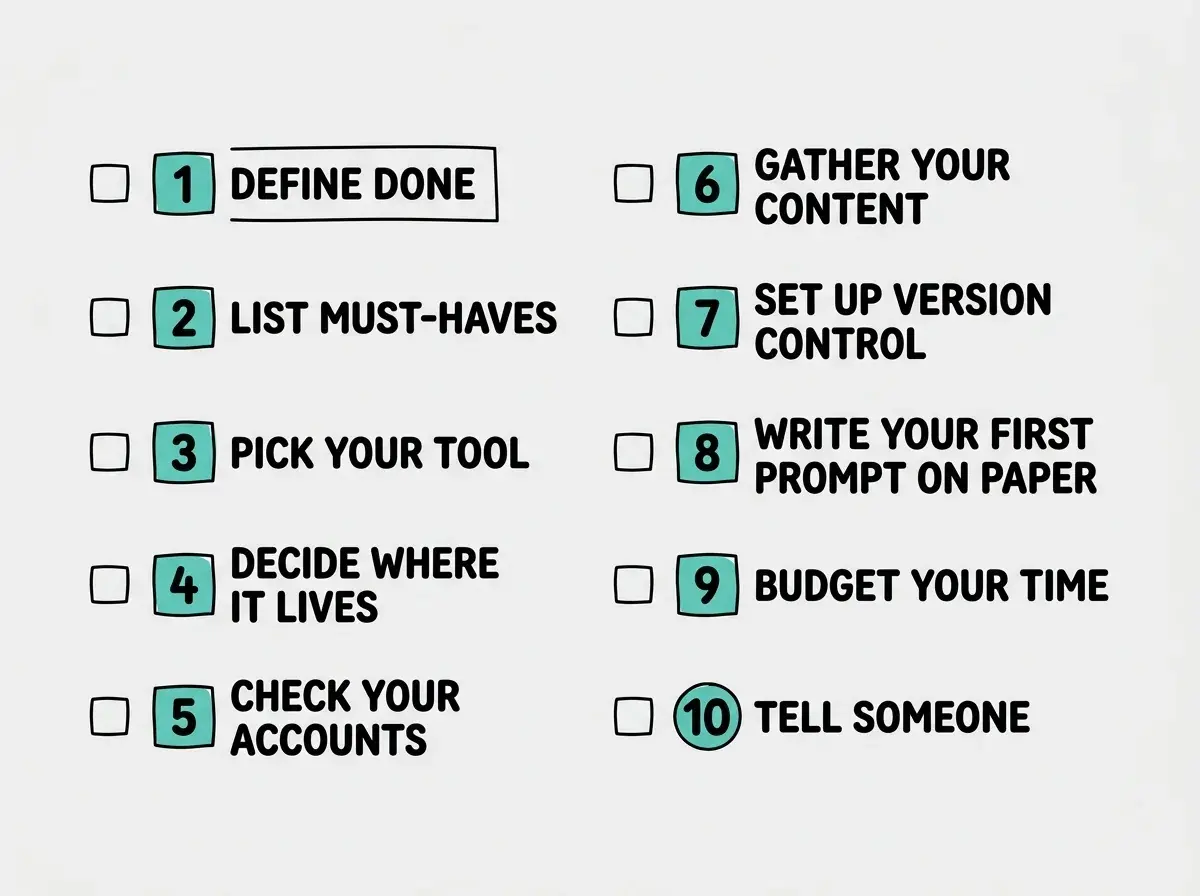
This is your pre-flight checklist. Ten items to verify before you type a single prompt. It takes fifteen minutes and saves you days of rework.
Why You Need a Checklist (Not Just Enthusiasm)
The urge to skip straight to building is powerful. You have an idea, the AI tool is right there, and you want to see something on screen immediately. That enthusiasm is good. It is also the number one reason first and second projects fail.
Pilots do not skip their checklist because they are excited to fly. They complete it because they are excited to fly and land safely. The checklist is not bureaucracy. It is what makes the exciting part possible.
Every item on this list addresses a specific failure pattern that shows up repeatedly in vibe coding projects. None of them are theoretical. All of them come from real projects that went sideways because one small thing was not verified upfront.
The fifteen minutes you spend on this checklist before opening your AI tool will save you five to ten hours of rework during the build. Every item addresses a failure pattern that hits the majority of first-time vibe coding projects. Treat this the way a pilot treats their pre-flight routine: non-negotiable, regardless of how many times you have done it before.
The Pre-Flight Checklist
Print this out. Bookmark it. Pull it up before every project. Pilots do not memorize their checklist and work from memory. They read it every time. You should too.
Item 1. Write Down What "Done" Looks Like
Before you build anything, write one to three sentences describing what the finished project does. Not what it looks like. Not what technology it uses. What it does for the person using it.
"A page where visitors can sign up for my newsletter and see past issues" is a good definition of done. "A beautiful, modern website with great UX" is not. The AI needs specific outcomes to aim at. If you cannot describe the finish line in plain language, you are not ready to start building.
Item 2. List Your Must-Have Features (and Nothing Else)
Write down the three to five features that must work for the project to be usable. Everything else goes on a separate "nice to have" list that you will not look at until the must-haves are complete.
This is the vibe coding equivalent of checking fuel levels. Most projects do not fail because a feature was too hard to build. They fail because the builder tried to build fifteen features at once and none of them worked properly. Three features that work are infinitely more valuable than twelve features that sort of work.
Item 3. Pick Your Tool Before You Start
Choose your AI coding tool and commit to it for this project. Do not switch tools mid-project unless something is genuinely broken. Each tool has different strengths, different file structures, and different deployment paths. Switching halfway through creates a mess that is harder to untangle than starting over.
If this is your first project and you have never seen a code editor, start with a browser-based tool like Lovable or Bolt. If you have some technical comfort, Cursor or Replit will give you more control. The specific choice matters less than making it before you begin.
Item 4. Decide Where It Will Live
Your project needs a home on the internet eventually. Figure out where that is now, not after you have built the whole thing. Many deployment problems come from building something in one environment and then trying to move it to another.
If you are using a browser-based tool like Lovable or Replit, deployment is usually built in. If you are using Cursor or another desktop tool, decide between Vercel, Netlify, or Cloudflare Pages before you write your first prompt. This is like a pilot confirming their destination airport before takeoff rather than figuring it out mid-flight.
Item 5. Check Your Accounts and API Keys
Nothing kills momentum faster than getting two hours into a project and discovering you need an API key from a service that requires email verification and a 24-hour approval process.
Before you start, make a list of every external service your project needs. Email service for newsletters? Payment processor for charging customers? Database for storing user data? Sign up for all of them now. Get your API keys. Verify your accounts. This is the equivalent of a pilot confirming that all communications are online before leaving the gate.
Item 6. Gather Your Content First
If your project needs text, images, logos, or any other content, collect it before you start building. Writing placeholder text and planning to "fill it in later" creates two problems. First, you end up designing around placeholder content that is a completely different length than your real content. Second, "later" often never arrives, and you launch with lorem ipsum still visible.
Spend twenty minutes pulling together the actual words and images your project needs. Real content makes every AI prompt more specific and every result more useful.
Item 7. Set Up Version Control
If you are using a desktop tool like Cursor, create a Git repository before you write your first line of code. If you are using a browser-based tool, check whether it has built-in version history (most do, but verify).
Version control is your ejection seat. When something goes wrong (and something will go wrong), you need the ability to rewind to a point where things still worked. Pilots have emergency procedures for every phase of flight. Your version control is the emergency procedure for "the AI just broke everything and I do not know why."
The most expensive mistake in vibe coding is not a bug or a bad prompt. It is building for three hours without saving a checkpoint, then having the AI make a change that breaks everything with no way to undo it. Set up version control first. Commit early and often. Every working state is a checkpoint you can return to.
Item 8. Write Your First Prompt on Paper
Before you type anything into your AI tool, write your opening prompt on paper or in a separate notes app. Read it out loud. Does it clearly describe what you want? Does it include the technology choices you made in items 3 and 4? Does it reference the specific features from item 2?
Your first prompt sets the trajectory for the entire project. A vague first prompt is like a pilot entering the wrong heading into the navigation system. You will fly confidently in the wrong direction and not realize it until you are far from where you need to be.
A good opening prompt includes what the project is, who it is for, which technologies to use, and the first one or two features to implement. It does not try to describe the entire project in one message.
Item 9. Budget Your Time Realistically
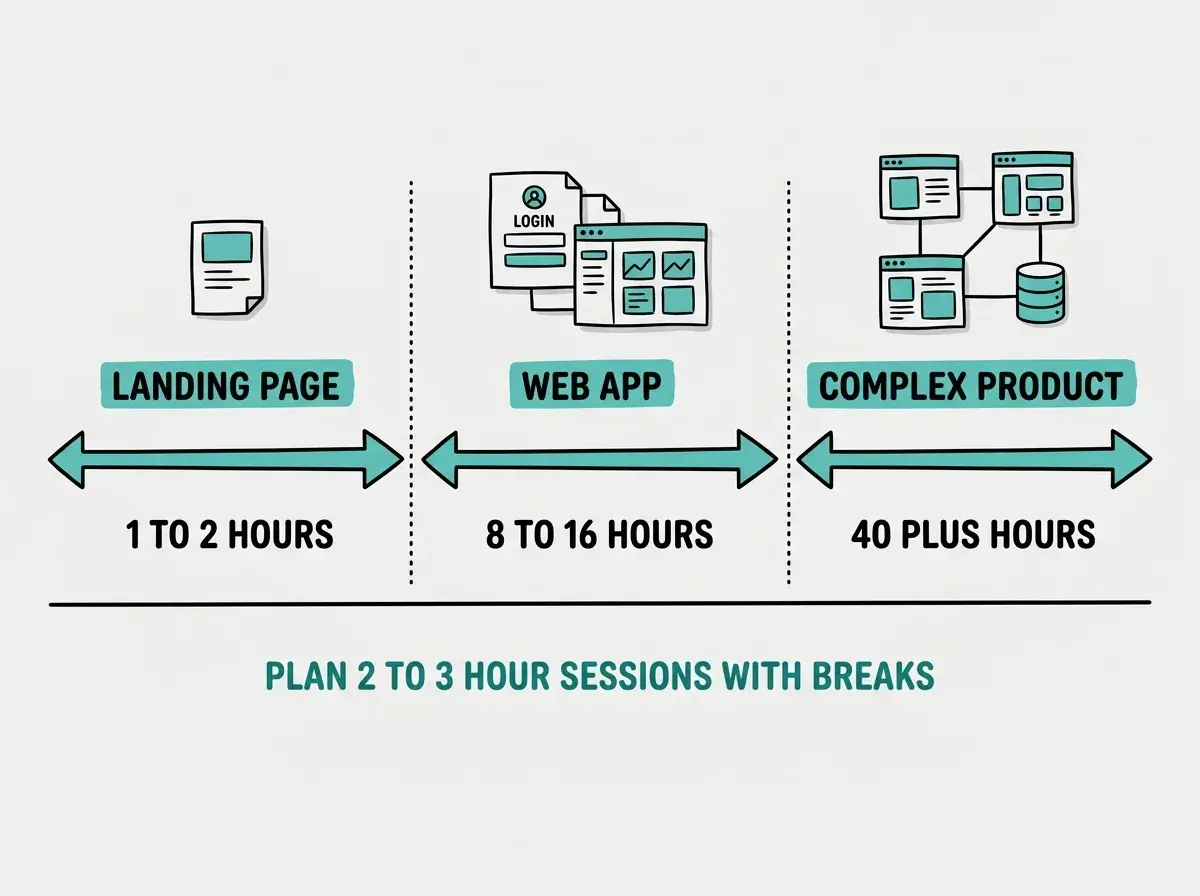
AI coding tools make building faster, not instant. A simple landing page takes one to two hours. A web application with user accounts and a database takes a full weekend at minimum. A complex product with multiple user types and integrations takes weeks.
Set a time budget before you start and plan your first session to last no more than two to three hours. Longer sessions lead to fatigue, which leads to accepting AI suggestions without reviewing them, which leads to bugs that compound on each other. Short, focused sessions with breaks produce better results than marathon builds.
Item 10. Tell Someone What You Are Building
This is the item most people skip, and it is one of the most valuable. Tell a friend, a partner, a colleague, or even an online community what you are about to build. Describe it in one sentence.
This does three things. It forces you to articulate the idea clearly (if you cannot explain it simply, you are not ready to build it). It creates accountability that motivates you to finish. And it gives you someone to show the result to, which makes the process more rewarding.
The Pre-Takeoff Mental Check
Once you have completed all ten items, do one final scan. This is the equivalent of a pilot's final "cabin ready" check before advancing the throttle.
Ask yourself these three questions. Can I describe what "done" looks like in one sentence? Do I have every account, API key, and piece of content I need? Is my first prompt written and reviewed?
If the answer to all three is yes, you are cleared for takeoff. Open your AI coding tool and paste in that first prompt you wrote on paper.
If any answer is no, take five more minutes and fix it. Pilots do not take off with an incomplete checklist, and neither should you.
After Takeoff
The checklist does not guarantee a perfect project. Pilots still encounter turbulence and mechanical issues after takeoff. You will still hit bugs, confusing errors, and moments where the AI generates something completely wrong.
But you will hit those problems with a clear destination, the right tools, your content ready, and version control protecting your work. That is the difference between a problem that derails your project and one that is just a normal part of the flight.
The best vibe coders are not the ones who prompt the fastest. They are the ones who prepare before they build. The vibe coding checklist takes fifteen minutes. The rework it prevents takes days. Use it on every project, because pilots never retire their checklist, and that consistency is exactly what makes them reliable.