Think of AI code review like hiring a very eager junior developer to sit next to you and read every line of code you write. This junior never gets tired, never gets distracted, and never feels awkward pointing out that you forgot to handle a null check. But this junior also has no taste. It will flag a variable name with the same urgency as a SQL injection vulnerability. Your job is not to let it review everything. Your job is to teach it what matters.
That distinction, between a tool that flags everything and a tool that flags the right things, is the entire game of AI code review. Get the setup right and you have a tireless assistant that catches the bugs your eyes skip over at 11pm. Get it wrong and you have a noise machine that trains you to ignore every suggestion, including the ones that would have saved you from a production incident.
Why AI Code Review Works Differently Than You Expect
Most developers expect AI code review to work like a linter on steroids. You point it at your code, it finds bugs, you fix them. But that mental model misses the most valuable part.
AI code review excels at pattern recognition across your entire codebase. A human reviewer sees the diff. An AI reviewer sees the diff in the context of every file it has been trained on (and, if configured correctly, your entire repository). This means it catches inconsistencies that no human would notice. You are using camelCase in this file but snake_case in the three files it imports from. You are handling errors with try-catch here but using Result types everywhere else. Your new endpoint does not follow the authentication pattern established in your other 47 endpoints.
That pattern-matching ability is the real superpower. Bug detection is a bonus.
AI code review is most valuable not for finding bugs, but for enforcing consistency across your codebase. A codebase where every file follows the same patterns is a codebase where bugs have fewer places to hide.
The numbers back this up. Studies show that 46% of new code is now AI-generated, which means code review volume is exploding. Human reviewers cannot keep pace with the output. AI review is not replacing human judgment. It is handling the volume so humans can focus on architecture, logic, and design decisions that require actual thought.
Setting Up AI Code Review Step by Step
Here is the setup workflow I recommend. Each step builds on the previous one, so follow them in order.
Start with one tool, not three. GitHub Copilot has built-in PR review. CodeRabbit and Sourcery are standalone options that integrate with GitHub and GitLab. Pick the one that matches your hosting platform. Install the GitHub App or CLI tool and connect it to your repository. Do not configure anything else yet.
Before you trust any AI reviewer, you need to calibrate your expectations. Run it against five merged PRs where you already know the outcome. Did it catch the bug that slipped through? Did it flag things that do not matter? This baseline tells you where the tool is strong and where it generates noise.
Create a .ai-review or equivalent config file in your repo root. List your coding conventions, the patterns you care about, and explicitly tell it what to ignore. Example: "Do not flag line length. Do not suggest adding comments to obvious code. Always flag unhandled promise rejections and missing input validation."
Configure the tool to distinguish between blocking issues (security vulnerabilities, data loss risks) and suggestions (style preferences, minor refactors). Your team should only be required to address blocking issues. Suggestions are optional. This single setting eliminates 80% of the noise complaints.
Add the AI review as a required check on your PRs, but set it to "informational" for the first two weeks. Let your team see the feedback without being blocked by it. After two weeks, promote the blocking-level checks to required status. Keep suggestions as informational permanently.
This phased rollout matters because dumping a noisy AI reviewer on a team with no warning is the fastest way to guarantee everyone ignores it within a week.
Configuring Reviews That Actually Help
The default configuration of every AI code review tool is terrible. Not because the tools are bad, but because the defaults try to be useful for every possible codebase, which means they are perfectly calibrated for none of them.
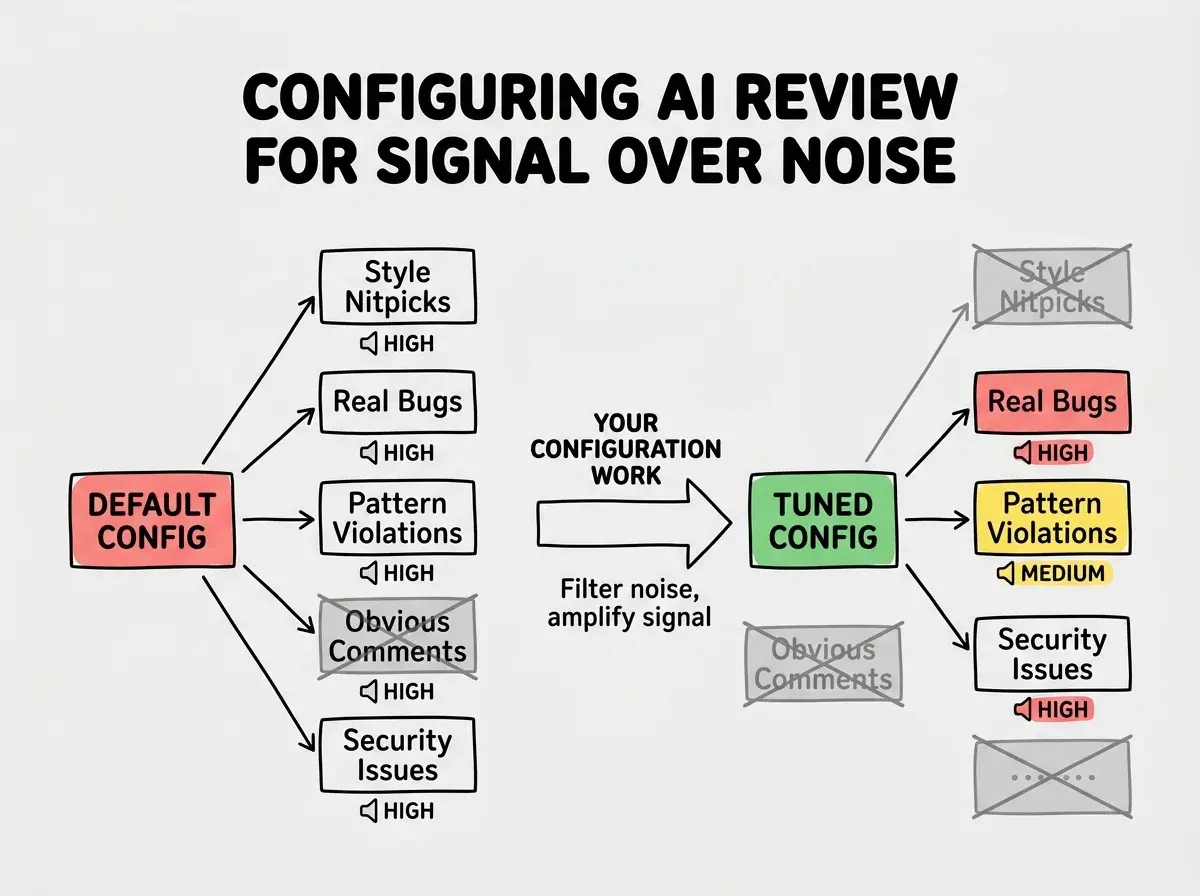
Here is what to configure on day one.
Turn off style enforcement entirely. You already have Prettier, ESLint, or Black handling formatting. An AI reviewer that argues about semicolons is wasting everyone's attention. Tell it explicitly: "Do not comment on formatting, style, or naming conventions unless they violate a pattern established elsewhere in the codebase."
Focus on three categories. Security issues, unhandled error paths, and pattern inconsistencies. These three categories represent the highest-value feedback an AI can provide. Everything else is nice-to-have at best and actively harmful at worst.
Set context scope. Most tools let you control how much of the codebase the AI considers during review. More context means better pattern matching but slower reviews and higher costs. Start with the changed files plus their direct imports. Expand to the full repository only if you are getting too many false positives about patterns.
Leaving the AI reviewer at default settings and then blaming the tool when it generates too much noise. Every team that says "we tried AI code review and it was useless" skipped the configuration step. An unconfigured AI reviewer is like an unconfigured spam filter. It will flag everything, including the important messages, until you teach it what matters.
What AI Catches That Humans Miss
After six months of using AI code review on my own projects, the pattern is clear. Humans and AI catch different bugs, and the overlap is smaller than you would think.
AI catches consistently. Null pointer risks, missing error handling on async operations, inconsistent patterns across files, SQL injection and XSS vulnerabilities, and race conditions in concurrent operations.
Humans catch consistently. Logic errors where the code does the wrong thing cleanly. Business rule violations. Architectural problems where the code works but will cause pain later. Over-engineering where a simple problem received a complex solution.
The most effective process uses both. AI handles mechanical checks. Humans handle judgment calls that require understanding the product and the long-term trajectory.
AI code review is one piece of the puzzle. Learn the full workflow for building with AI tools.
Explore More GuidesHandling False Positives Without Losing Trust
False positives are the silent killer of AI code review adoption. Every false positive trains your brain to skip the next suggestion. After enough false positives, you stop reading AI feedback entirely, and that is when a real bug slips through.
The fix is aggressive pruning. When the AI flags something incorrectly, do not just dismiss it. Add the pattern to your ignore list. If it flags a test file for not handling errors, tell it to skip test files. If it flags an intentional any type, tell it your team allows any in migration scripts. Every false positive you prune permanently improves the signal-to-noise ratio.
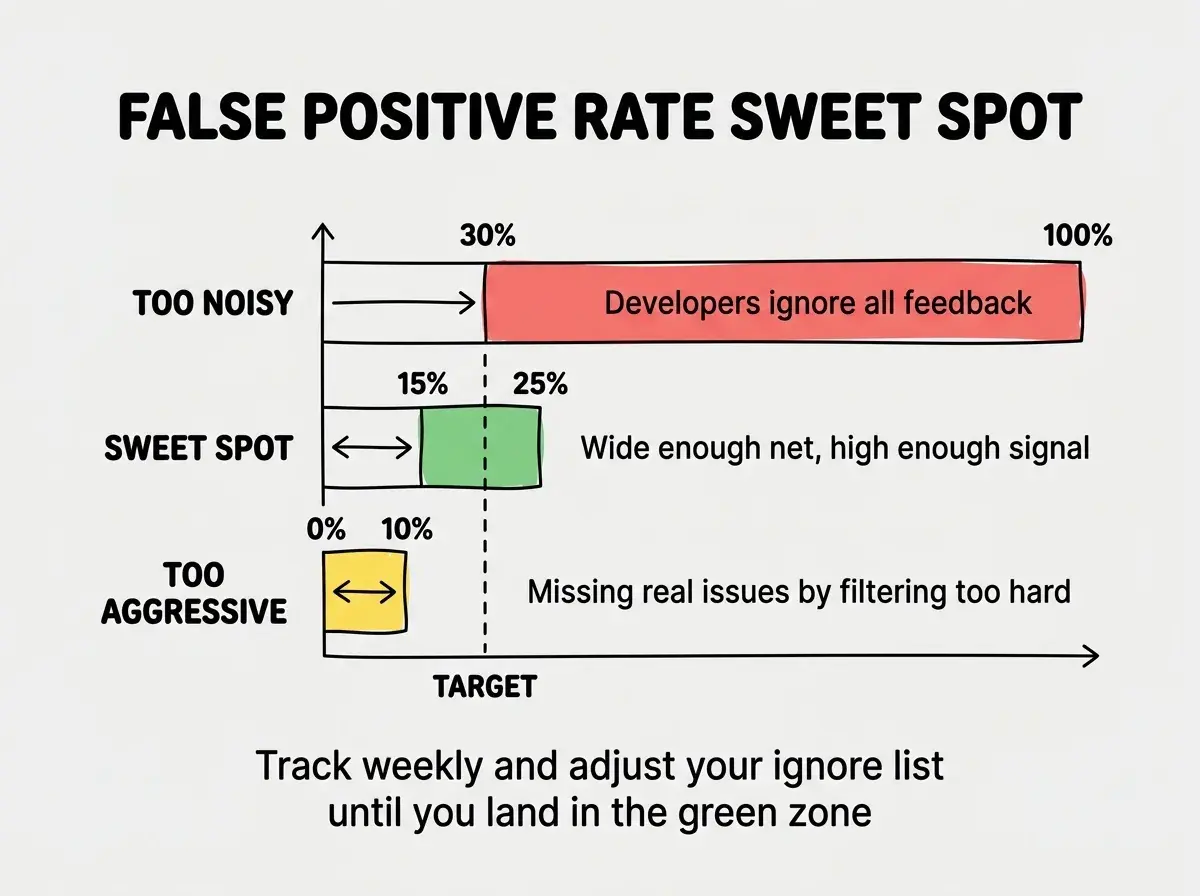
Track your false positive rate for the first month. If more than 30% of AI suggestions are irrelevant, your configuration needs work. If less than 10% are irrelevant, you might be filtering too aggressively and missing useful feedback. The sweet spot is 15% to 25% false positives, which means the tool is casting a wide enough net to catch edge cases while staying useful enough that developers actually read the feedback.
Making AI Review Work With Your Team
The biggest mistake teams make with AI code review is treating it as a replacement for human review. It is not. It is a filter that runs before the human reviewer ever sees the code.
Here is the workflow that works. Developer opens a PR. AI review runs automatically and posts comments within minutes. Developer addresses any blocking issues before requesting human review. Human reviewer sees clean code with mechanical issues already resolved, and can focus entirely on logic, architecture, and product fit.
This workflow saves your senior engineers 30 to 45 minutes per PR review because they are no longer hunting for null checks and missing error handlers. That time goes back into mentoring and architecture decisions.
Make it clear to your team that AI feedback is from a tool, not from a person. It is a spell checker for code. You do not take it personally when your word processor underlines a typo.
Code review is just the start. Learn how to integrate AI across your entire development workflow.
See All Workflow Guides