The architecture decisions in your AI-built app are the five choices you cannot undo cheaply once real users show up. Get them right early and your app scales smoothly. Get them wrong and you are looking at a rewrite that costs more than the original build. Most vibe coders skip these decisions entirely, letting their AI tool pick defaults that seem fine at first and become catastrophic at scale.
Here is what makes these decisions tricky. When you are building with Cursor, Bolt, or Claude Code, the AI will happily generate working code for whatever architecture you describe (or don't describe). It will scaffold a microservices setup if you ask. It will wire up three different databases if your prompt implies it. The problem is not that the AI builds it wrong. The problem is that nobody told it what "right" looks like for your specific situation, your team size, and your growth trajectory. These five decisions are the foundation your entire product sits on.
Why Architecture Matters Before You Scale
Think of architecture like the foundation of a house. You can change the paint color, swap out the fixtures, even knock down interior walls. But you cannot change the foundation without demolishing the house first. That is exactly what architecture decisions are in software. They are the concrete slab everything else sits on.
Architecture is not about building for millions of users on day one. It is about making choices that leave doors open instead of bricking them shut. The right defaults today save you from a complete rewrite in six months.
The 92% of developers now using AI tools daily are shipping faster than ever. Pieter Levels built a flight simulator in three hours. But speed without structural thinking creates apps that work brilliantly as demos and crumble as products. The five decisions below are what separate the demo from the product.
The Five Decisions
Every AI-built app rests on five foundational choices. Like the five load-bearing walls of a house, each one supports a different part of the structure. Remove one or pour it wrong, and the whole thing develops cracks. Let's walk through each.
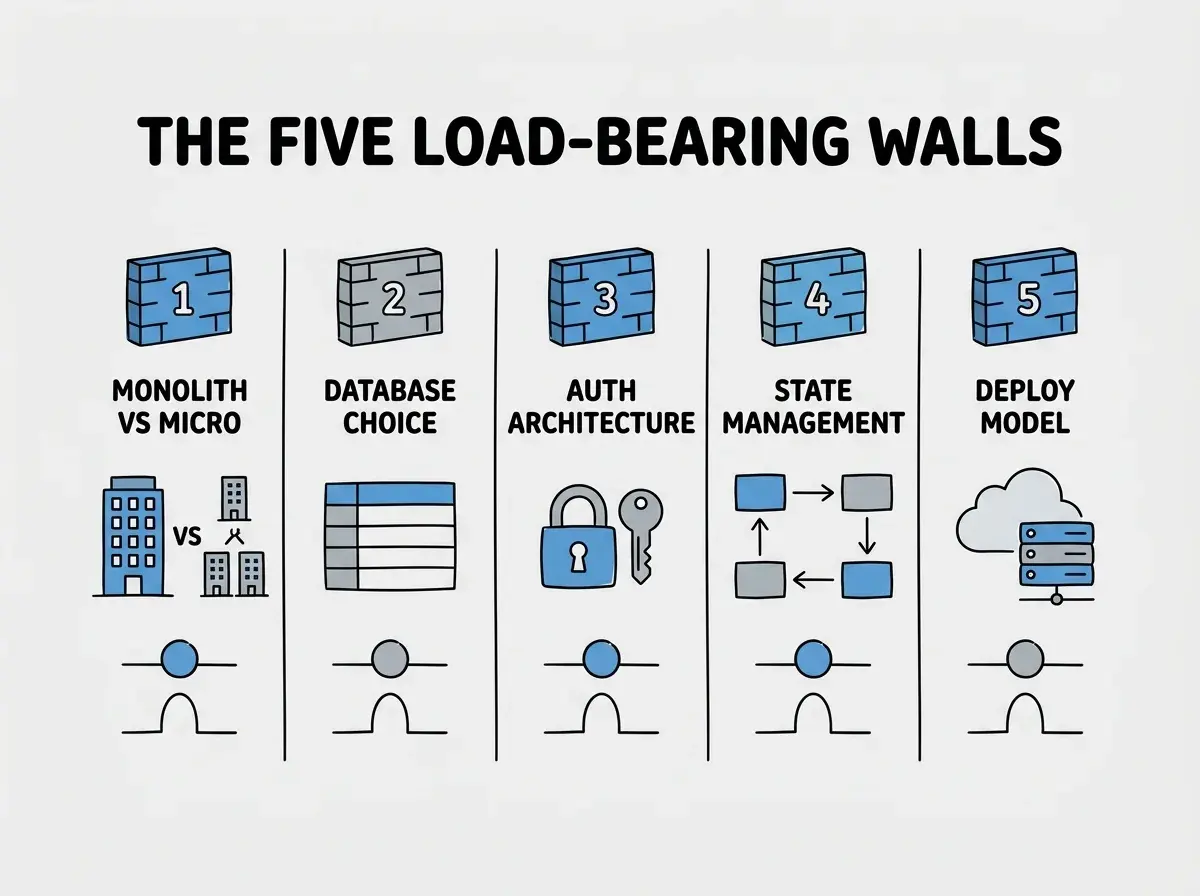
1. Monolith vs microservices. This is the first wall you pour and the one most vibe coders get wrong by overthinking it. A monolith is one codebase, one deployment, one thing to debug. Microservices split your app into separate services that talk to each other over the network. Big tech companies use microservices because they have hundreds of engineers working on the same product simultaneously. You do not have that problem. If you are a solo founder or a small team, a monolith is not just acceptable, it is the correct choice. Next.js, Rails, Laravel, Django; these are all monolith-friendly frameworks that handle enormous traffic. Shopify runs one of the largest e-commerce platforms in the world on a Rails monolith. Start with a monolith. Reconsider only when you have a team larger than five engineers working on the same codebase and stepping on each other's toes daily. That is the signal, not a certain number of users.
2. Database choice and schema design. This is the wall that determines how your data flows through the entire house. PostgreSQL is the right default for almost every AI-built app. It handles relational data, JSON data, full-text search, and geospatial queries. It scales to millions of rows without breaking a sweat. The mistake vibe coders make is reaching for trendy options (MongoDB, Firebase Realtime Database, multiple specialized databases) because the AI tool suggests them or because a tutorial used them. PostgreSQL on Supabase, Neon, or Railway gives you a managed database with connection pooling, backups, and a generous free tier. Your schema design matters more than your database engine. Tell your AI tool exactly what tables you need, how they relate to each other, and what columns need indexes. A well-designed schema on PostgreSQL will outperform a poorly designed schema on any database.
3. Auth architecture. This wall protects every room in the house. Authentication (who you are) and authorization (what you can access) are the two hardest things to retrofit. If you build your own auth from scratch, you are signing up for password hashing, session management, token refresh, email verification, password reset flows, rate limiting on login attempts, and a dozen edge cases that each represent a potential security vulnerability. The right default is to use a managed auth provider. Supabase Auth, Clerk, Auth.js (formerly NextAuth), or Firebase Auth. These handle the security-critical plumbing and give you hooks to customize the user experience. Roll your own only if your product IS an auth product. Otherwise, you are rebuilding a lock when you could buy a deadbolt.
4. State management approach. This is the wall that determines how information flows between rooms. State is everything your app remembers at any given moment, including which user is logged in, what is in their cart, what form fields they have filled out, and what data is loaded from the server. The mistake is reaching for complex state management libraries (Redux, Zustand, MobX) before you need them. For most vibe-coded apps, your framework's built-in tools are enough. React's useState and useContext cover most client-side needs. Server components in Next.js eliminate the need for client-side data fetching state entirely. Add a state library only when you find yourself passing the same data through five or more layers of components and it becomes painful. That is the signal, not a blog post telling you that you need global state management.
5. Deployment and hosting model. This is the roof that covers everything. Where and how you deploy determines your cost structure, your performance characteristics, and what technical capabilities are available to you. Serverless platforms (Vercel, Cloudflare Pages, Netlify) handle scaling automatically, cost nothing at low traffic, and deploy in seconds. Traditional servers (Railway, Fly.io, Render) give you persistent processes, WebSocket support, and more control over the runtime environment. The right default for most vibe-coded apps is serverless. It matches the usage pattern of early-stage products perfectly, because you pay proportionally to traffic, which is low when you are starting. Reconsider when you need long-running processes, persistent WebSocket connections, or when your serverless bill exceeds what a dedicated server would cost.
Each of these decisions has a clear default and a clear signal for when to reconsider. The house analogy holds because, like a real foundation, these choices get exponentially more expensive to change over time. Changing your deployment provider at 100 users is a weekend project. Changing it at 100,000 users is a quarter-long migration.
How to Make These Decisions Without Engineering Experience
You do not need a computer science degree to make good architecture decisions. You need a framework for thinking about them, and you need to resist the urge to optimize for problems you do not have yet.
Start with the right foundations and scale from there
Explore Our GuidesHere is the framework. For each of the five decisions, ask three questions. First, what is the simplest option that works for my current situation? Second, what would force me to change this choice? Third, how hard is that change? If the simplest option works today and the migration path is clear when you outgrow it, you have your answer. You do not need to future-proof every decision. You need to avoid decisions that are impossible to reverse.
When prompting your AI tool, be explicit about these choices. Instead of "build me a SaaS app," say "build me a Next.js monolith with PostgreSQL on Supabase, Clerk for auth, React useState for client state, and deploy to Vercel." That single sentence eliminates hundreds of architectural decisions your AI would otherwise make by guessing or following whatever pattern was most common in its training data.
The AI is excellent at implementing architecture decisions. It is terrible at making them for you. It does not know your team size, your budget, your growth trajectory, or your technical constraints. It will generate a perfectly valid microservices architecture for a solo founder's MVP because you did not tell it not to. Your job is the thinking. The AI's job is the typing.
When Architecture Debt Becomes Unrecoverable
Architecture debt is like a crack in your foundation. Small cracks are cosmetic. You notice them, note them, and keep building. But cracks compound. One bad decision creates pressure on adjacent systems, which develop their own cracks, which create more pressure. At some point, the foundation is more crack than concrete.
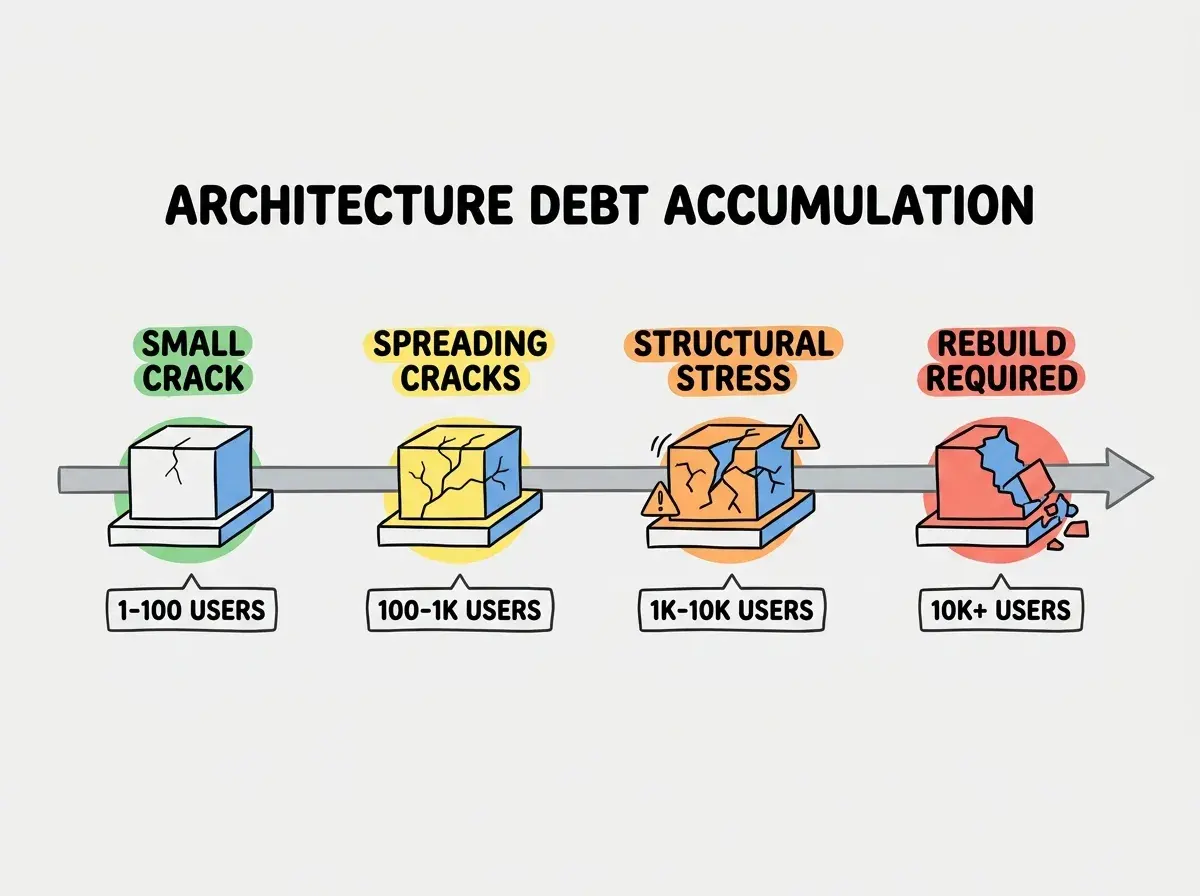
The most common pattern looks like this. You build with Firebase because the real-time features are cool. Your AI tool wires everything directly to Firebase's client SDK. Every component reads from and writes to Firebase directly. This works beautifully for your first fifty users. Then you need custom business logic that runs before data is written. You add Firebase Functions. Then you need full-text search, so you add Algolia. Then you need analytics processing, so you add BigQuery. Suddenly you have four services, no central API layer, and business logic scattered across client code, cloud functions, and third-party webhooks. Each new feature requires changes in three places. Your AI tool cannot reason about the full system anymore because the context is spread across too many services. That is unrecoverable architecture debt. The only way forward is a rewrite.
The most dangerous architecture decisions are the ones you do not realize you are making. When your AI tool picks Firebase, wires auth directly to the client, and spreads business logic across cloud functions, it is making architecture decisions on your behalf. Every default your AI chooses is a decision you did not make intentionally.
The antidote is a single API layer between your frontend and everything else. Every data read and write goes through your API. Every business logic check happens in your API. Your frontend talks to one thing. This does not mean you need microservices. A Next.js API route or a server action IS your API layer. The point is that your business logic lives in one place, not scattered across client components and third-party function triggers.
Dig deeper
A few hand-picked sources if you want to go further.
What This Means For You
The five architecture decisions outlined in this article are not theoretical. They are the concrete (literally) choices that determine whether your AI-built app survives contact with real users. Here is your action plan.
Start with a monolith. Use PostgreSQL. Pick a managed auth provider. Use your framework's built-in state management. Deploy serverless. Those five defaults will carry you from zero to tens of thousands of users without a rewrite. When you outgrow any of them, you will know because you will hit a specific, measurable wall, not because a blog post or a conference talk made you nervous about your architecture.
The best architecture is the one that lets you ship today and migrate tomorrow. Every hour spent on premature architectural optimization is an hour not spent on the features, the users, and the revenue that actually determine whether your app succeeds. Pour the right foundation, build fast on top of it, and fix the cracks when they appear, not before.
Learn the foundations that let vibe-coded apps scale without rewrites
Read More Guides